

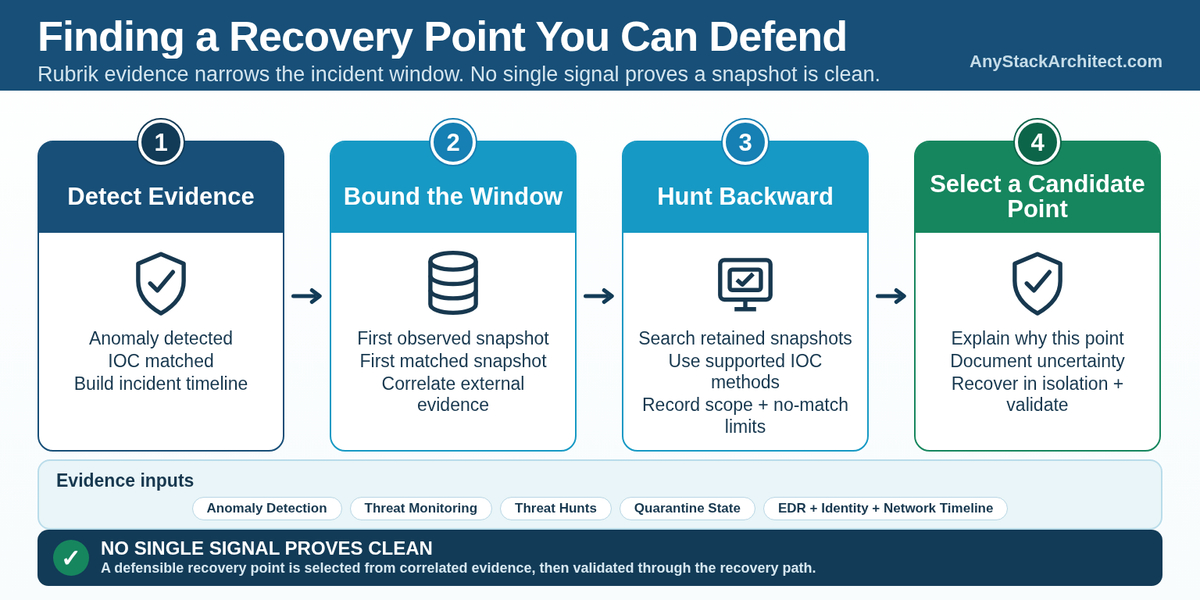
Finding a backup from before the ransomware note appeared is not the same thing as finding the point you should recover.
Rubrik gives the recovery team several useful sources of evidence: Anomaly Detection, Threat Monitoring, threat hunts, snapshot history, quarantine state, and the ability to download suspicious files for deeper analysis.[1][2][3][4] Those mechanisms help narrow the window. They do not collapse an incident into one timestamp labeled clean.
The Last Backup Before the Alert Can Still Be Too Late
Ransomware incidents rarely begin at the moment encryption becomes visible. Credential theft, remote access, persistence, discovery, data staging, and malware deployment can happen well before a large file-system change trips an alert.
Rubrik's Anomaly Detection is designed to identify unusual file-system behavior and content changes. It examines statistics such as files added, deleted, or modified, and can analyze signs of encryption. The investigation view includes the anomalous snapshot, suspicious files, and an event timeline.[1][5]
That is valuable evidence, but it describes what Rubrik observed in protected data. It does not establish the attacker's first access to the environment.
If the first obvious anomaly is Tuesday at 02:00, Monday at 23:00 is not automatically a safe point. The attacker may already have created an account, dropped a tool that has not yet matched an IOC, changed an application setting, or staged data without producing the file-system behavior that triggered the anomaly.
I would use the anomaly to bound the investigation, not to end it.
Rubrik's First Matched and First Observed Snapshots Mean Different Things
Threat Monitoring makes the timing problem more explicit. RSC continuously scans supported snapshots for indicators of compromise from threat intelligence sources. Depending on workload and platform support, those indicators can include YARA rules and file hashes.[2]
When Threat Monitoring finds a malicious file, Rubrik exposes both a first matched snapshot and a first observed snapshot.[3]
The names are easy to read too aggressively.
Documented Rubrik defines the first matched snapshot as the first snapshot in which Threat Monitoring confirmed the file as infected based on the ingested threat feed. Rubrik also warns that this might not be the first snapshot in which the file became malicious or was introduced.[3]
The first observed snapshot is the snapshot where the file was first observed. Rubrik notes that older snapshots can still contain the file, depending on the amount of data on the object.[3]
That gives the architect three different times to keep separate:
- when suspicious or anomalous behavior became visible,
- when a file was first observed in Rubrik's snapshot evidence,
- when a threat-intelligence rule or hash first matched it as malicious.
None of those timestamps should be silently renamed time of compromise.
Rubrik explicitly recommends using a threat hunt to determine whether older snapshots contain the file and whether it is malicious in those older points.[3]
Threat Monitoring and Threat Hunting Solve Different Parts of the Investigation
Threat Monitoring is proactive. Rubrik documents an initial scan followed by incremental scanning of new snapshot data, with threat intelligence updated as new indicators become available.[2] That can surface known malicious files after the intelligence exists even when the snapshot was created earlier.
Rubrik currently documents both Threat Monitoring and Threat Hunting as Enterprise edition capabilities.[3][13] Workload support also differs, so the evidence model has to be checked against the protected object rather than assumed from the RSC UI.
Threat hunting is investigator-driven. It scans Rubrik backups for user-defined indicators of compromise so the team can determine which protected systems contain a known indicator and when it appears in snapshot history.[4]
The two threat-hunt modes also have different mechanics.
Turbo threat hunts compare supplied file hashes against hash data created during backup ingest and can search large snapshot histories quickly. Threat Monitoring must be enabled and its initial scans completed for the relevant workloads before a turbo hunt can use those hashes. Advanced threat hunts can use YARA rules, file hashes, and file patterns, but Rubrik documents that advanced hunts do not support cloud workloads. For Azure virtual machines and managed disks, AWS EC2 and EBS, and Microsoft SharePoint and OneDrive, only turbo threat hunts are supported.[4][6][7]
Those differences matter during an incident because the IOC you have determines what you can prove. A known hash may be ideal for a turbo hunt. A malware family that changes file hashes but has stable characteristics may need YARA analysis where that hunt type is supported. A known path or filename can be useful in an advanced hunt, but the presence of a file path is not equivalent to proof that the file was malicious.
Architecture point A threat hunt is only as strong as the indicator and scope used for the hunt. A no-match result means the selected IOC was not found in the scanned scope. It is not a universal certification that the snapshot contains no malicious state.
Rubrik's own best-practice guidance reinforces this. It recommends carefully scoping hunts, testing YARA rules against malicious and benign samples, avoiding generic strings that create false positives, and keeping rules aligned with current threat intelligence.[8]
Anomaly Evidence and IOC Evidence Should Be Correlated, Not Ranked
Anomaly Detection and threat hunting answer different questions.
Anomaly Detection looks for behavior that departs from the learned baseline and for content signals such as possible ransomware encryption.[1][5] Threat Monitoring and threat hunts look for known or investigator-supplied indicators.[2][4]
A snapshot can be anomalous without containing the malware file you are hunting for. A snapshot can contain a known malicious indicator without showing the mass file changes associated with ransomware encryption. An attacker can also create persistence or abuse legitimate tools in ways that neither signal captures as a simple malicious-file match.
For recovery point selection, I want those sources on the same timeline.
| Evidence | What it tells you | What it does not prove |
|---|---|---|
| Anomaly Detection | The snapshot shows behavior or file changes that Rubrik identified as anomalous.[1][5] | The exact time the attacker first gained access. |
| First observed snapshot | Rubrik observed the file in that snapshot.[3] | That no older snapshot contains the file. |
| First matched snapshot | Threat Monitoring confirmed a match in that snapshot using the threat intelligence available to it.[3] | That the file first became malicious at that point. |
| Turbo threat hunt | Supplied file hashes were found or not found across the selected snapshot scope.[6] | That unrelated malware or non-file persistence is absent. |
| Advanced threat hunt | Supported IOCs such as YARA rules, hashes, or file patterns were found or not found in the selected scope.[7] | That workloads outside the supported hunt type or scope are clear. |
| Quarantine | The snapshot or associated data is in Rubrik quarantine, which restricts recovery actions.[9] | That every non-quarantined snapshot is safe to return to production. |
The recovery point becomes more defensible when independent evidence agrees. It becomes less defensible when the signals disagree or when the investigation has a blind spot.
Quarantine Is a Recovery Control, Not a Cleanliness Certificate
Rubrik's Quarantine feature gives the investigation a useful operational boundary. Rubrik currently documents Quarantine support for VMware virtual machines, NAS, and Linux and Windows servers, so it should not be assumed as a universal control across every workload protected by RSC.[9] For supported workloads, quarantining a file implicitly quarantines the folder and snapshot. For a quarantined snapshot, image-level recovery options are disabled, and the quarantine state also applies to replicas and archived copies.[9]
That prevents an operator from casually selecting a snapshot already identified as potentially malicious.
The inverse needs more care. A snapshot being non-quarantined does not mean every possible compromise technique has been disproven. It means the snapshot is not currently blocked by that quarantine state.
In Rubrik's documented virtual-machine Export cyber recovery workflow, this distinction is visible. When selecting snapshots based on Anomaly Detection results, RSC can present non-quarantined and non-anomalous snapshots, quarantined snapshots, anomalous snapshots, or snapshots without considering status.[10] Those states are decision inputs. The workflow does not erase the need to understand why a point is being selected.
Quarantine is therefore part of the recovery safety model, not the final forensic verdict.
Sometimes the Backup Is Also Evidence
One of the strongest reasons to keep recovery point selection separate from restoration is that the backup may still contain evidence the security team needs.
Rubrik allows suspicious or quarantined files to be downloaded for forensic analysis. The workflow can select a non-expired snapshot containing the file, and Rubrik warns that downloaded files may be malicious and must be handled carefully.[11]
Anomaly Detection also exposes suspicious-file details and allows file downloads for forensic analysis.[5]
Before deleting, overwriting, or aggressively cleaning anything, the recovery team should know whether the security team still needs evidence from that snapshot. Recovery urgency and evidence preservation can pull in different directions.
I would make that ownership explicit. Security should define the incident timeline and the indicators being investigated. The Rubrik team should preserve and expose the relevant snapshot evidence. The application owner should identify the business data loss created by moving farther back in time. The recovery decision is where those three views meet.
The Candidate Recovery Point Is Usually a Window, Not One Magic Snapshot
In a real incident, I would expect the investigation to narrow a range of candidate points rather than immediately produce one perfect timestamp.
Start with the first strong evidence of destructive or malicious activity. Correlate the anomaly timeline with Threat Monitoring results, IOC timing, and incident evidence from outside Rubrik. Then hunt backward through retained snapshots far enough to determine where the known indicators disappear and where suspicious behavior stops showing up.
If the latest candidate point still contains a suspicious account change or application modification from the incident timeline, move farther back. If moving farther back creates unacceptable data loss, the recovery team now has a concrete tradeoff to resolve instead of an unsupported claim that the newest available backup is clean.
The point selected for recovery should have a written reason behind it:
- why this snapshot is inside the expected safe side of the incident window,
- which IOCs were checked,
- which anomaly evidence was reviewed,
- what evidence was unavailable or inconclusive,
- what business data is lost by choosing this point,
- what still has to be validated after recovery.
That record matters because threat intelligence can improve after the incident. A snapshot that looked reasonable based on the evidence available on day one may need to be re-evaluated when a new IOC arrives.
Rubrik Can Help Narrow the Window, but It Cannot Own the Entire Incident Timeline
Rubrik sees protected data and the security signals its Data Threat Analytics features are designed to analyze. The incident can include evidence outside that protected-data view: identity events, EDR telemetry, firewall logs, cloud control-plane activity, privileged-access changes, application audit logs, and actions that never wrote a file into the backup scope.
The architecture should plan for that evidence to reach the recovery decision.
If the security team knows the attacker obtained a privileged credential on Sunday, but the first Rubrik anomaly is Tuesday, I would not choose Monday solely because the backup looks non-anomalous. If Rubrik finds a malicious hash in Thursday's snapshot and the EDR timeline shows execution on Wednesday, the hunt needs to move before Wednesday even if Thursday is the first matched backup point.
Rubrik provides a strong historical view of protected data. It should be correlated with the incident timeline, not used as a replacement for it.
Selecting the Point Is Not the Same as Proving the Recovery
Once the team has a defensible candidate point, recovery can begin through the appropriate supported workflow. For supported virtual-machine recovery workflows, Rubrik can use threat-hunt results and Anomaly Detection status to help select snapshots, including Export recovery to an isolated environment.[10][12]
That is where the investigation hands off to recovery validation.
A candidate point still has to be started, inspected, and validated against the recovery objective before it is allowed back into production. I would not turn that validation into another forensic search unless new evidence appears, but I would not skip it either. The detailed testing problem is separate from point selection.
The clean-point decision gets you to this is the point we can defend choosing. Recovery testing has to prove this point actually produces a usable service.
Review the Recovery Point Like an Incident Decision
When a recovery team proposes a snapshot during a cyber incident, I would ask these questions before accepting it:
- What is the earliest confirmed malicious or anomalous activity we have?
- Is that timestamp from Rubrik evidence, an external security system, or both?
- What does Rubrik show as the first observed snapshot for the known malicious file or indicator?
- What does it show as the first matched snapshot, and could older snapshots still contain the same file?
- Which IOCs were used for threat hunting, and were they hashes, YARA rules, or file patterns?
- Did the selected workload and deployment model support the hunt method we relied on?
- How far backward did the hunt scan, and were snapshot-count or date-range limits part of the scope?
- What anomaly evidence exists before and after the proposed recovery point?
- Does this workload support the quarantine control, and if so, is the proposed snapshot quarantined, non-quarantined, or otherwise classified by the available signals?
- What evidence from identity, EDR, network, cloud, and application systems changes the incident window?
- What business data is lost by selecting this point instead of a newer one?
- What validation must happen in isolation before the recovered service is allowed to reconnect?
A backup platform can preserve history. Rubrik can add useful threat evidence to that history and give the recovery team tools to search it quickly. The architecture still needs a method for converting those signals into a recovery decision that another engineer, an incident responder, or an auditor can understand later.
I would rather see candidate recovery point, supported by these findings in the incident record than last clean backup with no explanation underneath it.
Key Takeaways
- Rubrik's first observed, first matched, anomalous, and quarantined states describe different evidence. None should be silently treated as the time of compromise.
- Threat Monitoring is proactive threat-intelligence scanning; threat hunting is an investigator-driven search across backup history for selected IOCs.
- Turbo and advanced threat hunts use different mechanisms and have different workload support, so the hunt method is part of the evidence boundary.
- A non-quarantined or non-anomalous snapshot is a candidate for investigation and recovery, not universal proof that no compromise exists.
- The strongest recovery-point decision correlates Rubrik's snapshot evidence with the wider incident timeline and records why that point was chosen.
- Selecting a defensible point comes before restoration. Proving the recovered service is usable is a separate validation step.
Source Notes
Source access: Some links below point to official Rubrik technical documentation that requires a Rubrik OnePass login. Readers may be prompted to sign in. Public Rubrik Developer Center references are included where available. Source claims rechecked against the indexed Rubrik documentation on October 8, 2026; linked pages may still require OnePass authentication.
Public supplemental documentation: Rubrik Threat Analytics Developer Center; Rubrik Threat Hunting. These sources do not replace the authenticated procedures above.