

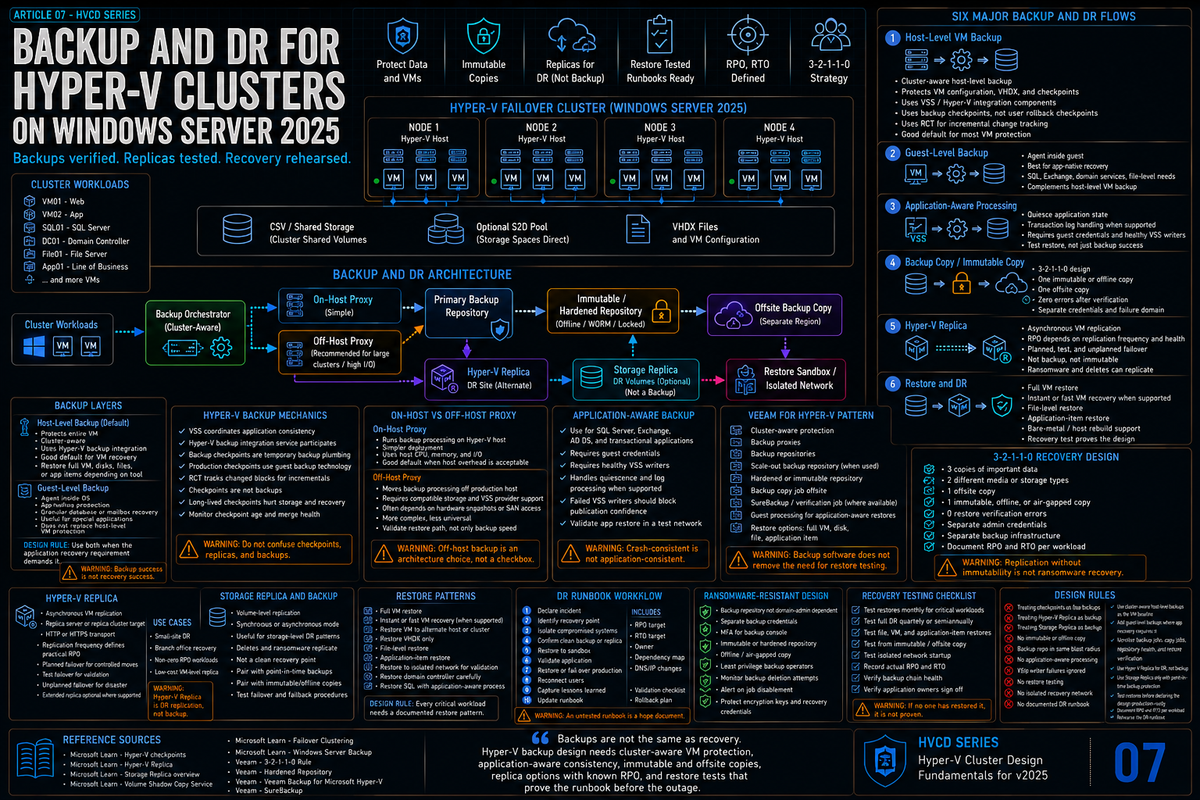
Article 7 in the Hyper-V Cluster Design Fundamentals for Windows Server 2025 series. This article covers backup and disaster recovery: host level versus guest level backup, RCT and how it actually works, production checkpoints, the difference between Hyper-V Replica and Storage Replica, when to use which, the practical Veeam patterns for S2D and shared SAN, and the recovery patterns that hold up when the cluster is gone.
Backup is not the same as DR. Backup is operational recovery: a deleted file, a corrupted database, a bad patch you need to roll back. DR is what you do when the cluster is gone, the building is gone, or the ransomware ran. Both matter and they are not interchangeable. A backup product that takes good restore points and then sits next to the cluster on the same network is not DR. A replication target that updates in near real time with no point in time history is not backup.
This article covers both. The Hyper-V specific mechanics underneath them are mostly the same. The recovery patterns and the operational discipline are different.
Host level versus guest level backup
Two valid models. Pick one as the default and use the other as the exception.
| Model | How it works | When to use |
|---|---|---|
| Host level (image based) | Backup product uses Hyper-V backup APIs to create a consistent reference point or backup checkpoint for the VM, coordinates guest VSS when application consistency is required, reads the VM data or changed blocks through supported APIs, then removes or merges the temporary backup state. | Default for most workloads. One agent on the host instead of agents in every VM. Captures full VM state. Restore can be a VM, a virtual disk, or individual files inside the VHDX. |
| Guest level (in VM agent) | Backup agent runs inside the guest OS, talks directly to the application VSS writer (SQL, Exchange, etc.) and streams data out over the network. | Use when application aware processing is hard from the host (large transactional databases, applications that need granular log handling, environments where VM owners want their own backup product). |
Host level is what most production Hyper-V environments standardize on. The economics are obvious (one agent per host beats one agent per VM at scale), the mechanics are well understood, and modern backup products handle the application consistency story through host coordinated VSS. Guest level is the right answer for specific workloads where the application owner needs control or where the database is too large or busy to backup cleanly through host VSS.
How Hyper-V backup actually works under the hood
Two mechanisms matter: the checkpoint that the backup product creates, and the change tracking that lets incremental backup work without rescanning the whole VHDX.
Backup checkpoints
Starting in Windows Server 2016, scalable Hyper-V backup uses the Hyper-V WMI backup API and no longer depends on host OS VSS for the scalable backup path. Modern Hyper-V backup is built around backup reference points, production checkpoint behavior, guest VSS integration when application consistency is required, and Resilient Change Tracking (RCT). In practice, the backup product calls Hyper-V to create a temporary consistent point in time for the VM (a reference point or backup checkpoint), coordinates VSS inside the guest when needed, reads the VM data or changed blocks through supported APIs, then removes or merges the temporary state. The exact read path depends on the product and API method, but the design goal is the same: capture a consistent VM without leaving a production checkpoint behind.
The two checkpoint types matter:
- Standard checkpoint (saved state): captures memory state in addition to disk state. Suspends the VM very briefly. Restore brings the VM back at the exact point captured, including running processes and memory contents. Not ideal for production because not all applications tolerate being resumed mid transaction.
- Production checkpoint: uses VSS inside the guest to quiesce applications, then captures disk state only. The VM is not put into a saved state; it just pauses I/O briefly while VSS does its work. This is the right answer for production workloads. Hyper-V switched to production checkpoints as the default starting in Windows Server 2016.
Per Veeam's best practice guide, backup products typically trigger production checkpoints with the VSS_BT_FULL backup type by default. This differs from Hyper-V Manager's manual production checkpoints, which use VSS_BT_COPY. The practical difference: VSS_BT_FULL truncates transaction logs in apps like SQL Server as part of the checkpoint, which is what you want for backup, but which can collide with native SQL log backup schedules. Coordinate the two so they do not fight over log management.
Resilient Change Tracking (RCT)
RCT is Hyper-V's native change block tracking mechanism, introduced in Windows Server 2016. RCT tracks which VHDX blocks have changed since the last backup, so the backup product only has to read the changed blocks instead of scanning the entire disk. Without RCT, every incremental backup is effectively a full read of the VHDX. With RCT, an incremental backup of a 500 GB VM that changed 2 GB of data reads roughly 2 GB.
RCT lives in the Hyper-V layer, not in the backup product. Veeam, Commvault, Rubrik, and others all consume RCT data through the same Hyper-V API. The implication: if RCT breaks, every backup product that uses it breaks. Microsoft has had RCT issues fixed in WS2025 cumulative updates (the buffered versus unbuffered I/O issue from late 2024 was one example). Stay current on cumulative updates and validate that backups actually complete after each major update, not just that they kicked off.
Per a Veeam community forum thread about WS2025 rolling upgrades, backup checkpoint creation can fail in a mixed mode cluster until you complete the upgrade and run Update-ClusterFunctionalLevel. The original user reported "Failed to create VM recovery checkpoint" errors that resolved after the functional level was bumped. Plan to keep the mixed period short (Microsoft's guidance is four weeks) and validate backups after the functional level update.
The Veeam patterns that matter for Hyper-V on 2025
Veeam Backup and Replication is the most common third party backup product for Hyper-V, and per Veeam's user guide, current versions explicitly support Windows Server 2025 Hyper-V hosts. The proxy modes and the cluster patterns are worth knowing regardless of which product you use because the underlying Hyper-V mechanics are the same.
On host versus off host proxy
| Proxy mode | How it works | When to use |
|---|---|---|
| On host proxy | The backup proxy role runs directly on the Hyper-V host. The proxy reads VHDX data locally and ships it to the repository. | Required for S2D clusters because S2D storage is local to each node. Required when the storage fabric does not support transportable VSS snapshots. Generally simpler. |
| Off host proxy | The backup proxy role runs on a separate machine. The proxy reads VHDX data via transportable VSS snapshot from shared SAN storage, leaving the Hyper-V host's CPU and network alone. | Useful for shared SAN environments where you want to keep backup load off the production hosts. Requires SAN storage with transportable VSS support and the SAN vendor's hardware VSS provider installed. |
Per Veeam's best practice guide, S2D clusters can only use on host proxy mode because the storage is local to each node. A CSV on S2D is owned by one specific node at any given time, which means the backup proxy needs to be on that node to read the data. For shared SAN clusters with proper VSS hardware provider support, off host is an option but on host is still simpler and increasingly the default recommendation.
Application aware processing
Application aware processing tells Veeam (or any other VSS aware backup product) to coordinate with the application's VSS writer in the guest, so SQL gets log truncation, Exchange gets database consistency, and AD gets a system state aware backup. This requires:
- Integration Services in the guest with the data exchange and backup components enabled. The cluster runs Integration Services that match its host generation; in 2025 this is current.
- VSS framework in the guest OS functioning correctly. Run
vssadmin list writersin the guest to verify; failed writers are the most common cause of backup failures. - Credentials with appropriate guest privileges for the backup product to authenticate into the VM and trigger the application aware step.
One constraint per Veeam's documentation: shielded VMs (covered in article 6) cannot do application aware processing because the backup product cannot interact with the guest OS of a shielded VM. For shielded workloads, your backup is disk only and you accept that limitation as part of the security posture.
Scale and parallelism
How many concurrent backups your cluster can sustain depends on three things: how much disk read bandwidth is available, how many proxy tasks the backup product can run in parallel, and how many checkpoint merges Hyper-V can handle without affecting production VMs. The merge phase at the end of each backup is the part most likely to cause production impact (CSV redirect mode I/O during a long merge is a classic problem). Schedule backups so they do not all merge simultaneously.
Disaster recovery: Hyper-V Replica versus Storage Replica
Two Microsoft built in DR mechanisms. They solve overlapping problems differently. Pick based on what you need.
Hyper-V Replica
Per Microsoft Learn, Hyper-V Replica is a built in feature that enables asynchronous replication of VMs between Hyper-V hosts. The mechanics:
- VM level replication. You replicate specific VMs, not entire volumes. Per Microsoft's documentation, replication frequencies are 30 seconds, 5 minutes, or 15 minutes. The default is 5 minutes.
- RCT based change tracking. Same RCT layer used by backup products. Only changed blocks are sent.
- Up to 24 hourly recovery points can be retained on the replica side, allowing rollback to a previous state of the VM.
- VSS integration available for application consistent recovery points. Microsoft's current documentation lets you check a VSS snapshot frequency option when creating additional hourly recovery points, with the snapshot interval configurable in hours.
- Three tier replication supported. Primary to secondary to tertiary, with different replication intervals for each leg.
- Failover modes: planned (graceful, no data loss), unplanned (manual trigger, RPO equals replication interval), test (creates an isolated test copy without affecting production).
- Authentication: Kerberos or certificate. Certificate based authentication enables replication between hosts that are not in the same AD domain.
Hyper-V Replica is workload agnostic, has zero licensing cost (built into Hyper-V), and works between standalone hosts, between clusters, or any combination. It is the right answer for most Hyper-V DR scenarios where you can tolerate an RPO of 30 seconds or more and an RTO of however long it takes to manually trigger failover.
Storage Replica
Per Microsoft Learn, Storage Replica is volume level (not VM level) block replication, supporting both synchronous and asynchronous modes. The mechanics:
- Volume level replication. You replicate entire volumes, not VMs. Anything on the volume goes (VM files, file shares, application data, all of it).
- Synchronous mode writes to both primary and secondary at the same time, with crash consistency on failover. RPO is effectively zero. Requires low latency network between sites (Microsoft's guidance is roughly 5 ms or better round trip).
- Asynchronous mode replicates with some lag; RPO is whatever the lag is. Suitable for higher latency networks.
- Failover is manual per Microsoft Learn for cross cluster Storage Replica scenarios. You orchestrate the role switch with PowerShell.
- Stretched clusters can use Storage Replica internally to span sites, where the cluster service handles failover automatically. This is the synchronously replicated stretched cluster pattern.
Storage Replica is the right answer when you need a near zero RPO across sites with low latency interconnect, when you need to replicate non VM data alongside VMs on the same volume, or when you need a stretched cluster across two physical sites.
Decision framework
Hyper-V Replica when: you need VM level granularity, you can tolerate RPO of 30 seconds or more, you want recovery point history (rollback to 4 hours ago), the network between sites is high latency or expensive, or you want to replicate to a different cluster topology.
Storage Replica when: you need synchronous, near zero RPO, you have low latency interconnect, you are building a stretched cluster, or you have non VM data on the volume.
Both in some environments. Hyper-V Replica for general workloads, Storage Replica for the specific volumes that need synchronous protection. They do not interfere with each other.
Backup repository design
A backup is only as good as the repository it lands on, and the repository is only as good as how isolated it is from the production environment.
3 2 1 baseline
Three copies of the data, on two different media types, with one off site. This rule predates ransomware and still applies. The modern read of it: production data is copy one, primary backup repository is copy two on different media, off site or immutable storage is copy three.
Immutability
Modern ransomware specifically targets backup repositories. If your backup product can write to the repository, the ransomware running with the same credentials can delete from the repository. Immutable storage closes this gap:
- Linux hardened repositories (Veeam) with single use credentials and locked down SSH access
- Object Lock on S3 compatible storage (Object First, AWS S3 with Object Lock, Azure Blob with immutability policies, on prem MinIO with versioning and lock)
- Tape remains the simplest immutable medium. Once written and ejected, it is offline by design.
Pick whichever fits the environment. The point is not the technology; the point is that the production credentials cannot delete or encrypt the backup data, no matter what those credentials get used for.
Off site copy
Off site means not in the same building, ideally not in the same city. A backup that lives on a separate VLAN in the same data center is on site by any meaningful definition. Cloud object storage, a colo facility, or a tape rotation off site to a vault are all reasonable off site patterns. Whatever you pick, document the recovery process to bring data back from the off site copy and test it at least annually.
Restore patterns that hold up
File level restore from a VM backup
The most common restore. User deleted a file, you mount the VM's last backup as a file system, browse to the file, copy it back. Modern backup products do this without restoring the whole VM. Verify the path works and the right people have permission to do this without filing a ticket.
Full VM restore in place
VM is corrupted, hung, or compromised. Restore the entire VM from backup, replacing the broken instance. The point of the host level backup model is that this restore is fast and self contained.
VM restore to alternate location
Common for testing, for migrating between clusters, and for recovery into a clean environment after a security incident. Validate that your backup product handles network reconfiguration on restore so the recovered VM does not collide with the original.
Instant recovery
Most enterprise backup products (Veeam, Commvault, Rubrik, and others) offer some variant of this: mount the backup repository as a virtual disk, register the VM against the mounted backup, power it on. The VM runs from the backup repository while the data migrates back to production storage in the background. RTO is minutes instead of the hours a full restore would take. This pattern requires the backup repository to have enough I/O capacity to actually run a VM from it; cheap object storage usually does not qualify. Implementation details and naming vary by vendor.
Cluster wide rebuild
Worst case. The cluster is gone (hardware failure, ransomware, site loss). You stand up a new cluster and restore VMs from backup. Time and effort here are dominated by how organized your runbook is and how fast you can read backups back over the network. A practiced team rebuilds in days; an unpracticed team finds out their last DR test was three years ago and spends weeks.
Testing the recovery path
The backup that has never been restored is not a backup. The DR plan that has never been tested is not a plan.
What to actually test
- File restore from any random backup, monthly. Tests that the backup product is healthy and the operator knows how to use it.
- Full VM restore to a sandbox, quarterly. Tests that the backup is actually consistent and the VM boots and the application starts.
- Hyper-V Replica test failover, quarterly per VM that is replicated. Microsoft's documented test failover mode does this without affecting production.
- Cluster rebuild from scratch, annually if you can manage it. Pick one cluster, treat it as if it died, rebuild it from documented procedures and backup data. Time it. Find what is missing.
- Off site recovery, annually. Pull data back from the off site copy. Validate the network path, the credentials, and the time required.
What to measure
- RPO actual versus RPO target. If your replication interval is 5 minutes but the average lag during business hours is 15 minutes, your real RPO is 15 minutes and you should know that.
- RTO actual versus RTO target. From "incident declared" to "production back up" is the number that matters, not just "VM started."
- Restore success rate. The percentage of attempted restores that complete without operator intervention.
- Data verification. Recovered VMs that boot but have corrupted application data are worse than VMs that fail to boot.
The backup and DR mistakes that bite you later
Treating Hyper-V Replica as a backup
It is not. Replica gives you a near real time copy of the current state. If a database gets corrupted at 10:01 AM, the replica has the corrupted state at 10:01:30 AM. Hyper-V Replica's recovery point history (up to 24 hourly points) helps but is not deep enough for a real backup window. Replica is DR; backup is backup. Run both.
Putting the backup repository on the production storage
It should be self evident bad. If the production storage fails, the backup goes with it. Repository must be on different physical storage, different chassis, different power domain, and ideally different building.
Backup credentials that can also delete the backup
If your backup product service account has unrestricted access to the repository, ransomware that gets that account gets your backups. Use immutable repositories or service accounts with append only permissions where the platform supports it.
Application aware processing without verifying it works
"Application aware processing enabled" in the backup configuration is not the same as "application aware processing succeeding." Check the backup logs for VSS writer states and verify that SQL log truncation actually happens, that AD ntds.dit is being captured properly, that Exchange databases are quiesced. The setting is a checkbox; the verification is operational.
No cumulative update validation
Microsoft fixes RCT bugs and other backup relevant issues in cumulative updates. Skipping CUs because "the cluster is fine" means you also skip the bug fixes that keep your backups working. Stay current. Validate backups after every major CU.
DR runbook that exists only in someone's head
The senior engineer who knows the runbook by heart will not be available the night the cluster dies. Document the procedure, store it somewhere that does not depend on the cluster being up, and test it with junior team members so you find out what is missing while you can still ask.
Forgetting to back up the cluster configuration
The Hyper-V VMs are not the only thing that needs to come back. Cluster configuration, network ATC intent definitions, custom Group Policy that applies to cluster nodes, monitoring agent configurations, certificate stores, and the Failover Cluster registry hive (CLUSDB at C:\Windows\Cluster\CLUSDB on each node) all matter for a real cluster rebuild. Per Microsoft Learn, failover clustering uses VSS for backing up and restoring the failover cluster configuration. Most enterprise backup products handle this when they back up the cluster nodes themselves; verify yours does, and verify you can actually restore from it.
No test failover for Hyper-V Replica
Replica failover is a real operation that has its own quirks. The IP addresses change, the network adapter mappings need verification, the replica VMs may need different MAC address handling, and applications may need to restart in a specific order. Discovering all of that during an actual disaster is the wrong time. Test failover quarterly, in test mode that does not affect production, and document what you learn.
Key Takeaways
- Host level backup is the default for Hyper-V at scale. One agent on the host, not in every VM. Guest level for specific workloads where the application owner needs control.
- Production checkpoints are the default since WS2016. Use VSS in the guest for application consistency. Saved state checkpoints rarely belong in production.
- RCT (Resilient Change Tracking) is the Hyper-V CBT introduced in 2016. Every backup product uses it. Stay current on cumulative updates because RCT bug fixes ship there.
- S2D clusters require on host proxy mode because the storage is local to each node. Off host proxy is for shared SAN with hardware VSS provider support.
- Veeam supports WS2025 in current versions. After a cluster OS rolling upgrade, run
Update-ClusterFunctionalLevelbefore validating backups. - Hyper-V Replica is asynchronous VM level replication. 30 seconds, 5 minute, or 15 minute frequencies. Up to 24 hourly recovery points. Right answer for most DR scenarios.
- Storage Replica is block level volume replication. Synchronous (near zero RPO, low latency network required) or asynchronous. Right answer for stretched clusters and synchronous protection.
- Immutable backup repositories matter. If production credentials can delete the backup, ransomware gets to delete the backup. Linux hardened repositories, Object Lock storage, or tape close this gap.
- 3 2 1 still applies. Three copies, two media types, one off site. Off site means not in the same building.
- The backup that has never been restored is not a backup. Test file restore monthly, full VM restore quarterly, replica failover quarterly, cluster rebuild annually. Measure RPO and RTO actuals not just targets.