

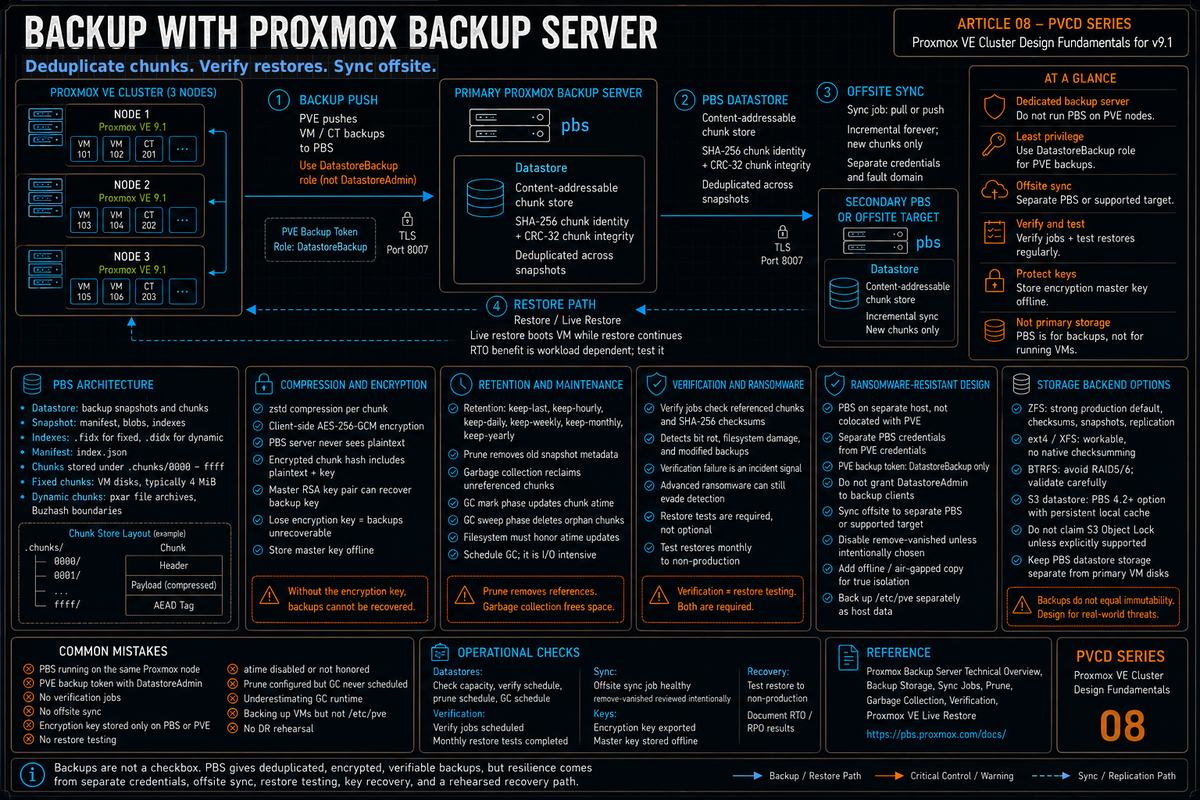
Article 8 in the Proxmox VE Cluster Design Fundamentals for v9.1 series. PVCD-07 covered who can access the cluster. This article covers what happens when something gets corrupted, encrypted, or deleted: Proxmox Backup Server architecture, the chunk store and deduplication model, push versus pull backups, encryption, verification, retention with prune, sync to offsite, and the design choices that make backups actually work in a ransomware incident.
Backup is the part of cluster design that everyone agrees matters and most teams underinvest in. Proxmox Backup Server (PBS) is the native answer, and it is genuinely good: SHA-256 deduplication on a content addressable chunk store, client side AES-256-GCM encryption, incremental forever after the first full backup, fast restores including live restore, and a verification framework that catches bit rot and ransomware before recovery time. None of that matters if the operational design is wrong.
This article walks the architecture, the operational decisions, and the design choices that make PBS the actual backup system rather than a checkbox. Series target version is Proxmox VE 9.1 with Proxmox Backup Server 4.x. Every claim below is sourced to the PBS Technical Overview, the PBS Backup Storage documentation, the proxmox-backup-manager man page, or linked Proxmox forum threads with Proxmox staff responses.
PBS architecture
Per the Proxmox Backup Server Introduction documentation, PBS is a client server backup solution implemented in Rust. The server stores backup data and provides an API; the client tool (proxmox-backup-client, or the integrated PVE backup) reads source data, chunks it, and uploads.
The core data model per the Technical Overview:
- Datastore. The logical place where backup snapshots and their chunks are stored. Backed by a directory on a filesystem (typically ZFS for the integrity benefits).
- Chunk. Per the Technical Overview, a chunk is some (possibly encrypted) data with a CRC-32 checksum at the end and a type marker at the beginning. Identified by the SHA-256 checksum of its content. The same content always hashes to the same checksum, which is what enables deduplication.
- Snapshot. Per the docs, a snapshot is the collection of manifest, blobs, and indexes that represent a backup. When a client creates a snapshot, it uploads blobs (single files which are not chunked, like the client log) and one or more indexes.
- Index file. Per the docs, indexes (.fidx, .didx) contain an ordered list of references to the chunks that the original file was split into. The chunks themselves are stored once, referenced many times across snapshots.
- Manifest. Per the docs, an index.json manifest file is created within each backup, containing a list of all the backup files along with their sizes and checksums.
The chunk store on disk per the Technical Overview: chunks are stored in a directory subdivided by the first 2 bytes of the SHA-256 checksum (4 hexadecimal digits, 0000 through ffff, preallocated when a datastore is created). This keeps the file count per directory manageable.
Fixed versus dynamic chunking
Per the PBS Technical Overview:
- Fixed size chunks (typically 4 MiB). Used for block based backups (VM disk images). The disk image is split into chunks of equal length. Each chunk hashes deterministically.
- Dynamically sized chunks. Used for file based backups (containers, host filesystems via the proxmox-backup-client). PBS first generates a consistent file archive (pxar), then uses a rolling hash (a variant of Buzhash, a cyclic polynomial algorithm) to calculate chunk boundaries. Per the docs: assuming most files have not changed, the algorithm triggers the boundary on the same data as a previous backup, resulting in chunks that can be reused.
The reason this matters: fixed chunking is fast but loses deduplication efficiency for file based data when files change size (everything after the change shifts and produces new chunks). Dynamic chunking via Buzhash maintains deduplication across file size changes by anchoring chunk boundaries on content boundaries rather than file offsets.
Compression and encryption
Per the PBS Features page and the Introduction:
- Compression. Zstandard (zstd) per the docs. Several gigabytes per second compression speed; high compression ratio. Applied per chunk before storage.
- Authenticated encryption (AE). AES-256 in Galois/Counter Mode (GCM). Per the docs, encryption is performed on the client side before chunks are uploaded. The server never sees the plaintext.
The encryption model per the Technical Overview:
- The hashes of encrypted chunks are calculated from the plaintext content concatenated with the encryption key, not from the encrypted chunk content. This way, two chunks of the same data encrypted with different keys generate two different checksums and no collisions occur for multiple encryption keys.
- Per the docs, this is also done to speed up the client part of the backup, since it only needs to encrypt chunks that are actually getting uploaded. Chunks that already exist in the previous backup do not need to be re encrypted and re uploaded.
- For encrypted chunks, only the checksum of the original (plaintext) data is available. The server cannot verify the content against it without the encryption key. Instead only the CRC-32 checksum of the encrypted chunk is checked.
Per the Features page, you can further increase security by generating a master key as an RSA public/private key pair, which is then used to securely store the backup encryption key alongside the backup. The PBS Features page also notes that the secret encryption key can be printed for offline storage.
Client side encryption means PBS cannot decrypt your backups for you. Lose the encryption key and the backups are unrecoverable. The master key as RSA pair is the recovery path: print it, store it offline in a safe or vault, treat it like the root password to your infrastructure. There is no support escalation that can recover an encrypted backup without the key.
Push versus pull and the sync model
PBS supports two operational models:
- Push from PVE to PBS (the default). The PVE node initiates the backup, reads the VM data, chunks it, and pushes to PBS. PBS is configured as a storage in PVE. This is what the Datacenter, Backup scheduling does.
- Pull from PBS via Sync Job. A second PBS instance pulls a copy of a remote PBS datastore. Used to replicate backups offsite or to a different fault domain.
The sync model is the operational answer to the 3-2-1 backup rule: 3 copies, 2 different media, 1 offsite. PBS Sync Jobs let you replicate the chunk store from a primary PBS to a secondary PBS over the network, including only the deltas. The sync is incremental forever; only new chunks transfer.
Reverse sync (pull from remote)
Per the PBS docs, Sync Jobs can be configured in two directions:
- Pull (default). The local PBS connects to the remote PBS and pulls snapshots into a local datastore.
- Push. The local PBS pushes its snapshots to a remote PBS. Useful when the remote PBS is firewalled and cannot initiate connections.
The right design depends on network direction. The design that holds up well: push backups from PVE to a primary PBS in the same datacenter, pull from primary PBS to a secondary PBS at a different site, with the secondary site initiating the connection (so the primary site does not need inbound firewall rules for the offsite copy).
Verification
Per the PBS Backup Storage documentation, verification jobs read backups and confirm that all referenced chunks exist and match their SHA-256 checksums. This catches:
- Bit rot on the underlying storage (chunks corrupted at rest).
- Filesystem corruption that loses or damages chunks.
- Per the PBS docs: ransomware or malicious modification of existing backups. Per the docs, since verification jobs regularly check if all backups still match the checksums on record, they will start to fail if a ransomware starts to encrypt existing backups.
Per the docs, verification is configurable for parallelism via tuning options:
default-verification-workers: number of threads for verification (default 4).default-verification-readers: number of threads for reading chunks (default 1).
The schedule is set via Verify Jobs in the PBS UI or CLI. A weekly verify on the full datastore is a reasonable starting point; for tier 1 data, daily verification of recent snapshots plus weekly full verification.
Per the PBS Backup Storage documentation: an advanced enough ransomware could circumvent this mechanism. Verification jobs are an additional security measure, not a sufficient one. The docs recommend testing actual restore from backups regularly. The right operational practice: weekly automated restore tests to a test cluster, never overwriting production, with documented success criteria.
Retention with prune
Per the PBS docs, prune is the mechanism that removes old backup snapshots based on retention rules. The retention model is multi tier:
- keep-last. Keep the most recent N snapshots regardless of date.
- keep-hourly, keep-daily, keep-weekly, keep-monthly, keep-yearly. Keep the most recent snapshot for each of these time windows.
The classic retention model: keep-daily=14, keep-weekly=8, keep-monthly=12, keep-yearly=5. That gives daily granularity for the last two weeks, weekly for two months, monthly for a year, yearly for five years.
Per the PBS documentation, prune is the deletion logic but it does not actually free space. The chunk store still references the chunks. Garbage collection is the separate process that reclaims space.
Garbage collection
Per the PBS docs, garbage collection (GC) is the process that removes chunks no longer referenced by any snapshot. After prune marks snapshots for deletion, GC walks the chunk store, identifies orphan chunks, and removes them.
The two phases per the PBS docs:
- Phase 1: mark. Iterate all snapshot index files, update the atime of every referenced chunk to mark it as in use.
- Phase 2: sweep. Iterate all chunks, delete chunks whose atime is older than the cutoff. Per the PBS docs, the cutoff is 24 hours and 5 minutes before the start of the garbage collection (the grace period accounts for filesystems mounted with relatime, which only updates atime if the file has not been accessed in the last 24 hours).
GC is I/O intensive on large datastores because every chunk file must be touched. Per Proxmox forum reports, phase 1 dominates the runtime on spinning disks: each index file's referenced chunks must have their atime updated, and on slow storage this takes hours. A datastore with millions of chunks (a few hundred VMs, several months of retention) takes hours.
Storage backends for the datastore
Per the PBS documentation, a datastore is a directory on the filesystem. The choice of underlying filesystem matters operationally:
| Backend | Strengths | Weaknesses | Notes |
|---|---|---|---|
| ZFS | Native checksumming, snapshots, compression, RAIDZ, send/receive replication | RAM hungry; ARC tuning required | A strong production default. Use mirrors or RAIDZ2 when the hardware and capacity model fit. Note: do not set atime=off on the dataset; PBS uses atime updates to mark referenced chunks during garbage collection (per the PBS Roadmap safeguard, PBS now tests for atime honoring at datastore creation and aborts GC if atime is not honored). |
| ext4 on hardware RAID | Simple, predictable | No checksumming; bit rot invisible until verify catches it | Workable but PBS verification becomes the only integrity check. |
| XFS on hardware RAID | Same as ext4 plus better large file handling | Same caveats as ext4 | Reasonable for very large datastores where ZFS RAM is a concern. |
| BTRFS | Checksumming and snapshots | Per Proxmox storage wiki, RAID 5/6 still considered experimental and dangerous | Single disk or mirror only. Most teams use ZFS instead. |
| S3 backend | Cloud or S3 compatible storage | Latency higher than local; egress costs apply; PBS S3 support does not include S3 Object Lock per Proxmox staff guidance | S3 added as technology preview in PBS 4.0; officially supported as of PBS 4.2 (April 2026). Requires a local persistent cache. Common design is primary on local ZFS, sync to S3 for offsite. |
The right approach for most production: ZFS mirror or RAIDZ2 on local SAS or NVMe, with a sync job to a secondary PBS at an offsite location.
Live restore
Per the Proxmox VE vzdump documentation chapter (Live Restore section), PBS supports live restore: a VM can be powered on while the restore is still ongoing. Per Proxmox staff (Fiona) on the forum: the VM is started as usual on the Proxmox VE host, but if it reads a block that is not yet restored, it will be restored immediately. The usual sequential restore is running in the background. Per a forum discussion involving Proxmox staff, the live restore uses a QEMU block-stream job with the alloc-track block driver to coordinate reads from PBS with the local disk being populated.
Why this matters operationally: traditional restore for a 500 GB VM takes the time to copy 500 GB. Live restore can reduce the wait before a VM starts because the VM can boot while the restore continues in the background. Missing blocks are restored on demand while the normal restore continues. Treat the RTO benefit as workload dependent and test it for tier 1 services.
The CLI form (live restore is enabled by default in the PVE UI restore dialog). Per the docs, live restore requires the destination storage to support the operation; verify before relying on it for tier 1 services.
Ransomware resistance
Per the PBS Backup Storage documentation, PBS has specific design properties that help against ransomware:
- Per the docs: PBS does not rewrite data for existing blocks. A compromised PVE host or any other compromised system that uses the client to back up data cannot corrupt or modify existing backups in any way.
- If on site backups are encrypted by ransomware, the SHA-256 checksums no longer match and verification jobs fail.
- Sync to a separate PBS instance or S3 with different credentials provides a separate recovery copy. It is not an air gap unless the target is offline, immutable through a supported mechanism, or otherwise unreachable from the compromised environment. The compromised PVE credentials cannot reach the sync target.
The hardening checklist for ransomware resistance:
- PBS on a separate host, not colocated with PVE. Per Proxmox staff forum guidance, colocation is generally not recommended.
- PBS uses different credentials than PVE. The PVE user that pushes backups should not have admin on PBS.
- Use API tokens with privsep=1 and DatastoreBackup role only (not DatastoreAdmin). The PVE side cannot delete snapshots even if compromised.
- Sync to a secondary PBS at a different site. For ransomware resistance, configure sync jobs so vanished snapshots are not removed on the target. PBS can remove vanished snapshots when that option is enabled, so treat remove-vanished as a deliberate retention and risk decision.
- Optionally, add a rollback layer at the secondary site, such as ZFS snapshots taken on the underlying datastore filesystem outside of PBS. Treat that as an extra recovery layer, not a true air gap. A true air gap requires an offline copy, tape, or another target that is unreachable from the compromised environment. Note: PBS S3 support does not include S3 Object Lock. Do not enable bucket immutability or retention features for a PBS datastore unless Proxmox documents that exact configuration as supported.
- Regular automated restore tests to verify backups are actually restorable.
The PBS design mistakes that bite you later
PBS colocated on the PVE host
Per Proxmox staff guidance: running PVE and PBS on the same host is generally not recommended. The package and kernel behavior may be outside the combinations validated for the enterprise repository, and the colocation removes the separate fault domain that PBS is supposed to provide. Run PBS on dedicated hardware, even if it is a small box.
PVE backup user with DatastoreAdmin role
Granting the PVE side admin on the PBS datastore means a compromised PVE node can delete every backup. Use DatastoreBackup role for the PVE backup token: it can write new backups and read its own, but cannot prune or delete. Prune runs on PBS itself with PBS credentials.
No verification job configured
Bit rot, filesystem corruption, ransomware encryption: all silent until you try to restore. Verification jobs catch these proactively. Run verify weekly at minimum, more frequently for tier 1 data. Alert on verify failures.
No sync to offsite or different fault domain
Single PBS instance in the same datacenter as PVE means a fire, flood, or facility level incident takes both. The 3-2-1 rule exists for a reason. Sync to a secondary PBS at a different site, or to S3 with different credentials.
Encryption keys stored only on the PBS host
The encryption key on the PVE node is what allows reading the backup. If the key is only stored on PVE and PVE is destroyed, the backups are unrecoverable. Print the master key, store it offline. Document the recovery procedure.
No restore testing
Backups that have never been restored are not backups; they are wishful thinking. Schedule monthly restore tests to a test environment. Restore a real VM, boot it, validate it. The first time you restore should never be during an actual incident.
Filesystem that does not honor atime updates
Per the PBS Roadmap (Known Issues): the first phase of garbage collection marks used chunk files by explicitly updating their atime. If the filesystem backing the chunk store does not honor such atime updates, phase two may delete chunks that are still in use, leading to data loss. PBS now performs an atime update on a test chunk at datastore creation and at GC start and reports an error if the atime update is not honored. Verify ZFS dataset properties and any mount options (noatime is a known cause of this on ext4/XFS) before pointing PBS at the filesystem.
Garbage collection never scheduled
Prune marks snapshots for deletion; GC reclaims the space. Without scheduled GC, the datastore fills up over time even though prune is running. Schedule GC weekly or monthly depending on retention churn.
Underestimating GC time on large datastores
Per Proxmox forum discussions, GC scales with chunk count. A datastore with several hundred VMs and months of retention can have tens of millions of chunks. GC takes hours and is I/O intensive. Schedule GC for off hours, monitor completion, plan capacity for the I/O load.
Backing up the cluster but not /etc/pve
VM backups are essential but they are not enough. The cluster configuration in /etc/pve (ACLs, tokens, realms, firewall rules, replication jobs, HA configuration) is also at risk. Back up the mounted /etc/pve view on a schedule and document the restore procedure. Do not treat the underlying pmxcfs database file as a normal file sync target unless you have a tested, source backed recovery runbook.
Skipping the backup rehearsal
The first time you do a full DR restore, including PBS recovery if PBS itself is destroyed, should not be in a real incident. Run a tabletop exercise: assume primary PBS is gone, walk through what it takes to bring up a new PBS, restore from offsite copy, get a VM running on PVE. Document the steps, time the exercise, fix the gaps.
Key Takeaways
- PBS is content addressable, chunk based, deduplicated. Per the Technical Overview: SHA-256 chunk identity, CRC-32 chunk integrity, 4 MiB fixed chunks for VM disks, dynamic chunks (Buzhash rolling hash) for file archives.
- Encryption is client side AES-256-GCM. Per the docs, server never sees plaintext. Hash includes the key so different keys produce different chunks. Master key as RSA pair for key recovery; print and store offline.
- Push from PVE, pull or push between PBS instances. Sync jobs replicate chunk stores incrementally. Design: push to primary PBS in datacenter, sync from secondary site at different location.
- Verification jobs catch bit rot and ransomware. Per the docs, reverify all backups at least monthly. A practical design is a recurring hourly or daily verify job for new and expired backups, plus a weekly or monthly job that reverifies everything. Configurable workers and readers via tuning options. Not sufficient alone; combine with restore testing.
- Prune marks, GC sweeps. Two phase: mark referenced chunks via atime, sweep orphans. GC scales with chunk count and is I/O intensive on large datastores. Schedule for off hours.
- Retention model: keep-last plus keep-hourly through keep-yearly. Multi tier matches operational reality (granular near term, sparse long term).
- ZFS is a strong default for production PBS datastores. Native checksumming, snapshots, replication. ext4/XFS workable; BTRFS RAID 5/6 still experimental per Proxmox storage wiki. S3 backend was tech preview in PBS 4.0, officially supported in PBS 4.2 (April 2026).
- Live restore boots the VM while restore continues. Per the docs. Treat the RTO benefit as workload dependent and test it for tier 1 services.
- Ransomware resistance: separate host, separate credentials, sync offsite, immutable target if possible. Per the PBS docs, PBS does not rewrite data for existing blocks; compromised client cannot modify existing backups.
- Restore testing is non negotiable. Backups that have never been restored are wishful thinking. Monthly minimum.
- /etc/pve backup matters too. Cluster configuration is not in VM backups. Back up the mounted /etc/pve view on a schedule, ship to PBS as host data, and document the restore procedure.