

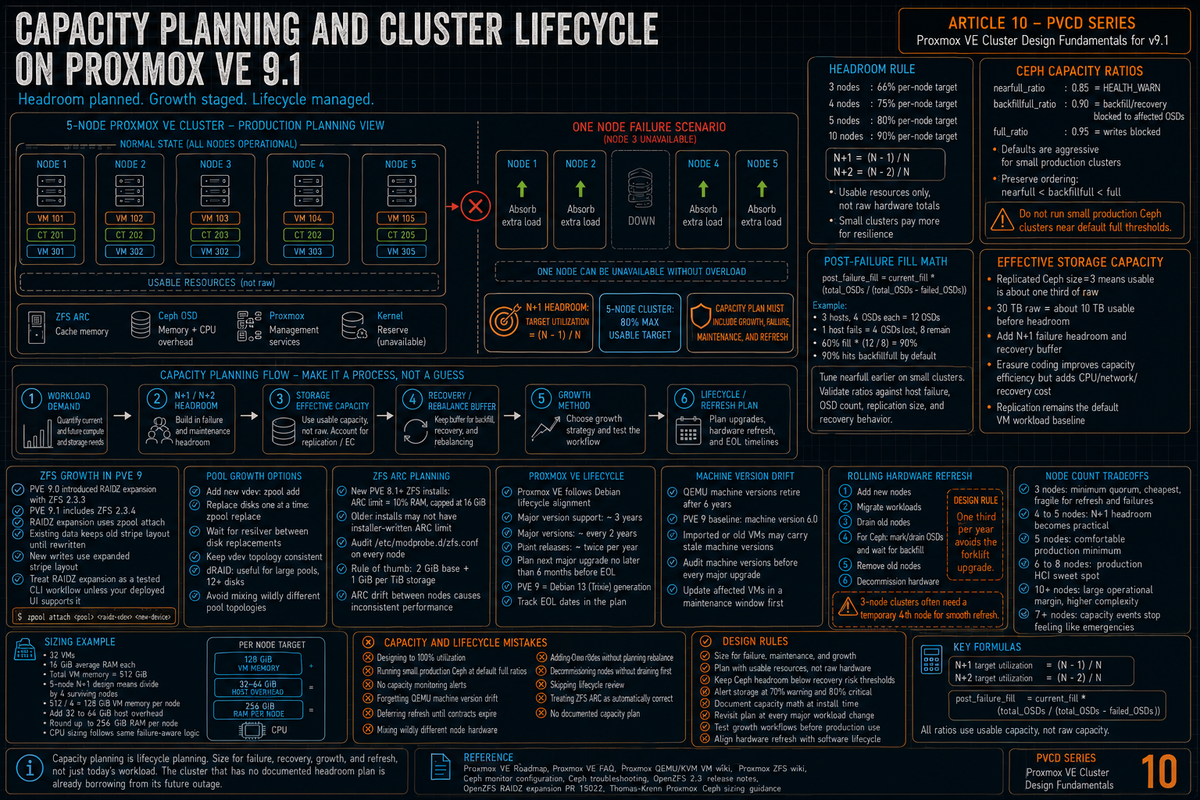
Article 10 in the Proxmox VE Cluster Design Fundamentals for v9.1 series. PVCD-09 covered monitoring. This article covers capacity planning and cluster lifecycle: how much headroom you actually need on a Proxmox HCI cluster, the Ceph full ratio math that decides when the cluster stops accepting writes, ZFS pool growth options now that RAIDZ expansion exists, lifecycle alignment with the Debian release cadence, machine version constraints that bite during major upgrades, and the hardware refresh planning that keeps the cluster current without forcing an unscheduled forklift.
Capacity planning is the part of cluster design that is easy to get wrong and hard to fix later. Most teams either oversize and waste budget, or undersize and end up firefighting at 90% used. The Ceph defaults are aggressive for production. Growing a RAIDZ vdev in place was a one way street until ZFS 2.3. Major version upgrades remove old machine versions on a schedule. None of this is in the install wizard; all of it shows up later as constraints on what the cluster can do.
Series target version is Proxmox VE 9.1 on Debian 13 Trixie. Every claim below is sourced to the Proxmox VE Roadmap, the Ceph documentation, the Proxmox VE FAQ, the Qemu/KVM VM wiki, or Debian release information.
N plus 1 and the headroom rule
The basic capacity rule for any HA cluster: you need enough free capacity on the remaining nodes to absorb the workload of one node failing. If your three node cluster runs flat out at 100% CPU and memory on every node, losing one node means the workload from that node has nowhere to go. The HA manager either fails to start the VMs (insufficient resources) or starts them and the surviving nodes thrash under the load.
The practical math:
- 3 node cluster (N+1 with N=2). Run each node at no more than 66% of usable resources. One node failure leaves 2 nodes at roughly 100%, which is the upper edge of acceptable.
- 4 node cluster (N+1 with N=3). Run each node at no more than 75% of usable resources.
- 5 node cluster (N+1 with N=4). Run each node at no more than 80%.
- N node cluster. Target utilization is (N minus 1) divided by N. A 10 node cluster can run at 90% per node and still tolerate a single failure.
For N+2 (tolerating two simultaneous failures, which is the design target for some environments), the math is (N minus 2) divided by N. A 5 node cluster with N+2 caps at 60% per node. Tolerating two failures gets expensive fast on small clusters; it gets cheap on large clusters.
These numbers are usable resources, not raw. ZFS ARC, Ceph OSD overhead, the Proxmox VE management overhead, and reserved memory for the kernel all subtract from raw before you get to "what VMs can use." On a typical Proxmox HCI node with 256 GB RAM, plan on 32 to 64 GB consumed by host functions before VM workload, depending on Ceph configuration and ZFS use.
Ceph capacity ratios and the math that matters
Per the Ceph monitor configuration reference, the three ratios that govern cluster capacity behavior:
| Ratio | Default | Behavior |
|---|---|---|
| nearfull_ratio | 0.85 (85%) | HEALTH_WARN. The cluster keeps serving I/O but warns that capacity is getting tight. |
| backfillfull_ratio | 0.90 (90%) | OSDs at this level will not accept backfill data. Recovery and rebalancing toward the affected OSDs stops. |
| full_ratio | 0.95 (95%) | OSDs at this level go read only. All client writes to pools containing this OSD are blocked. |
Per the Ceph troubleshooting documentation: when a Ceph Storage Cluster gets close to its maximum capacity, Ceph prevents you from writing to or reading from OSDs as a safety measure to prevent data loss. Letting a production cluster approach its full ratio is not a good practice because it sacrifices high availability. The default full ratio of 0.95 is described in the docs as a very aggressive setting for a test cluster with a small number of OSDs.
Reading the current ratios
Per the Ceph docs, these are stored in the OSDMap and modified at runtime with:
Per the Ceph documentation, the ordering must be preserved: nearfull less than backfillfull less than full. Setting them out of order produces HEALTH_ERR OSD_OUT_OF_ORDER_FULL.
The recovery capacity math
The reason the defaults are aggressive: when an OSD fails, Ceph rebalances the affected PGs onto remaining OSDs. The surviving OSDs must have enough free capacity to absorb the failed OSD's data. If they are already at 90% used, there is no room to absorb.
The Thomas Krenn Proxmox Ceph wiki provides the canonical formula for the post failure fill level on the remaining OSDs:
Worked example based on the Thomas Krenn 3 node Ceph reference design: 3 hosts with 4 OSDs each (12 OSDs total), replication factor 3, host as failure domain. If one host fails, 4 OSDs are out and 8 remain. At 60% current fill, post failure fill would be 60% times (12 / (12 minus 4)) which equals 90%. That hits backfillfull_ratio and Ceph stops recreating PGs.
To stay safe through a host failure on this design, current fill must stay below roughly 60% (which would produce a post failure fill of 90%, right at the default backfillfull threshold). Tuning nearfull_ratio down to 0.67 (based on the post failure fill math) gives the operator an earlier warning, before the cluster gets to a fill level where a host failure would block recreation.
Operational guidance from the Thomas Krenn Proxmox 3 node Ceph wiki: on small clusters (3 to 4 nodes), use the failure math to set earlier warning and full thresholds. Values such as nearfull_ratio 0.70 and full_ratio 0.85 are reasonable starting points, but validate them against host failure, OSD count, replication size, and recovery behavior. On larger clusters (8 plus nodes), the defaults are workable but still aggressive for production. The general rule: more nodes equal smaller per node share, equals smaller post failure jump, equals safer defaults.
Per the Ceph documentation: the default full ratio of 0.95 is a very aggressive setting for a test cluster with a small number of OSDs. Use the Ceph full ratio math to tune warning and full thresholds for your failure domain. Do not blindly keep defaults on small production clusters. Per Proxmox staff: in the end, it is the responsibility of the admin to decide what they want. The defaults are a starting point, not a target.
Replication factor and effective capacity
Per Ceph documentation, the default replication factor for a Proxmox Ceph pool is 3 (size=3, min_size=2). This means usable capacity is one third of raw. A cluster with 30 TB raw storage has 10 TB of usable Ceph capacity at replication 3.
Per the Ceph erasure coding documentation, EC pools provide better space efficiency (EC overhead is (k plus m) divided by k; for example, k=4,m=2 gives 1.5x overhead, and k=8,m=2 gives 1.25x overhead, instead of 3x for replicated) at the cost of higher CPU on writes and slower recovery. EC is documented in PVCD-04 (Ceph for Proxmox). For typical Proxmox HCI workloads (VM disks with mixed reads and writes), replication is the default and the right answer; EC fits archival and cold tier designs.
ZFS pool growth in PVE 9
Proxmox VE 9.0 introduced RAIDZ expansion with ZFS 2.3.3. Proxmox VE 9.1 includes ZFS 2.3.4. The operational point is unchanged: RAIDZ expansion lets you attach a new disk to an existing RAIDZ vdev, but existing data keeps its old layout until rewritten.
RAIDZ expansion mechanics
Per the OpenZFS 2.3 release notes and the upstream PR (#15022), the new mechanism:
Per the OpenZFS documentation: a new device can be attached to an existing RAIDZ vdev. The new device will become part of the RAIDZ group. A raidz expansion will be initiated, and the new device will contribute additional space to the RAIDZ group once the expansion completes. The feature@raidz_expansion on disk feature flag must be enabled to initiate an expansion, and it remains active for the life of the pool. Pools with expanded RAIDZ vdevs cannot be imported by older releases of the ZFS software.
Operationally, treat RAIDZ expansion as a CLI workflow in PVE 9 unless your deployed version exposes it in the UI. Use man zpool-attach and test on non production pools before using it on live storage.
Per the OpenZFS PR #15022, which documents the expansion behavior: existing data on the pool keeps its original stripe layout (the original number of data devices per parity device). New writes use the new stripe layout. The result is that capacity increases but space efficiency on existing data does not. To realize the full space benefit, existing data has to be rewritten (copy to a different dataset and back, or recreate the pool). Plan growth based on usable capacity gained from new writes, not by recalculating existing data overhead.
Other pool growth options
Beyond RAIDZ expansion, the standard ZFS pool growth options remain:
- Add a new vdev to the pool.
zpool add <pool> mirror <dev1> <dev2>or similar. Adds the entire new vdev as additional capacity. Works for any pool topology. The new vdev should match the existing topology (do not mix mirrors with RAIDZ in the same pool). - Replace each disk with a larger disk.
zpool replace <pool> <old> <new>one at a time, wait for resilver between each. Once all disks in a vdev have been upgraded, the pool autogrows to use the new capacity (if autoexpand=on on the pool). - dRAID (supported in PVE 9 via OpenZFS 2.3). dRAID is recommended for large pools (12 plus disks) where rebuild times on RAIDZ become operationally painful. dRAID uses distributed parity and integrated spare blocks for faster rebuilds.
ZFS ARC sizing
Per the Proxmox VE ZFS wiki: ZFS uses 50% of the host memory for the Adaptive Replacement Cache (ARC) by default. For new installations starting with Proxmox VE 8.1, the ARC usage limit will be set to 10% of the installed physical memory, clamped to a maximum of 16 GiB. This value is written to /etc/modprobe.d/zfs.conf.
What this means operationally: PVE 8.1 and later new installs on ZFS get a sane ARC limit out of the box. Older installs that predate PVE 8.1 may not have an installer written ARC limit. On those systems, the effective default depends on the ZFS version: 62.5% starting with ZFS 2.3.0, or 50% on older ZFS versions. Audit /etc/modprobe.d/zfs.conf on every node instead of assuming.
Per the Proxmox VE ZFS wiki, the general rule of thumb for ARC sizing is at least 2 GiB base plus 1 GiB per TiB of storage. ZFS also enforces a minimum value of 64 MiB. The configuration in /etc/modprobe.d/zfs.conf on nodes that need an explicit limit:
After updating, regenerate the initramfs (update-initramfs -u) and reboot. Operationally, set this at install time on every node and document the value as part of the cluster's standard configuration. ARC drift between nodes is a real cause of inconsistent VM performance.
Proxmox VE lifecycle alignment with Debian
Per the Proxmox VE FAQ: Proxmox VE versions are supported at least as long as the corresponding Debian version, approximately 3 years after its initial release. PVE uses a rolling release model and using the latest stable version is always recommended.
Per Debian release information, Debian 13 Trixie was released August 9, 2025. Full Debian Security Team support runs to August 9, 2028, then 2 years of Debian LTS to roughly June 2030 per the Freexian extended LTS timeline. Per Proxmox community references, PVE 8 (Bookworm based) is supported until approximately June 2026.
PVE release history and cadence
| PVE Major | Debian Base | Released | Approximate EOL |
|---|---|---|---|
| PVE 7 | Debian 11 Bullseye | July 2021 | July 2024 (end of life) |
| PVE 8 | Debian 12 Bookworm | June 2023 | June 2026 (approximately) |
| PVE 9 | Debian 13 Trixie | August 2025 | August 2028 (approximately) |
Per the Proxmox VE FAQ, major versions release approximately every two years aligned with Debian. PVE point releases (9.0, 9.1, 9.2, etc) target two stable point releases per year per Proxmox staff (Thomas) forum guidance. The cadence: major version follows Debian, point releases follow Proxmox internal feature and stability work.
QEMU machine version constraints
Per the Proxmox VE QEMU/KVM wiki: starting with QEMU 10.1, machine versions are removed from upstream QEMU after 6 years. In Proxmox VE, major releases happen approximately every 2 years, so a major Proxmox VE release will support machine versions from approximately two previous major Proxmox VE releases.
Per the same wiki: before upgrading to a new major Proxmox VE release, you should update VM configurations to avoid all machine versions that will be dropped during the next major Proxmox VE release. The removal policy is not yet in effect for Proxmox VE 8, so the baseline for supported machine versions is 2.4. The last QEMU binary version released for Proxmox VE 9 is expected to be QEMU 11.2, which will remove support for machine versions older than 6.0. So 6.0 is the baseline for the Proxmox VE 9 release lifecycle.
What this means operationally: VMs migrated from older Proxmox installs may be running on old machine versions (pc-i440fx-2.4, pc-q35-2.6, etc). These work fine in the current major release but will break when the major upgrade drops their machine version. Audit machine versions cluster wide as part of upgrade planning:
Update affected VMs to a newer machine version per the wiki process. The update requires a VM shutdown (cold reboot, not just a guest reboot) for the new machine type to take effect.
Hardware refresh planning
The cluster lifecycle is also a hardware lifecycle. Server hardware has a useful life of typically 5 to 7 years before vendor support expires, the maintenance contract gets prohibitive, or the hardware becomes a performance bottleneck. The cluster software lifecycle (3 year major version) is shorter than the hardware lifecycle, which means you upgrade Proxmox more often than you replace hardware.
The rolling hardware refresh plan
For a cluster that needs to stay running while hardware ages out, the approach that works:
- Add new nodes to the cluster (cluster joins covered in PVCD-01).
- Migrate VMs from the oldest nodes onto the new nodes (live migration, covered in PVCD-05).
- Remove the empty old nodes from the cluster.
- Decommission the old hardware.
For Ceph HCI clusters, the same workflow applies but with attention to data movement: adding new OSDs triggers a backfill to balance data across the new disks. Removing old OSDs triggers another backfill to move data off. Plan rolling refreshes during low load windows and monitor backfill throughput.
A rolling refresh plan, such as replacing a third of the cluster per year, avoids an all at once hardware forklift. This keeps the cluster never older than three years on any node and spreads capital expenditure.
Cluster size and refresh interaction
Small clusters (3 nodes) cannot easily do rolling refresh because you cannot drop below 3 nodes during the transition (quorum requirements, covered in PVCD-01). The typical approach for small clusters: provision a temporary fourth node, migrate to it, refresh one of the original three, migrate back, repeat. Or schedule a maintenance window and accept downtime.
Larger clusters (8 plus nodes) refresh smoothly because removing one node at a time leaves plenty of capacity. The N plus 1 headroom rule already accounts for one missing node.
Workload sizing and the right node count
The question every cluster design starts with: how many nodes, how big each one. The capacity math gives you a floor but not a target. Some practical guidance for the typical Proxmox use case:
Node count tradeoffs
| Node count | Strengths | Weaknesses |
|---|---|---|
| 3 nodes | Minimum for quorum. Cheapest entry point. Simple to operate. | Cannot tolerate two failures. Refresh requires temporary node. Ceph is fragile at 3 nodes per the Thomas Krenn 3 node Ceph wiki. |
| 4 to 5 nodes | N plus 1 headroom is reasonable. Refresh smooths out. Ceph capacity math improves. | Still small enough that capacity events are dramatic. |
| 6 to 8 nodes | Sweet spot for most production HCI. Tolerates failures gracefully. Refreshable without temporary nodes. | Hardware budget meaningful. |
| 10 plus nodes | Operational margin is large. Failures are background noise. Capacity at 90% per node is feasible. | Hardware budget is enterprise scale. Operational complexity grows with node count. |
The pragmatic default: 5 nodes is the smallest count that is genuinely comfortable for production. 3 nodes works for labs and small production with awareness of the constraints. 7 plus nodes is where capacity events stop feeling like emergencies.
Sizing each node
For each node, the right answer is determined by:
- Workload memory footprint divided by node count, divided by N over (N minus 1), plus host overhead.
- Workload CPU footprint with similar math.
- Storage capacity per the Ceph capacity math above.
- Network bandwidth, with separate planning for management, VM, Ceph replication, and Ceph public network per PVCD-02.
For a worked example: workload of 32 VMs at average 4 cores and 16 GB each, target N+1 on a 5 node cluster. Total workload memory is 32 times 16 equals 512 GB. Per node N+1 share is 512 divided by 4 (running nodes after one failure) equals 128 GB of VM memory per node, plus 32 to 64 GB host overhead, equals 160 to 192 GB per node. Round up to 256 GB. CPU sizing follows the same logic.
The capacity and lifecycle design mistakes that bite you later
Designing to 100% utilization
The classic mistake. The cluster gets sized to exactly what the workload needs and there is no room for failure, no room for growth, no room for the periodic capacity spike during patch windows when VMs migrate. Design to (N minus 1) divided by N utilization, with budget for organic workload growth on top.
Running Ceph at default ratios on production small clusters
Per the Ceph troubleshooting documentation, the default full_ratio of 0.95 is described in upstream Ceph docs as a very aggressive setting for a test cluster. On small production clusters, use the failure math to set earlier warning and full thresholds. Values such as nearfull 0.70 to 0.75 and full 0.85 to 0.90 are reasonable starting points, but validate them against host failure, OSD count, replication size, and recovery behavior.
No capacity monitoring alerts
Covered in PVCD-09. Without external metrics with retention and alerts, you discover capacity problems when the cluster goes read only. Alert at 70% used (warning) and 80% used (critical) on every storage pool. The lead time for hardware orders is the entire point.
Forgetting machine version drift
Per the Proxmox QEMU/KVM wiki, machine versions are removed from QEMU after 6 years. VMs migrated in from older clusters or imported from VMware on old hardware may carry old machine versions. The next major Proxmox upgrade silently breaks them. Audit machine versions before every major upgrade and update affected VMs in a maintenance window before the upgrade.
Hardware refresh deferred until contracts expire
Vendor maintenance on a 5 year old server is expensive. The forklift upgrade where you replace all hardware at once because the contract is up is the most expensive way to do a refresh. Stagger replacements on a rolling cadence (one third per year) to spread cost and avoid the all at once forklift.
Mixing wildly different node hardware in one cluster
Proxmox supports heterogeneous clusters but the operational reality is that VMs land on different hardware classes and performance is inconsistent. Live migration between very different generations may fail on CPU feature mismatch. The N plus 1 capacity math assumes a roughly homogeneous cluster; with very different node sizes, you have to plan around the biggest node's failure rather than the average.
Adding nodes to a Ceph cluster without planning the rebalance
New OSDs trigger automatic backfill to balance data. On a busy cluster, this can saturate the Ceph backend network and degrade VM performance for the duration of the rebalance (hours to days depending on data volume). Schedule cluster expansion for low traffic windows, throttle backfill with osd_max_backfills if needed, monitor the rebalance to completion.
Decommissioning nodes without draining first
Removing a Proxmox node from the cluster while it still hosts VMs orphans those VMs. Migrate or stop all VMs on the node before removing it from the cluster. For Ceph nodes, set the OSDs to out and let the data drain before physically removing the node. ceph osd safe-to-destroy <id> confirms when an OSD has finished draining.
Skipping the lifecycle review
The cluster that ran fine for two years quietly hits the major version EOL date and starts accumulating unpatched security issues. Calendar the EOL date for the current PVE major version. Plan the next major upgrade no later than six months before EOL. The upgrade window itself takes weeks of testing and rolling execution; the planning takes longer.
Treating ZFS ARC as autoconfigured
New Proxmox installs set the ARC limit to 10% of host memory, capped at 16 GiB, by writing the value to /etc/modprobe.d/zfs.conf. Older installs that predate PVE 8.1 may not have an installer written ARC limit. On those systems, the effective default depends on the ZFS version, so audit /etc/modprobe.d/zfs.conf on every node instead of assuming. Drift between nodes (some configured, some default) causes inconsistent VM performance and confusing capacity reports.
No documented capacity plan
The cluster gets installed with the capacity that fit the initial workload. Two years later, no one remembers why each node has 256 GB or why the Ceph pool is sized the way it is. Document the capacity math at install time. Update the document at every major workload addition. The next person who has to plan growth needs the same numbers you used.
Key Takeaways
- The headroom rule is (N minus 1) divided by N. 3 node cluster targets 66% per node, 5 nodes targets 80%, 10 nodes targets 90%. N plus 2 designs reduce the target further. Usable resources, not raw.
- Ceph default ratios are aggressive for production. Per the Ceph docs, the 0.95 full_ratio is described as a test cluster setting. Tune nearfull to 0.70 to 0.75 and full to 0.85 to 0.90 on small production clusters.
- Replication 3 means usable is one third of raw. Plan Ceph cluster raw capacity at 3x workload plus the headroom and the recovery buffer.
- RAIDZ expansion in the 9 series. PVE 9.0 introduced RAIDZ expansion with ZFS 2.3.3; PVE 9.1 includes ZFS 2.3.4. Per OpenZFS PR #15022,
zpool attach <pool> <existing-raidz-vdev> <dev>adds a device. Treat as a CLI workflow unless your deployed version exposes it in the UI. Existing data is not re striped; only new writes use the expanded stripe layout. - ARC tuning depends on install vintage. New Proxmox installs set an ARC limit of 10% RAM capped at 16 GiB. Older installs may not have that limit. Audit
/etc/modprobe.d/zfs.confon every node. - Proxmox VE major versions are supported about 3 years. Per the Proxmox FAQ, aligned with Debian. PVE 9 (Trixie) released August 2025, EOL approximately August 2028. PVE 8 (Bookworm) EOL approximately June 2026.
- QEMU machine versions removed after 6 years. Per the Proxmox QEMU/KVM wiki. PVE 9 baseline is machine version 6.0. Audit VM machine versions before every major upgrade.
- Major versions release every 2 years, point releases twice per year. Per Proxmox staff (Thomas). The cluster lifecycle is shorter than the hardware lifecycle.
- Rolling hardware refresh, one third per year. Spreads cost, avoids the forklift, keeps no node older than 3 years.
- 5 node cluster is the comfortable production minimum. 3 nodes works but is fragile for failures and refreshes. 7 plus nodes is where capacity events stop feeling like emergencies.
- Document the capacity plan at install. Update at every major workload change. The next person planning growth needs the same numbers you used.