

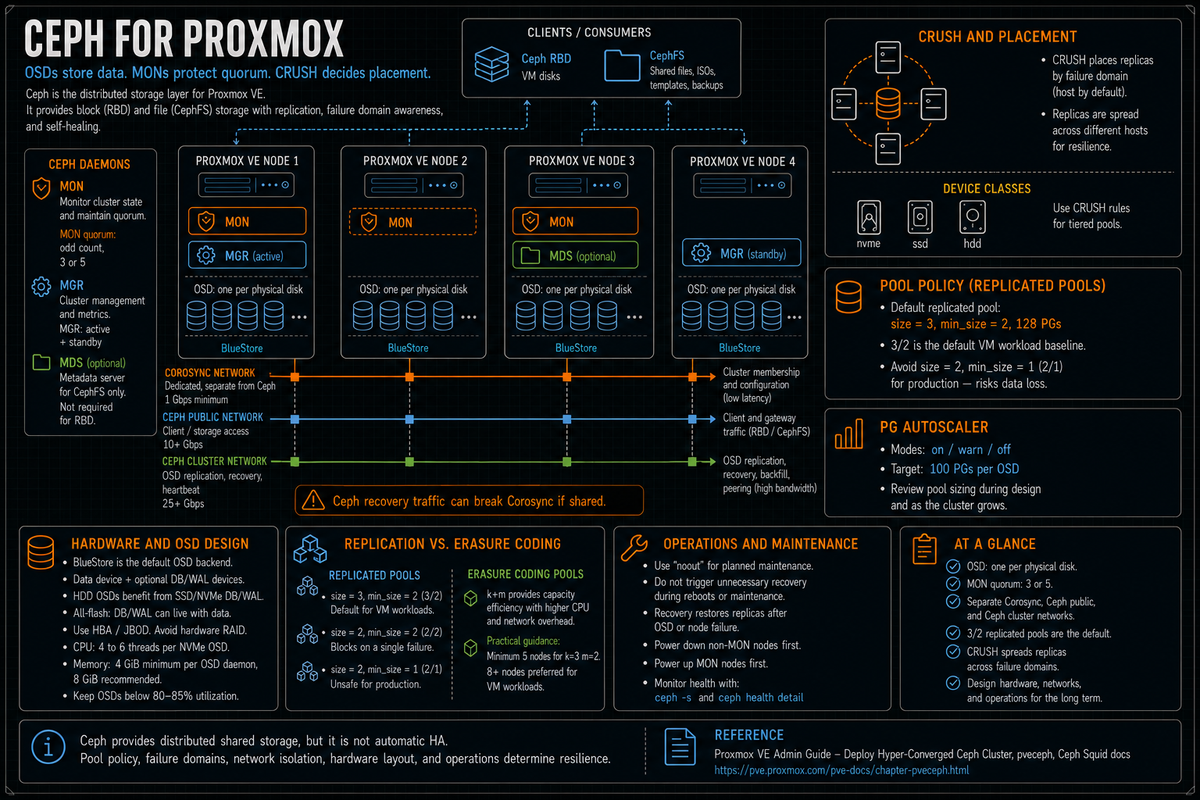
Article 4 in the Proxmox VE Cluster Design Fundamentals for v9.1 series. Ceph is its own architecture inside Proxmox, deep enough that PVCD-03 only introduced the storage type and pointed here. This article covers the Ceph daemons (OSD, MON, MGR, MDS), CRUSH and placement groups, replication versus erasure coding, Ceph network and hardware requirements per the official Deploy Hyper-Converged Ceph Cluster wiki, the all NVMe versus hybrid decision, and the operational reality of running Ceph at production scale on Proxmox 9.1 with Ceph Squid 19.2.3.
Ceph is the part of Proxmox that intimidates VMware admins the most, and rightly so. Ceph is not VMFS. It is not vSAN. It is a distributed object store with its own daemons, its own networking model, its own failure semantics, and its own operational rhythm. Get Ceph right and you have shared storage with HA and self healing across cluster nodes without a SAN. Get Ceph wrong and you have a complex distributed system in a degraded state that you do not know how to repair.
This article is the architectural orientation for Ceph on Proxmox. Every fact below is sourced to the Proxmox Deploy Hyper-Converged Ceph Cluster wiki, the pveceph(1) man page, the Ceph Squid documentation, or the linked Proxmox forum discussions where staff developers commented. Series target version is Proxmox VE 9.1 with Ceph Squid 19.2.3 (the bundled version per the Proxmox VE 9.1 release announcement).
The Ceph daemons
Per the Proxmox Deploy Hyper-Converged Ceph Cluster wiki, Ceph as deployed on Proxmox runs four service types relevant to the cluster operator:
- OSD (Object Storage Daemon). Per the docs, OSDs store objects for Ceph over the network. The recommendation is one OSD per physical disk. Each OSD owns one disk and handles reads, writes, replication, and recovery for that device. This is the data plane.
- MON (Monitor). Per the docs, monitors maintain the cluster map and quorum. Per the Ceph documentation, MONs use a variation of the Paxos algorithm to maintain consensus, and a majority of MONs must be active to establish quorum. An odd number is recommended (typically 3 or 5). Lose MON quorum and the cluster goes read only.
- MGR (Manager). Provides metrics, the dashboard, the orchestration interface, and the placement group autoscaler. Multiple MGRs are recommended for redundancy; one is active and others are standby.
- MDS (Metadata Server). Required only if you use CephFS. Manages file system metadata. Can run active or active plus standby; multiple active MDSs scale CephFS metadata operations.
Per the docs, to build a hyperconverged Proxmox plus Ceph cluster you should use at least three (preferably) identical servers for the setup.
vSphere admins: Ceph is closer to vSAN in role than to VMFS, but the architecture is different. vSAN integrates tightly with vSphere; Ceph is its own thing that Proxmox manages on top. There is no shared filesystem visible to all hosts the way VMFS is. Each VM disk is an RBD image stored as a collection of objects distributed across OSDs.
Hyper-V admins: Ceph is closer to Storage Spaces Direct (S2D) in concept, distributed storage built from local disks across cluster nodes. Ceph predates S2D by years and offers more flexibility (object, block, and file storage from the same cluster) at the cost of more configuration knobs.
Pools, replication, and the size and min_size defaults
Per the Deploy Hyper-Converged Ceph Cluster wiki: "When no options are given, we set a default of 128 PGs, a size of 3 replicas and a min_size of 2 replicas, to ensure no data loss occurs if any OSD fails."
What size and min_size mean in practice:
- size = 3. Each object is replicated to three OSDs (in different failure domains, typically different hosts). The cluster targets three copies at all times.
- min_size = 2. The pool will accept I/O as long as at least two replicas are available. If only one replica is online, I/O blocks until the cluster recovers to at least min_size.
The 3/2 default is what you want for production. Per multiple Proxmox forum discussions with Proxmox staff: a 3/2 pool can lose one node and still serve I/O. With only 2 replicas online (at min_size), it serves I/O but is one OSD away from blocking. Recovery to size=3 happens automatically when the failed node returns or new OSDs are added.
The unsafe 2/1 configuration: cuts capacity overhead but accepts data loss risk if a single OSD fails during recovery. Per the Proxmox forum discussion, the lowest reasonable option for storage efficiency is size=2, min_size=2: more efficient than 3/2 (50% capacity vs 33%) but the pool blocks on a single failure rather than serving degraded I/O. Multiple Proxmox staff in forum threads strongly advise against 2/1 for production data.
CRUSH map and failure domains
Per the Deploy Hyper-Converged Ceph Cluster wiki: CRUSH (Controlled Replication Under Scalable Hashing) is the algorithm at the foundation of Ceph. CRUSH calculates where to store and retrieve data, removing the need for a central index. CRUSH uses a map of OSDs, buckets (device locations), and rulesets (data replication) for pools.
The default replicated rule places one replica per host. With a 3 node cluster and size=3, each replica lives on a different node. Lose any one node and the other two still have a copy.
The CRUSH map can be tuned for richer failure domains:
- Host (default). Replicas distributed across hosts. The right choice for most clusters.
- Rack. Replicas distributed across racks (you define which hosts belong to which rack). Useful in larger deployments where rack power or top of rack switch failure is a meaningful failure domain.
- Room or datacenter. For multi room or multi DC deployments.
Per the docs, Ceph introduced device classes with the Luminous release to accommodate the need for easy ruleset generation. Device classes (hdd, ssd, nvme) let you create CRUSH rules that constrain a pool to a specific class of disk:
Per the docs, this is how you build a tiered Ceph cluster (NVMe pool for hot VMs, SSD pool for warm, HDD pool for cold) inside a single Ceph cluster.
Placement groups and the autoscaler
Per the Deploy Hyper-Converged Ceph Cluster wiki, a pool's PG count determines how data is distributed across OSDs. Each placement group represents a logical grouping of objects that share a placement rule. PGs are the unit that CRUSH actually maps onto OSDs.
Per the docs, the default at pool creation is 128 PGs. Per the Ceph Squid documentation, the autoscaler (introduced in Nautilus) automatically scales pg_num to match cluster usage. Per the docs, the autoscaler aims for the number of PG replicas per OSD to be proportional to the amount of data in the pool, with a default target of 50 to 100 PGs per pool that accounts for replication overhead and erasure coding spread of each PG's replicas across OSDs. The default target is 100 PGs per OSD (per the mon_target_pg_per_osd parameter).
The PG autoscaler modes per the Ceph docs:
- on. Automatic adjustment. Recommended for most deployments.
- warn. Recommendations logged, no automatic changes. Useful when you want explicit control.
- off. No recommendations or changes. Manage pg_num manually.
Per the Proxmox docs: "It is advised that you either enable the PG-Autoscaler or calculate the PG number based on your setup."
Erasure coding versus replication
Per the pveceph(1) man page: "Erasure coding (EC) is a form of forward error correction codes that allows to recover from a certain amount of data loss." EC pools require less raw storage for the same usable capacity than replicated pools, at the cost of higher CPU and network overhead and write amplification.
EC profiles use k+m notation: k data chunks plus m parity chunks. To survive m failures you need k+m OSDs in different failure domains.
| Profile | Min nodes | Storage efficiency | Default min_size | Failure tolerance with default min_size |
|---|---|---|---|---|
| Replicated 3/2 | 3 | 33% (3x overhead) | 2 | 1 host (continues at min_size) |
| EC 2+1 (m=1) | 3 | 67% | k=2 | 1 chunk before I/O blocks |
| EC 4+2 (m=2) | 6 | 67% | k+1=5 | 1 chunk before I/O blocks (data recoverable up to 2 lost) |
| EC 8+3 (m=3) | 11 | 73% | k+1=9 | 2 chunks before I/O blocks (data recoverable up to 3 lost) |
Per the Deploy Hyper-Converged Ceph Cluster wiki: "The default min_size of an EC pool depends on the m parameter. If m = 1, the min_size of the EC pool will be k. The min_size will be k + 1 if m > 1." So an EC 4+2 pool defaults to min_size 5; an EC 8+3 pool defaults to min_size 9.
Per a Proxmox forum discussion on EC configuration with multiple Proxmox staff and community contributors: erasure coded pools make sense with a very minimum of 5 nodes (k=3, m=2), but for reasonable performance you would need at least 8+ nodes. EC pools are quite underperforming for general VM workloads.
The honest framing for Proxmox EC: replicated 3/2 is the right default for VM workloads. EC is the right answer for object storage workloads (RGW), large scale archival, and bulk capacity tiers where the capacity savings justify the performance hit. Per the Proxmox EC pool documentation, you can add an existing EC pool as Proxmox storage with the data-pool option:
Per the docs, RBD on EC requires a small replicated metadata pool plus the EC data pool; the storage definition references both.
Network requirements per the docs
Per the Deploy Hyper-Converged Ceph Cluster wiki, Ceph traffic interferes with other services on the same network. The wiki specifically warns: "The volume of traffic, especially during recovery, will interfere with other services on the same network, especially the latency sensitive Proxmox VE corosync cluster stack can be affected, resulting in possible loss of cluster quorum."
The official Proxmox network recommendation per the wiki: when unsure, use three physically separate networks for high performance setups.
- One very high bandwidth (25+ Gbps) network for Ceph (internal) cluster traffic. Per the docs verbatim. This is the OSD to OSD replication and heartbeat network.
- One high bandwidth (10+ Gbps) network for Ceph (public) traffic. Per the docs. Between the Ceph servers and Ceph client storage traffic. Per the wiki, depending on your needs this can also host the virtual guest traffic and the VM live migration traffic.
- One medium bandwidth (1 Gbps) exclusive for the latency sensitive corosync cluster communication. Per the docs verbatim. Covered in PVCD-02.
Bandwidth sizing per the wiki
Per the Deploy Hyper-Converged Ceph Cluster wiki directly:
- Per the wiki, a single HDD might not saturate a 1 Gb link, but multiple HDD OSDs per node can already saturate 10 Gbps.
- Per the wiki, a single modern NVMe SSD can already saturate 10 Gbps of bandwidth or more.
- Per the wiki, for high performance setups the recommendation is at least 25 Gbps, with 40 Gbps or 100+ Gbps potentially required to take full advantage of the underlying disks.
Operational reality: 10 GbE is the floor for production Ceph. 25 GbE is the practical minimum for all flash. 100 GbE is what large NVMe Ceph clusters actually need to saturate the disks.
Full mesh network for small clusters
Per the Proxmox wiki "Full Mesh Network for Ceph Server" referenced from the Ceph deployment wiki: "A meshed network setup is also an option for three to five node clusters, if there are no 10+ Gbps switches available." The layout: each node has direct point to point links to every other node in the cluster, no switch between them. Limits to about 5 nodes due to NIC port count, but for a small HCI cluster it eliminates the switch as a single point of failure and a cost line.
CPU and memory requirements per the docs
Per the Deploy Hyper-Converged Ceph Cluster wiki:
CPU
Per the docs verbatim: "A high CPU core frequency reduces latency and should be preferred. As a simple rule of thumb, you should assign a CPU core (or thread) to each Ceph service to provide enough resources for stable and durable Ceph performance."
Per the docs example: "If you plan to run a Ceph monitor, a Ceph manager and 6 Ceph OSDs services on a node you should reserve 8 CPU cores purely for Ceph when targeting basic and stable performance."
Per the docs on NVMe specifically: modern enterprise NVMe SSDs that sustain a high IOPS load over 100,000 with sub millisecond latency can drive multiple CPU threads per OSD, with the docs noting four to six CPU threads per NVMe backed OSD as likely for very high performance disks.
Memory
Per the docs verbatim: "As a rule of thumb, for roughly 1 TiB of data, 1 GiB of memory will be used by an OSD."
Per the docs on OSD memory: "The current recommendation is to configure OSDs with at least 8 GiB of memory for good performance. The OSD daemon requires 4 GiB of memory by default."
Per the docs on planning: in a hyperconverged setup, memory consumption needs careful planning and monitoring. In addition to the predicted memory usage of virtual machines and containers, the system needs enough memory available for Ceph to deliver stable performance. Memory usage may be lower under normal conditions but climbs during critical operations such as recovery, rebalancing, or backfilling.
Disk choices: HDD versus SSD versus NVMe
Per the Deploy Hyper-Converged Ceph Cluster wiki: "It is recommended that you use SSDs instead of HDDs in small setups to reduce recovery time, minimizing the likelihood of a subsequent failure event during recovery. In general, SSDs will provide more IOPS than spinning disks."
The current production reality on Proxmox Ceph:
- All NVMe. The right answer for new builds where IOPS and latency matter. Each OSD can use 4 to 6 CPU threads per the docs. Network sizing follows: at least 25 GbE, often 100 GbE.
- All SSD (SATA or SAS). Reasonable for moderate workloads where the cost of NVMe is not justified. Easier on CPU per the docs (single core per OSD typically sufficient).
- Mixed SSD plus HDD. Use device classes to keep them separate. Per the docs, you can use a faster disk as a journal or DB/WAL device for HDD OSDs (the WAL is the BlueStore write ahead log, the DB is the BlueStore RocksDB metadata; both benefit from SSD acceleration).
- All HDD. Possible, but with caveats. Per the docs: "If a faster disk is used for multiple OSDs, a proper balance between OSD and WAL / DB (or journal) disk must be selected, otherwise the faster disk becomes the bottleneck for all linked OSDs."
Per the Deploy Hyper-Converged Ceph Cluster wiki: "As Ceph handles data object redundancy and multiple parallel writes to disks (OSDs) on its own, using a RAID controller normally doesn't improve performance or availability. On the contrary, Ceph is designed to handle whole disks on it's own, without any abstraction in between. RAID controllers are not designed for the Ceph workload and may complicate things and sometimes even reduce performance, as their write and caching algorithms may interfere with the ones from Ceph." Use HBA mode or JBOD passthrough.
BlueStore (the OSD storage backend)
Per the docs: "Starting with the Ceph Kraken release, a new Ceph OSD storage type was introduced called Bluestore. This is the default when creating OSDs since Ceph Luminous." (Filestore is end of life and not used in current Proxmox Ceph builds.)
BlueStore writes directly to the block device, bypassing a filesystem. The components per the docs:
- Data. The actual object data, written directly to the block device.
- DB (RocksDB metadata). The BlueStore metadata. Per the docs, you can use a separate device for DB to accelerate metadata operations on slower data devices (HDD). Specified via the
-db_devoption topveceph osd create. - WAL (Write Ahead Log). The BlueStore journal. Specified via the
-wal_devoption. Per the docs, the WAL can sit on the DB device or be separated.
For all flash configurations, putting DB and WAL on the same device as the data is fine; the bottleneck moves to CPU and network. For HDD configurations, dedicating SSD or NVMe partitions for DB and WAL meaningfully improves write performance.
Recovery and rebalance behavior
Per the Deploy Hyper-Converged Ceph Cluster wiki, recovery time matters when planning cluster size. Especially with small clusters, recovery can take a long time.
What happens when an OSD fails or a node goes down:
- The cluster marks the OSD down (after a heartbeat timeout).
- After a configurable grace period (default 600 seconds, the
mon_osd_down_out_interval), the cluster marks the OSD out and begins recovery. - Recovery means rebuilding the missing replica copies on remaining OSDs to restore the desired replication count.
- During recovery, the cluster is degraded. I/O continues as long as the pool is at min_size or above.
- Recovery generates significant traffic on the cluster network. Per the docs, this is why Ceph cluster traffic must be on a dedicated network.
The noout flag is the operational tool for planned maintenance. Per the docs: "In order to not cause any recovery during the shut down and later power on phases, enable the noout OSD flag." Set noout, do the maintenance, unset noout when done. Without it, leaving a node down past the 10 minute grace period triggers recovery, and that work is wasted as soon as the node returns.
CephFS for shared file storage
Per the pveceph(1) man page, CephFS provides a POSIX file system interface on top of the Ceph cluster. In Proxmox storage configuration, CephFS is the right answer for ISO images, container templates, backups, and snippets that need to be shared across cluster nodes.
The components:
- Two pools. A data pool (for file content) and a metadata pool (for the directory tree, inodes, etc). Per the docs, the example creates a data pool with 128 PGs and a metadata pool with 32 PGs (one quarter of the data pool).
- One or more MDS daemons. The metadata servers. At least one active; standby MDSs improve availability.
Per the docs: "This creates a CephFS named cephfs, using a pool for its data named cephfs_data with 128 placement groups and a pool for its metadata named cephfs_metadata with one quarter of the data pool's placement groups (32)."
Operational essentials
Health monitoring
Per the docs, continuous monitoring of Ceph health from day one matters, either via the Ceph CLI tools or via the Proxmox VE API status endpoint. The CLI commands:
The Proxmox web UI shows the same information at Datacenter, Ceph. Real time graphs at Datacenter, Ceph, Performance.
Rolling node maintenance
Per the Deploy Hyper-Converged Ceph Cluster wiki, the planned shutdown and power on sequence:
- Set the
nooutOSD flag (web UI Manage Global Flags orceph osd set noout). - Per the docs: "Start powering down your nodes without a monitor (MON). After these nodes are down, continue by shutting down nodes with monitors on them."
- Per the docs: "When powering on the cluster, start the nodes with monitors (MONs) first."
- Confirm all Ceph services are up.
- Unset the
nooutflag.
The Ceph design mistakes that bite you later
Three node Ceph with size=2
The math looks attractive: 3 nodes, size=2, you keep 50% capacity instead of 33%. The reality is that any single OSD failure during recovery can leave you below min_size=1 (if you set that) or block I/O (if you keep min_size=2). Per Proxmox developer dcsapak in a forum post: 2/1 is generally a bad idea because it is very easy to lose data, for example bit rot on one disk while the other fails or flapping OSDs. Per Proxmox staff Alwin in a separate thread: I STRONGLY ADVISE AGAINST IT. With only one copy of data, a subsequent failure may just lose the data. Per Alwin, if storage usage is an issue, the lowest reasonable option is size=2 and min_size=2. Stick with 3/2 on 3 node clusters.
Putting Ceph traffic on the corosync network
Covered in detail in PVCD-02. The Ceph wiki says it directly: Ceph recovery traffic can break corosync quorum if they share a network. Dedicate the Ceph cluster network. Dedicate the Ceph public network or at least separate it via VLAN with QoS.
RAID controller in front of Ceph OSDs
Per the docs: RAID controllers complicate things and may reduce performance. Use HBA or JBOD mode. Buy controllers in IT mode, or flash existing controllers to IT mode firmware where supported.
Mixing OSD sizes within a node
Per the docs: "Aside from the disk type, Ceph performs best with an evenly sized, and an evenly distributed amount of disks per node." A node with 6x 4TB disks plus 2x 8TB disks has a CRUSH weighting problem; the 8TB disks attract twice the data and become hot spots. Standardize disk sizes within a node and ideally across the cluster.
Insufficient cluster width for the size policy
3 nodes plus size=3 means each node is one of three replicas. Lose a node and you lose redundancy until it returns. With 4 nodes plus size=3, lose a node and Ceph can still rebuild the third copy on the remaining 3 nodes. The fourth node is what gives you self healing under node failure. Plan capacity so a node can fail and the remaining capacity still holds all data at the desired replication.
Maxing out OSD capacity
Per the docs: avoid maxing out memory and avoid maxing out OSD capacity. Per multiple Proxmox forum discussions: keep OSDs below 80 to 85% utilization. Above 85% Ceph triggers near full warnings; above 95% it stops accepting writes to that OSD. Once an OSD is full, recovery becomes very difficult.
Skipping the noout flag during maintenance
Reboot a node without setting noout, the cluster waits 10 minutes (default mon_osd_down_out_interval), then begins recovery. The node comes back, the recovery has to undo itself, the cluster spends extra hours rebalancing for nothing. Always set noout for planned maintenance.
Treating Ceph as a black box
The Ceph daemons are real services with logs, configurable parameters, and failure modes. ceph -s, ceph health detail, ceph pg dump, and the OSD logs in /var/log/ceph/ are operational tools, not optional reading. Time spent reading the Ceph documentation up front pays back during the first incident.
Skipping the Ceph rehearsal
The first time you fail an OSD, fail a node, or recover from a network partition should not be in production. Build a 3 node nested test cluster on existing hardware, fail an OSD intentionally, watch the recovery, set noout, take a node down for 30 minutes, bring it back, watch the convergence. Operational muscle memory is the difference between a calm 30 minute outage and a panicked 4 hour incident.
Key Takeaways
- Ceph Squid 19.2.3 bundled in PVE 9.1. Per the Proxmox VE 9.1 release announcement. Four daemon types: OSD (one per disk), MON (odd count for quorum, 3 or 5), MGR (active plus standby), MDS (CephFS only).
- Default pool is size=3, min_size=2, 128 PGs. Per the Deploy Hyper-Converged Ceph Cluster wiki verbatim. The right default for production. 2/1 is an unsafe production configuration Proxmox staff explicitly advise against.
- CRUSH places replicas across failure domains. Default is host. Tune to rack or room for larger deployments. Device classes (hdd, ssd, nvme) enable per pool placement on specific disk types.
- PG autoscaler should be reviewed during pool design. Per the Ceph Squid docs, the default
mon_target_pg_per_osdis 100. Modes are on, warn, and off. - Erasure coding for capacity, replicated for performance. Per Proxmox forum guidance, EC needs at least 5 nodes (k=3, m=2) but practically 8+ for VM workloads. Replicated 3/2 is the right default for VMs.
- Three networks for production Ceph per the wiki. 25+ Gbps for Ceph cluster (internal), 10+ Gbps for Ceph public, 1 Gbps dedicated for corosync.
- NVMe needs more CPU and network. Per the docs, 4 to 6 CPU threads per NVMe OSD; single NVMe can saturate 10 Gbps; recommended 25 Gbps minimum, 100 Gbps for full performance.
- Memory rule of thumb: 1 GiB per 1 TiB of OSD data, plus at least 4 GiB per OSD daemon, 8 GiB recommended. Per the wiki verbatim.
- BlueStore is the default OSD backend. Direct device access, separate DB and WAL devices via
-db_devand-wal_devoptions. - HBA or JBOD, never RAID controller. Per the wiki, RAID complicates and may reduce Ceph performance. Same disk sizes within and across nodes.
- noout flag for planned maintenance. Set before shutdown to prevent recovery during the maintenance window. Power down non MON nodes first; power up MON nodes first.
- Keep OSDs below 80 to 85% utilization. Per Proxmox forum guidance. Above 85% triggers near full warnings; above 95% blocks writes.