

Changed Block Tracking is one of those technologies most backup administrators depend on every day without spending much time thinking about it. Normally, there is no reason to.
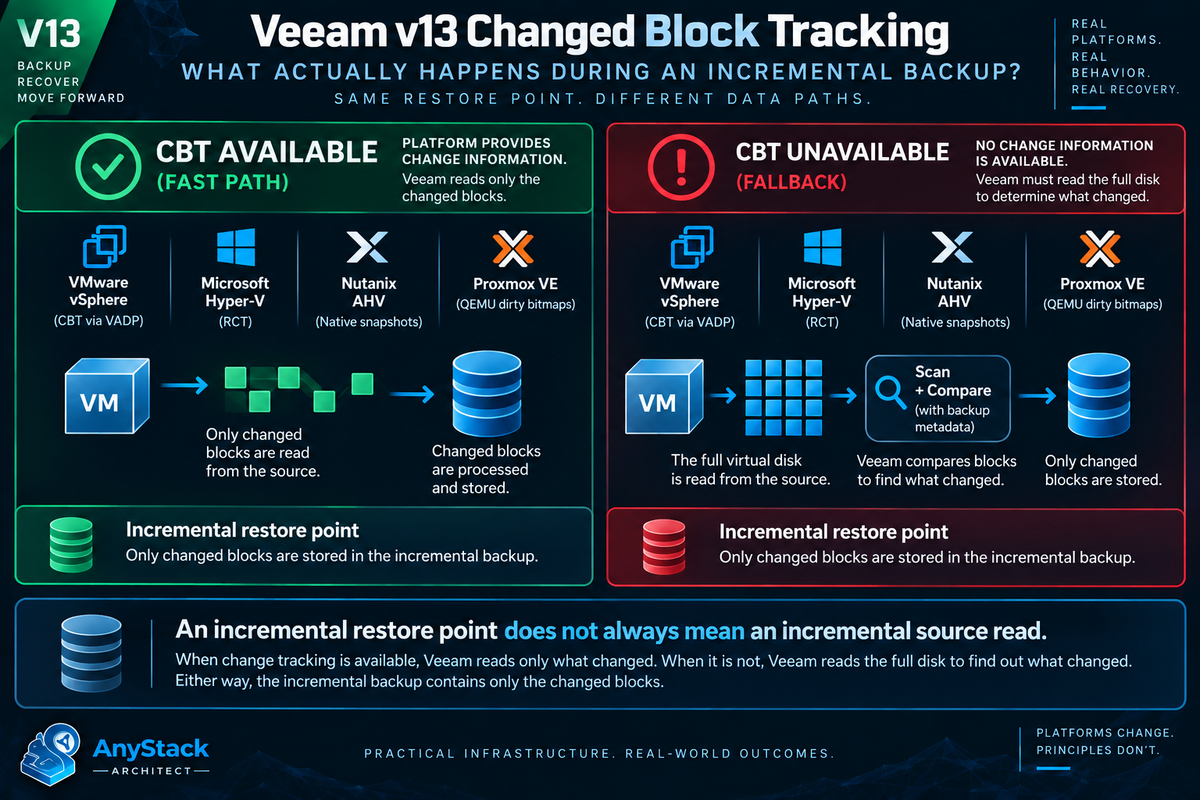
A Veeam job runs. The first backup is large. The next backup is smaller. We call it an incremental backup and move on. But there is an important distinction underneath that process:
That distinction matters. When change tracking is working, Veeam can determine which portions of a virtual disk changed since the previous backup and focus its reads on those areas. When usable change tracking information is unavailable, Veeam may have to read substantially more of the source to determine what changed.
The resulting restore point can still be incremental. The amount of production data Veeam had to read to create it can be completely different. With Veeam Backup & Replication v13 protecting VMware vSphere, Microsoft Hyper-V, Nutanix AHV, Proxmox VE, and other virtualization platforms, understanding that distinction is more useful than ever.
What Changed Block Tracking Actually Does
At its simplest, Changed Block Tracking answers one question:
Which parts of this virtual disk changed since the last known point?
Imagine a 2 TB virtual disk. During the last backup interval, the operating system and applications changed 18 GB of data. Without some form of change tracking, the backup application has to determine where those changes occurred.
With change tracking, the platform can provide information identifying the disk areas that changed. Instead of searching through the complete disk to discover those 18 GB of changes, Veeam can concentrate on the areas that matter. That reduces unnecessary production storage reads and can reduce proxy workload, network traffic, snapshot lifetime, and the overall backup window.
CBT is not application consistency. It does not replace VSS, application aware processing, VMware Tools quiescence, or another mechanism used to establish a consistent state. It is also not deduplication or compression.
Those are different parts of the backup process. CBT is fundamentally about avoiding unnecessary reads.
Incremental Backup Does Not Always Mean Incremental Read
This is the part I think gets missed most often. We normally describe a Veeam backup as full or incremental based on the restore point being created. That does not necessarily describe the amount of data Veeam had to read from production.
Suppose a 4 TB VM normally completes its incremental backup in 15 minutes. Tonight only 30 GB changed, but the job takes two hours. The first instinct is usually to start looking at the repository, network, proxy, compression, or deduplication.
Those are reasonable places to investigate. But if Veeam could not use the platform's change tracking information, it may have needed to scan a much larger amount of the VM to discover those 30 GB of changes. The repository can still receive a relatively small incremental restore point.
Production storage can experience something much closer to a full scan. Those are two very different things.
VMware: Where Most of Us Learned CBT
VMware is probably where most Veeam administrators first encountered Changed Block Tracking.
Documented For VMware VMs using virtual hardware version 7 or later, Veeam can use the native VMware vSphere CBT mechanism. Instead of scanning VMFS to discover changes, Veeam queries CBT through VMware VADP and receives a list of blocks that changed since the previous job session.[1] Veeam enables CBT by default, although it can be disabled in job settings.[1] The normal process is straightforward.
The VM writes data. VMware tracks which areas of the virtual disk changed. Veeam creates the snapshot required for backup processing.
Veeam asks VMware which blocks changed since the previous known state. The Veeam proxy reads those areas. Veeam processes the data and creates the new restore point.
The important part is that Veeam does not have to discover those changes by scanning the entire virtual disk. VMware has already done the tracking.
Documented Underneath that process, VMware exposes changed disk areas using its QueryChangedDiskAreas API and a Change ID associated with a known disk state.[8][9] Broadcom documents an interesting detail about the results. The API can identify an area as changed when it was not, but it is designed so actual changes are not omitted.[9] That is exactly the tradeoff you want from a backup perspective.
Reading a block you did not really need costs some performance. Failing to read a block that actually changed could cost data.
CBT Can Help With Full Backups Too
CBT is easy to think of as an incremental backup feature, but that is not quite accurate.
Documented For VMware VMs using thin virtual disks, Veeam can also use CBT during an Active Full backup to identify unallocated regions and skip them.[1] Veeam can use CBT with VMware VMs stored on NFS as well, although it cannot leverage CBT on the first full run in the same way.[1] That tells us something important about the purpose of CBT.
The goal is not merely to create incrementals. The goal is to avoid reading blocks that Veeam already knows it does not need.
What Happens When VMware CBT Cannot Be Used
This is where things become much more interesting operationally. Veeam does not simply give up if VMware cannot provide usable CBT information. It has a fallback.
Documented For VMware workloads, Veeam can use its proprietary filtering mechanism.[1] Veeam scans the VM image and calculates checksums for data blocks. Those checksums are compared with metadata stored in the existing backup chain. If a block is already represented in the backup, Veeam filters that block from the new incremental backup.[1] The resulting restore point can still be incremental.
But the production workload can be completely different. With healthy CBT, Veeam already knows where the changed blocks are and can read the required areas.
Without usable CBT, Veeam has to do more work to determine what changed before unchanged data can be filtered. That is why a small incremental file does not necessarily mean a small source read.
Hyper-V Uses Resilient Change Tracking
Microsoft solves the same problem differently.
Documented For supported Hyper-V environments, Veeam uses Microsoft's Resilient Change Tracking, commonly called RCT.[3] During backup, Veeam asks Hyper-V to create a checkpoint for the processed VM. At the end of processing, Hyper-V converts that checkpoint into a reference point representing the disk state.[3] During the next incremental session, Veeam creates another checkpoint and queries Hyper-V for the changes between the previous reference point and the current state.
Veeam then copies the changed blocks into the incremental backup. Microsoft designed RCT to retain useful tracking information through different types of events.[3] An in memory bitmap contains the most granular tracking data.
The RCT file provides persistent information that can be used during normal operational events, such as moving a VM to another host. The MRT file contains coarser tracking information and can be used when the more granular data is unavailable after an abnormal event such as a host crash or power loss. That is why the word resilient is there.
The goal is still to tell Veeam what changed, but the implementation is completely different from VMware CBT. Veeam also documents the cost of disabling this capability clearly. When incremental jobs run with CBT disabled on Hyper-V, the backup window can increase dramatically because Veeam must read all VM data to determine what changed.[3]
Nutanix AHV Uses Snapshots and the REST API
Nutanix AHV gives us another implementation of the same basic idea.
Documented Veeam uses native Nutanix AHV snapshots and the Nutanix REST API.[4] During the initial backup, Veeam creates a native snapshot and uses API requests to identify written data.[4] During subsequent sessions, Veeam compares the previous snapshot with the new snapshot to determine which blocks changed between the two backup points.
Veeam then needs to read only those changed blocks during a normal incremental backup. There is an important exception. Veeam does not use CBT for AHV backup jobs that include a protection domain with consistency groups containing two or more entities.[4]
In that situation, Veeam reads the full content of the processed disks and compares that data with what already exists in the backup repository. Again, the restore point can still be incremental. The source reading required to create it is what changed.
Proxmox VE Uses QEMU Dirty Bitmaps
Proxmox VE makes this distinction even more obvious.
Documented Veeam Backup & Replication v13 uses QEMU Dirty Bitmaps to track changes for Proxmox workloads.[5] During the initial full backup, Veeam creates a bitmap for each attached disk. During later sessions, Veeam uses those bitmaps to determine which blocks changed since the previous backup. Once the new backup is created, the bitmaps are updated to include the latest state.
There is a platform specific limitation that matters. For RAW and VMDK disks, Proxmox removes the dirty bitmaps when a VM using those disks is powered off or restarted.[5] If that happens, Veeam may not have usable change tracking information during the next backup.
Veeam then reads the whole content of the VM disks and compares it with the data already stored in the repository. Veeam documents that this limitation does not apply to QCOW2 disks.[5]
That matters when troubleshooting. A Proxmox administrator who assumes change tracking behaves exactly like VMware CBT can spend a lot of time looking in the wrong place.
The Same Goal, Four Different Mechanisms
Veeam presents a familiar incremental backup workflow, but the change map comes from a different mechanism on each platform.
| Platform | Change mechanism | Normal incremental path | Important fallback or edge case |
|---|---|---|---|
| VMware vSphere | vSphere CBT through VADP [1] | Veeam queries changed disk areas and reads the required extents. | If usable CBT information is unavailable, Veeam can scan the VM image and filter unchanged blocks against backup metadata. [1] |
| Microsoft Hyper-V | Resilient Change Tracking [3] | Veeam queries changes between Hyper-V reference points. | When change tracking cannot be used, substantially more VM data may need to be read to determine what changed. [3] |
| Nutanix AHV | Native snapshots and REST API comparison [4] | Veeam compares backup snapshot states to identify changed blocks. | Protection domains with qualifying multi-entity consistency groups can force full disk reads and repository comparison. [4] |
| Proxmox VE | QEMU Dirty Bitmaps [5] | Dirty bitmaps identify blocks changed since the previous session. | RAW and VMDK disks can lose dirty bitmaps after power off or restart. Veeam documents that the limitation does not apply to QCOW2. [5] |
Veeam v13 Turns Change Tracking Into an Architectural Abstraction
Architecture point This is the part that matters most from an architecture perspective. For years, VMware administrators could hear "Veeam CBT" and immediately think "VMware CBT." That mental model is becoming less useful.
The objective is consistent across platforms:
Avoid rereading blocks that have not changed.
The implementation is not. VMware provides vSphere CBT. Microsoft provides RCT for Hyper-V.
Nutanix AHV uses native snapshots and API based comparison. Proxmox VE uses QEMU Dirty Bitmaps. Veeam sits above those mechanisms and turns the result into a familiar backup workflow.
The job still creates an incremental restore point. The work required underneath that job depends on the virtualization platform and whether its change information is still valid. That is the abstraction.
VMware Snapshot Changes Can Break the Expected CBT Path
Snapshots and CBT are related, but they solve different problems. A snapshot provides a point in time disk state that Veeam can process. CBT identifies which areas of that disk changed relative to another known state.
That relationship also creates a few VMware rules worth remembering. Veeam requires a VMware VM to have no existing snapshots when CBT is initially enabled. After CBT is enabled, snapshots can be created normally.
There is another scenario that is particularly useful when troubleshooting.
Documented If a VM had active snapshots when a backup was created and one of those active snapshots is deleted before the next job run, Veeam will not use CBT for that next backup. Veeam reads the entire VM from the datastore instead.[1] That can explain a backup session that suddenly looks nothing like the previous night.
Nothing necessarily failed. The state Veeam expected to use for change tracking changed underneath it.
CBT Resets Can Affect Another Backup Job
Documented VBR v13 provides an option to reset VMware CBT during each Active Full backup.[2] There is a good reason for the feature. Resetting CBT establishes a clean tracking baseline and can help avoid problems if CBT returns incorrect change information.
But there is an interaction that can surprise people. If the same VM is protected by two different Veeam jobs and one job performs an Active Full with the CBT reset option enabled, the second job can lose the tracking baseline it expected to use. During its next incremental run, that second job can be forced to read the entire VMDK.
Veeam specifically recommends disabling automatic CBT reset for both jobs when the same VM is intentionally protected by two jobs and this behavior needs to be avoided.[2] That is a great example of why CBT belongs in the architecture discussion. Nothing may be wrong with the SAN.
Nothing may be wrong with the proxy. One backup job changed the tracking state another backup job depended on.
One More VMware Edge Case
There is another VMware behavior worth knowing.
Documented If a VM being protected is itself assigned the Veeam backup proxy role and that proxy uses Virtual Appliance, or HotAdd, transport mode, Veeam disables CBT for that VM and it cannot be enabled.[1] It is not something most environments encounter every day. It still reinforces the larger point.
Backup architecture affects backup behavior. Proxy placement, snapshot lifecycle, virtual disk format, hypervisor implementation, and job design can all influence change tracking. CBT is not just a checkbox.
CBT Is Useful During Recovery Too
Changed Block Tracking is not limited to backup creation.
Documented Veeam can also use CBT during VMware Quick Rollback.[6] When a VM is restored to its original location, Quick Rollback can use CBT to identify which blocks need to change to return the VM to the selected restore point rather than rewriting the complete disk. Veeam recommends using Quick Rollback for guest operating system problems such as an application error or accidental file deletion.[6]
It specifically warns against using Quick Rollback when the problem occurred at the VM hardware level, storage level, or because of power loss. That distinction makes sense.
CBT is an optimization. It should not override your understanding of the failure you are trying to recover from.
The Veeam Counters I Would Look At First
VBR gives you a useful way to see the difference between the VM size, the data actually read, and the data eventually transferred.
Documented The session statistics include Processed, Read, and Transferred.[7]
Total VM disk capacity processed by the job.
Data read from the datastore by the source Veeam Data Mover before compression and deduplication.
Data sent from the source Data Mover to the target after compression and deduplication.
Operational view Those numbers tell a much better story than backup file size alone. If an incremental job suddenly slows down, I want to know what happened to Read. A relatively small amount transferred with a very large source read immediately changes the direction of the investigation.
That points me toward the source and the mechanism being used to discover changed blocks rather than immediately blaming the repository. The same Veeam statistics view also exposes processing rate and detected performance bottlenecks, so you can evaluate the complete data path instead of guessing based on job duration.[7]
Why This Matters More at Scale
Changed Block Tracking rarely gets its own box on an architecture diagram. Its impact still belongs in the architecture discussion. Imagine an environment protecting hundreds of terabytes of provisioned virtual disks.
If change tracking becomes unavailable across a meaningful portion of that environment, production storage reads can increase dramatically. Backup jobs run longer. Snapshots stay open longer.
Proxies remain occupied. Storage latency can rise. Jobs begin overlapping.
The backup window that comfortably fit overnight starts running into production hours. At small scale, CBT makes incremental backups faster.
At large scale, effective change tracking helps make the entire backup architecture practical. That is a much bigger job than the checkbox in the backup wizard would suggest.
The Bottom Line
Changed Block Tracking sounds simple because the objective is simple:
Do not read data you already know has not changed.
The mechanism behind that objective depends on the platform. VMware provides Changed Block Tracking. Microsoft Hyper-V provides Resilient Change Tracking.
Nutanix AHV exposes change information through native snapshots and its API. Proxmox VE uses QEMU Dirty Bitmaps. When those mechanisms work, Veeam can go directly after the blocks that matter.
When they do not, Veeam can often still create an incremental restore point, but it may need to read considerably more production data to determine what belongs in it. That is the part worth remembering.
Incremental describes the difference between restore points.
It does not always tell you how much production data had to be read to discover that difference. When a backup window suddenly goes sideways, that is one of the first things I want to know.
Key Takeaways
- An incremental restore point does not prove that Veeam performed an incremental read from production storage.
- VMware CBT, Hyper-V RCT, Nutanix snapshot comparison, and Proxmox Dirty Bitmaps solve the same basic problem through different platform mechanisms.
- When usable change information disappears, Veeam can often still create an incremental restore point, but the source read can grow dramatically.
- In Veeam session statistics, a large
Readvalue paired with a smallTransferredvalue is an important clue when troubleshooting a suddenly slow incremental. - At scale, change tracking is not a minor optimization. It is part of what keeps backup windows and production storage load practical.
Source Notes
Product behavior changes. These sources were checked against public vendor documentation available on September 10, 2026.