
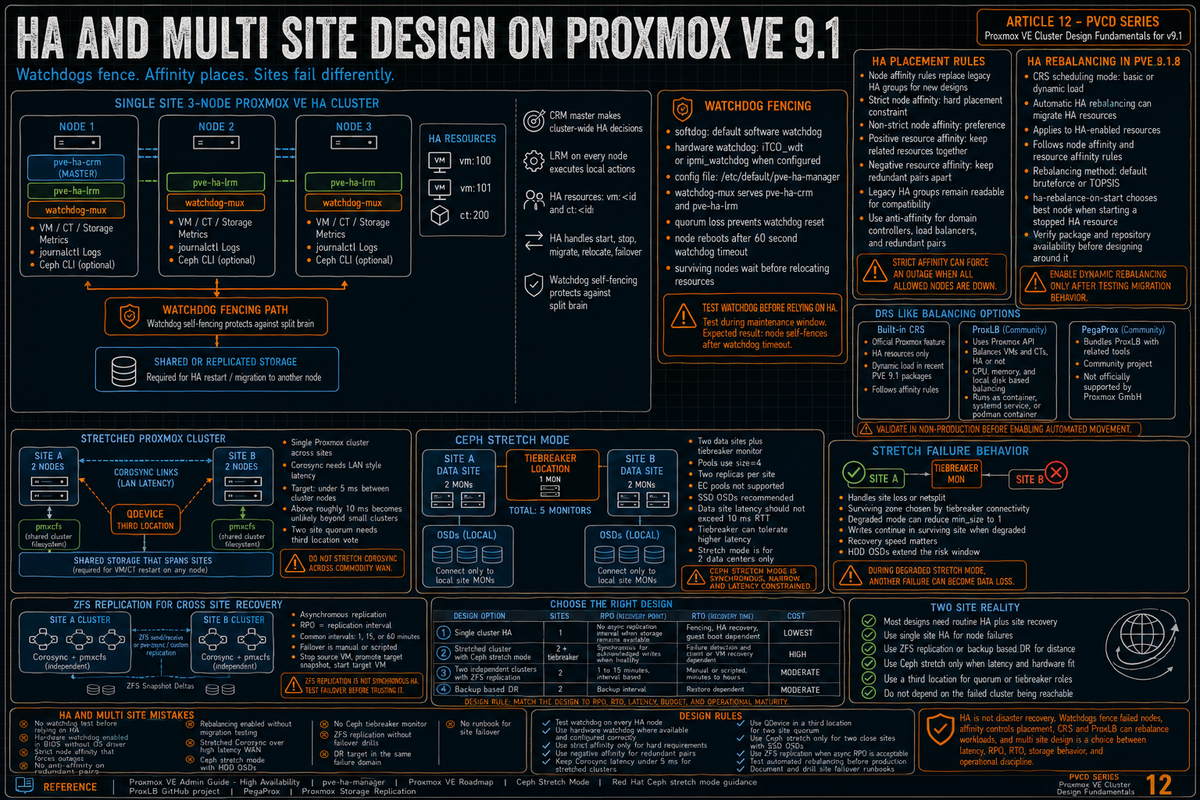
Article 12 and the final article in the Proxmox VE Cluster Design Fundamentals for v9.1 series. This article covers HA and multi site design: the ha-manager architecture, watchdog fencing with softdog and hardware watchdogs, HA node affinity and resource affinity rules (which replaced HA groups in PVE 9), the new HA rebalancing in PVE 9.1.8, ProxLB for DRS like behavior, stretched clusters, Ceph stretch mode for synchronous two site replication, ZFS replication for cross site recovery, and the two site reality that most multi site designs are trying to solve.
The previous eleven articles in the series built the cluster up: networking, storage, security, backup, monitoring, capacity, workloads. This article addresses how to keep all of that running when something fails: a single node, multiple nodes, or an entire site. The mechanics are different at each layer; the trade offs at each layer are the difference between a design that works and a design that fails the test of an actual outage.
Series target version is Proxmox VE 9.1 on Debian 13 Trixie. Every claim below is sourced to the Proxmox VE High Availability chapter of the Administration Guide, the Proxmox VE Roadmap, the Ceph stretch mode documentation, the Red Hat Ceph documentation, the ProxLB GitHub project, and Proxmox staff discussion around the pve-ha-manager 5.2.0 package.
The HA manager: how it actually works
Per the High Availability chapter of the Proxmox Administration Guide, the HA manager is the ha-manager package and runs as two services on each cluster node:
- pve-ha-crm (Cluster Resource Manager). One CRM is the master at any time. It makes the cluster wide decisions: which node should run which service, when to fence, when to fail over.
- pve-ha-lrm (Local Resource Manager). Runs on every node. Executes the local actions the CRM dictates: start a VM, stop a container, hand off to fencing.
Per the HA docs, a resource (also called a service) is identified by a service ID consisting of the resource type and a type specific ID, for example vm:100. The two resource types currently supported are virtual machines and containers. The HA manager handles failover, start, stop, relocate, and migrate operations on these resources.
Watchdog fencing
Per the High Availability chapter: ha-manager regularly resets the watchdog timer to prevent it from elapsing. If, due to a hardware fault or program error, the computer fails to reset the watchdog, the timer will elapse and trigger a reset of the whole server (reboot).
Per the same chapter: when a cluster member determines that it is no longer in the cluster quorum, the LRM waits for a new quorum to form. As long as there is no quorum the node cannot reset the watchdog. This will trigger a reboot after the watchdog times out (this happens after 60 seconds).
So the fencing model: a node that loses quorum is rebooted by its own watchdog 60 seconds after the loss. The other nodes wait out that window before relocating the resources the failed node was running.
softdog (the default)
Per the Proxmox HA wiki: by default fencing is handled by the Linux watchdog (also known as softdog). softdog is a kernel software watchdog that does not depend on any specific hardware. softdog is the fallback when no hardware watchdog is configured. It is usually acceptable, but a correctly configured hardware watchdog is more independent of the host.
Hardware watchdog
Per the HA chapter: hardware watchdog modules can be specified in /etc/default/pve-ha-manager for environments that have one available (iTCO_wdt on Intel, ipmi_watchdog on IPMI capable hardware). The watchdog-mux service reads that configuration and loads the specified module at startup.
Per the same wiki: hardware watchdogs in BIOS may need to be deactivated to avoid double watchdog behavior; the watchdog will still appear to the kernel. Some BIOSes activate the watchdog and expect a driver in the OS to update it; if no driver runs, an unwanted reset can happen.
The watchdog-mux architecture
Per the Proxmox HA documentation: the primary purpose of the watchdog-mux service is to listen on a socket to clients. When the service has active clients, it creates the marker /run/watchdog-mux.active/. The clients are pve-ha-crm and pve-ha-lrm. The clients set a subordinate timer with watchdog-mux, which monitors separately if they were able to check in within the specified intervals. The higher threshold of 60 seconds is what triggers self fencing.
Testing the watchdog
Per the Proxmox HA documentation, the simple test that the watchdog is functional:
Per the Proxmox HA documentation: this should trigger a reboot within 60 seconds. If the device is busy (because the watchdog-mux service has it open), that confirms the watchdog stack is wired up. Do this test before relying on HA in production.
HA node affinity, resource affinity, and legacy groups
Per the Proxmox VE Roadmap and the HA chapter, since Proxmox VE 9.0, HA groups are deprecated and migrated to HA node affinity rules. For new PVE 9.1 designs, use node affinity rules for host placement and resource affinity rules for keep together or keep separated relationships. Treat legacy HA groups as compatibility material, not the design target. Existing HA groups defined on PVE 8 are automatically migrated to equivalent HA node affinity rules once all nodes in the cluster run PVE 9.
Node affinity rules
Node affinity rules express which nodes a resource is allowed to run on. They are the current PVE 9 replacement for the legacy HA group concept.
- Strict node affinity. The resource must run on nodes named in the rule. If none of those nodes are available, the resource is stopped. Use for hard placement requirements (license bound workloads, GPU dependent VMs, workloads with PCI passthrough).
- Non strict node affinity. The resource prefers nodes named in the rule but can run elsewhere when none of those nodes are available. Use for preference without a hard binding.
- failback. Controls whether a resource moves back to its preferred node after a failed preferred node recovers. The legacy nofailback flag from HA groups maps to this new failback option, which is on by default.
- Priority. Higher priority nodes are preferred for placement within the set named in the rule.
Resource affinity rules
Per the HA chapter, resource affinity (positive) and anti affinity (negative) rules are first class concepts in PVE 9.x. The CRM honors them when placing or migrating resources:
- Positive (keep together). Two resources that benefit from running on the same node (an application VM and its tightly coupled cache VM, for example).
- Negative (keep separated). Two resources that should never share a host (HA pair members like clustered domain controllers, redundant load balancers, master and replica databases).
Legacy HA groups
HA group configuration in /etc/pve/ha/groups.cfg and the original restricted, nofailback, and priority flags remain readable for backward compatibility on PVE 9. Treat them as compatibility behavior. Build new clusters and new HA resources around node affinity rules and resource affinity rules.
HA rebalancing in PVE 9.1.8
Recent Proxmox 9.1 packages introduced dynamic HA load scheduling and automatic rebalancing for HA resources. In the Proxmox staff discussion around pve-manager 9.1.8 and pve-ha-manager 5.2.0, dynamic load, automatic rebalancing, affinity rule handling, and documentation still in progress were discussed. Verify repository availability before treating the feature as present on every PVE 9.1 system. The Cluster Resource Scheduling (CRS) settings in Datacenter, Options now expose:
- HA scheduling mode. Basic (default, the previous behavior) or dynamic load.
- Automatic HA resource rebalance. When enabled, the CRM continuously evaluates placement and migrates HA resources to balance the cluster.
- Rebalance method. Default (bruteforce) or TOPSIS (Technique for Order of Preference by Similarity to Ideal Solution; covered in the patch series but not yet fully documented as of this writing).
- ha-rebalance-on-start CRS option. Per the HA chapter, when a stopped HA service is started, the CRS evaluates which node is the best fit using the chosen algorithm. Per the docs: requesting that a stopped service should be started is a good opportunity to check for the best suited node, since moving stopped services is cheaper than moving them when running.
Per the HA chapter: the load balancer makes sure that initiated migrations follow the affinity rules (both node and positive or negative resource affinity rules). An HA resource in a node affinity rule with three nodes can only be placed on those three nodes. HA resources in positive resource affinity rules are moved together and are considered a single HA resource for CPU and memory statistics.
Before dynamic HA rebalancing, HA recovery did not imply automatic redistribution after a failed node returned. VMs that had been restarted elsewhere stayed where they were. Over time this led to uneven resource distribution. With 9.1.8 and dynamic load, the cluster can now redistribute HA resources during normal operation, not just react to failures. This is the largest single step toward the DRS style behavior that operators migrating from VMware ask for.
ProxLB for DRS like behavior
Per the ProxLB GitHub project (github.com/credativ/ProxLB, originally gyptazy), ProxLB is a community maintained load balancer for Proxmox clusters. It uses the Proxmox API to gather node and VM resource metrics, evaluates the spread (called Balanciness in the project), and triggers live migrations when the difference between max and min utilization exceeds the configured threshold.
Per the ProxLB project README: ProxLB collects CPU, memory, and local disk usage from each node, plus per VM and per container statistics. Balancing modes select on CPU, memory, or disk. The output is a balancing matrix that sorts resources by usage and places them on the node with the most free resources of the selected type.
Per the same project: ProxLB can run as a container, as a systemd service on any host with network access to the Proxmox API, or in a podman container. It does not require root on the cluster nodes; an API token with appropriate ACL works.
ProxLB is a community maintained load balancer for Proxmox clusters. It is not officially supported by Proxmox GmbH, but it can complement the built in CRS for clusters that need broader balancing beyond HA enabled resources.
Built in CRS versus ProxLB
The trade off as of PVE 9.1.8:
- Built in CRS dynamic load (PVE 9.1.8+). Officially supported by Proxmox. Limited to HA enabled resources only. Algorithm is bruteforce or TOPSIS. Documentation still maturing.
- ProxLB. Community supported. Operates on all VMs and containers regardless of HA status. More configuration knobs around Balanciness threshold, ignored VMs, scheduling windows.
The pragmatic answer: for HA enabled production workloads, use the built in 9.1.8 dynamic load CRS. For broader cluster wide balancing including non HA workloads, ProxLB complements the built in feature. Either way, validate behavior in a non production environment before enabling in production.
Stretched Proxmox clusters across two sites
A stretched cluster is a single Proxmox cluster whose nodes are distributed across two or more sites, with shared cluster filesystem (pmxcfs) and shared storage (Ceph or external block storage) that spans the sites. The goal: a node or site failure does not require manual site failover; the surviving site continues serving workloads.
Why stretched is hard
Per the Corosync requirements covered in PVCD-01, the cluster filesystem requires reliable low latency communication between all nodes. Per the Proxmox Cluster Manager wiki, the cluster stack requires latencies under 5 ms (LAN performance) between all nodes to operate stably. Across two sites this is achievable with dedicated dark fiber or carefully provisioned MPLS, but it is not achievable on commodity WAN.
Per the Proxmox cluster documentation: the Proxmox VE cluster stack requires a reliable network with latencies under 5 milliseconds (LAN performance) between all nodes to operate stably. Higher latency may work in very small clusters, but above around 10 ms becomes unlikely, especially beyond three nodes. The cluster will work in lab conditions but the consequences of even brief network blips at higher latency include false fencing events, split brain detection failures, and migration timeouts.
Two site Corosync and the third site quorum vote
A two site Proxmox cluster has an unavoidable problem: an even node count splits quorum on a site failure. A 4 node cluster (2 per site) loses quorum if a site fails. Solutions:
- QDevice in a third location. Per the Proxmox docs, corosync-qdevice running on a small host in a third location (a small VM in a public cloud region, a Raspberry Pi at a colo facility, an offsite management server) adds a quorum vote without contributing a full node. The third location only needs network reachability to both sites; it does not need fast storage or compute.
- Asymmetric node counts. 3 nodes at the primary site and 2 at the secondary site gives 5 votes total; loss of either site still has the math work out with QDevice. But losing the primary 3 node site means the 2 node secondary site cannot achieve quorum without QDevice or manual intervention.
The pragmatic answer for two genuine sites: use a QDevice in a third location. Without it, two site clusters have an unavoidable failure mode.
Ceph stretch mode for synchronous replication
Per the Ceph documentation on stretch clusters, Ceph supports an explicit stretch mode designed for two data center deployments with a tiebreaker monitor in a third location. This is the canonical answer for synchronous storage replication across two sites within a single Ceph cluster.
Stretch mode topology
Per the Ceph docs verbatim:
- Two Monitors must be run in each data center, plus a tiebreaker in a third (possibly in the cloud) for a total of five Monitors.
- While in stretch mode, OSDs will connect only to Monitors within the data center in which they are located. OSDs do not connect to the tiebreaker monitor.
- Pools will increase in size from the default 3 to 4, and two replicas will be placed at each site.
- Erasure coded pools cannot be used with stretch mode. Attempts to use erasure coded pools with stretch mode will fail.
- Because stretch mode runs with pools min_size set to 1 when degraded, the Ceph docs recommend enabling stretch mode only when using OSDs on SSDs.
Failure handling
Per the Ceph docs: stretch mode is designed to handle netsplit scenarios between two data centers as well as the loss of one data center. It handles the netsplit scenario by choosing the surviving zone that has the best connection to the tiebreaker Monitor. It handles the loss of one data center by reducing the min_size of all pools to 1, allowing the cluster to continue operating within the surviving data center.
Per the Ceph stretch mode Part 3 blog: when stretch degraded mode kicks in, Ceph no longer requires acknowledgment from offline OSDs in the failed data center to complete writes. The orchestrator updates the OSD map and PG states automatically. Administrators do not need to promote or demote any site manually.
Latency constraints
Per Red Hat Ceph documentation: the latency between the two data sites should not exceed 10 ms RTT, as higher latency can significantly impact Ceph performance in terms of replication, recovery, and related operations. The tiebreaker monitor in the third site can tolerate higher latency compared to the two data sites.
This 10 ms RTT ceiling is the practical constraint that determines whether stretch mode is feasible for a given two site design. Within a metro on dedicated fiber it is usually achievable. Across regions on commodity WAN it usually is not.
Per the Red Hat Ceph documentation verbatim: stretch mode currently only works with 2 data centers. Attempting to enable it with 3 data centers in the CRUSH map produces the error "there are 3 datacenters in the cluster but stretch mode currently only works with 2!" For three site designs where each site needs a replica, use stretch pools (per pool stretch configuration) or accept asynchronous replication instead.
ZFS replication for cross site recovery
Per the Proxmox storage replication wiki (covered in PVCD-05), ZFS replication via pvesr is asynchronous and snapshot based. It replicates a VM's disk image from one node to another on a schedule (commonly every 1, 15, or 60 minutes).
Cross site ZFS replication mechanics
Cross site replication works the same way as within site replication: the source node sends a ZFS snapshot delta to the target node over the network. The replication is asynchronous, so the target site has a small but non zero RPO equal to the replication interval.
For two site designs where:
- The two sites are too far apart for Ceph stretch mode (per Red Hat Ceph documentation, over 10 ms RTT between the data sites).
- Or the design does not warrant a full stretched Ceph cluster.
- Or the workload tolerates a 1 to 15 minute RPO.
ZFS replication is the simpler answer. Each site runs its own Proxmox cluster (own Corosync, own pmxcfs); workloads replicate between sites. Failover is manual or scripted: stop the source VM, promote the target snapshot, start the target VM. The downside is the RPO and the manual or scripted failover step.
Combining replication with backup based DR
Backup based DR is another cross site option: tenant side Proxmox cluster, backup repository in a separate failure domain, and a tested restore or failover runbook. If a Veeam provider supports Proxmox workloads through the current Veeam Plug-in for Proxmox VE, validate the exact backup, restore, replication, and failover features in current Veeam documentation before designing DR around it.
Choosing the right design
| Design | Sites | RPO | RTO | Operational cost |
|---|---|---|---|---|
| Single cluster HA | 1 | no async replication interval when VM disks remain on available shared or replicated storage; application state depends on workload | failure detection, fencing, HA recovery, and guest boot dependent | Lowest |
| Stretched cluster with Ceph stretch mode | 2 plus tiebreaker | no async replication interval for acknowledged writes when stretch mode is healthy | failure detection and client or VM recovery dependent | High (5 monitors, dedicated low latency interconnect, all SSD) |
| Two independent clusters with ZFS replication | 2 | 1 to 15 minutes (interval based) | Manual or scripted, minutes to hours | Moderate |
| Backup based DR with Veeam and Proxmox Backup Server | 2 | backup interval | restore dependent, workload dependent | Moderate |
The right design is the one that matches your RPO and RTO requirements at acceptable cost. Most production deployments end up at single cluster HA for routine availability, plus ZFS replication or backup based DR for cross site recovery. Stretched Ceph fits the narrow band where two sites are close, well connected, and the workloads need synchronous storage replication across both sites.
The HA and multi site design mistakes that cost you later
No watchdog testing before relying on HA
HA was enabled in the UI. Nobody verified the watchdog was actually working. The first real fencing event arrives and the node does not reboot. Per the Proxmox HA documentation, test with echo 1 > /dev/watchdog on every node during install and after every kernel or HA package update.
Hardware watchdog enabled in BIOS without OS driver
The hardware watchdog is on in BIOS and expects a driver in the OS. If the configured driver is missing or wrong, the watchdog resets the host on its own schedule. Per the Proxmox HA documentation, either configure the matching watchdog kernel module in /etc/default/pve-ha-manager or disable the watchdog in BIOS and let softdog handle it.
Strict node affinity that forces outages
A VM is bound by a strict node affinity rule to two nodes. Both nodes go down. The VM cannot run anywhere else because the rule is strict. Use strict node affinity only when the placement constraint is genuinely a hard requirement (licensing, hardware passthrough). For everything else, prefer non strict node affinity so HA can place the VM wherever capacity exists.
No anti affinity on redundant pairs
The two domain controllers, the two load balancers, the database master and replica are all clustered for HA but no anti affinity rule is set. The CRM places both members of the pair on the same node because the node had capacity. A single node failure takes out both. Use negative resource affinity (anti affinity) for every redundant pair.
Enabling rebalancing without watching for migration storms
Validate the migration behavior before enabling continuous rebalancing. Sensitive workloads may need maintenance windows or a more conservative schedule. Validate that the workload tolerates the migrations (database session timeouts, transient I/O drops) and consider scheduling rebalancing windows rather than full continuous rebalancing if the workload is sensitive.
Stretched cluster across too much latency
The two sites are 60 ms apart over a public WAN. Somebody decided to stretch a single Corosync cluster across them. Corosync fires false fencing events on transient WAN blips. Per the Proxmox cluster documentation, the cluster stack expects LAN style latency under 5 ms with higher latency unlikely to work beyond three nodes and around 10 ms. Use two independent clusters when the sites cannot meet that latency requirement.
Ceph stretch mode with HDD OSDs
Per the Ceph docs: stretch mode runs with pools min_size set to 1 when degraded. Recovery time matters because the window where you have only one copy is the window where another failure causes data loss. The Ceph docs recommend stretch mode only with SSD OSDs to keep recovery fast. HDD stretch is a documented mistake per the Ceph docs.
No tiebreaker for stretched Ceph
The two site Ceph design has 4 monitors split 2 and 2 across sites with no tiebreaker. A network partition between sites leaves both sides with 2 of 4 monitors, neither has quorum, and the cluster halts. Per the Ceph stretch mode docs, the canonical configuration is 5 monitors with the 5th as a tiebreaker in a third location.
ZFS replication without testing failover
Replication is configured and running. Nobody has ever actually failed over to the replica. The first time it is needed, the operator discovers the failover requires steps no one documented and procedures no one practiced. Run quarterly failover drills on at least one non production workload to keep the procedure tested and operators current.
DR strategy that depends on the failed cluster being reachable
The cross site backup target is on the same cluster being backed up. The site failure that triggers DR also makes the backup unrecoverable. Backup and replication targets must be in a different failure domain than the primary. PVCD-08 covers backup design; the same principle applies at site scale.
No runbook for site failover
The technology works. The on call engineer at 3 AM does not know which manual steps to run, in which order, with which credentials. Document the failover procedure: prerequisites, step by step actions, validation steps, rollback procedure, who to call if anything goes wrong. Test the runbook. Update it after every drill.
Key Takeaways
- The HA manager runs pve-ha-crm and pve-ha-lrm. Per the HA chapter. The CRM master makes cluster decisions; LRMs on every node execute. Resources are identified as vm:<id> or ct:<id>.
- Watchdog fencing triggers a node reboot 60 seconds after quorum loss. Per the HA chapter verbatim. softdog is the fallback when no hardware watchdog is configured; a correctly configured hardware watchdog in
/etc/default/pve-ha-manageris more independent of the host. - Test watchdog before relying on HA. Per the Proxmox HA documentation:
echo 1 > /dev/watchdogshould trigger a reboot within 60 seconds. Validate on every node. - Node affinity and resource affinity rules. Per the PVE Roadmap and HA chapter, HA groups are deprecated in PVE 9 and migrated to node affinity rules. Strict node affinity for hard placement, non strict for preference. Positive resource affinity for keep together pairs, negative for redundant pairs.
- HA rebalancing is emerging in recent Proxmox 9.1 packages around pve-ha-manager 5.2.0. Dynamic load mode and automatic rebalancing apply to HA resources and follow node and resource affinity rules. Verify package and repository availability before designing around it.
- ProxLB for broader cluster wide balancing. Per the project README. Operates on all VMs and containers, not just HA enabled ones, via Proxmox API. Complements the built in CRS.
- Stretched Proxmox clusters need LAN style latency. Per the Proxmox documentation: under 5 ms between nodes for stable operation; higher latency may work in very small clusters but above around 10 ms becomes unlikely. Two site Corosync needs a QDevice in a third location to avoid even split quorum.
- Ceph stretch mode is the synchronous two site answer. Per the Ceph documentation: 5 monitors (2 per site plus tiebreaker), size=4 with 2 replicas per site, SSD OSDs only, EC pools not supported. Per Red Hat Ceph documentation, latency between the two data sites should not exceed 10 ms RTT.
- ZFS replication for cross site recovery with non zero RPO. Per the storage replication wiki. Asynchronous, snapshot based, simpler operationally than stretched Ceph but with a 1 to 15 minute RPO and manual or scripted failover.
- Backup based DR as the third option. Per PVCD-08. Tenant side Proxmox cluster, backup repository in a separate failure domain, tested restore or failover runbook. If a Veeam provider supports Proxmox workloads through the current Veeam Plug-in for Proxmox VE, validate exact features in current Veeam documentation.
- The runbook is the second half of HA. Test watchdog. Test failover. Document the procedure. Practice it. Update it. The technology works only when the operators know what to do.
Series wrap
This article closes the Proxmox VE Cluster Design Fundamentals for v9.1 series. Twelve articles covering the design choices that determine whether a Proxmox cluster delivers what production needs:
- PVCD-01. Cluster design fundamentals (Corosync, quorum, node counts, cluster join).
- PVCD-02. Cluster networking (Corosync rings, MTU, separation of management, VM, replication, and Ceph networks).
- PVCD-03. Storage architecture overview (ZFS, Ceph, NFS, iSCSI, when each fits).
- PVCD-04. Ceph for Proxmox HCI in depth.
- PVCD-05. Live migration and storage replication.
- PVCD-06. Patching and cluster updates.
- PVCD-07. Security and identity (realms, roles, ACLs, TFA, certificates).
- PVCD-08. Backup with Proxmox Backup Server.
- PVCD-09. Monitoring and observability.
- PVCD-10. Capacity planning and cluster lifecycle.
- PVCD-11. VM and container design choices.
- PVCD-12. HA and multi site design (this article).
Each article is sourced to primary Proxmox documentation, Ceph docs, and project documentation. None of it is theoretical; all of it is what actually ships in production on Proxmox VE 9.1.