Honeypots and Backup Infrastructure: What Object First Built Into Ootbi


Honeypots and Backup Infrastructure: What Object First Built Into Ootbi
Ransomware groups don't walk in, encrypt everything, and leave. They spend time inside your network first. Days, sometimes longer - mapping infrastructure, disabling defences, locating backups. By the time the encryption trigger fires, the attacker has usually already been inside your environment for some time. The visible attack - the encrypted desktops, the ransom note on your screen - is the end of a process that started quietly before anyone noticed.
The question isn't whether you can survive the encryption event. With a solid Veeam and immutable repository setup, most organisations can. The question is whether you can detect the reconnaissance phase before the damage is done.
That's the problem honeypots were designed to solve. And it's what Object First has shipped as a built-in feature in Ootbi v1.7.
What a Honeypot Actually Is
A honeypot is a decoy - a system that looks like a real, valuable target but isn't. It runs real services, sits on the network with a real IP, and does a convincing impression of something an attacker would want to access. The moment someone interacts with it, you know something is wrong, because nothing legitimate should be touching it.
The concept has been around for a long time. Clifford Stoll's 1989 book "The Cuckoo's Egg" documents some of the earliest honeypot techniques, where decoy systems were used to track down a hacker who had compromised government and military networks. Bill Cheswick at AT&T Bell Labs documented a similar "roach motel" approach in January 1991, constructing a contained environment to observe an attacker over several months. The underlying idea has not changed: create something that looks real, wait for someone to touch it, and treat the interaction as the detection event itself.
What has changed is what honeypots are pointed at. Early use was mostly in research - academic institutions and government agencies trying to understand attacker behaviour and emerging threats. Production use - deploying honeypots inside real environments to catch real attacks - became more common as organisations started understanding the value of early detection over perimeter defence alone.
The core value of a honeypot is that any interaction with it is, by definition, suspicious. Unlike a firewall alert or an IDS event - both of which generate enormous volumes of mostly-legitimate noise - a honeypot interaction has no false positives from authorised users. If anything touches it, that's worth investigating. The signal-to-noise ratio is as close to perfect as detection mechanisms get.
Low-Interaction vs High-Interaction - The Practical Difference
Honeypots fall into two main categories. Understanding the difference matters when you're evaluating what a given implementation actually gives you.
| Type | What It Does | Strength | Where It's Used |
|---|---|---|---|
| Low-interaction | Emulates services and open ports. Responds to connection attempts but doesn't run a real OS for the attacker to explore. | Easy to deploy, low risk if compromised, good for early detection | Production environments, most common deployment |
| High-interaction | Runs a real OS and real services. An attacker can log in, explore, and interact as if it were a genuine machine. | Deep intelligence on attacker TTPs, tools, and objectives | Research organisations, government, specialist security teams |
For most production backup environments, low-interaction is the right call. You don't need to let an attacker run commands on a fake server to learn everything you need to know. You need to know that someone is scanning your network for VBR servers. A low-interaction honeypot tells you that the moment it happens.
High-interaction honeypots are genuinely interesting from a research perspective - they're how security teams learn about new malware strains and attacker playbooks - but they come with real operational overhead and risk. If not properly isolated, a compromised high-interaction honeypot becomes a staging point for lateral movement into your actual environment. That's a trade-off that makes sense for a dedicated security research team. It doesn't make sense for a backup admin who just wants to know if someone is probing their Veeam infrastructure.
One of the reasons honeypots have remained a niche tool in most environments is the setup complexity. Conventional open-source honeypot toolkits can require 30 to 50 configuration steps. That's not an exaggeration - Object First cites it on their own blog. Most backup admins never get around to deploying one, not because they don't understand the value, but because the overhead doesn't fit the job.
Why Backup Infrastructure Specifically Needs This
Backup servers are a high-value target in any ransomware playbook. The logic is straightforward: if an attacker can destroy or encrypt your backups before triggering the main encryption event, your recovery options collapse. No backups means no leverage - you either pay the ransom or rebuild from scratch.
Veeam environments are a known target. Attackers go looking for VBR servers specifically. They scan for the ports VBR uses, look for SQL Server instances running on the same machine, probe for RDP, and try to enumerate shares. This is not theoretical - the 2024 Veeam Ransomware Trends Report found that 96% of ransomware attacks targeted backup repositories, and 76% successfully impacted them at least partially.
Here's the timing problem: by the time your backups are being actively attacked, the attacker is already well inside your environment. That reconnaissance phase - the scanning, the enumeration, the initial foothold - is where a honeypot does its work. If you have a decoy VBR server sitting on the network, it gets probed before the real one does. And the moment it's probed, you know someone is looking.
That's the detection window. Not after the attack. During the approach.
What Object First Built Into Ootbi
Object First shipped their Honeypot feature as part of Ootbi v1.7, announced in October 2025. It's available at no additional cost to existing Ootbi customers running that version.
The feature deploys a decoy that simulates a VBR production server. It runs on a securely segmented part of the Ootbi appliance itself - you don't need a separate machine, a separate VM, or a separate IP pool from another device. The decoy sits on its own isolated network segment within the appliance, exposing the ports and services that attackers specifically look for when targeting Veeam environments.
The ports the honeypot makes available include SSH, RDP, SQL Server, and VMware service ports - the exact profile that matches what a VBR server looks like from the outside. If someone on your network is scanning for Veeam infrastructure, they'll find this first. When they do, you find out immediately.
🎯 What It Simulates
A VBR production server - with SSH, RDP, SQL Server, and VMware ports open. The exact profile an attacker would scan for when targeting backup infrastructure.
🌐 Where It Runs
On a securely segmented part of the Ootbi appliance itself. No separate VM, no extra hardware, no additional IP management beyond choosing DHCP or static.
Ootbi Honeypot ships as a no-cost feature in version 1.7. If you're already running an Ootbi appliance, you update to 1.7 and turn it on. There's no separate licence, no additional subscription, and no extra hardware required. Object First has confirmed this in both their product announcement and their official press release from October 8, 2025.
Enabling the Honeypot - The Five Steps
This is probably the most important thing to understand about this feature relative to conventional honeypot toolkits: it takes five steps from a standing start to a functioning decoy.
Open the Object First Cluster Manager web interface for your Ootbi appliance. You need to be on version 1.7 (build 1.7.79.12311) before this option is available. If you're updating from a version earlier than 1.5.55.10660, apply the intermediate patch to 1.5.54.10596 first, then update to 1.7.
In the Cluster Manager, go to Settings, then Security, then select Honeypot. The Honeypot configuration panel appears.
Tick the Enable Honeypot checkbox to activate the feature.
Select either DHCP to have an IP assigned automatically, or Static to set the IP and netmask manually. If you're using static, enter the values now. A static IP is worth considering if you want the honeypot to appear consistently on the network and you want to ensure it doesn't land on an address already in use.
Click the Apply Changes button. The honeypot is now active and listening. From this point, any interaction with the decoy will generate alerts.
Before you enable the honeypot, make sure your SMTP or Syslog notification settings are configured in the Cluster Manager. An alert that has nowhere to go doesn't help anyone. If you use a SIEM - Splunk, ELK, or similar - the Syslog output is the right channel. If you're a smaller shop without a SIEM, email via SMTP works fine and will get the alert to you immediately.
What Gets Detected and Where Alerts Go
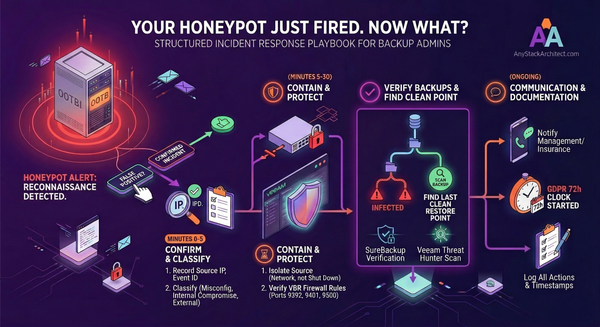
Once the honeypot is active, it monitors for the following event types. Each alert includes the Event ID, source IP address, protocol targeted, and a summary of the activity - enough to start an investigation without needing to dig through raw logs.
- ALERT Multiple authorisation attempts - repeated failed logins against the decoy
- ALERT Port scans - systematic enumeration of the decoy's open services
- ALERT Probing behaviour - general reconnaissance activity against the decoy
- ALERT Requests on sensitive protocols - interaction with SSH, RDP, SQL or VMware ports
- ALERT Service startup failure - abnormal service behaviour on the decoy
- ALERT Unexpected service stop - a running service stops without an authorised action
- ALERT Service failure - service crash or error condition
- ALERT Suspicious Veeam Console access - an attempt to connect to the fake VBR instance
- ALERT Cumulative suspicious activity - a pattern of lower-level events that collectively indicate probing
- INFO Service lifecycle events - informational only, service start/stop under normal conditions
Event IDs are assigned to each event type. For example, Event ID 7041 covers SSH attempts and Event ID 7030 covers port scan activity. These IDs are useful for SIEM correlation rules if you want to map honeypot events alongside other security alerts in your environment.
Alert Delivery
Alerts are visible directly in the Ootbi Cluster Manager dashboard and can be forwarded through Object First's standard notification system, which supports two channels: Email via SMTP (specify your email server in the notification settings) and Syslog for integration with platforms like Splunk or ELK.
For smaller environments without a SIEM, the SMTP option works well - you get a structured alert with source IP and event details sent directly to your inbox. For environments where a SIEM is already in place, Syslog output means honeypot events can be correlated with your other detection sources automatically.
One thing worth noting about how this works in practice: the honeypot doesn't just catch external attackers who have made it onto your network. It also catches internal scanning - junior staff running unauthorised network discovery tools, a misconfigured monitoring agent probing the wrong subnet, or a contractor's device doing something it shouldn't. Those events are less dramatic than a targeted attack, but they are equally worth knowing about.
What It Is Not
This is a low-interaction production honeypot. It will tell you that someone is scanning for VBR infrastructure on your network. It will not give you deep forensic insight into attacker tooling, techniques, or lateral movement paths. It is not an EDR, not a SIEM, not a replacement for any part of your existing security stack. Object First are clear about this themselves.
A honeypot also only catches what touches it. If an attacker moves carefully through your environment, targeting machines they've already fingerprinted as real, they may avoid the decoy entirely. Sophisticated, targeted attacks against known infrastructure may not trigger the honeypot at all. That's a real limitation - and it's why the honeypot complements your security posture rather than substituting for any part of it.
What it does do well is exactly what backup admins need: a low-overhead, zero-false-positive early warning mechanism, purpose-built for the threat profile that Veeam environments face. It runs inside your existing Ootbi appliance, it takes five steps to enable, it costs nothing extra, and the first time someone on your network scans for a VBR server, you'll know about it before they find the real one.
The Practical Takeaway
- Honeypots detect reconnaissance - the activity that happens days before a ransomware attack becomes visible
- Low-interaction is the right fit for production backup environments - simple to deploy, low risk, high signal-to-noise
- Object First Ootbi v1.7 ships a built-in VBR decoy that takes five steps to enable, runs isolated on the appliance, and costs nothing extra
- It simulates SSH, RDP, SQL Server, and VMware ports - the exact profile attackers scan for when targeting Veeam infrastructure
- Alerts go to the Cluster Manager, SMTP, or Syslog - with source IP, protocol, and Event ID included
- It is not an EDR or a SIEM replacement - it's an early warning layer that adds depth without adding complexity
If you're running Ootbi already, there is no good reason not to have this on. It's already in your appliance. Update to v1.7, navigate to Settings > Security > Honeypot, and turn it on. You will find out about reconnaissance activity in your environment that you currently have no visibility into.
The full Object First Honeypot feature announcement is on their blog, with screenshots of the Cluster Manager UI and the alert dashboard: objectfirst.com/blog/introducing-object-firsts-honeypot-feature