I Built a Practical Home MCP Server for ChatGPT and Claude

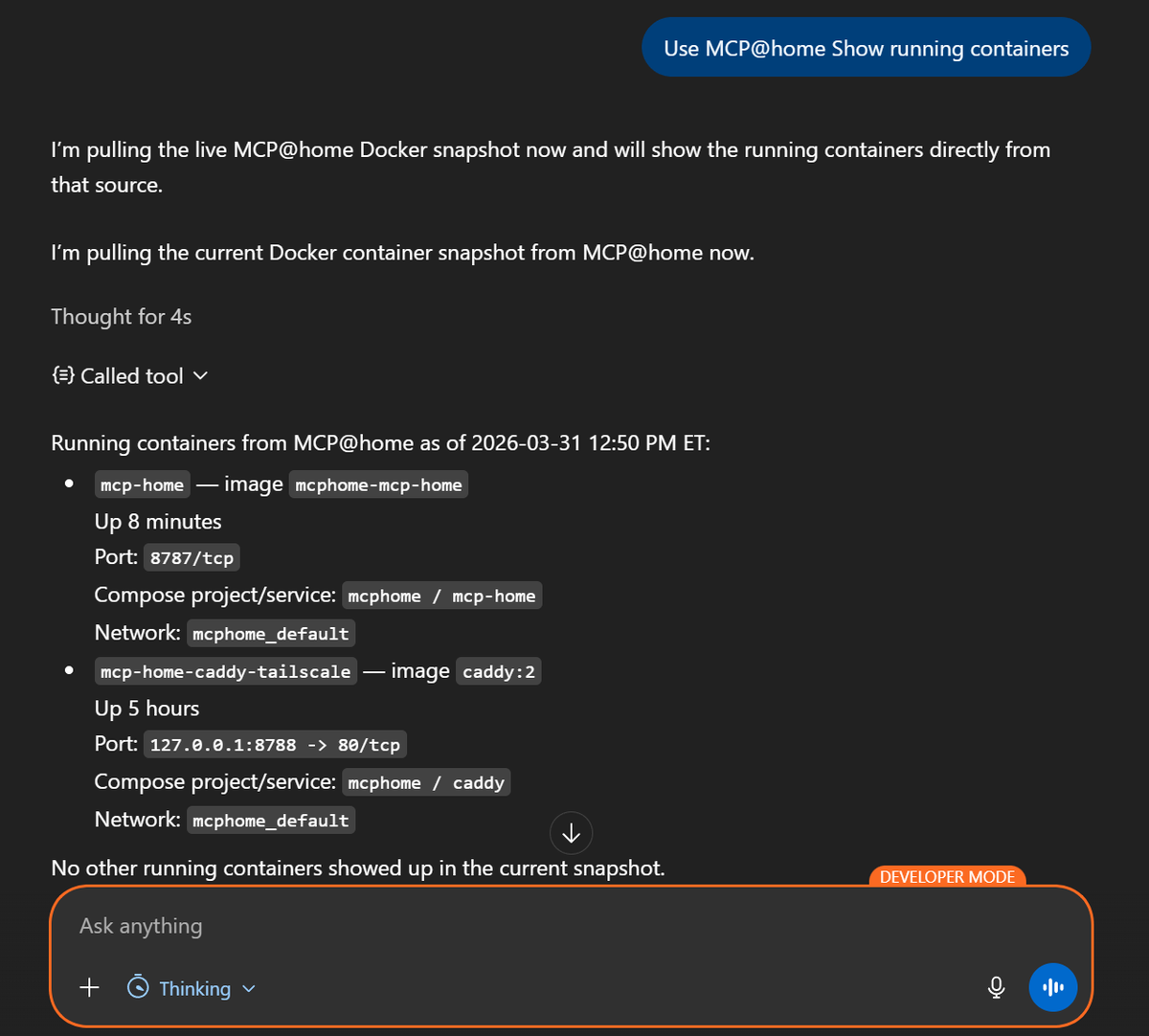
I wanted ChatGPT and Claude to interact with my home environment through MCP, but I did not want two different tool systems, a pile of dangerous shell access, or an overengineered science project that would not survive a month of real use.
That was the real constraint. Not a demo contest. One clean tool layer that could answer useful questions about my own environment, stay narrow enough to trust, and survive actual repeated use without turning into a maintenance problem.
That pushed the design in a specific direction. One TypeScript MCP server. One shared tool registry. A local path for stdio-based clients. A remote Streamable HTTP path for clients that need a reachable endpoint. Read-only data first. And just enough operational discipline to keep the whole thing from becoming a homelab horror story. The repo is public at github.com/eblackrps/mcp-home.
Why I Built This
The starting point was simple. I wanted LLMs to query useful home data without me building a different integration for every model ecosystem. I already had a Windows 11 machine doing real work. Docker Desktop was there. Plex was there. Corsair iCUE telemetry was there. Notes and local status data were there. The missing piece was a sane way to expose some of that context without giving an AI assistant a loaded footgun.
I also wanted both local and remote paths. Local matters because it is the fastest way to validate the server and the least complicated way to wire up a client that can spawn a subprocess directly. Remote matters because some integrations want a public HTTPS endpoint, and that immediately changes the design conversation from "can I make a tool call" to "what exactly am I comfortable exposing, how is it authenticated, and what happens when it reconnects after a restart."
Most of all, I wanted this to be useful. Not just impressive. That meant real Plex lookup, real Docker visibility, real note access, and a design that made it obvious what the server could and could not do.
What MCP Actually Gave Me
MCP solved the right problem. Not every problem, but the right one.
In plain terms, MCP let me define tools once and advertise them in a standard way. Clients discover those tools, inspect their schemas, and call them without me building a one-off adapter for each model vendor. The value is not magic. The value is shared tool definitions, shared input schemas, shared logic, and one place to evolve the server over time.
That matters more than it sounds. The client integration path varies a lot. Local stdio and remote HTTP do not behave like the same thing in practice. But the tool registry should not care. The actual logic for "get Docker status" or "search Plex for Sopranos" should exist once, not once per ecosystem.
The Architecture I Settled On
The finished design looks straightforward on paper, but it got there through a lot of small corrections.
The big architectural choice was this: the server reads curated snapshots, not live system state at request time. That ended up being the difference between a cool demo and something I would actually keep running.
The Windows host was the natural center because that is where Docker Desktop, Plex, and the rest of the local context already lived. The MCP server itself was written in TypeScript, with separate entry points for stdio and HTTP, but backed by the same registry and tool implementations. The refresh scripts ran on the host side and generated JSON snapshots. The server consumed those snapshots as read-only inputs.
That sounds less glamorous than live shell access. Good. That was the point.
Why I Did Not Build Separate GPT and Claude Tool Servers
Because that would have been a maintenance mess almost immediately.
If the server logic had split into a "GPT version" and a "Claude version," every new tool, every schema tweak, every bug fix, and every security decision would have started duplicating. That is how you end up with two systems that drift apart while pretending they are the same.
MCP already solves the standardization problem well enough that the duplication made no sense. The integration path differs. The transport differs. The auth story differs. But the tool logic should not differ unless the underlying capability differs. A shared registry with multiple transports is the right architecture because it keeps the surface area honest.
The Implementation Process
Phase 1: Basic MCP Server Scaffold
I started where I usually start: the smallest version that proves the shape is correct. TypeScript was the obvious choice because it is comfortable for schema-driven server work and keeps transport and tool definitions easy to organize.
The first registry was intentionally boring: ping, get_time, and notes-related tools. Enough to prove tool discovery, input handling, output formatting, and the basic server lifecycle without dragging Docker and Plex into the room too early.
registerTool("ping", {
  title: "Ping",
  description: "Basic reachability test"
}, async () => ({
  content: [{ type: "text", text: "pong" }]
}));
That first pass was not about capability. It was about establishing a stable skeleton.
Phase 2: Local Claude Path via stdio
The local stdio path was the easiest first validation route because it removes a lot of deployment complexity. No reverse proxy. No public hostname. No TLS concerns. No auth flow. The client spawns the server process, talks over stdin and stdout, and that is enough to prove the registry and tool wiring are real. The MCP spec still defines stdio as one of the two standard transports, and it remains the simplest local integration shape.
This was useful for another reason: it kept me from confusing "the server runs" with "the remote integration works." Those are very different milestones. Local stdio gave me the first honest proof that the tool surface itself was sound.
Phase 3: Remote HTTP Path
Once the core registry was stable, I added the remote HTTP transport. Current MCP guidance centers on Streamable HTTP for remote servers. That is the transport shape needed when a client cannot just spawn a local process.
This mattered because local success is not enough if the eventual goal includes ChatGPT or other app-style integrations. A remote MCP server has to be reachable the right way, described the right way, and verified through the actual endpoint path clients will use.
// same registry, different transport entrypoint
const server = buildServer(sharedRegistry);
await attachHttpTransport(server, { endpoint: "/mcp" });
The important part was not the code. The important part was resisting the urge to fork the registry for remote mode. Same tools. Same schemas. Different transport.
Phase 4: Safe File-Backed Notes and Homelab Tools
From there I expanded into real tools, but carefully. Read-only first. Narrow surface area first. No unrestricted shell exposure. No broad "run whatever" helper pretending to be a productivity feature.
Notes were a good early case because they are useful, local, and easy to bound. Then I started adding homelab-oriented visibility tools that answered concrete questions instead of exposing raw system internals just because I technically could.
I did not want an AI assistant to have a vague ability to "interact with my machine." I wanted it to answer specific classes of questions using inputs I understood.
Phase 5: Windows Host Refresh Model
This was one of the most important turns in the whole build.
The Docker container could not directly see the Windows services, iCUE status, or local Plex details the way I needed, so I stopped fighting that boundary and built around it. The host became the collector. PowerShell scripts ran on the Windows 11 box, gathered the state I cared about, and wrote JSON snapshots into a local directory. The MCP server read those files.
npm run refresh:host

# outputs read-only snapshots:
#   data/local/windows-host-status.json
#   data/local/plex-library-index.json
#   data/local/plex-activity.json
I like this model because it is honest. The server is not pretending to be an omniscient control plane. It is reading generated state. That reduces blast radius, simplifies debugging, and makes stale data easier to reason about. The repo also includes a Windows Task Scheduler helper so the refresh can run on a repeating interval without manual intervention.
Phase 6: Plex Expansion
Plex turned into one of the most satisfying parts of the build because it crossed the line from "tool demo" to "this is actually pleasant to use."
I started with basic status and library export (the repo uses a Python script to export a searchable index from the local Plex SQLite database), then expanded into natural-language finder behavior. The key was not making users memorize the exact command for every media lookup. A tool like find_plex sits in front of more specialized logic and lets you ask for "Sopranos," "Sopranos season 2," or a specific episode title without playing schema trivia.
Once that shape was in place, the Plex side became much more useful: show summaries, season summaries, recent additions, continue watching, on deck, unwatched content, duplicates, and search paths that felt natural instead of brittle.
Phase 7: Docker Expansion
Docker was the other major capability area. The goal was not "expose every raw Docker command the model could maybe call." The goal was practical visibility.
That meant container lists, project summaries, issue detection, resource usage, compose health, recent activity, networks, volumes, and cleanup candidates. The host refresh step already captured enough Docker data to support those views from snapshots.
This made the server useful in a day-to-day way. I could ask the system for the current health picture instead of spelunking through dashboards and terminals for the tenth time that week.
Phase 8: Remote Auth and ChatGPT Integration
This is where the build stopped being a tidy local server and became a real integration project.
Private testing over Tailscale Serve was useful because it let me validate reachability inside the tailnet without publishing the endpoint publicly. But Serve is tailnet-only, which means external services still cannot reach it. If the client that needs to connect is outside your tailnet, Serve is not enough. Funnel was the step that made the endpoint publicly reachable.
On the ChatGPT side, OpenAI currently describes custom remote MCP integrations as "apps" (renamed from "connectors" in December 2025) and documents connecting a public HTTPS /mcp endpoint through ChatGPT Developer mode. They recommend OAuth and dynamic client registration for protected remote MCP servers.
That made the auth choice clear. If I wanted a public path that was not just hanging open, OAuth was the right direction.
MCP_AUTH_MODE=oauth
MCP_SERVER_URL=https://your-public-hostname/mcp
MCP_OAUTH_STATE_PATH=./state/oauth-state.json
That still left proxy and metadata details to get right. It was not enough to expose only /mcp. The auth-related routes also had to be reachable through the reverse proxy so the linking flow could complete cleanly.
Phase 9: Production Polish
I am careful with the phrase "production ready" in homelab projects because that can mean anything from "it survived one weekend" to "it has real operational discipline." For this build, production-worthy for home use meant boring but important things: reconnect stability, health checks, persistent OAuth client state, smoke tests, audit logging, manifest cleanup, and verification that matched the real deployment path instead of a fantasy local path.
The Real Problems and Debugging Lessons
This part was not glamorous, but it was the real work.
Local and remote MCP are different shapes, not just different URLs. Local stdio feels direct. Remote HTTP has more moving parts and more places to be "technically running" while still being functionally broken. A server process can be alive, a container can be healthy, and a reverse proxy can be up, but the client can still fail because the public path, auth metadata, or expected endpoint shape is wrong.
ChatGPT integration is not the same thing as local stdio success. OpenAI's current setup flow expects a publicly reachable HTTPS endpoint and supports metadata refresh from ChatGPT settings. Remote testing and remote verification have to be treated as first-class work, not a final checkbox.
Tailscale Serve versus Funnel really matters. Serve is great for private validation from another device on the tailnet. It is not a public publishing mechanism. Funnel is the piece that changes that. This is exactly the kind of mistake that wastes an afternoon.
OAuth client registration persistence is not optional. If client registrations and tokens disappear on rebuild or restart, reconnect behavior gets flaky fast. Persisting registrations and tokens under state/ so reconnects keep working is one of those details that feels minor until it burns you.
Tool manifests can go stale silently. Sometimes the code changes are right, the server is redeployed, and the client still looks like it has yesterday's tool list. OpenAI's ChatGPT connection docs explicitly mention refreshing metadata in settings after changing tools or descriptions. I now treat manifest refresh as part of deployment verification, not an optional cleanup step.
Smoke tests can lie. The smoke script auto-detects its target by trying MCP_HEALTH_URL, then the local app port, then the local Caddy port, then the origin derived from MCP_SERVER_URL. If the configuration chain is slightly off, you think the system is validated when you have only validated a nearby approximation of it. Not exciting. Still burned time.
Reconnect bugs matter more than happy-path demos. A demo only needs one clean run. A useful home service needs to survive client reconnects, container restarts, stale metadata, and the boring edge cases that happen after you stop looking at it closely.
API billing and ChatGPT subscriptions are separate. A practical detail, but practical details define whether a build feels clean or confusing.
Security Decisions and Why They Mattered
The entire security posture started with one principle: read-only first.
That sounds obvious until you see all the tempting shortcuts. It is very easy to expose raw shell access, broad admin operations, or mixed public and private capabilities in one convenient registry. It is also how you end up with a server that technically works and should absolutely not be reachable from anywhere outside your machine.
Using snapshots instead of direct runtime control paths helped a lot. The server reads generated JSON state. It does not get arbitrary shell execution as a side effect of "being helpful." Dangerous admin actions are not mixed into the same public toolset. OAuth protects the remote path. JSONL audit logging gives you a trail of what was invoked, whether it succeeded, and how long it took.
I also kept generated state, OAuth data, local logs, and snapshots out of version control. Not a clever trick. Just basic hygiene. The gap between "works" and "safe enough to expose" is mostly made of decisions like that.
What the Finished System Can Actually Do
This is the part that made the project worth keeping.
I can ask for the current Docker health picture and get something more useful than a raw container dump. I can inspect Docker projects, look for issue patterns, check resource usage, and spot cleanup candidates. I can search Plex naturally by title, ask for "Sopranos" without remembering exact tool names, browse show or season summaries, check continue-watching and on-deck state, and look at recent additions. I can read local notes, inspect host status, and get a higher-level homelab summary instead of opening three different interfaces.
That is the difference between a protocol experiment and a system I actually use. It does not try to do everything. It answers a useful class of questions cleanly.
What I Would Improve Next
The next obvious step is splitting public-safe tools from more private or admin-level capabilities. Right now the read-only model keeps the risk profile sane, but there is a strong case for a second, more tightly scoped admin-only MCP server or at least a more explicit policy split by tool group.
I would also like better host dashboards, richer Plex metadata, stronger per-tool auth policy, and more generalized natural-language intent tools that sit in front of the narrower specialist tools without turning into vague catch-all handlers.
Home Assistant and more homelab data sources are both tempting future expansions. But I would only add them if the auth and scope story stays clean. I am much less interested in making the tool list bigger than I am in making the boundaries better.
Closing
MCP was worth it because it let me build one tool server instead of multiple incompatible ones. That alone saved the project from turning into duplicated glue code.
But the real work was never just the protocol. The real work was transport, reachability, auth, refresh strategy, debugging, and operational cleanup. It was figuring out how to make the system useful without making it reckless.
The best part of the finished build is not that it demos well. It is that I can ask practical questions about my home environment, get useful answers, and still understand why the system is shaped the way it is.
Key Takeaways
- One TypeScript MCP server with a shared tool registry eliminates the duplication of building separate tool stacks for different model ecosystems.
- Local stdio and remote Streamable HTTP are the two standard MCP transports. Both can share the same registry and tool logic without forking the server.
- Windows host-side PowerShell refresh scripts that generate read-only JSON snapshots are a safer and more debuggable alternative to giving the server live shell access.
- Caddy, Tailscale Funnel, and OAuth form the remote exposure stack. Tailscale Serve alone is not enough for clients outside your tailnet.
- Operational polish is what separates a weekend demo from a system you keep running: health checks, audit logs, persistent OAuth state, smoke tests, and manifest refresh as part of every deployment.