

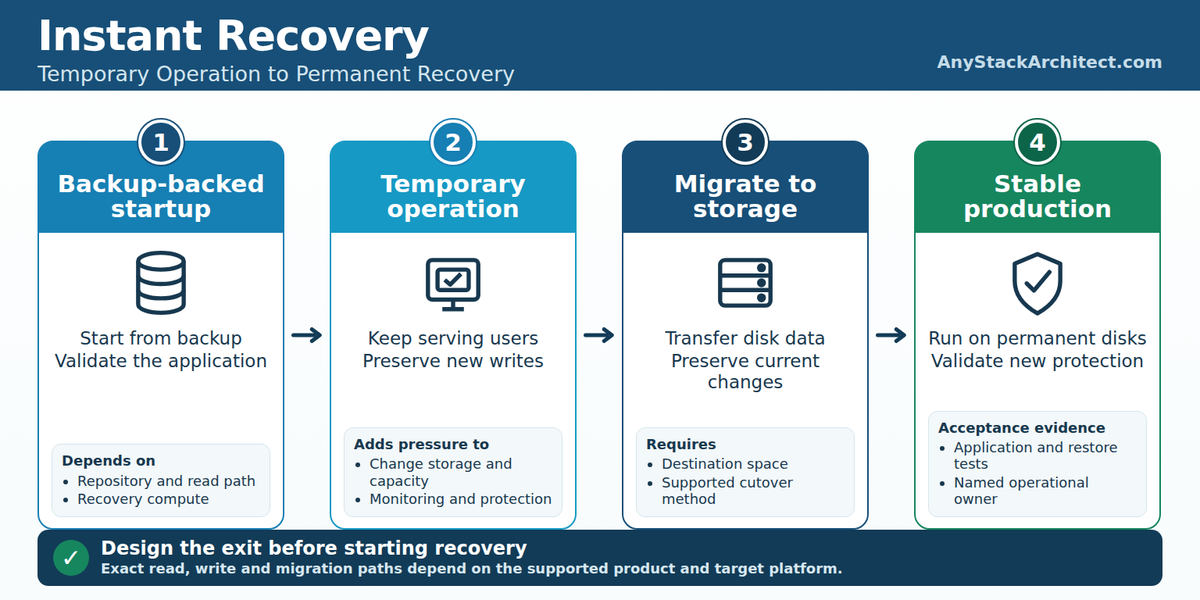
A recovered VM can be serving users while its disks still depend on a backup repository, a mount service, and a growing set of changes outside the original restore point. The application is available, but the infrastructure supporting it may differ from the infrastructure that normally runs production. If that arrangement lasts through the next business day, somebody has to operate it as production.
Instant Recovery is valuable because it lets useful work begin before the complete disk restore finishes. It also moves part of the recovery work into the period when users are already creating new data. Capacity, performance, migration, protection, and failure handling now have to work without casually discarding that data.
For an AHV recovery service, I would make the exit from Instant Recovery part of the initial design. The target cluster needs enough resources to start the applications, sustain their workload, finish the migration, and survive the agreed failure scenario. Those are separate acceptance tests, even when one recovery console presents them together.
The VM is running. Recovery isn't finished.
A full restore places the selected backup data onto destination storage before the VM starts. Instant Recovery starts the VM while at least some disk data is still supplied through the backup infrastructure. Restoring into an alternate environment describes where the workload lands; either approach can be used where the product supports it. Migration completes the storage transition for the running recovered workload.
Record application availability and completion of that transition separately. The business may accept a service restored within its RTO while storage migration continues, provided performance, data protection, and the temporary operating risk meet the agreement. An early login screen alone does not establish any of those conditions. An RTO improvement measured for one application and repository does not establish a percentage improvement for another.
The product baseline here is Veeam Backup & Replication 13.1.2.57, released October 27, 2026, according to Veeam's release information. For AHV, the associated component is Veeam Plug-in for Nutanix AHV 10.1, build 13.10.1.4, which Veeam's plug-in build history identifies as included with 13.1.2. The mechanisms below are documentation verified; the twelve-VM scenario is illustrative and contains no measured recovery results.
Start with the exact supported recovery path
Veeam documents Instant Recovery to Nutanix AHV for native AHV image backups and specified backups from other platforms. An eligible backup source does not make every target configuration supported. The current AHV platform requirements require Nutanix-certified hardware or NC2 running AOS version 6.8.1.6 or later and exclude Community Edition. The feature overview's older AOS 6.0 prerequisite is insufficient for selecting a current deployment.
Inventory every data disk before admitting a workload. Veeam's AHV recovery limitations exclude attached volume-group disks from Instant Recovery. A database or file server that boots with missing data disks has not passed recovery acceptance.
The table describes specific recovery mechanisms in the checked VBR release. It is not an exhaustive source compatibility list.
| Recovery target | Temporary operation | Completion mechanism |
|---|---|---|
| Nutanix AHV, plug-in 10.1 | Backup image through a mount server; changed writes held on the AHV cluster | Migrate VM disk data to the selected production storage |
| VMware vSphere | vPower NFS presents backup data; redo logs default to the NFS server, with optional datastore redirection | Supported Storage vMotion path or Veeam Quick Migration |
| Microsoft Hyper-V | Target VM, protective snapshot, Veeam driver and Data Movers supply data from backup | Additional Data Movers populate target disks; local reads replace redirected reads |
| Proxmox VE | Separately documented mount and redo-log workflow with experimental support | Its own migration workflow, subject to the Proxmox prerequisites |
The vSphere mechanism and Hyper-V mechanism explain why the same feature name does not establish the same storage design. The current Instant Recovery to Proxmox VE guide explicitly labels its target workflow experimental. I would not offer it under the same support commitment without qualifying that status.
Service providers have another restriction. The Cloud Connect provider-side recovery procedure supports vSphere and Hyper-V targets, and excludes other target platforms for that operation. An AHV page listing Cloud Connect as an eligible backup source does not extend the provider-side target list. The twelve-VM example uses ordinary VBR-controlled recovery from an accessible disk repository into a registered AHV cluster.
Licensing belongs in this qualification. Veeam's AHV licensing model counts protected VMs using VUL instances; provider rental licensing has its own workload and reporting rules. Verify the applicable Veeam service-provider rights and the target platform's licenses before promising hosted recovery or continued protection.
What happens between backup storage and a running workload
For the documented AHV workflow, the backup image remains read-only. The mount server supplies the image from the compressed and deduplicated backup, while new virtual disk changes are recorded in auxiliary redo logs on the cluster. Migration merges those changes into the recovered workload; reverting recovery discards them. The original restore point therefore does not contain the transactions committed since the VM started.
The AHV-specific port and component table identifies CVM connections to a mount server running vPower NFS. That establishes the AHV read dependency independently of VMware documentation. A useful conceptual path is repository, mount server, AHV cluster/CVM, recovered VM. The changed-write path terminates in cluster storage, rather than in a presumed VMware-style write cache on the mount host.
The AHV recovery prerequisites require a dedicated mount server with vPower NFS running and at least 512 MB of additional RAM for each concurrently recovered VM disk. Count disks, not just VMs. This is a memory prerequisite, not proof of acceptable latency or a supported number of simultaneous applications.
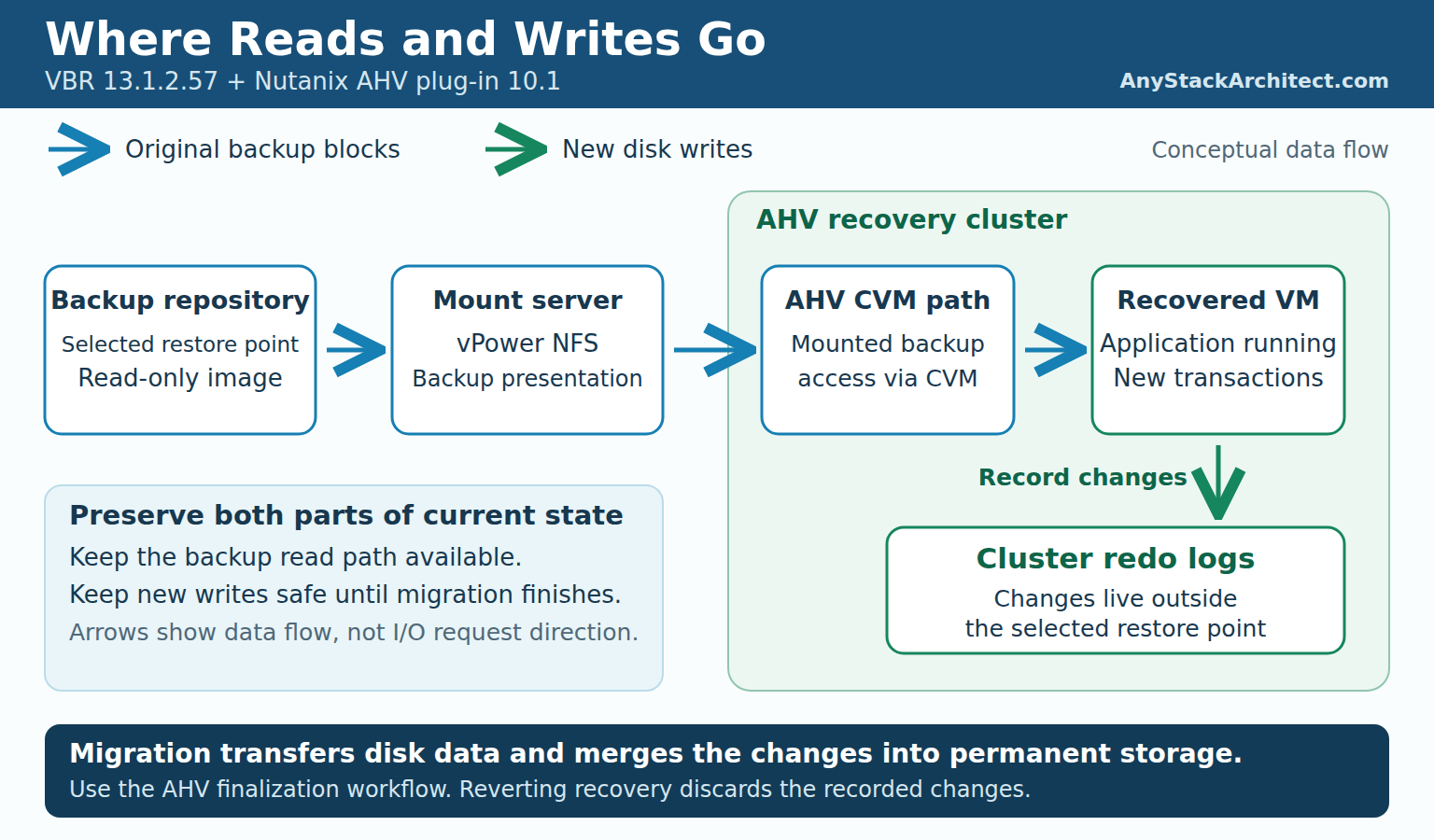
VMware uses a different placement model. Its vPower NFS service presents emulated VMDKs to ESXi while the backed-up data remains in the repository. Redirecting VMware changes to a datastore changes both write placement and the available migration choices. Neither that option nor its exact directory layout should be used to describe AHV.
For Hyper-V, Veeam describes a target VM with empty disks, a protective snapshot, a driver, and a pair of Data Movers maintaining the backup mount. Microsoft's Using checkpoints guide explains the underlying differencing-disk and merge behavior. Use that description to assess Hyper-V checkpoint storage; assess AHV redo logs against the AHV workflow.
Where the writes go determines what you can lose
Once users resume work, the temporary changes can contain the only current copy of orders, documents, database transactions, and configuration updates. Losing the backup read path can interrupt access to blocks still needed from backup. Losing the resources holding new writes can threaten data that was never present in the original restore point. Restarting from the old backup would recover an older state.
Do not treat cancellation as a harmless session reset. Veeam's AHV finalization procedure distinguishes migrating data from removing the recovered VM with Stop publishing. It also warns that stopping a restore to the original destination removes both the original and recovered VMs. The vSphere finalization procedure explicitly says that changes are lost when publishing stops. A failure runbook needs to preserve the current state before an operator chooses a destructive action.
For AHV, the cited procedures do not establish automatic reconnection after every mount-server failure, lossless restart after every interrupted session, or a universal migration outage guarantee. I would test those specific failures on disposable workloads using the intended build and involve vendor support where the supported recovery action is unclear. A protective-snapshot statement from the Hyper-V guide does not settle them.
Temporary capacity needs a time budget. Start with measured allocated change growth over the intended operating period, then add room for migration overlap, retries, and an operational reserve. Guest write throughput alone is a poor estimate: repeated overwrites, allocation behavior, snapshots, and merges can make storage growth differ from bytes issued by the application. Monitor actual consumption and its trend, and define the action to take while there is still room to complete it.
The duration includes the queue before migration starts and the time migration takes under load. If the target cannot accept the VM until tomorrow, tonight's writes still need somewhere to live. I would set a maximum planned temporary operating period based on tested headroom and escalation time, rather than invent a vendor-wide limit in hours.
A successful boot is a small performance test
The repository that comfortably accepts backup streams may face a different workload when recovered applications request small, scattered reads. Boot activity is only the beginning. Database queries, index maintenance, antivirus scans, reporting jobs, and user logins can change the working set and the balance of reads and writes after the initial recovery looks healthy.
I would measure guest storage latency and application response time alongside repository IOPS, queueing, mount-server CPU and memory, network latency and throughput, and the cluster's changed-write storage. A fast average can hide long tail latency that causes application timeouts. Run cold-cache and warm-cache trials where practical, and keep the working set large enough to reveal dependence on the repository. A cache that helps the test can be useful in production, but its benefit needs to survive the workload and concurrency being promised.
Instant Recovery is not inherently too slow for useful production work. Fast backup storage, an appropriate mount path, sufficient compute, and an application with modest I/O demands can perform acceptably. The requirement is to show that result under representative load, rather than infer it from the feature name or the repository's sequential throughput specification.
Concurrency multiplies several demands at once. Recovering more VMs increases boot activity and live reads; their applications generate new writes; migration consumes additional reads and destination writes. Existing backup jobs, retention processing, synthetic operations, and another tenant's recovery can contend for the same components. Test that overlap and decide which work receives priority during an incident.
Compute deserves the same treatment. Reserve enough CPU and memory for the recovered guests and the recovery infrastructure, including CVMs and mount services in the chosen design. Test the agreed degraded state, such as one recovery host unavailable, without assuming an idle cluster's capacity is still available after a failure. If the design only works with every node healthy and all background work stopped, record that condition in the service being offered.
The infrastructure keeping Instant Recovery alive
Separate components that start or manage recovery from components servicing the running workload. The backup management server, plug-in, credentials, and hypervisor management interfaces coordinate lifecycle operations. The selected repository, access path, mount service or Data Movers, target compute, and changed-write storage carry the active recovery workload. Putting every component in one diagram with the same arrow conceals that distinction.
For the AHV example, I would keep the following dependency record with the recovery plan. The runtime column separates management access from components that service disk requests.
| Component or resource | Start and temporary operation | Migration and completion |
|---|---|---|
| VBR, AHV plug-in, management access | Start and manage the session; retain usable credentials, configuration and operator access | Launch, observe and complete migration; recover management capability if it is lost |
| Repository and required backup chain | Supply blocks still read from the restore point; retain any required gateway and access credentials | Supply remaining source data until the supported migration finishes |
| Dedicated mount server and vPower NFS path | Present the AHV backup image to the cluster | Keep the required path available until data transfer and finalization complete |
| AHV compute, CVMs and cluster storage | Run guests and retain new writes; monitor latency, capacity and resiliency | Absorb permanent disks and merge work while applications continue or undergo the planned cutover |
| Destination storage and migration resources | Reserve capacity and establish an available exit route | Materialize the workload, validate data, release temporary dependencies through the supported workflow |
| Protection and operations teams | Monitor the service, protect new data through a qualified method, handle incidents | Verify a usable new restore point and accept ongoing ownership |
A gateway is relevant when the repository implementation requires one. A proxy belongs in a migration path when that migration method uses it. AHV backup workers should not be drawn into the live NFS read path merely because they exist elsewhere in the backup architecture. The inventory needs actual component placement, failure domains, credentials, and recovery instructions for the selected workflow.
Retention also becomes an operational dependency. Identify the restore point and every chain component still needed, then verify how the product handles retention, merges, tiering, and maintenance while the recovery is active. Do not manually remove or relocate files because the VM appears to have started successfully. Veeam's upgrade checklist requires active Instant Recovery sessions to be finished before upgrade, which needs to be reflected in the recovery site's maintenance plan.
Assign one person or team authority to manage the session and migrate the workload, with escalation to storage and application owners. Record who may stop publishing, what evidence they need, and who confirms the application runs from permanent storage. A tenant portal role or a successful start action does not prove that the operator can complete recovery.
Moving from temporary recovery to production storage
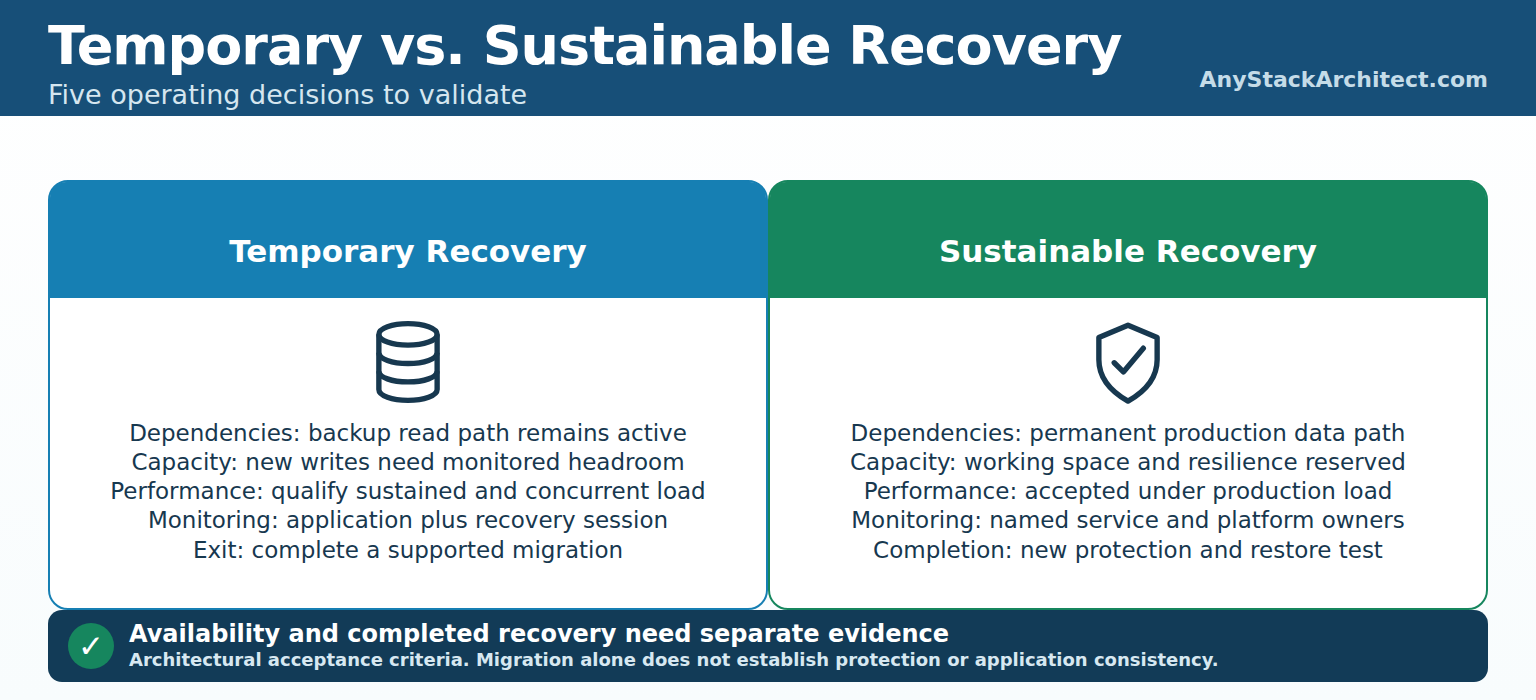
For AHV, Migrate to production transfers VM disk data to the production storage selected for the recovered VM. Plan that destination before starting recovery. A compressed backup's size is not a capacity reservation for the resulting virtual disks, accumulated changes, migration overhead, and the cluster's required resilience headroom.
The VMware migration choice needs to be settled just as early. The documented direct Storage vMotion path applies when changes remain on the NFS datastore; redirected changes exclude that route. The host also needs the appropriate entitlement and datastore access, as covered by Broadcom's Storage vMotion prerequisites. Veeam's Quick Migration methods include SmartSwitch, which suspends the VM, and ColdMigration, which stops it. An online migration option in one configuration is not a no-downtime promise for another.
Hyper-V completes recovery by copying backup data into the target disks with another pair of Data Movers. As blocks become permanent, the driver reads them locally. Its finalization procedure should govern that operation; calling it Storage vMotion or assuming an AHV migration algorithm would misdescribe the implementation.
Migration has to make progress while the applications are busy. Measure transferred data, remaining work, destination latency, changed-data growth, and application response time during the transfer. If concurrent migrations saturate the repository or target, reducing their count can be a better decision than making every VM slower. Reserve enough time and capacity for a failed attempt without removing the still-authoritative workload.
A storage-consistent migration preserves the state the VM currently has. It does not repair an inconsistent application restore point or establish consistency across several databases. Application owners should validate a known set of transactions before and after migration, define any quiescence or outage window, and verify dependent systems. The rollback decision must identify which copy has accepted the latest writes before another copy is started.
I would close the migration only after the product reports completion, the disks are on the intended storage, the application passes its checks, and the documented temporary session has been finalized. Re-protection is another acceptance item. Veeam specifically requires a vSphere VM recovered to an alternate location to be added to a backup job after migration. For AHV, verify the recovered object's job membership, permissions, identity, and first usable restore point. Do not assume that the old job protects a newly registered VM.
Twelve VMs through three recovery phases
Consider an illustrative provider-managed recovery of twelve x86 AHV VMs into an alternate AHV cluster: database servers, application servers, web servers, file services, and supporting systems. They use supported VM disks with no attached volume groups. Their native AHV image backups are already available in a standard disk repository controlled by the authorized VBR installation. The target runs AOS 7.3 on supported hardware, is registered in VBR 13.1.2.57, and uses AHV plug-in 10.1 with a dedicated mount server. This is an architecture example, not a customer result or a Cloud Connect provider-side AHV recovery claim.
Phase 1: Immediate recovery. Select compatible restore points and start workloads in the application dependency order. Separate the original and recovery copies before permitting writes. Record when recovery begins, when the guests start, and when the application owner completes a real transaction. Check repository read latency, mount memory by recovered disk count, cluster resource use, and initial write growth. The admission decision for the next group of VMs should use those observations.
Phase 2: Extended operation. Run representative business activity across the recovered systems, including a scheduled batch period and concurrent recovery of another workload group. Track allocated redo growth and remaining storage runway, tail latency, application errors, repository load, and any competing maintenance.
Prove a supported method of protecting data created during this period. Establish whether image backup of the active AHV recovery session is supported. If support is unconfirmed, qualify another protection method or shorten the temporary phase. The old restore point cannot protect new transactions.
Use a disposable rehearsal to interrupt the mount path and to test the agreed degraded cluster condition. Record which services stall, what state remains, which supported actions restore operation, and whether application data survives. The purpose is to produce a recovery procedure the on-call team can follow, including an explicit prohibition on canceling the only current copy to clear an alert.
Phase 3: Permanent recovery. Migrate the workloads in controlled groups while the service remains under observation. Confirm destination capacity before each group, measure migration progress under application load, and validate the final location and transaction state. Establish protection of the recovered VMs, complete a restore test from the new recovery points, and hand over monitoring and incident ownership. If the alternate site will remain production, that is the accepted operating state. If the customer intends to return, begin the separate failback process.
The test record should show application availability, the duration of backup dependence, maximum observed temporary allocation, migration completion, and the first validated recovery point containing DR-era changes. A record of twelve successful boots provides none of the remaining acceptance evidence.
Why failback must be designed before failover
After applications accept writes at the recovery site, the original site's disks are stale. Bringing its servers back online creates a second copy, not an automatic return to the latest state. Identify the authoritative workload and prevent the old copy from accepting transactions until synchronization and cutover are deliberate.
Choose a supported return method for the actual source and destination. That may involve backup and restore of the now-permanent recovered VM, a separately supported replication product, or application-native data synchronization. Each choice needs its own compatibility, capacity, permissions, licensing, and outage assessment. A cross-hypervisor outward restore does not prove that the reverse path supports the same guest, virtual hardware, or incremental synchronization.
Veeam's provider-side Cloud Connect Instant Recovery procedure makes this limit explicit: it can finalize into the provider's virtual environment, but migration back to the tenant's production site is unavailable in that workflow. The return therefore needs another qualified method. AHV Migrate to production likewise identifies the selected storage destination; it does not establish a reverse-replication relationship with the original site.
Protect the workload during recovery so that a second incident has an acceptable recovery point. Before return, verify the latest transfer, arrange the application write freeze or controlled handoff, apply the final changes, and switch the user path. DNS, routes, addresses, identity, certificates, and dependent services still need validation, but the storage decision comes first: which copy contains the accepted transactions, and how were those transactions transferred?
Define the rollback boundary before cutover. If the returned application has accepted new writes, restarting the DR copy without reconciling those writes can lose data or create conflicting state. Keep the return path under observation until the application owner accepts it and protection from the returned environment is proven. Retiring the DR copy is a separate authorized action after those checks.
What I would validate before using Instant Recovery for DRaaS
I would require a recovery test to leave behind evidence for the following decisions:
- Supported path: Exact VBR and plug-in builds, source backup type, repository, target platform, operator permissions, and applicable provider licenses.
- Current data location: Where the original blocks and new writes reside, which components are needed to read them, and which actions discard them.
- Operating capacity: Application latency and resource use under expected concurrency, cache conditions, scheduled work, and the agreed degraded state.
- Time remaining: Measured change growth, usable temporary and destination capacity, migration queue time, and an escalation threshold early enough to act.
- Failure procedure: Supported response to a lost mount path, interrupted session or migration, and exhausted capacity, tested with disposable workloads before production use.
- Completion and protection: Verified permanent disk placement, application checks, correct backup-job coverage, and a restorable recovery point containing new writes.
- Return ownership: Authoritative copy, synchronization method, cutover and rollback conditions, operational owners, and customer acceptance.
I would also retain the failed trials. A mount-server interruption that requires manual recovery, a migration that needs an outage, or a capacity alarm that arrives too late changes the service design. Those results should change placement, monitoring, staffing, or the offered recovery commitment before customers depend on it.
Instant Recovery can restore useful service while the full recovery is still in progress. Treating that temporary state as the finished design leaves the backup platform carrying production storage duties without a proven capacity plan, protection method, or exit. The architecture is complete when the workload can keep operating, recover from another failure, and move to its intended long-term location with its current data intact.
Source Notes
Product behavior and release information were checked against public primary sources on November 3, 2026. Veeam guide pages cited for the core mechanisms identify build 13.1.2.57. Platform prerequisites and support exceptions remain part of each workflow. Capacity, failure tests, ownership, and failback planning recommendations are architectural judgments, not vendor performance guarantees. No lab execution or measured RTO is claimed.