

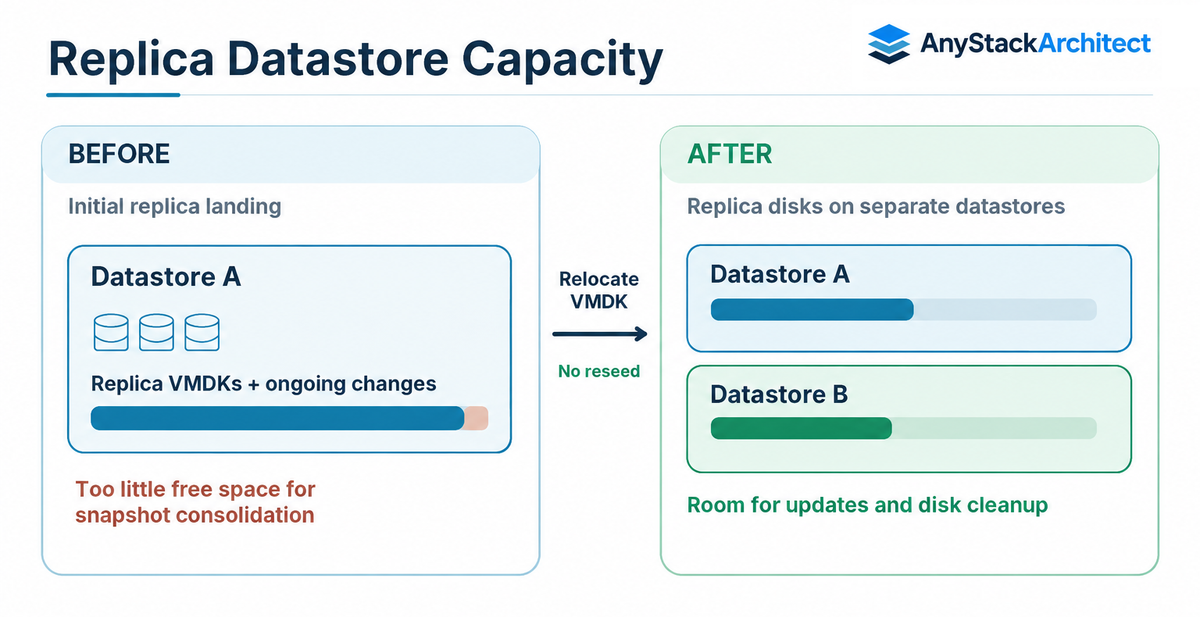
A large replica can finish its initial seed and still fail a few replication cycles later. The baseline fits. Changed blocks accumulate, restore points need space, and a consolidation needs room to finish. Eventually the individual datastore runs out of headroom while the storage array still has capacity available.
We ran into that with a Veeam Cloud Connect replica that landed on one VMFS6 datastore. After the seed and early updates, too little free space remained to complete consolidation. We stopped replication, used vSphere to move an existing large VMDK onto a second datastore, completed consolidation, and resumed the job. The repair did not require sending the baseline again.
The important part is how Cloud Connect places the initial replica, why that placement becomes a constraint, and how a provider can redistribute existing replica disks afterward without building another replica from scratch.
The baseline has to fit somewhere first
Veeam's Cloud Connect replication limitations explicitly state that Pick datastore is not supported for replication jobs targeting a cloud host. A Cloud Connect tenant does not get a per-VMDK destination selection comparable to what an administrator may see in a direct vSphere migration.
Cloud Connect can use a VCD organization VDC or a Veeam hardware plan as the replication target. Those models expose storage differently, but neither gives the tenant a documented control to pick a different backing datastore for every VMDK during the baseline. Veeam's hardware-plan documentation says the service provider selects a datastore for replica files when working with clustered resources. VCD presents a storage policy and eligible backing datastores instead.
With the default Storage DRS setting, Keep VMDKs together, the replica's initial disks land together in this configuration. Broadcom describes that default and the way it can move individually relocated VMDKs back to their original datastore. Its Storage DRS FAQ also notes that initial placement evaluates disks individually depending on effective affinity rules. That distinction matters: our single-datastore landing does not establish how every vSphere configuration behaves.
For the Cloud Connect configuration we used, the operational prerequisite was straightforward: the initial baseline had to fit on one landing datastore. Changing Storage DRS defaults before a new replica is created might alter VMware placement behavior, but I have not verified that Cloud Connect will distribute its baseline that way. It is not a substitute for planning the initial landing capacity.
The supported maximum for a single VMFS5 or VMFS6 datastore is 64 TB, according to Broadcom KB 410951. Another 64 TB datastore, a larger SAN pool, or a higher tenant quota does not make that one filesystem larger. Once the baseline occupies most of it, replication has to compete for the space left behind.

A replica does not stop growing after seeding
Veeam's VMware replication-chain documentation describes a full replica followed by VMware snapshots that hold changed blocks as restore points. Updates, retained deltas and the work required to remove or consolidate snapshots all affect physical space. Ten restore points do not mean ten complete VM copies, but they do mean the capacity calculation cannot stop at the base disks.
On each datastore that holds part of the replica, I would look at the existing disk allocation, the relevant delta files, the next expected change cycle, cleanup or consolidation working space, and other workloads sharing the volume. Free space between jobs is not necessarily the minimum free space during a busy update or retention cycle.
The failure came from insufficient free space on the particular VMFS datastore holding the replica's files, not an array-wide capacity limit or Cloud Director quota. That datastore was already at the supported filesystem ceiling. Extending the array behind it was not a way around the VMFS limit.
Redistribute the existing VMDKs in vSphere
We have used this approach more than once, including on Cloud Connect targets backed by VCD and by VMware hardware plans. The provider uses vSphere Storage vMotion to relocate the individual VMDKs. VCD or the hardware plan controls destination eligibility, not the migration operation.
This sequence requires an approved change window and environment-specific validation. Snapshot-based replicas have a managed restore-point chain, and changing disk locations while a job or failover is active is asking for trouble.

- Let the baseline finish. Confirm the replica exists and the initial landing has completed. If the baseline cannot fit on the first datastore, this post-baseline procedure cannot fix it. Reseeding with the same placement behavior just restarts the same problem.
- Hold the Veeam replication job. Confirm there are no active replica updates, failover tasks, or overlapping storage operations. Record the replica identity, its VMDK and snapshot paths, and the starting restore-point inventory.
- Confirm eligible destination storage. The service provider must have access to the datastores receiving the disks. In our VCD case, that meant the datastores were tagged and included in the relevant VCD storage policy. For a hardware plan, the destination must be available to the plan's configured cloud storage and vSphere hosts; do not move files outside the plan's managed allocation and assume Veeam will follow them.
- Temporarily disable Storage DRS. We did this before relocating the disk so automated placement would not compete with the manual move. This changes behavior for the datastore cluster, not just the replica, so account for the other workloads in that cluster.
- Move the existing VMDK with vSphere Storage vMotion. Use per-disk placement to relocate the selected disk and its associated files to the second datastore. Do not divide the VMDK, change the replica into a new VM, or initiate another full seed. Record exactly which disk moved and where its files landed.
- Resolve consolidation before reopening replication. In the field repair, the VMware Consolidate virtual machine disk files task was required after the move. After the move freed usable space, the consolidation completed successfully. Consolidation is not automatically required after every Storage vMotion, and snapshot cleanup is not a casual operation on a Veeam-managed replica. Review the replica chain and the intended operation before consolidating; never use manual snapshot deletion as a shortcut.
- Override the default grouping behavior. Storage DRS defaults to keeping a VM's VMDKs together. Configure the appropriate VM-level override or datastore-cluster affinity behavior so it no longer requires them on one datastore. If specific disks must stay apart, an explicit VMDK anti-affinity rule is a stronger separation control than merely allowing separation. Check the effective rules rather than assuming the labels are interchangeable.
- Re-enable Storage DRS and verify placement. Once the disk locations and effective rules were correct, we enabled Storage DRS again and confirmed the disks remained separated. Broadcom documents a case where a manual per-disk move is immediately reversed because default affinity is still enabled.
- Rescan as required and resume the Veeam job. Reconcile the provider and tenant inventory, verify that Veeam identifies the expected replica and restore points, and restart replication. Watch the next incremental updates, cleanup and retained-point handling. The goal is to continue incremental updates against that same replica.
The distinction between Keep VMDKs together = No and an actual VMDK anti-affinity rule matters. The first removes a grouping requirement. The second imposes separation on selected disks. Both are documented Storage DRS controls, but the effective setting must match the intended disk placement.
There are also storage-policy affinity conditions that can prevent a per-disk migration even after the default grouping rule is disabled. Broadcom documents that specific failure. If it appears, investigate the policy conflict instead of blindly changing advanced Storage DRS settings across a production datastore cluster.
What the field repair established
The initial baseline and early deltas completed on one datastore. The space problem appeared later, when replication updates and consolidation required more room. The team paused replication, moved an existing VMDK to eligible storage, completed the necessary consolidation, reconciled inventory, and resumed incremental updates against the existing replica.
| Stage | Observed result |
|---|---|
| Initial replication | Baseline and early updates completed on the original datastore |
| Capacity failure | Insufficient datastore free space; consolidation attempts failed |
| Provider remediation | An existing large VMDK was relocated to a second eligible datastore using Storage vMotion |
| Required consolidation | Completed after usable working space was restored |
| Continuation | Provider and tenant reconciled the replica, and incremental replication resumed without a new baseline |
The restored free space reflected both the VMDK move and the required consolidation; the individual contribution of each operation was not measured separately. The observed follow-up supports continued replication against the same replica. It does not prove that every historical restore point remained intact or that an isolated application recovery test passed.
VCD and hardware plans: different eligibility checks, same VMware operation
The observed target used VMware Cloud Director. Both destination datastores had to be tagged and covered by the appropriate VCD storage policy before vSphere could place the existing disks there. Broadcom's Cloud Director placement guidance confirms the effect of missing policy membership or datastore tags.
A Cloud Connect VMware hardware plan exposes storage through Veeam instead. Veeam documents both individual datastore targets and datastore-cluster backing. We have used the post-baseline disk-redistribution method in that model too. The requirement is that the destinations remain eligible and visible to the service provider's managed storage configuration; Veeam does not need the VM to be under VCD for vSphere to move its VMDKs.
There is an important documentation boundary. Veeam's Moving Replica Files guide describes full replica relocation and plan/policy changes, not this exact selective-disk procedure. That documentation is useful during support escalation. The observed selective-disk procedure still uses vSphere Storage vMotion with either target model. I would describe the selective redistribution as a provider-operated method supported by our observed results and documented VMware operations, rather than claim a Veeam-published, step-for-step procedure exists for it.
What I would check before calling the repair complete
I would not judge the result solely by the Storage vMotion task reaching 100 percent. Before reopening replication, verify the moved disk and its chain, datastore paths, space remaining on each destination, Storage DRS rules and recommendations, and the replica's inventory in Veeam. If consolidation was required, confirm the task completed and the expected restore-point state is understood. In VCD, also verify the relevant storage policy remains consistent.
After the job resumes, watch multiple incremental cycles and at least one retention cycle. Confirm that changes land on the intended datastores, free space remains adequate during cleanup, and Storage DRS does not regroup the disks. A successful incremental job is the operational continuation check. An isolated Veeam failover and application test is a separate recovery assurance check, not something that can be inferred from a green job history alone.
This method has a hard boundary: the initial baseline still has to land successfully. If the initial copy cannot fit on one target datastore under the effective initial-placement settings, there is no existing replica to redistribute. A hypothetical way to influence first placement by changing cluster-wide Storage DRS affinity beforehand remains unverified for Cloud Connect seeding and is not part of the method described here.
For large Cloud Connect replicas, the capacity plan needs two answers: where the first copy can land, and how its disks and restore-point growth will be distributed after it exists. We solved the second problem by moving existing VMDKs in vSphere and keeping Veeam replication on the same replica.
Source Notes
Vendor references rechecked November 20, 2026. This field account concerns snapshot-based VMware Veeam Cloud Connect replication. Veeam 13 documentation supplies the product-behavior references; the operator-observed repair is not presented as a Veeam-published selective-disk relocation procedure.
- Veeam: Cloud Connect Replication limitations
- Veeam: Hardware Plan
- Veeam: VMware Cloud Director Support
- Veeam: Hardware Plan Storage Settings
- Veeam: Moving Replica Files
- Veeam: VMware Replication Chain
- Broadcom: VMFS 5/6 Maximum Capacity
- Broadcom: Storage DRS FAQ
- Broadcom: Storage DRS can regroup manually relocated disks
- Broadcom: Disabling and reenabling Storage DRS
- Broadcom: Storage-profile affinity can block separate disk migrations
- Broadcom: VCD storage-policy datastore eligibility
- Broadcom: Estimating snapshot consolidation work