

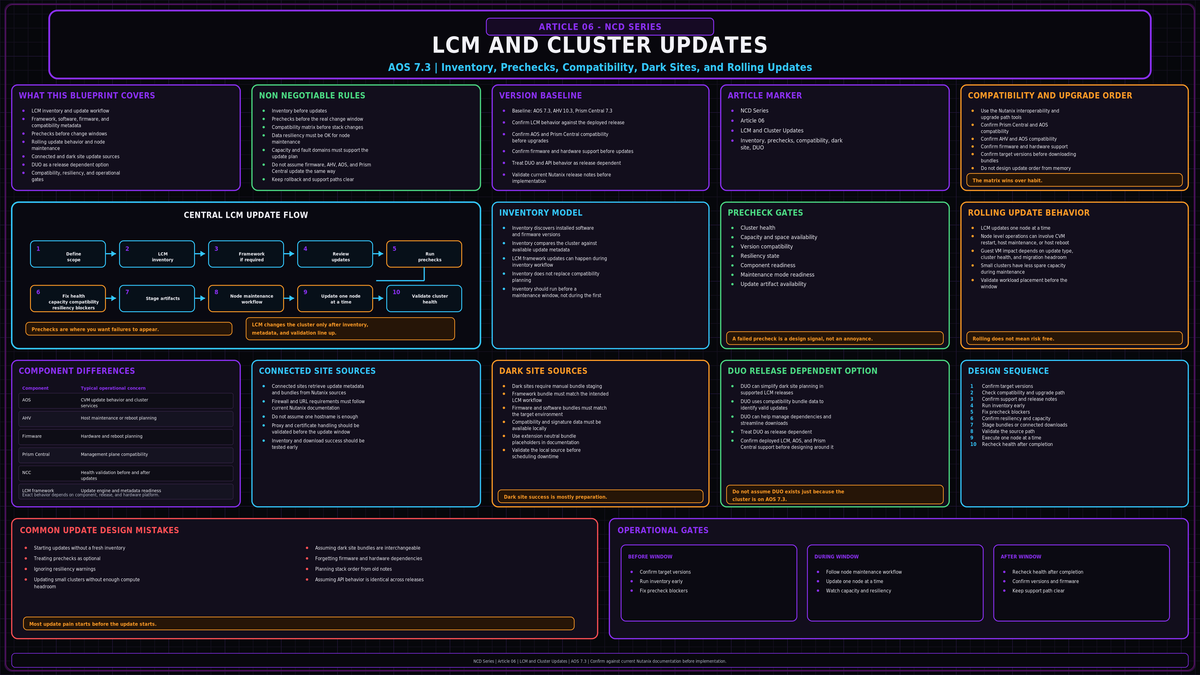
NCD-06 in the Nutanix Cluster Design series. This one covers Life Cycle Manager (LCM) and how cluster updates actually run: the framework and module model, the inventory and update workflow, how a rolling update moves through the cluster one node at a time, connected versus dark site sources, upgrade sequencing against the interoperability matrix, and fleet scale updates from Prism Central. Baseline is AOS 7.3, AHV 10.3, and Prism Central 7.3.
Sources: Nutanix Life Cycle Manager Guide and LCM Dark Site Guide on portal.nutanix.com, the Nutanix LCM product and datasheet pages on nutanix.com, the Nutanix Bible, and Nutanix Community posts on next.nutanix.com. The technical claims and version sensitive values below were checked against those sources. Confirm exact bundle versions and supported upgrade paths on the portal for your hardware before you run anything in production.
What LCM actually is
Life Cycle Manager is the engine that tracks, inventories, and updates the software and firmware on a Nutanix cluster. It runs inside both Prism Element and Prism Central. It is not a separate appliance and it is not a script you run by hand. It is a framework plus a set of modules, and the modules know how to update specific entities.
Two things matter from a design standpoint. First, LCM is self managing. In connected environments, LCM checks for framework updates during inventory and updates the framework when required. In dark site environments, the current LCM framework bundle must be staged through the dark site process before inventory and software or firmware updates can use it. Do not treat the framework as a separate manual patch in connected environments, but do not assume a disconnected cluster can update the framework unless the dark site source has been refreshed. Second, every bundle, every module, and the compatibility metadata are signed with public key cryptography and verified against keys already on the cluster. A tampered or unofficial bundle does not install.
The scope splits by where LCM runs:
| Runs from | Updates |
|---|---|
| Prism Element | AOS, AHV, NCC, Foundation, Foundation Platforms, and platform firmware: BIOS, BMC, NIC, HBA, SATADOM, M.2, and data drives, depending on the hardware vendor |
| Prism Central | Prism Central itself and supported Prism Central managed services or microservices platform components, depending on the deployed service and release |
Firmware coverage is platform dependent. NX is the broadest. Dell, Lenovo, Cisco, HPE, and Fujitsu platforms are supported to varying degrees through their own LCM modules. Check what your hardware exposes before you assume LCM owns the whole stack.
Treat data services such as Objects, Files, and related platform services as their own lifecycle items. Verify their specific upgrade path rather than assuming Prism Central LCM owns them just because they run on Prism Central.
In older AOS the Upgrade Software page in Prism Element handled AOS and hypervisor upgrades while LCM only did firmware. On current AOS the full stack runs through LCM. The Upgrade Software page still exists, and it is the fallback when you need to upload AOS binary and metadata files by hand, for example to clear an upgrade path that LCM does not display because the running version is too old.
Inventory first, update second
LCM is two operations, not one button. You inventory, then you update. Treating them as one step is where people get into trouble.
The prechecks themselves verify cluster health, free capacity, version compatibility against the matrix, and data resiliency. They are the safety gate. They are not noise.
How a rolling update executes
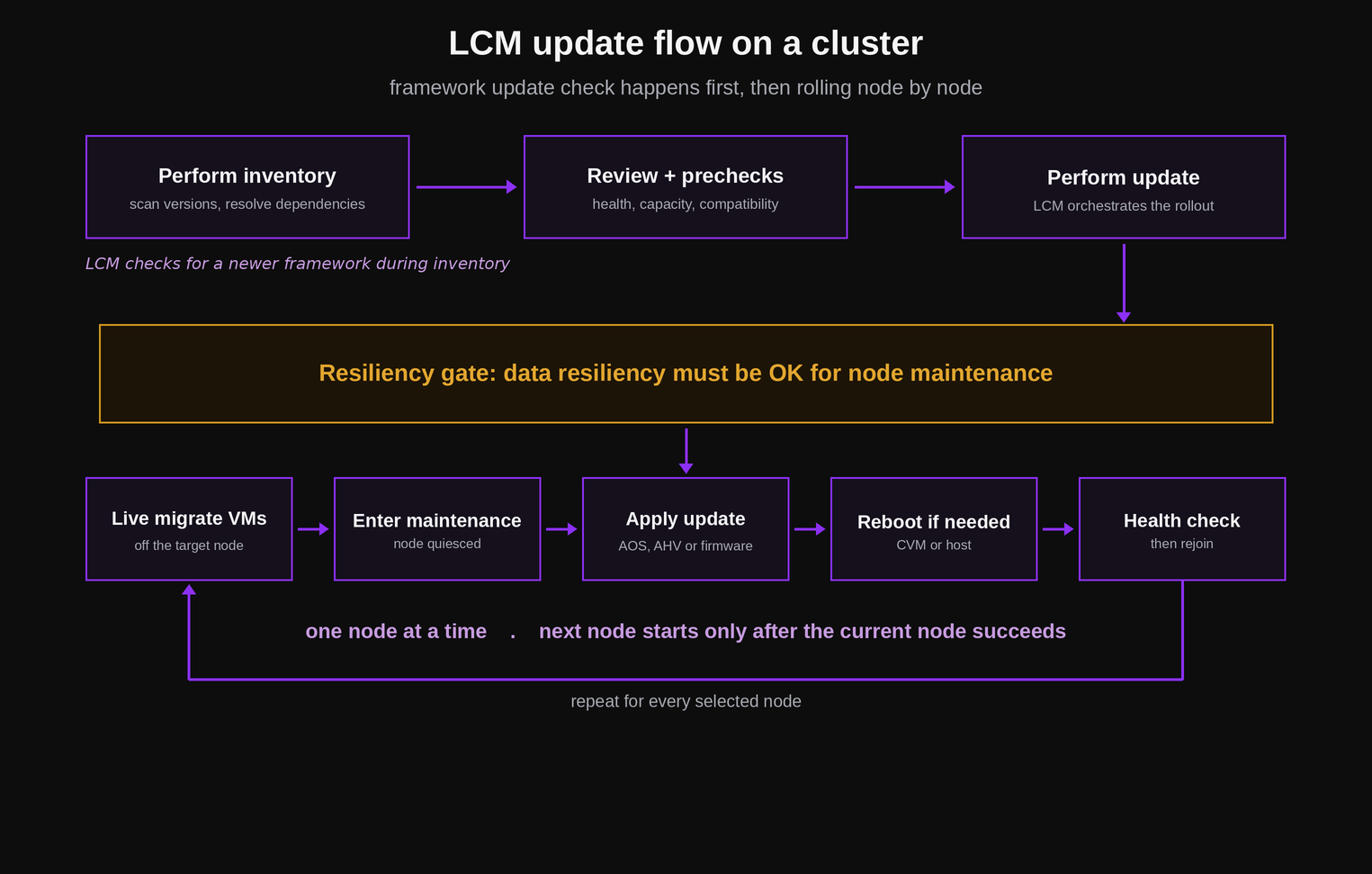
The single most important rule: LCM updates one node at a time, and it only moves to the next node after the current node succeeds. If a node fails its update, the rollout stops there rather than marching through the cluster breaking things.
Before any of that, LCM enforces the resiliency gate. Data resiliency must be OK for the planned rolling update, meaning the cluster can tolerate the required node maintenance event without data unavailability. If resiliency is not OK, the update does not start.
What happens per node depends on what is being updated:
- AOS. The update is applied and the Controller VM (CVM) on that node reboots gracefully in maintenance mode, one CVM at a time. The host itself does not reboot, and user VMs keep running on the host. During the CVM reboot, storage I/O on that node is served through the other CVMs. Applications should remain online, but latency can increase while that CVM is unavailable.
- AHV or firmware. These need the host to reboot. LCM live migrates the user VMs off the node first, puts the host into maintenance mode, applies the update, reboots, runs health checks, and only then rejoins the node and moves on.
With resiliency OK, enough compute headroom, and VMs that can live migrate cleanly, AHV and firmware updates are designed to avoid user VM downtime. Do not treat that as a guarantee. VMs with passthrough devices, pinned resources, failed guest tools, insufficient destination capacity, or other migration blockers can turn an online update into an outage or a failed maintenance operation. The cost is also time and the fact that real reboots happen, so on clusters with 1G networking or tight headroom run updates inside a maintenance window even though the process is meant to be online.
On a two node cluster, taking a node out for an update drops you to a single node serving the cluster for the duration, with the Witness arbitrating. On a three node cluster you are at the minimum for RF2 and have no spare fault tolerance while a node is out. Confirm resiliency is OK and accept that the per node window is the riskiest moment. Single node clusters cannot do an online rolling update at all and have their own update path. For two node and three node clusters, validate compute headroom as well as storage resiliency: passing the storage resiliency gate does not mean the remaining nodes have enough CPU, memory, or network headroom to absorb every VM comfortably.
Connected versus dark site
LCM needs a source for the framework, the bundles, and the compatibility metadata. There are two modes.
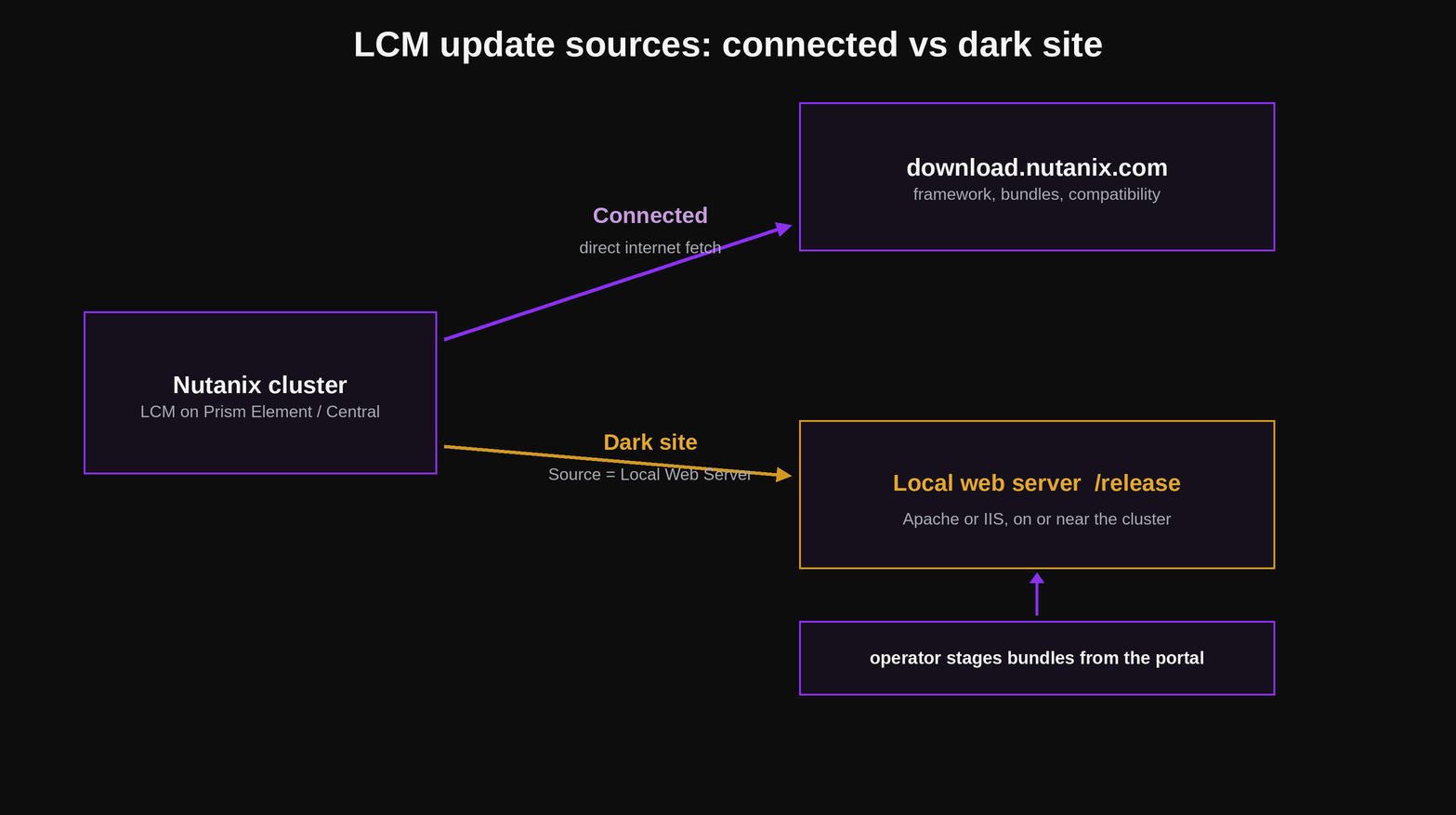
Connected is the default. The cluster uses the configured Nutanix online source to retrieve LCM framework updates, bundles, and metadata. Follow current Nutanix documentation for the required URLs and firewall allow list rather than assuming a single hostname. Hypervisor images from other vendors still have to be uploaded manually.
Dark site is for clusters with no direct internet access. You download the LCM bundles from the portal, stage them on a local web server, and point LCM at it. The web server can be a VM on the same cluster or any machine the cluster can reach. Apache on Linux or IIS on Windows both work. The bundles extract into a release directory served over HTTP.
# web root is /var/www/html, served at http://<server>/release
mkdir -p /var/www/html/release

# stage the LCM framework bundle and the platform firmware bundle
# bundle filenames and extensions vary by LCM version, so follow the
# current LCM dark site guide for the exact bundles your release needs
tar xf <downloaded_lcm_framework_bundle> -C /var/www/html/release/
tar xf <downloaded_lcm_firmware_or_software_bundle> -C /var/www/html/release/

# also place the Nutanix Compatibility bundle and its signature
# file in the release directory, or LCM cannot validate versions
Then in Prism Element, go to LCM, Settings, set the source to Local Web Server (Dark Site), and enter the URL:
http://<web_server_ip>/release
Two things bite people here. The bundle layout has changed over time, so extracted contents now go into specific subdirectories rather than a flat dump, and you have to follow the current dark site guide for your LCM version. And the Compatibility bundle plus its signature must be present and current. Forget the Compatibility bundle or signature and inventory may fail, return stale results, or show no valid update recommendations. Any of those outcomes means the mirror is not trustworthy until the dark site source is corrected.
In newer LCM releases, Dark Site Upgrade Orchestrator (DUO) can simplify dark site planning by using a compatibility bundle to identify valid updates, manage dependencies, and streamline downloads. Treat DUO as release dependent. If your deployed LCM, AOS, and Prism Central versions support it, it may be the right answer once a single mirror and manual source settings stop scaling.
Sequencing and the interoperability matrix
The interoperability matrix and the upgrade path matrix are the authority. LCM resolves dependencies inside a single update workflow, but it does not decide your overall stack order across Prism Central, the clusters under it, and the hypervisor. When you intentionally upgrade individual components, follow the Nutanix recommended upgrade order rather than inventing your own sequence.
A common planning order, top of the management stack down, not a universal rule:
- Run current health checks and required prechecks for Prism Central, then upgrade Prism Central before the clusters it manages.
- Run current NCC health checks on each Prism Element cluster before cluster side updates, then Foundation.
- AOS on each cluster.
- LCM inventory, then firmware updates.
- Hypervisor (AHV or ESXi).
- Nutanix Files and other data services last.
Two checks decide whether this is even possible in one pass. The Software Product Interoperability matrix tells you which versions are supported together, and Prism Central and AOS versions are coupled, so you cannot let them drift arbitrarily. The Upgrade Path matrix tells you whether your target is reachable in one jump or whether you need a staged upgrade through an intermediate version. Old clusters that have not been touched in a year or two almost always need more than one hop.
Firmware order should follow LCM recommendations for the platform and the selected target versions. Do not override the dependency order that LCM computes.
Run a full NCC health check from the latest NCC version before you start, and clear critical findings. NCC is cheap to update and it is what tells you the cluster is actually ready. Skipping it is how a known issue becomes a mid window surprise.
Fleet scale from Prism Central
One cluster at a time through Prism Element is fine for a single cluster. It does not scale to a fleet. Multicluster LCM runs from Prism Central and gives you the operations that matter at scale:
- Centralized inventory. One view of the software and firmware versions across every registered cluster, with compliance gaps surfaced.
- Centralized upgrades. Orchestrate updates across many clusters from one place rather than logging into each.
- Scheduled inventory. Run inventory automatically inside defined maintenance windows so the data is fresh when you plan an upgrade.
- v4 REST APIs. Drive LCM from automation to wire updates into change tooling or chat approvals for a lower touch workflow.
LCM automation is increasingly exposed through Prism Central and the v4 APIs, but API namespace availability depends on the deployed Prism Central and AOS release. For a 7.3 baseline, verify the exact LCM API support in the installed version before building automation around v4 lifecycle endpoints.
The design point: decide early whether updates are a per cluster manual task or a fleet operation driven from Prism Central. The two lead to very different runbooks, and retrofitting the second onto a fleet you have been patching by hand is painful.
The design mistakes that cost you later
Running on a stale inventory
LCM is only as good as its last inventory and its compatibility metadata. An inventory that has not run in months, or a dark site mirror that has not been refreshed, gives you wrong or missing upgrade paths. Inventory first, every time, and keep the dark site mirror current.
Starting with resiliency not OK
If the cluster cannot already tolerate one node down, taking a node out for an update is how you turn a routine upgrade into an outage. The prechecks catch this. Do not force past it. Fix resiliency first.
Assuming a single hop
The target version you want is not always reachable in one upgrade. Check the Upgrade Path matrix. A cluster that has drifted far behind needs a staged upgrade through intermediate versions, and discovering that mid window is the worst time to learn it.
Letting Prism Central and AOS drift apart
PC and AOS versions are coupled by the interoperability matrix, and PC upgrades before the clusters it manages. Upgrade AOS without checking PC compatibility and you can strand Prism Central on an unsupported pairing.
Treating prechecks as friction
Precheck failures are the cluster telling you it is not ready. That is exactly why LCM lets you run them on their own. Run them early, fix what they flag, then schedule the real window.
Forgetting that real reboots happen
Online does not mean free. AHV and firmware updates reboot hosts, and AOS updates reboot CVMs, one at a time. On small clusters, tight networking, or thin compute headroom, run inside a maintenance window even though no user VM has to go down.
- LCM is a self updating framework plus signed modules that lives in Prism Element and Prism Central. On current AOS the full software and firmware stack runs through it.
- Inventory and update are two operations. Inventory and run prechecks on their own first, then perform the update.
- Updates roll one node at a time and only advance after a node succeeds. AOS reboots the CVM gracefully with no host reboot. AHV and firmware updates require host reboots; LCM attempts to evacuate or live migrate VMs first, and the update depends on those migrations being possible.
- Data resiliency must be OK before an update starts. Small clusters have no spare fault tolerance during the per node window.
- Connected clusters fetch from the configured Nutanix online source. Dark site clusters use a local web server release directory, and the Compatibility bundle plus signature must be present and current.
- Stack order and reachability come from the Software Product Interoperability and Upgrade Path matrices, not from LCM. Run NCC current first.
- For fleets, drive inventory and upgrades from multicluster LCM in Prism Central with scheduled inventory and the v4 APIs.