

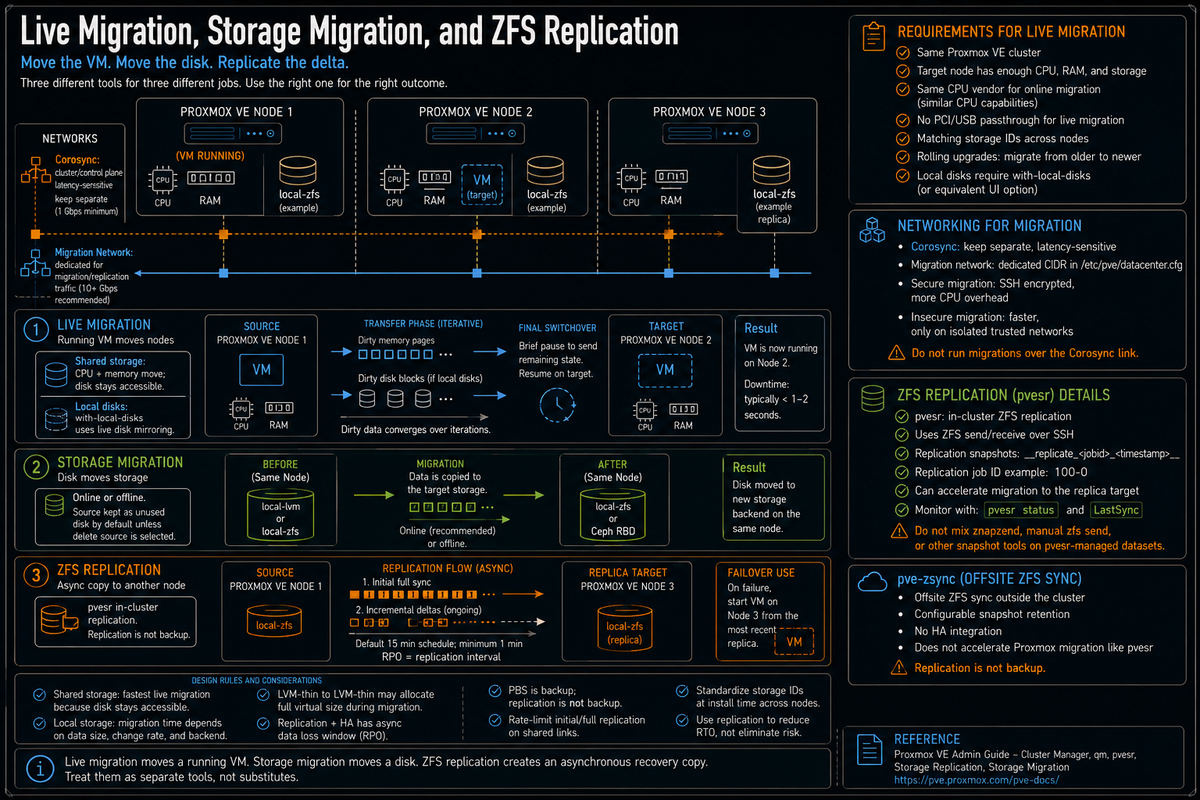
Article 5 in the Proxmox VE Cluster Design Fundamentals for v9.1 series. Live migration, storage migration, and ZFS replication are three different operational tools for VM mobility. Each solves a different problem. Live migration moves a running VM between nodes. Storage migration moves a virtual disk between storage backends. ZFS replication keeps a copy of a VM on a second node so the VM can be started there if the original node fails. This article covers what each one does, how they actually work under the hood, when to use which, and the operational gotchas that come with all three.
Most teams new to Proxmox conflate these three. The web UI Migrate button does live migration. The web UI Move Storage button does storage migration. The Replication panel does ZFS replication. They look similar, they all involve moving data, and they all reference VMs, but they are not interchangeable. Picking the wrong one for the use case costs time during incidents, fills storage with orphan disks, or leaves you holding a stale replica that you assumed was current.
Series target version is Proxmox VE 9.1. Every fact below is sourced to the Proxmox VE Administration Guide, the Cluster Manager wiki, the qm(1) man page, the Storage Replication wiki, the PVE-zsync wiki, the Storage Migration wiki, or linked Proxmox forum threads with Proxmox staff developer responses.
Live migration mechanics
Per the Proxmox VE Administration Guide and the qm(1) man page, live migration moves a running VM from one cluster node to another with minimal interruption. The cluster transfers the VM memory, CPU state, and (for local storage) the disk image, then briefly pauses and resumes on the destination.
The key requirements per the docs:
- Source and target nodes are members of the same Proxmox VE cluster.
- The target node has enough free CPU, memory, and storage to host the VM.
- For shared storage VMs (NFS, Ceph RBD, CephFS, iSCSI shared LVM, FC SAN with shared LVM), the storage is reachable from both source and target nodes with identical storage IDs.
- For local storage VMs (local ZFS, LVM-thin, directory), Proxmox performs live disk mirroring during the migration. Matching storage IDs make the operation cleaner, while
qm migratecan remap target storage with--targetstoragewhen needed. - Per the Cluster Manager wiki, online migration of virtual machines is only supported when nodes have CPUs from the same vendor (Intel to Intel, AMD to AMD).
- No PCI or USB devices passed through to the VM. Per the Administration Guide, live migration cannot handle devices directly attached to the source host.
Per a Proxmox forum reply from Proxmox staff (Aaron): live migrations from older to newer PVE should work and Proxmox actively keeps an eye on this. Live migrating from newer to older versions is not tested and thus might not work. Operationally, this means rolling cluster updates should always go oldest to newest, never reverse.
The phases of a live migration
Per Proxmox documentation and operational reality:
- Phase 1: Initialization. The migration is triggered (web UI, qm CLI, HA, or API). Proxmox validates configuration, storage mappings, target node compatibility.
- Phase 2: Target preparation. The destination node creates a paused VM instance with virtual hardware and network interfaces matched to the source.
- Phase 3: Disk transfer (local storage only). For VMs on local storage, Proxmox starts a live disk mirror. Block changes on the source are tracked in a dirty bitmap while the bulk of disk data copies to the destination.
- Phase 4: Memory synchronization. RAM pages transfer to the destination iteratively. Pages modified during transfer are resent until the remaining delta is small enough for a fast switchover.
- Phase 5: Switchover. The VM is briefly paused on the source. Final memory pages, CPU state, and any remaining dirty disk blocks transfer. The VM resumes on the destination. Pause time is typically sub second on healthy networks.
The web UI Migrate option in Proxmox VE 9 covers all of this with a single click; the qm CLI offers more control:
vSphere admins: live migration is vMotion equivalent. Storage migration is Storage vMotion equivalent. Cross hypervisor cold migration from VMware is supported via qm importovf or the disk import workflow per the Migrate to Proxmox VE wiki.
Hyper-V admins: live migration is Hyper-V Live Migration equivalent. Shared Nothing Live Migration (live migration with local disks) is supported on Proxmox via the same UI button, where vSphere requires SvMotion to be triggered separately.
Local storage live migration
Per the qm(1) man page, the --with-local-disks flag (or the equivalent web UI option) enables migration of VMs whose disks live on local only storage like local ZFS, LVM-thin, or directory storage. The mechanic per Proxmox staff forum responses: Proxmox uses QEMU storage_migrate to mirror disk blocks from source to target while the VM continues running.
Practical implications:
- Migration time depends on how much data the backend actually has to copy. Some formats preserve sparse allocation. Some storage paths can allocate the full virtual size. Plan migration windows from observed copy rates, not the configured disk size alone. Faster networks (10 GbE, 25 GbE, 100 GbE) reduce wall clock time roughly proportionally.
- Per Proxmox forum threads: thin provisioning behavior during local storage migration depends on the storage type. qcow2 disks transfer only the used data (the migration progress display shows virtual size, which can be misleading). ZFS source to ZFS target preserves sparseness. LVM-Thin to LVM-Thin migration is known to lose the thin state on the destination, allocating the full virtual size; Proxmox staff and users have flagged this as a long standing limitation tied to QEMU storage_migrate behavior.
- Storage IDs must match between source and target. If the source disk is on storage ID
local-zfs, the target must also have a storage IDlocal-zfswith content type Disk Image enabled. The--targetstorageoption remaps if IDs differ. - Network bandwidth during migration is bursty and can saturate the migration link. PVCD-02 covered the migration network configuration in datacenter.cfg; production clusters should keep migration on a dedicated network or VLAN.
Storage migration
Per the Storage Migration wiki, storage migration moves a VM disk to a different storage on the same node, or to a different format (raw to qcow2, for example). Storage migration runs on online or offline VMs.
The key facts per the Storage Migration wiki:
- By default, the source disk is added back as an unused disk for safety after the migration completes. Click Delete source if you want it removed during the move.
- Moving from raw to qcow2 enables qcow2 features like internal snapshots (where supported by the storage backend).
- Storage migration works between storage types on the same node: local LVM-thin to local ZFS, local ZFS to Ceph RBD, local to NFS, etc.
The CLI is qm move-disk (alias qm move_disk or qm disk move):
Common use cases:
- Migrating a VM from local storage to shared storage so it can live migrate across the cluster.
- Tier moving: cold VMs from NVMe to spinning HDD pools, or hot VMs from HDD to NVMe.
- Format conversion: raw to qcow2 to enable qcow2 features, or qcow2 to raw on storage that supports thin provisioning natively.
- Storage decommission: drain a storage backend before retiring it.
Storage migration on running VMs
Per the Storage Migration wiki, storage migration works on running VMs without downtime. The mechanic: Proxmox starts a live disk mirror, copies the bulk of the disk to the target while the VM continues to write to the source, tracks dirty blocks, then briefly switches the VM to the new disk once the mirror is converged. Same mechanism as live migration disk transfer, but happening in place on a single node between two storage backends.
What this means operationally:
- Storage migration of a 1 TB disk takes hours regardless of node speed because the bottleneck is moving data through both source and target storage on the same node.
- I/O on the source storage during migration is contended between the running VM and the migration job. Plan migrations during low load windows for sensitive workloads.
- Per the wiki, the
--bwlimitoption on qm move-disk caps the migration rate to avoid saturating the storage during business hours.
Migration types: secure versus insecure
Per the Cluster Manager wiki and the datacenter.cfg manual, the migration type parameter accepts two values:
- secure (default). Migration traffic tunnels through SSH. Encrypted in transit. CPU overhead from encryption on both sides; throughput limited by the SSH cipher and the slower CPU at either end.
- insecure. Migration traffic transfers without encryption directly between the nodes. Higher throughput; recommended only on physically isolated migration networks where the wire itself is trusted.
The configuration in /etc/pve/datacenter.cfg:
Operational rule: leave the default secure unless you have a dedicated, physically isolated migration network and have measured that SSH encryption is your bottleneck. On 10 GbE and below, SSH encryption usually keeps up; on 25 GbE and above with NVMe storage, secure can become the bottleneck and insecure on a trusted network unlocks the next tier of migration speed.
ZFS replication: what it actually is
Per the Storage Replication wiki, the built in Proxmox replication framework is currently designed for local ZFS storage. It uses ZFS native incremental snapshot send and receive to keep a copy of guest volumes on a second node so the data is available without requiring shared storage. Replication requires storage backends that support native snapshot functionality, incremental snapshot transfers, and identical storage IDs across the source and target nodes.
What replication is:
- A scheduled snapshot and incremental send mechanism between two nodes.
- Asynchronous: the replica is always behind the source by at least one replication interval.
- Per the wiki, the default replication interval is 15 minutes; the minimum is one minute, the maximum is once a week.
- Per the wiki, replication uses snapshots to minimize traffic; new data is sent only incrementally after the initial full sync.
- A foundation for HA on shared nothing clusters: if the primary node fails, the HA manager can start the VM on the replica node using the most recent replicated snapshot.
What replication is not:
- Not synchronous. Data written to the source between replications is lost if the source fails before the next replication.
- Not a backup. Per multiple Proxmox staff forum posts: replication is not backup. Replication snapshots are managed by the replication system and removed automatically as the schedule rotates. Do not store long term recovery data in replication snapshots.
- Per the Storage Replication wiki, the framework is currently designed for local ZFS storage. Other storage types (LVM-thin, BTRFS) that support snapshots are not currently supported targets for the integrated replication framework.
- Not a substitute for Ceph or other distributed storage. For larger clusters with shared distributed storage, replication does not apply and is not needed.
Replication mechanics
Per the Storage Replication wiki and the pvesr(1) man page:
Per the wiki, a replication job ID is composed of the VMID plus a job number (for example 100-0 for the first replication job of VM 100). A single VM can have multiple replication jobs to different target nodes.
The underlying mechanic per the Storage Replication wiki and the pvesr source: Proxmox replication uses the storage layer's export and import primitives. On ZFS storage these wrap zfs send and zfs receive over SSH with the snapshot deltas. Replication snapshots use the format __replicate_<jobid>_<timestamp>__.
Replication and migration interaction
Per the Storage Replication wiki and Proxmox forum discussions: when a VM with active replication jobs is migrated to its replication target node, the migration is much faster because the bulk of the disk is already there. Only the delta since the last replication snapshot needs to transfer. This is one of the operational reasons to set up replication even on small clusters: it makes maintenance migrations significantly faster.
When a replicated VM is migrated to a node that is not its replication target, the replication job is reconfigured to replicate from the new source node back to the old source (or wherever you specified).
PVE-zsync: the standalone alternative
Per the PVE-zsync wiki, pve-zsync is a separate Proxmox tool for syncing ZFS volumes between two servers. Unlike pvesr, pve-zsync was originally introduced as a tech preview for Proxmox VE 3.4 and predates the integrated replication framework. The two tools coexist for historical reasons.
What pve-zsync does that pvesr does not, per the wiki:
- Sync to ZFS storage outside the cluster (for example, an offsite backup server that is not a Proxmox cluster node).
- Configurable retention policy for snapshots on the destination, allowing the destination to keep more historical snapshots than the source.
- Can be installed on plain Debian if ZFS is configured.
What pve-zsync does not do:
- Per the PVE-zsync wiki comparison, pvesr integrates with migration while pve-zsync does not. A VM that uses pve-zsync for replication does not gain the same migration acceleration that pvesr provides.
- No HA integration; pve-zsync is a Perl script wrapping
zfs send,zfs receive, SSH, and cron, not a cluster service.
Operational rule: use pvesr for in cluster replication that supports HA failover. Use pve-zsync for offsite ZFS sync where the destination is not part of the same Proxmox cluster.
Per multiple Proxmox forum threads on operational issues with ZFS replication: pvesr expects to manage all snapshots on the replicated datasets. External tools that create or remove snapshots on the same dataset can conflict with pvesr and cause replication failures. The supported approach is pvesr for in cluster replication, pve-zsync for offsite, and never run znapzend or custom zfs send jobs on the same datasets that pvesr manages.
Replication and HA together
Per the Proxmox VE Administration Guide HA chapter (more on HA in PVCD-12), HA on shared nothing clusters relies on replication to provide a recoverable copy of the VM on a second node. The HA manager picks the replication target as the failover node and starts the VM from the most recent replicated snapshot when the primary fails.
The data loss window per this design:
- Worst case: a node fails immediately before the next scheduled replication. The replica is up to one full replication interval behind. With the default 15 minute schedule, that is up to 15 minutes of data loss. With a 1 minute schedule, up to 1 minute.
- Best case: the primary fails immediately after a successful replication. The replica is current to the last replication.
- Data written to the source between the last replication and the failure is lost on failover.
This is the architectural tradeoff: replication plus HA gives you a fast restart with recent data on shared nothing clusters at the cost of an asynchronous data loss window. Ceph or other shared storage removes the asynchronous replication interval data loss window, but application consistency still depends on the guest, storage, and failure mode. Pick deliberately based on RPO requirements.
Migration and replication design mistakes that bite you later
Live migration on the cluster network
Covered in PVCD-02. Live migration on the same link as Corosync produces fencing during big migrations. Set migration: secure,network=<CIDR> in /etc/pve/datacenter.cfg with a separate CIDR for the migration network.
Migrating between mixed CPU vendors expecting it to work online
Per the Cluster Manager wiki: online migration is only supported when nodes have CPUs from the same vendor. Intel source to Intel target, AMD source to AMD target. Cross vendor migrations require shutting the VM down, migrating offline, and starting on the target. Mixed vendor clusters need to know this in advance.
Migrating from newer PVE to older PVE
Per a Proxmox forum reply from Proxmox staff (Aaron): live migrations from older to newer PVE should work, and Proxmox actively keeps an eye on this; live migrating from newer to older versions is not tested and thus might not work. During rolling upgrades, always migrate VMs off the not yet upgraded node onto already upgraded nodes. Never migrate from an upgraded node back to a not yet upgraded one.
Migrating with PCI or USB passthrough enabled
Per the Administration Guide: live migration cannot handle devices directly attached to the source host. The migration will fail. Either remove the passthrough device, migrate, and reattach (if the target has a compatible device), or shut down and migrate offline.
Treating replication as backup
Per multiple Proxmox staff forum responses: replication is not backup. Replication snapshots are short lived, automatically rotated, and managed by the system. Use Proxmox Backup Server (covered in PVCD-08) for actual backup. Replication is for fast HA failover and faster maintenance migrations.
Setting replication intervals too aggressively
Per the Storage Replication wiki, the minimum replication interval is one minute. A 1 minute schedule on a busy VM means a continuous load of incremental ZFS sends across the migration network. For most VMs, 5 to 15 minutes is the sweet spot. Tune to RPO requirements, not to "smaller is better."
Replicating without rate limiting on a shared link
The --rate option on a replication job limits bandwidth in MBps. Without it, replication can saturate the migration link during the initial full sync (which can be hours for large VMs). Set a rate limit when migration shares a link with other traffic.
Mismatched storage IDs between cluster nodes
Replication requires matching Proxmox storage IDs across nodes, backed by the expected ZFS pool or dataset path on every node that can receive the replica. If a VM disk lives on storage ID local-zfs backed by rpool/data on node A, the target node needs storage ID local-zfs backed by a compatible local ZFS pool or dataset path as well. pvesr does not treat different local ZFS storage names as interchangeable targets. Migration is simpler when IDs match, but qm migrate can remap target storage with --targetstorage. Standardize ZFS storage IDs and backing paths cluster wide at install time. Treat --targetstorage as an operational exception, not the design.
External snapshots on datasets pvesr manages
Per the Proxmox forum: znapzend, manual zfs send, or other custom snapshot tools on a pvesr managed dataset cause replication to fail. Pick one tool per dataset.
Forgetting to verify replication is current before failing over
The HA manager will fail over to the replica even if the last replication is hours old (because of network issues, target node downtime, or a stuck replication job). Monitor replication state via pvesr status or the GUI Replication panel. Alert on replication jobs in error or with stale LastSync timestamps.
Key Takeaways
- Three different tools, three different jobs. Live migration moves a running VM between nodes. Storage migration moves a disk between storage backends. ZFS replication keeps an asynchronous copy of a VM on a second node for HA failover.
- Live migration requirements per the docs. Same cluster, sufficient resources on target, compatible storage or deliberate target storage remapping, same CPU vendor for online migration, no PCI or USB passthrough, oldest to newest PVE version direction during upgrades.
- Local storage live migration uses live disk mirroring. Migration time depends on how much data the backend actually copies, which varies by format and storage backend. Plan migration windows from observed copy rates and size the migration network accordingly.
- Storage migration default keeps source as unused disk. Per the Storage Migration wiki. Tick Delete source or pass
--delete 1to qm move-disk if you want it removed. - ZFS replication is asynchronous and ZFS only. Per the Storage Replication wiki. Default 15 minute schedule, minimum 1 minute, maximum once a week. Uses incremental ZFS send and receive.
- Replication is not backup. Per multiple Proxmox staff forum responses. Use PBS for backup. Replication is for fast HA failover and faster maintenance migrations.
- pve-zsync is the offsite tool. Per the wiki, pvesr is for in cluster replication; pve-zsync handles sync to ZFS storage outside the cluster with configurable retention.
- Do not mix replication tools on the same datasets. Per Proxmox forum guidance, znapzend or custom
zfs sendon pvesr managed datasets causes replication failures. - HA plus replication has an asynchronous data loss window. Worst case is one replication interval. The architectural tradeoff against shared storage that removes the replication interval window, where application consistency still depends on the guest, storage, and failure mode.
- Replication requires matching storage IDs and matching ZFS backing paths on target nodes. Standardize both at install time. Migration is cleaner when IDs match, but
qm migratecan remap target storage with--targetstorage. - Monitor replication state. Use
pvesr statusor the Replication panel. Alert on stale LastSync timestamps and jobs in error.