

I built MCP Engineering Gateway because I wanted a controlled way to bring analysis tools into the engineering work I already do. Logs, packet captures and configuration snapshots can answer different parts of the same question. I want to move between them without losing track of the original files, the limits of each tool or who authorized an execution.
The project is now available as v0.52.0-dev, a source-only technical prerelease. Phase I combines built-in analysis with controlled execution for infrastructure engineers, architects, homelab users and developers who want to install it, inspect the source and extend it. I'm releasing it in phases so that adding more tools builds on an explicit, reviewable workflow.
One installation requirement comes first: the current full installation requires independently authorized, exact Windows symbols, even if you intend to use other analysis providers. There isn't a qualified symbol-free full image. The source release doesn't supply those symbols or grant rights to them. Read the dependency requirements before committing to a build.
What I wanted the gateway to handle
I wanted to preserve the connection between a question and the files used to answer it. Which log produced that line? Which capture contains the packet observation? Was the input changed? What did the tool actually check, and what did it leave unknown?
Phase I organizes staged inputs into private analysis workspaces, called cases, and records their SHA-256 identities. Its tools can return source lines, timestamps, packet-frame references and coverage information alongside results. Registered originals are protected through the gateway interface, although that isn't a storage immutability guarantee.
MCP, the Model Context Protocol, provides the client interface. The gateway is software that exposes defined analysis operations and controls their execution. An LLM can participate through an MCP client, but the gateway itself doesn't supply a language model. External programs remain separate dependencies with their own versions, capabilities and licenses.
For my purposes, a result that identifies an unsupported input or incomplete coverage is valuable. I'd rather know where an analysis stopped than build a conclusion around data the tool never examined.
Following a timeout across logs and a capture
One of the documented workflows starts with a log marker such as a connection timeout. After staging and registering the file, log_index creates a bounded local index and log_search searches the indexed redacted excerpts for literal matches. Results include source-line references and timezone-aware timestamps. Large indexing jobs use the persistent fixed-job queue and its processor.
From there, the text timeline tools can show the event sequence and identify sources with missing or unanchored timestamps. An offline PCAP or PCAPNG can be registered alongside the logs. After the required decode and correlation jobs, the packet tools expose protocol counters, capture-local flow aliases and observations tied to source frames. The correlation tools let you examine a bounded window around a selected event.
I can examine a timeout in a log alongside nearby TCP, DNS or TLS observations in a capture. Their proximity doesn't establish that they describe the same endpoint or that one caused the other. A sequence-gap candidate also doesn't prove packet loss. The packet results exclude application-payload export, and this workflow doesn't perform live capture.
Clock assumptions stay visible. If I have a declared offset and uncertainty for a source, correlation_clock_model can show how that assumption affects the comparison. It doesn't verify the clocks or rewrite the original timestamps. I still have to decide whether the available evidence supports a relationship.
The evidence-reporting path carries that restraint forward. case_evidence_report builds a report against a pinned correlation-index revision, keeping measured metadata, unknowns and deliberately reviewed operator reasoning separate. It doesn't promote a hypothesis into a diagnosis or approve the result for external sharing. Redaction and bounded output still need a human disclosure review.
Comparing configuration changes without returning the whole configuration
A second workflow starts with two registered JSON or key=value snapshots. config_compare compares normalized fields, while config_drift_report describes supported semantic changes such as additions, removals and changes in type or value. Results use safe labels or opaque field aliases and leave out raw configuration values.
I can use that to narrow a before-and-after review while retaining the identity of both inputs. The output has a deliberate limit: it doesn't identify who changed a setting, establish when it happened or prove that it caused a problem. Unsupported structures and size limits also remain part of the result. The original snapshots are still needed for authorized follow-up.
Bringing an existing tool into the same workflow
For a third example, the released ansible_syntax provider can check an offline playbook's syntax without executing its tasks. The provider planner binds the input identity and expected tool version into a fixed analysis plan. That plan must go through the separate review, signing and import workflow before it can execute in the approved image.
An adapter in the catalog doesn't mean the release includes an installed copy of Ansible. Operators build the analysis image from the documented dependency inputs. The same distinction applies to the other fixed providers, including Git, filesystem checks and the narrowly scoped Volatility adapters. The release supplies source without a prebuilt analysis image.
Phase I also accepts bounded Python analysis when a fixed provider doesn't cover the question. The execution plan identifies the exact source, approved inputs, declared outputs, image and resource limits. A script can use dependencies already present in the approved image; preparing it doesn't install another tool or authorize execution. Custom Python also doesn't automatically acquire a fixed provider's structured result semantics.
The default catalog exposes 44 MCP tools, but I wouldn't use that number as a measure of what every installation can do. Some methods have optional prerequisites. EVTX metadata analysis, for example, requires additional dependencies, and its optional clean-host installation profile wasn't run as part of baseline qualification.
The gateway and the worker have different jobs
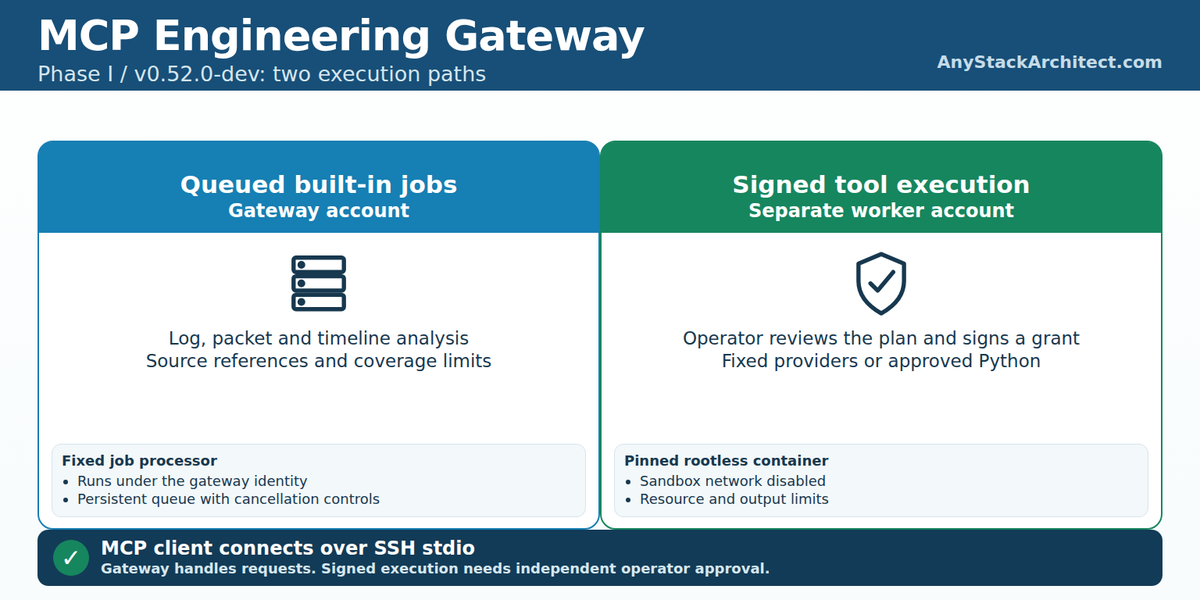
The client reaches the gateway through authenticated SSH stdio. The qualified implementation has no gateway HTTP server. The gateway account manages the private cases, validates requests and queues fixed built-in analysis jobs. A separate processor runs those queued jobs under the same gateway identity.
Signed execution uses a different worker account with its own private state, image storage, execution history and replay ledger. An independent operator reviews the exact plan and issues a one-use, expiring signed decision. SSH access and execution authorization are separate. A request from an MCP client cannot issue that approval.
The worker launches the approved job in a digest-pinned rootless container. The documented controls include disabled sandbox networking, a read-only root filesystem, dropped capabilities, no-new-privileges and limits on CPU, memory, processes, execution time and output. Only declared safe output files are accepted. These controls apply to the signed container path; built-in log and packet jobs use the gateway-account processor.
Both paths expose cancellation, with separate job and execution controls. Cancellation of running work is a request whose resulting state needs to be checked. The runtime also handles uncertain container startup conservatively: it can retain the job as running and block further execution during the same boot. A reviewed reboot permits subsequent cleanup and interruption recovery. Clearing history to get past that refusal would undermine the execution controls.
The signed worker service has qualified boot persistence. The documented foreground fixed-job processor must be started deliberately. A running signed worker doesn't mean queued log-analysis work has a processor available.
Making it installable took more than publishing the source
My working private deployment was the starting point. For another engineer to install it, the project needed explicit dependencies, site configuration, identities and trust enrollment. An existing account, preloaded image or assumption about my workstation couldn't stand in for an installation step.
The release includes source verification, site inventory and planning, preparation with the worker disabled, and explicit activation of the operator's image and public trust. The documentation separates those administrative decisions from submitting analysis work. It also covers coherent capture and restore, interrupted work and retirement that preserves cases and authorization history.
I wanted the qualification record to distinguish an installation that had actually been exercised from instructions that had only been reviewed. The recorded rehearsal includes a fresh installation, an SSH/MCP first-analysis sequence, actual human signing, denied and invalid authorization, replay and expiry checks, interruption by reboot, and isolated recovery with populated signed history. Those exercises support specific claims about the documented profile.
The final public release needs a qualification distinction of its own. The live rehearsal ran on an earlier candidate. The released source retains the same runtime modules, while later destination, packaging and documentation changes received checks appropriate to those changes. They did not receive a fresh live installation, signing exercise or full native regression run. The release notes record a clean independent review of the final release and identify the exact published source.
Recovery qualification is similarly bounded. The capture and restored copies in the recorded exercise shared a disposable disk. The exercise shows logical recovery of the tested state; it doesn't test off-drive disaster protection or a production restore. Cross-version upgrade is also unsupported in this first release.
Publishing in phases lets me keep those claims specific. I can release the source and documented foundation now, then qualify additional tools and installation changes against their own requirements.
What you need before trying it
The qualified reference is a dedicated Rocky Linux 10.2 amd64 host, with the exact running kernel specified in the platform guide, SELinux Enforcing and cgroup v2. The reference resources are 2 vCPU, 8 GiB of RAM and 40 GiB of disk, with at least 20 GiB of initial free working space plus room for evidence, derived data, images and backups. Those figures describe the qualification environment, not a throughput or retention-sizing result.
Expect a source build and administrative setup. You'll need the documented host packages, a verified Git checkout for the package builders, the pinned image inputs and your own signing trust. The reference operator workflow used Windows PowerShell 5.1 and native OpenSSH. MCP transport and invocation were exercised with a test client; that doesn't certify every desktop client's configuration or establish Linux-client qualification.
The Windows-symbol requirement applies to the full image build, even for someone interested only in other providers. The current context builder requires the exact symbol archive described in the dependency guide. Without independent entitlement, the full qualified installation path is blocked. Basic source and log functions can be explored separately, but that doesn't amount to a qualified symbol-free full installation.
The project license doesn't automatically license every dependency or restricted input. The source includes a component-license map and notices, including designated supplemental Volatility terms. Dependencies must be acquired and used under their own applicable terms; symbols, memory dumps and a prebuilt OCI image aren't supplied by this release.
Start at the v0.52.0-dev release, verify the source identity and follow the installation and dependency guides linked below. The audited project source ZIP and GitHub's automatic source archives have different layouts and hashes. Use the release's verification instructions for the artifact you choose, then begin with the documented synthetic first-analysis tutorial.
This is a technical prerelease for a specific qualified environment. General Linux compatibility, ARM64, multi-tenant deployment and direct internet exposure haven't been qualified. The repository also makes no managed-service or support-SLA commitment. Choose a dedicated test environment on that basis.
Where I intend to take Phase II
I intend to extend the analysis capabilities and bring more tools into real engineering workflows. The documented Phase II direction is additive: each integration needs to make its inputs, authorization, dependencies and results explicit. It doesn't commit to particular tools, delivery dates or a stable plugin SDK.
The released extension guide covers reviewed Python using an approved image and fixed-provider development in a separate source checkout. A provider needs a narrow input/output contract, dependency and rights review, and tests for known answers, unsupported inputs and failure cases. It also needs validation through the actual isolated execution path before it's treated as qualified.
For exploratory work, I'd start with the engineering question: what repetitive analysis needs a tool, what files does it require, and what result would help someone decide what to check next? I'd want partial coverage and refusals to remain visible as integrations grow. Those are criteria for choosing future work, not an announcement that another integration has shipped.
Try a small workflow and tell me what needs work
The public repository contains the source and the guides. Start with the released version, read the dependency requirements before committing to a build, and use synthetic inputs for the first documented workflow.
Focused feedback through repository issues and pull requests will help. Include the commit or artifact, platform, expected result, actual result and a minimal synthetic reproduction. For a proposed integration, explain the engineering question, dependency requirements and how you'd verify the result. Keep private operational evidence and credentials out of public reports.
I'd like to hear where the existing tools answer a useful question and where the setup is harder than it needs to be. Tell me which carefully scoped addition would help in your own engineering work.
Source Notes
Verified October 26, 2026 against release v0.52.0-dev, commit d6b0bf0381b9af34ace1466bf8b27483d17f85b0. Documentation links below are pinned to that commit. Some tagged files retain candidate-era publication and validation language; the published release notes provide the release-status update. The qualification document provides the precise scope of the recorded tests.