

A Microsoft 365 tenant can have every mailbox, site, OneDrive, and Team protected and still have a weak recovery plan.
The problem appears when the incident is large enough that recovery becomes a queue. Thousands of users, millions of items, several Microsoft 365 services, different business priorities, and service-specific API limits all compete for the same recovery window. If every object is treated as equally urgent, the organization can spend the first hours restoring low-value historical data while the people needed to run Finance, Legal, executive operations, customer support, or incident response are still waiting.
Rubrik's Microsoft 365 recovery model now reflects that reality. RSC supports granular recovery across Exchange, OneDrive, SharePoint, and Teams. Its documented mass and prioritized recovery workflows cover Exchange, SharePoint, and OneDrive, while Microsoft 365 Backup Storage is a separately licensed path for those three workloads. Rubrik also offers generally available Autonomous Business Recovery for Microsoft 365, built around restoring a Minimum Viable Business first.[1][3][5][7][9]
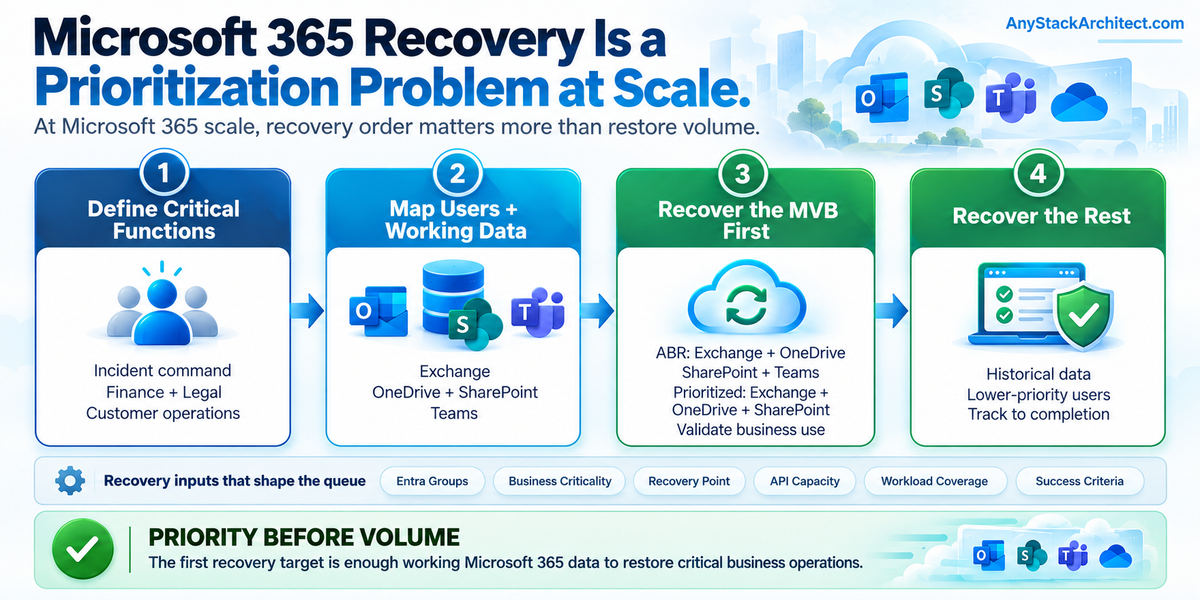
Recovery objective: Restore the minimum set of users, working data, and collaboration services required to resume critical business functions. Full tenant recovery can continue after the business is operating again.
A Tenant Is Not One Recovery Object
Microsoft 365 looks like one service from the user side. Recovery exposes several different workloads underneath it.
Exchange recovery deals with mailboxes, messages, folders, contacts, calendars, and archives. OneDrive recovery is file and folder oriented. SharePoint brings site collections, libraries, lists, files, list items, apps, and some permission state. Teams adds channels, conversations, attachments, and files, while some of the data a Team depends on also lives in SharePoint and other Microsoft 365 services.[1][13]
Rubrik can protect those workloads under one Microsoft 365 subscription, but the restore units are still different. RSC's protection hierarchy can apply an SLA Domain broadly at the subscription level and then override it at Exchange, OneDrive, SharePoint, Team, site, library, list, group, or individual-object levels depending on the workload.[2]
Protection scope answers, "what has a recovery point?" It does not answer, "what has to be back in the first hour?"
Architecture point I would not derive recovery order from the SLA hierarchy. A broad protection policy is useful because it reduces coverage gaps. Recovery priority needs a separate business model because the most important mailbox, SharePoint site, or OneDrive folder may not be the object with the most aggressive backup frequency.
Rubrik Already Exposes Different Recovery Modes
Day-to-day recovery and incident-scale recovery are not the same operation.
For a normal deletion or user mistake, RSC can recover individual Microsoft 365 objects from snapshots. Exchange items, OneDrive files and folders, SharePoint objects, and Teams content can be recovered without starting a tenant-wide event.[1][13]
Rubrik's documented mass-recovery workflow is aimed at a larger failure. It can recover multiple Exchange, SharePoint, and OneDrive objects through groups, with progress tracked as a single recovery event. The linked Rubrik mass-recovery guide describes support for up to 10,000 objects per group for each workload type, subject to workload-specific concurrency limits. It also describes Rubrik Support enablement for the mass-recovery UI or API. Confirm those limits and enablement steps against the documentation and feature availability for your RSC deployment before relying on them in a recovery runbook.[3]
Prioritized data recovery narrows that further. Rubrik documents prioritized recovery for Exchange, SharePoint, and OneDrive so a selected subset of important or recent data can be restored before the remaining data. The linked guide specifies Enterprise Edition for prioritized recovery and describes Rubrik Support enablement. Because those detailed guide pages could not be rechecked behind OnePass during this review, validate current licensing, enablement, and recovery options in your RSC deployment. Rubrik's SharePoint API procedure also carries a gradual-rollout notice.[3][4][15]
That progression matters:
- Granular recovery fixes a specific object or user problem.
- Mass recovery restores many users or objects as one incident workflow.
- Prioritized recovery restores a smaller, high-value subset first.
- Autonomous Business Recovery moves the priority decision into a prebuilt business-recovery plan and executes that plan during the incident.[7][8][9]
The technical restore operation becomes more useful as the scope gets closer to the business function that needs to return.
The Priority Unit Should Be the Business Function
A recovery plan built only around workload types usually starts with questions such as "Exchange first or SharePoint first?" That is too coarse for a large tenant.
Finance may need the CFO and controller mailboxes, a small set of OneDrive files, two SharePoint sites, and a Teams channel. Legal may need a different set of users and repositories. The incident-response team may need email, Teams, and a specific SharePoint evidence site before anyone else gets historical content back.
Rubrik's current Minimum Viable Business model takes this approach. The planning workflow starts with critical users and the Microsoft 365 applications and data they need, then builds a recovery scope around those relationships. Rubrik's current ABR material describes using Entra ID groups, backup metadata, file index data, Microsoft 365 audit signals, and workload activity to identify and execute the recovery of critical users and data first.[7][8]
Operational view A Minimum Viable Business is not operational if its users cannot authenticate. If Entra ID or a hybrid identity dependency is impaired by the incident, recover the authentication path far enough for those users to sign in before declaring the Microsoft 365 recovery usable.
Architecture point The useful recovery tier is not "Tier 1 Exchange." It is "these people must be able to perform this business function, and these are the Exchange, OneDrive, SharePoint, and Teams objects they require to do it."
That model also gives leadership something concrete to approve before the incident. A named recovery group with a defined scope is easier to govern than an emergency decision to "restore the important stuff first."
Recent Data Helps, but It Is Not the Policy
Large Microsoft 365 restores contain a lot of historical data that may be valuable without being immediately operational.
Rubrik's prioritized recovery features use this distinction directly. For OneDrive, for example, administrators can recover files modified within a recent time window before triggering recovery of the remaining data. Rubrik's documented Exchange and SharePoint prioritized-recovery APIs also support narrowing the first-pass scope by time.[4][14][15]
Rubrik's current ABR architecture applies the same idea at a higher level. The service prioritizes the critical users and data identified by the recovery plan, while less urgent content can continue in the background.[7][9]
I would still avoid turning "recent" into a universal recovery rule. A legal hold document that has not changed in a year can be more important than a file modified five minutes ago. A finance workbook may be critical because of who uses it, not because of its timestamp.
A strong priority model combines at least three dimensions:
- who needs the data;
- what business function the data supports;
- how much recent data is required to resume useful work.
Time is one filter. Business criticality is the decision.
The Workloads Do Not Share One Recovery Boundary
The recovery plan needs to preserve the differences among Microsoft 365 services.
| Workload | Rubrik recovery surface | At-scale consideration | Priority question |
|---|---|---|---|
| Exchange | Mailboxes, messages, folders, contacts, calendars; granular, mass, prioritized, and ABR recovery paths are documented across Rubrik's published materials. | Mailbox history can be large. Recent messages, contacts, and calendars may be enough for the first operational recovery tier. | Which users and how much recent mailbox state must return first? |
| OneDrive | Files and folders; granular, mass, prioritized, ABR, and Microsoft 365 Backup Storage recovery paths. | User storage can contain years of low-priority history mixed with a small active working set. | Which users and recent working files are required to resume work? |
| SharePoint | Site collections, libraries, lists, files, list items, apps, and some permission state; mass, prioritized, ABR, and Microsoft 365 Backup Storage paths. | One site serves several business functions. Restoring the entire site may take substantially more work than recovering the initial critical subset. | Which sites, libraries, and files support the first business functions back online? |
| Teams | Standard and private channels, conversations, attachments, and files through the standard RSC protection path; current ABR materials also include Teams. | Teams is collaboration context, not one isolated data store. The documented mass/prioritized and Microsoft 365 Backup Storage paths are centered on Exchange, OneDrive, and SharePoint. | Which channels and collaboration data are required for the critical teams to coordinate? |
Rubrik's standard Microsoft 365 snapshot protection covers Exchange, OneDrive, SharePoint, and Teams. The documented mass and prioritized recovery path names Exchange, SharePoint, and OneDrive. Microsoft 365 Backup Storage in RSC is also documented for Exchange mailboxes, OneDrive accounts, and SharePoint sites, not Teams.[1][3][5]
Current Rubrik ABR material presents business-aware recovery across Exchange, OneDrive, SharePoint, and Teams. That product-level statement is not a guarantee that every Teams item uses the same restore workflow; validate the available Teams recovery operations and prerequisites for the tenant.[7][9][13]
Operational view Do not assume a feature named "Microsoft 365 recovery" has the same workload coverage, recovery mode, license, or scale behavior across every Microsoft 365 service. Check the exact path you plan to use.
API Capacity Is Part of the RTO
A restore plan for Microsoft 365 is also a plan for how much work the Microsoft services will accept.
Microsoft documents throttling across Microsoft Graph and individual Microsoft 365 services. Throttling limits are scenario-specific rather than one universal tenant number. When a threshold is exceeded, Graph can return HTTP 429 and a Retry-After value, and SharePoint Online can return 429 or 503 responses for overloaded request patterns.[10][11]
That matters because large recovery events are write-heavy. A tool can have every recovery point available and still be limited by how quickly the destination service accepts object creation, updates, permission changes, mailbox writes, or SharePoint operations.
Rubrik's own current M365 recovery material frames API capacity as one of the reasons to restore the Minimum Viable Business first. ABR directs recovery effort toward the users and data in the approved plan instead of spending the first part of the incident restoring lower-priority content.[7][8]
Architecture point RTO for Microsoft 365 should not be written as if backup throughput is the only variable. Recovery scope, Microsoft service limits, destination-side behavior, and priority order all affect when useful business capability returns.
Microsoft 365 Backup Storage Is a Different Recovery Path
Rubrik also integrates with Microsoft 365 Backup Storage. This is not simply another checkbox on the same restore workflow.
Rubrik's linked Microsoft 365 Backup Storage guide describes a separately licensed solution using Microsoft's backup-storage APIs for Exchange, OneDrive, and SharePoint. RSC acts as the controller, while the protected data remains within the Microsoft 365 backup-storage service. The linked recovery guide describes in-place recovery and Microsoft-recommended express restore points for full-object recovery in SharePoint and OneDrive. Confirm the available operations and entitlements for the chosen tenant before designing around that path.[5][6]
That can be attractive for large-volume recovery, but it changes the architecture discussion. Teams coverage still belongs to the standard Rubrik Microsoft 365 path, and the protection policy, recovery controls, restore-point behavior, and licensing are different from Rubrik's standard Microsoft 365 Data Protection workflow.[1][5][6]
I would document which recovery path owns each workload instead of writing "Rubrik protects Microsoft 365" as one line in the DR plan.
Autonomous Business Recovery Executes a Business Priority Plan
The current Rubrik product direction goes beyond manually choosing a group during the incident.
Rubrik states that Autonomous Business Recovery for Microsoft 365 is generally available as of August 2026. Its current workflow is built around a prevalidated Minimum Viable Business plan that identifies critical users and data, maintains current relationship information, and executes the approved recovery scope during an incident rather than forcing the team to triage every object in real time.[7]
Rubrik's planning guidance describes defining critical users, mapping them to Exchange, OneDrive, SharePoint, and Teams, refining the recovery scope, and maintaining a standing playbook with estimated restore time. The execution workflow then restores the approved high-priority scope while the remaining tenant data can continue afterward.[7][8]
The automation is useful, but the hard decision is still organizational. Rubrik can analyze usage, relationships, and backup metadata. It cannot decide whether Payroll, Legal, customer support, executive communications, or a regulatory reporting function is more important to your business during a specific incident.
Architecture point The recovery plan should define business criticality before ABR is configured. Automation can execute a priority model. It should not be expected to invent the organization's priorities during the outage.
Build the Priority Model Before the Incident
I would expect a Microsoft 365 recovery design to name the priority groups before the first test.
A simple model might look like this:
- Priority 0: Incident command and platform recovery. Security, Microsoft 365 administration, identity administration, executive incident leadership, and legal response.
- Priority 1: Minimum viable business. The smallest group of users and data required to keep critical customer, financial, operational, or regulatory functions running.
- Priority 2: Core departments. Broader business units needed after the first operational state is established.
- Priority 3: Historical and lower-urgency data. Archives, inactive users, older working sets, and content that can return after core operations are stable.
The names will differ by company. The important part is that each tier has owners, users, workloads, data scope, and a success condition.
For each priority group I would record:
- Entra ID groups or another authoritative user grouping;
- Exchange users and the required mailbox window;
- OneDrive users and active working-data window;
- SharePoint sites, libraries, or critical content sets;
- Teams channels and collaboration requirements;
- the selected Rubrik recovery path;
- the target recovery point or incident-approved time boundary;
- who can authorize recovery;
- what proves the business function is usable.
That turns "restore Microsoft 365" into an ordered recovery plan.
Twelve Questions I Would Ask Before Signing Off
- Which users must be productive in the first hour, first four hours, and first day?
- Which business functions do those users support?
- Which Exchange, OneDrive, SharePoint, and Teams objects do those functions actually require?
- How much recent data is required for each group to work effectively?
- Which historical data can safely recover later?
- Are the priority groups represented cleanly in Entra ID or another source Rubrik can use?
- Which Rubrik recovery path applies to each workload: granular, mass, prioritized, ABR, or Microsoft 365 Backup Storage?
- Are mass or prioritized recovery features enabled and licensed in this RSC deployment if the design depends on them?
- Does the design account for Microsoft Graph and service-specific throttling during a large restore?
- How will Teams recovery be handled where a recovery path covers Exchange, OneDrive, and SharePoint but not Teams?
- Can priority users authenticate, and what user action or business transaction proves each priority group is actually operational?
- When the Minimum Viable Business is restored, who owns the background recovery of the rest of the tenant and how is progress reported?
If those answers do not exist, the organization has protected Microsoft 365 data but has not finished the Microsoft 365 recovery design.
The Bottom Line
Microsoft 365 recovery at scale is not a race to restore the largest number of objects. It is a decision about which people and data must return first.
Rubrik gives architects several recovery mechanisms: granular restores, documented mass and prioritized recovery, Microsoft 365 Backup Storage integration, and generally available Autonomous Business Recovery for a business-aware Minimum Viable Business workflow.[1][3][5][7]
The useful design work happens before any of those buttons are pressed. Define the critical users, map the data they need across Microsoft 365 services, decide how much recent state is enough to work, choose the recovery path for each workload, and validate the result as a business function rather than a restore count.
I would rather recover 200 people who can run the company than recover 20,000 users in an order nobody thought about.
Key Takeaways
- Microsoft 365 protection scope and Microsoft 365 recovery priority are separate design decisions.
- Granular, mass, prioritized, Microsoft 365 Backup Storage, and ABR recovery paths solve different recovery scopes and have different workload boundaries.
- Rubrik's documented mass and prioritized recovery paths focus on Exchange, OneDrive, and SharePoint; standard RSC protection and current ABR materials also cover Teams.
- Microsoft Graph and service-specific throttling are part of the recovery-time calculation for large incidents.
- Recent data is often the fastest way to restore useful work, but business criticality should decide what returns first.
- Microsoft 365 Backup Storage is a separate recovery path with separate licensing and documented coverage for Exchange, OneDrive, and SharePoint.
- Rubrik Autonomous Business Recovery for Microsoft 365 is generally available and turns a prebuilt Minimum Viable Business plan into an executable recovery workflow.
- The best first recovery target is the smallest set of users and data that can restore critical business operations while the rest of the tenant recovers in the background.
Source Notes
Source-link access note (October 22, 2026): Some Rubrik documentation links may redirect to Rubrik OnePass or require an authenticated session. These are the vendor's canonical documentation references; an authentication redirect is not confirmation that a particular page was independently opened or verified. Public Rubrik materials and accessible documentation were checked where possible. Verify current feature availability, support limits, and release status in your own Rubrik documentation session before making a production recovery decision.
Verification scope: Rubrik's August 2026 ABR announcement, its Microsoft 365 overview, and Microsoft's throttling guidance were checked directly. Detailed Rubrik guide claims supported by indexed official documentation were not revalidated behind OnePass. The SharePoint prioritized-recovery API rollout remains conditional. No lab test or measured RTO is claimed.