

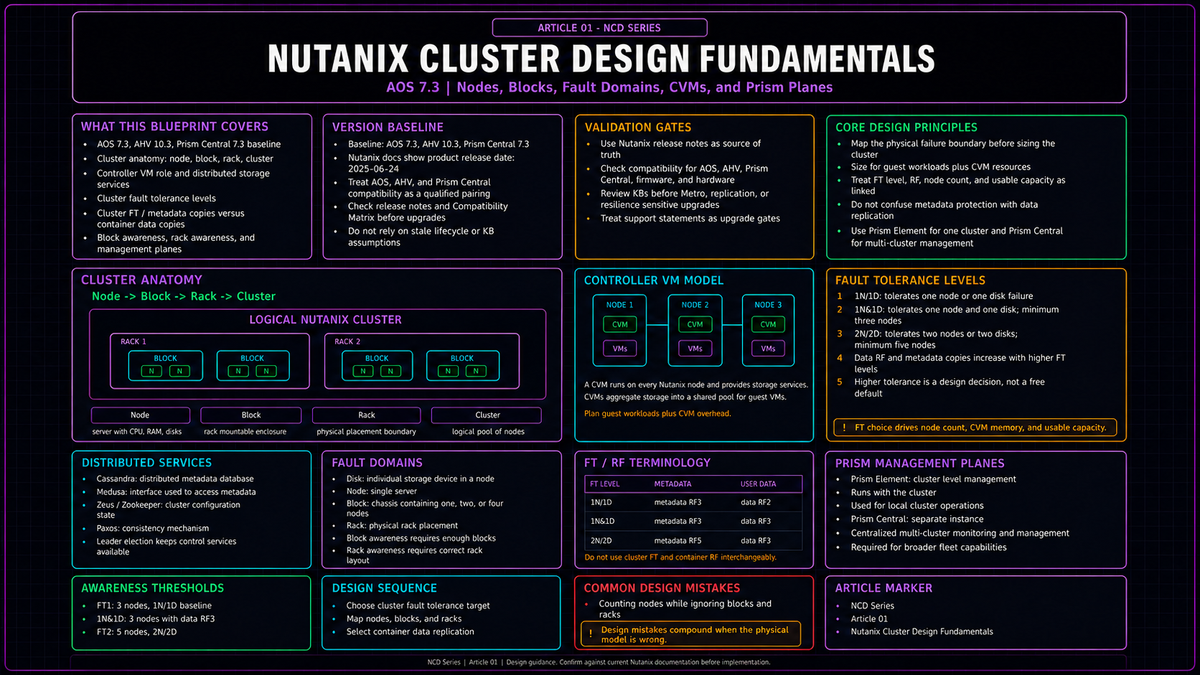
Every design decision you will make about a Nutanix cluster, from networking and storage to mobility and resilience, traces back to a small set of structural facts about how the platform is built. This article establishes those facts on the AOS 7.3 baseline. Get these right and the rest of the series has firm ground to stand on. Get them wrong and you will build a cluster that behaves in ways you did not predict the first time something fails.
This is the opening article of the Nutanix Cluster Design Fundamentals series (NCD). It is written for infrastructure architects who already operate clusters on other platforms and want a precise mental model of how Nutanix differs, not a marketing tour. The goal here is the conceptual spine: what a cluster is made of, what the Controller VM does, how the platform protects data and itself, and the difference between the two management planes you will interact with daily. Replica placement mechanics inside the storage fabric are covered in NCD-03. Prism Central sizing and scale out deployment are covered in NCD-10. Container level storage features land in NCD-04. This article gives you the vocabulary the rest of those discussions assume.
The version baseline
Fixing a version baseline matters because Nutanix changed its release model with the 7.0 family, and the support math is now predictable in a way it was not before. Starting with AOS 7.0 and Prism Central 2024.3, Nutanix moved its Cloud Infrastructure components to a unified release cadence: two feature releases per year, aligned across components, each carrying a 24 month lifecycle composed of 15 months of maintenance followed by nine months of support.
The baseline for this series is the set released on 24 June 2025: AOS 7.3, AHV 10.3, and Prism Central 7.3. Under the lifecycle math above, AOS 7.3 has maintenance through September 2026 and end of support life through June 2027. These three version numbers do not increment in lockstep by coincidence of value: AOS uses a 7.x line, AHV uses a 10.x line, and Prism Central tracks the AOS major. What matters operationally is that a given AOS release qualifies a specific AHV release, and you should treat the qualified pairing as the unit you deploy and upgrade, not the individual components in isolation.
Upgrade caveat worth knowing early
If you run AHV Metro or synchronous replication, check KB-20067 and the compatibility matrix before moving to any 7.3.1 maintenance build. Treat this as a release specific upgrade gate rather than a design rule. It does not change the fundamentals in this article, but it is exactly the kind of condition you verify before an upgrade. We return to Metro topology in NCD-12.
Security posture still has to be verified against the exact AOS build you deploy. This article treats AOS 7.3 as the architectural baseline, but CVM access controls, hardening settings, and release specific security defaults belong in the security article, where they can be checked against the active Security Guide and release notes for that build.
Cluster anatomy: node, block, rack, cluster
Nutanix uses four physical terms with precise meanings. Confusing them is the single most common source of resilience miscalculation, so they are worth stating exactly.
A node is a single server: CPU, memory, local drives, and a hypervisor. A block is the chassis that holds nodes, and a block contains either one, two, or four nodes depending on the platform. A rack is a physical unit containing one or more blocks. A cluster is the logical collection of nodes that pool their storage and present a single managed system.
The reason these distinctions carry weight is that a shared chassis is a shared failure boundary. A multi node block shares chassis level components such as power supplies, fans, front control panels, and backplane, depending on the platform generation. If the platform places two copies of the same data on two nodes that happen to live in the same block, a single chassis event can take both copies offline at once. The whole purpose of the fault domain machinery described below is to make the platform aware of these boundaries so it never lets that happen when you have asked it not to.

The Controller VM
The defining architectural choice in Nutanix is that storage is delivered by software running in a virtual machine on every node, not by a dedicated storage controller or array. That virtual machine is the Controller VM, commonly abbreviated CVM. One CVM runs on each node. Collectively, the CVMs form the distributed system that owns all storage services and most cluster intelligence.
When a guest VM issues a read or write, that I/O is served by the CVM on the same node wherever possible. The hypervisor hands storage traffic to its local CVM, and the CVM decides where data lives, maintains the copies, and acknowledges the write. Because every node carries a CVM, adding a node adds storage controllers and storage capacity at the same time. This is why the platform scales the way it does: there is no central controller to become a bottleneck, and there is no separate storage tier to size independently.
The CVM is not a black box you can ignore. It consumes real CPU and memory on each node, and the amount it needs depends on what the cluster is asked to do. A cluster running the higher resilience level discussed below requires the CVM to be sized with enough memory to support it. When you plan node resources you are planning for the guest workload plus the CVM, never the guest workload alone. Capacity math that forgets the CVM overhead is capacity math that comes up short, and we treat the headroom calculations properly in NCD-10.
The distributed services underneath
The CVMs run a set of cooperating services. You do not need the full internals to design a cluster, but two of them shape resilience decisions directly and belong in your model now.
Cluster metadata lives in a distributed store built on a heavily modified Cassandra, arranged as a ring and replicated to peers to keep it consistent and available. Strict consistency across the ring is enforced using the Paxos algorithm. Metadata is accessed through an interface called Medusa. The practical consequence is that metadata has its own replication behavior, separate from your data, which becomes important in the next section.
Cluster configuration, the inventory of hosts, addresses, and state, is held by a service built on Zookeeper. It runs on a small set of nodes, one elected as leader, and is accessed through an interface called Zeus. The leader receives requests and forwards them to its peers; if the leader stops responding, a new leader is elected automatically. This is the quorum machinery of the cluster, and it is the reason small clusters have minimum node counts that feel arbitrary until you remember that a quorum needs an odd number of voters to break ties.
The fault tolerance model
This is the heart of cluster design, and it is where careful vocabulary pays for itself. Nutanix protects two distinct things: the user VM data, and the cluster's own infrastructure data, meaning metadata and configuration. The level of protection is expressed as a Fault Tolerance level, and the failures it protects against are organized into fault domains.
Fault domains
A fault domain is a set of components that share a single point of failure. Nutanix recognizes four, in increasing scope:
| Fault domain | What it represents | Awareness behavior |
|---|---|---|
| Disk | A single drive in a node | Protected in a healthy supported configuration at the configured fault tolerance level |
| Node | A single server | Protected in a healthy supported configuration; the default fault domain when block awareness conditions are not met |
| Block | A chassis of one, two, or four nodes | Activated when minimum block counts are met, opt in or best effort |
| Rack | One or more blocks | Configured manually |
In a healthy supported configuration, the platform protects against disk and node failure at the configured fault tolerance level. Block awareness and rack awareness extend that protection to larger physical boundaries, but only when you have enough physical units to make it possible and, for racks, only when you turn it on. To place copies of data across separate blocks, you need separate blocks to place them on.
Fault Tolerance levels: FT1 and FT2
A cluster has a Fault Tolerance level that determines how many simultaneous component failures it can absorb without data loss or unavailability.
FT1, shown in current Prism language as 1N/1D (one node or one disk), means the cluster tolerates the failure of one component in a given fault domain: one disk, one node, or with block awareness enabled, one block. This is the default. It is appropriate for the large majority of clusters.
FT2, shown in current Prism language as 2N/2D (two nodes or two disks), means the cluster tolerates two simultaneous failures in a given fault domain. Data remains available through the loss of two nodes, or two blocks, or with rack fault tolerance, two racks, assuming the design has the required physical domains and a healthy supported configuration. VMs that were running on failed hosts still depend on compute HA behavior and available surviving resources to restart. FT2 buys you the headroom to survive a second failure while you are still recovering from the first, which on a large cluster is not a hypothetical, because the more nodes you run the more likely a coincident failure becomes.
FT2 is not free and it is not always available. It requires a minimum of five nodes in the cluster. The CVMs must be sized with enough memory to support it. And because protecting against two failures means keeping more copies, it consumes more capacity than FT1. You choose FT2 when the cost of an outage justifies the extra nodes and capacity, not by default.
Minimum cluster sizes and the edge case
The resilience levels above imply minimum node counts, and those minimums are part of cluster design rather than an afterthought. A standard cluster that wants node level fault tolerance needs at least three nodes, because the quorum services need an odd number of voters and three is the smallest set that survives losing one while retaining a majority. FT2 raises that floor to five nodes for the same quorum reason scaled up. These are not capacity numbers, they are availability numbers; you can have abundant storage on a small cluster and still lack the quorum to tolerate a failure cleanly. Two node Nutanix clusters are a supported ROBO design when deployed with the required external Witness VM, providing many of the resiliency features of a three node cluster, but they carry documented restrictions and are a special case topology rather than the baseline model this series is using.
The edge is where this gets interesting, and where the 7.x family changed the calculus. Distributed and remote sites often run with smaller footprints, but the important distinction is that this mode does not eliminate the three node requirement. One Node and One Disk cluster fault tolerance (1N&1D), available in the 7.x baseline, is an enhanced exactly three node option that keeps three data copies placed one per node, so it can withstand the simultaneous failure of one node and one disk. This is the point where a careful reader objects that three copies sounds like Redundancy Factor 3, which requires five nodes. The reconciliation is that the five node minimum governs the cluster Redundancy Factor 3 configuration (2N/2D), which is built to survive the loss of two entire nodes and still hold three copies. 1N&1D is a distinct mode: it keeps three copies on three nodes to survive one node plus one disk, not two full nodes, which is exactly why it fits a three node cluster. It carries documented limitations covered in the Nutanix Prism guide, and is a deliberate edge configuration rather than a substitute for a full three node cluster. If your design includes remote or branch locations, this is the capability that improves resilience at the edge, but it does not turn a one node or two node deployment into the equivalent of a full three node cluster. The detailed sizing and the tradeoffs of running at the edge belong to later articles, but the fundamental point is that minimum viable cluster size and the fault tolerance mode you select are deliberate design inputs, not fixed constants.
Redundancy Factor versus Replication Factor
These two terms are the most overloaded vocabulary in the Nutanix world, because both are expressed as the number 2 or 3, and casual writing uses them interchangeably. They are not the same thing, and a designer needs to keep them separate.
| Redundancy Factor | Replication Factor | |
|---|---|---|
| Scope | The cluster | The storage container |
| Governs | Cluster resilience and metadata copies | Number of copies of user data |
| Set on | Cluster wide; maps to the FT level | Per container; can differ between containers |
| Values | 2 or 3 | 2 or 3 |
At the cluster level, Nutanix uses cluster fault tolerance to define how many node or disk failures the cluster survives within the configured fault domain, and current Prism exposes this as 1N/1D, 1N&1D, and 2N/2D. Older and informal discussions describe the same thing as Redundancy Factor 2 or 3. In design terms, 1N/1D aligns with the familiar RF2 and FT1 model, 2N/2D aligns with the RF3 and FT2 model, and 1N&1D is the middle case covered above: still three nodes, but keeping three data copies to survive one node plus one disk. Replication Factor is the separate container level setting that decides how many copies of your data the fabric keeps, and here RF2 or RF3 means data copies, not the cluster fault tolerance mode. The relationship is a constraint: a cluster at Redundancy Factor 2 can only offer Replication Factor 2 on its containers, while a cluster at Redundancy Factor 3 can offer either Replication Factor 2 or Replication Factor 3, and you can mix them. One container at RF2 and another at RF3 on the same cluster is a supported and common arrangement.
Data and metadata are protected to different depths even within one setting. At data Replication Factor 2 the fabric keeps two copies of the data and three copies of the metadata. At data Replication Factor 3 it keeps three copies of the data and five copies of the metadata. Those five metadata copies apply to the full cluster Redundancy Factor 3 configuration, the five node 2N/2D mode. The three node 1N&1D mode keeps three data copies but holds metadata at three copies, because five metadata copies require five nodes to place them. Metadata replication is not independently configurable; it is derived from the data replication factor and the cluster's redundancy factor. The reason metadata is held more widely than data is that losing metadata is catastrophic in a way that losing one data replica is not, so the platform spends extra copies protecting the index that makes everything else findable. The exact placement of these replicas across the fabric is an NCD-03 topic; here the point is only that the two counts are different and deliberate.
The one line that prevents most confusion
Redundancy Factor is a property of the cluster and protects the cluster. Replication Factor is a property of a container and protects your data. They share the numbers 2 and 3, and nothing else.
Block awareness and rack awareness
Awareness is the mechanism that ties the fault domain concept to physical placement. With block awareness active, the fabric ensures that the copies of a piece of data, and the copies of metadata and configuration, are spread across separate blocks, so a block failure never takes the last copy with it. Rack awareness does the same one level up, across racks.
These do not switch on simply because you want them. Block awareness requires a minimum of three blocks to activate in the RF2 baseline without erasure coding; below that, the cluster falls back to node awareness. The three block floor exists to satisfy quorum: with copies and the deciding votes spread across three independent chassis, the cluster can lose one and still hold a majority. For the higher Fault Tolerance level, the bar rises to five blocks, consistent with the five node minimum for FT2. Block awareness operates either as an explicit opt in through Prism or on a best effort basis that activates automatically when documented conditions are met: storage tiers present across blocks, eligible replication factors, sufficient block counts, and adequate free space in the required storage tiers. Erasure coding can raise the block count needed to maintain block awareness, which is a storage efficiency topic for NCD-04. Uniformly populated blocks are still the cleaner design because they keep placement and capacity behavior predictable.
Rack awareness must be configured manually. Once enabled with enough racks for the selected protection level, data remains available through the loss of one rack at Replication Factor 2 or two racks at Replication Factor 3, because the redundant copies of data and metadata are kept on other racks. As with node failures, VM restart depends on compute HA behavior and available surviving resources. Rack awareness is the bridge between single chassis resilience and the multi site discussions in NCD-12, and it is worth knowing it exists even on clusters that will never use it.
| Goal | Minimum requirement |
|---|---|
| 1N/1D fault tolerance (tolerate one node or one disk) | Three nodes; RF2 containers by default |
| 1N&1D fault tolerance (tolerate one node plus one disk) | Three nodes; keeps three data copies, one per node |
| 2N/2D fault tolerance, FT2 (tolerate two nodes or two disks) | Five nodes; RF3; CVM memory sized for it |
| Block awareness, FT1 | Three blocks |
| Block awareness, FT2 | Five blocks |
| Rack awareness | Configured manually; sufficient racks for the chosen FT level |
The two management planes: Prism Element and Prism Central
Nutanix presents two distinct management surfaces, and understanding which is which is foundational because nearly every operational task in the rest of this series happens in one or the other.
Prism Element is the per cluster management plane. It runs on the cluster itself, served by the CVMs, and it manages exactly one cluster. Every Nutanix cluster has a Prism Element whether or not anything else is deployed. If you have a single cluster and no broader estate, Prism Element is all you strictly need to run it.
Prism Central is the multi cluster management plane. It is a separate deployment, delivered as one or more VMs, that registers clusters and gives you a single place to manage many of them: fleet wide visibility, the home for the broader management services, and the point from which features that span clusters are driven. A single cluster shop can run without Prism Central. The moment you want centralized operations across more than one cluster, or capabilities that only live in Prism Central, Prism Central becomes the management plane for that work.
The design decision this raises, how large to make Prism Central and whether to deploy it as a scale out instance, is a real one, but it is a sizing and lifecycle decision rather than a fundamentals decision, so it lives in NCD-10. What you need here is the clean split: Prism Element manages a cluster and ships with it; Prism Central manages clusters and is deployed separately. When a later article says to do something in Prism Central, that now means something specific to you.

Putting the fundamentals to work
None of the above is academic. A handful of design questions on every new cluster are answered directly by the concepts in this article, and it is worth walking the sequence once so the connections are explicit.
Work that sequence and the cluster you stand up behaves the way you expect when hardware fails, which is the entire point of designing it deliberately rather than accepting defaults and discovering the consequences during an incident. Every later article in this series, networking, the storage fabric, mobility, updates, security, protection, and multi site resilience, assumes you carry these fundamentals into it. NCD-02 picks up the next layer: how AHV networking is built, and the design choices that govern how traffic moves in and out of the cluster.
Key Takeaways
- The series baseline is AOS 7.3 with AHV 10.3 and Prism Central 7.3, released June 2025, on a 24 month lifecycle (15 months maintenance, nine months support): maintenance through September 2026, end of support life through June 2027. Deploy and upgrade the qualified pairing as a unit.
- A node is a server, a block is a chassis of one, two, or four nodes, a rack holds blocks, and a cluster spans them. Shared chassis are shared failure boundaries, which is why fault domain awareness exists.
- One Controller VM runs on every node and delivers all storage services. Size each node for the guest workload plus the CVM, never the workload alone.
- Fault Tolerance level sets how many simultaneous failures the cluster survives: FT1 tolerates one, FT2 tolerates two and requires a minimum of five nodes plus extra capacity.
- Redundancy Factor is a cluster property that protects the cluster and its metadata; Replication Factor is a container property that protects your data. They share only the numbers 2 and 3. RF2 keeps two data and three metadata copies; RF3 keeps three data and five metadata copies.
- Block awareness needs three blocks for FT1 and five for FT2 in the base RF model; rack awareness is manual. Erasure coding can raise block count requirements, and below the block threshold the cluster protects at node level.
- Prism Element manages a single cluster and ships with it. Prism Central is a separate deployment for centralized multi cluster operations and Prism Central only services.