

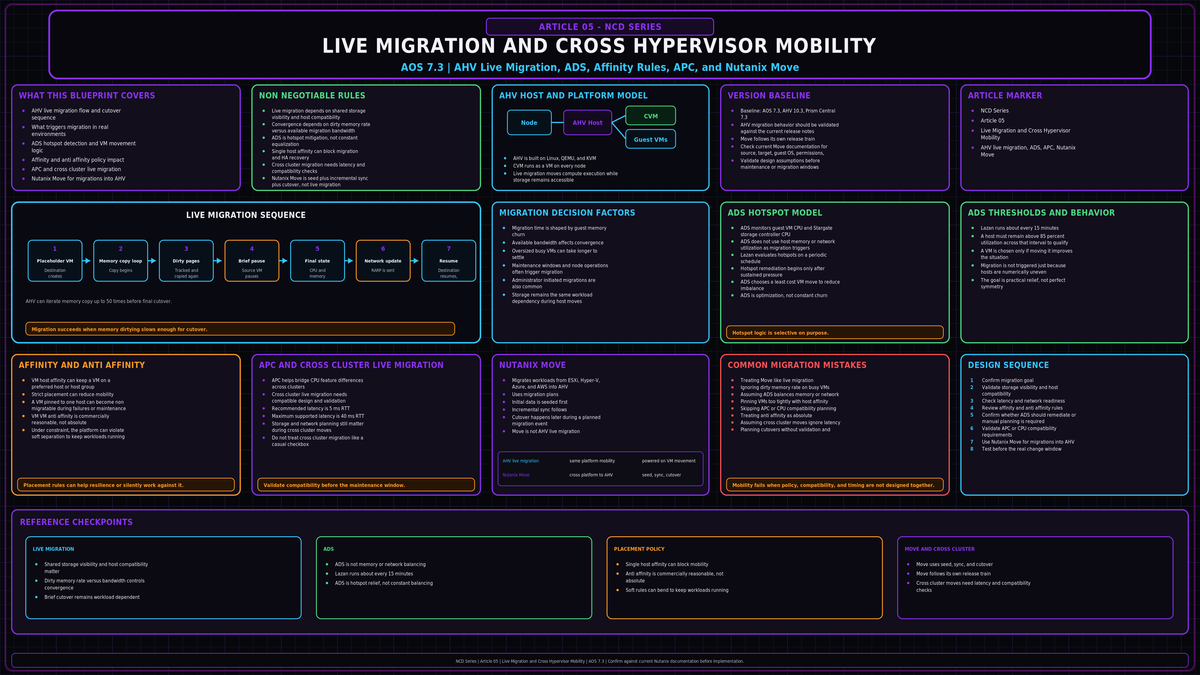
Live migration is the feature you lean on every time you patch a host, every time a workload spikes, and every time you retire old hardware. On AHV it is part of the platform, not an add on. This article covers how AHV live migration actually runs, what triggers it, how the Acropolis Dynamic Scheduler decides what to move, and how you get a workload onto AHV from another hypervisor in the first place. Baseline is AOS 7.3 with AHV 10.3.
Sources: nutanixbible.com (Book of AHV Architecture), portal.nutanix.com (AHV Administration Guide, Nutanix Move documentation), next.nutanix.com. Verify any version specific maximums against the AOS 7.3 Configuration Maximums page before you design to them.
The KVM foundation under AHV
AHV is Linux plus QEMU plus KVM. Every guest runs as a qemu-kvm process using hardware assisted virtualization. AOS talks to the hypervisor through libvirtd, and the Controller VM runs as a VM with its storage devices presented over PCI passthrough. That is the whole stack: a KVM kernel module, libvirt as the management layer, and one QEMU process per running VM.
This matters for migration because a live migration is a QEMU and libvirt operation that AOS orchestrates. The same machinery gives you processor generation leveling and the iterative memory copy that makes a migration safe. Nothing here is a bolt on appliance. It is the hypervisor doing what KVM does, coordinated cluster wide by AOS.
How an AHV live migration runs
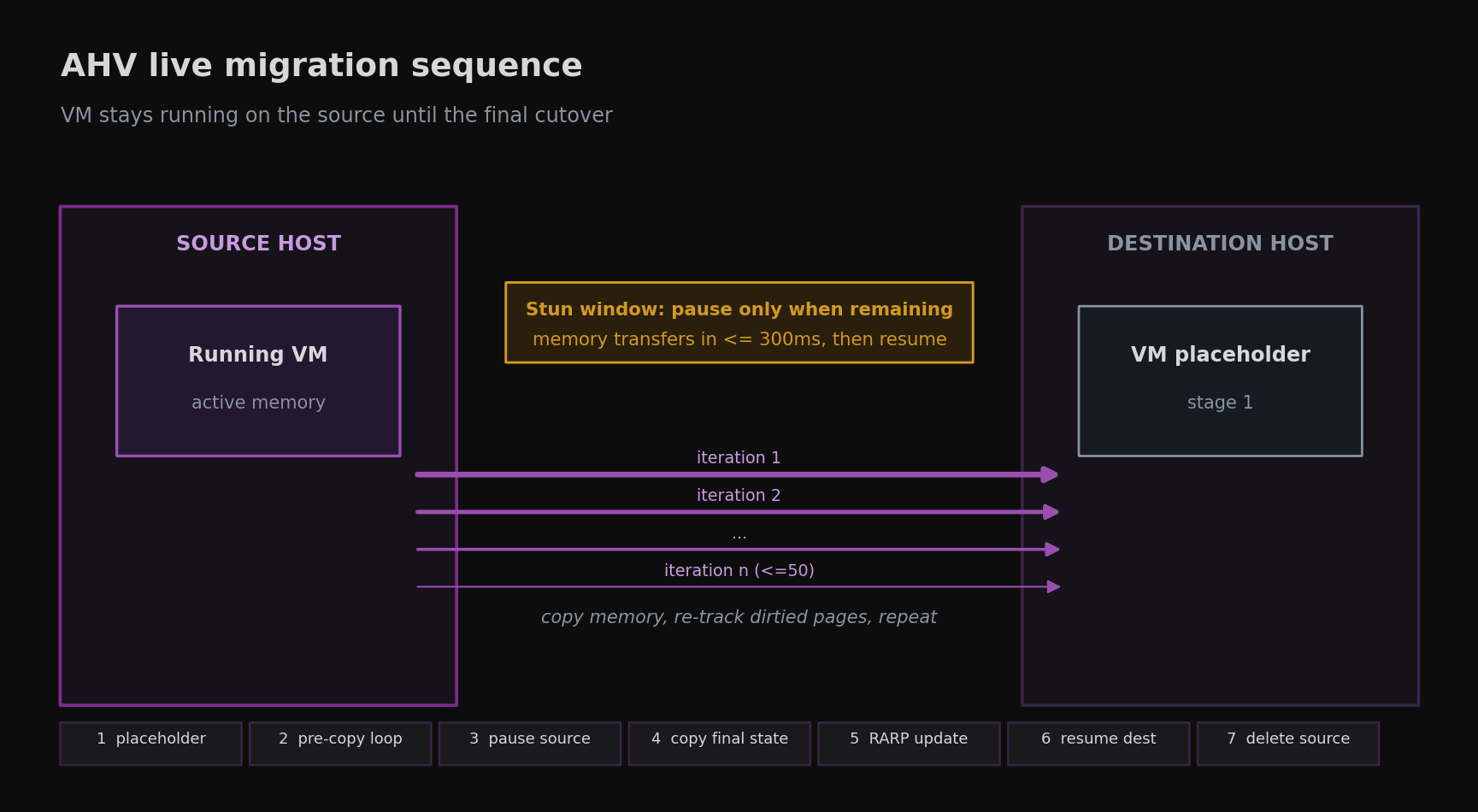
Live migration moves a powered on VM from one host to another with no workload interruption, whether an administrator or an automated process starts it. The VM keeps serving traffic on the source host through almost the entire operation. There are seven stages.
- 1A VM placeholder is created on the destination host.
- 2The source VM memory is copied to the destination, iteratively, while the VM keeps running.
- 3The VM is paused on the source host.
- 4The final VM state is copied to the destination placeholder.
- 5The network switches are updated so traffic follows the VM.
- 6The VM resumes on the destination host.
- 7The paused copy on the source host is deleted.
The iterative memory copy
Stage 2 is where migrations succeed or fail. AHV copies the VM memory over the network in passes, up to 50 of them as documented. Because the VM is still running, it keeps dirtying pages during each pass. After every pass AHV looks at how much memory still needs to go across and the transfer rate it is achieving, then decides whether another pass is needed or whether it can move on. The rate at which the guest dirties memory matters more than how much memory the VM has. AHV will deliberately slow the guest down to let the copy catch up.
The stun window
The source VM is only paused once AHV calculates that the remaining memory can transfer in 300ms or less. That is the maximum stun window, and it is what keeps the VM responsive on the destination after a very short pause. If the remaining memory cannot move inside that window after the final pass, the migration can abort with a failure to converge error. ADS, a host evacuation, or you can retry it.
When the VM comes up on the destination, AHV sends a RARP broadcast onto the subnet so the physical switches relearn where that MAC address now lives. That is what keeps TCP connections from dropping across the move.
The VMs that fail to converge are large memory, write heavy VMs. A busy database changing memory faster than the migration network can drain it is the classic case. Your ceiling is set by guest memory write rate against migration network bandwidth, not by raw RAM size. If a host will not drain during a maintenance window, this is usually why.
What triggers a live migration
Migrations happen for four reasons, and most of them are not manual.
- Maintenance operations. Putting a host into maintenance mode evacuates its VMs first by live migrating them elsewhere. Every rolling AOS and AHV upgrade does this under the covers. Cluster updates are their own topic, covered in NCD-06.
- ADS workload balancing. The scheduler moves VMs to clear host hotspots. Covered in the next section.
- Node expansion. Adding nodes gives ADS room to redistribute placement across the larger cluster.
- Administrator requests. A manual migration from Prism or from
acli, usually to stage hardware work or test a path.
Maintenance mode is the one to understand cold. Enter it on a host, AHV live migrates every VM off, you do the work, you exit, and the host rejoins the placement pool. The trap is a VM that cannot be migrated off, which brings us to affinity.
The Acropolis Dynamic Scheduler
The Acropolis Dynamic Scheduler, ADS, is the placement and migration brain of the cluster. It runs in the background at all times. Its job is broader than load balancing:
- Initial VM placement. Choosing the host for a new VM, and defragmenting placement across the cluster if needed to make room.
- Hotspot mitigation. Watching every host and resolving a hotspot when one appears.
- Policy enforcement. Moving VMs in the background to respect affinity and anti affinity rules.
- High availability guarantees. When HA is enabled, keeping placement such that every host failure can be absorbed.
- GPU management. Placing VMs against NVIDIA vGPU profiles.
The service that implements ADS on AHV is Lazan. A Lazan manager gathers statistics from the components it watches, a Lazan solver checks those statistics for anomalies and works out whether and how to resolve them, and the manager then runs the resulting tasks, such as VM migrations.
What it watches, and when it acts
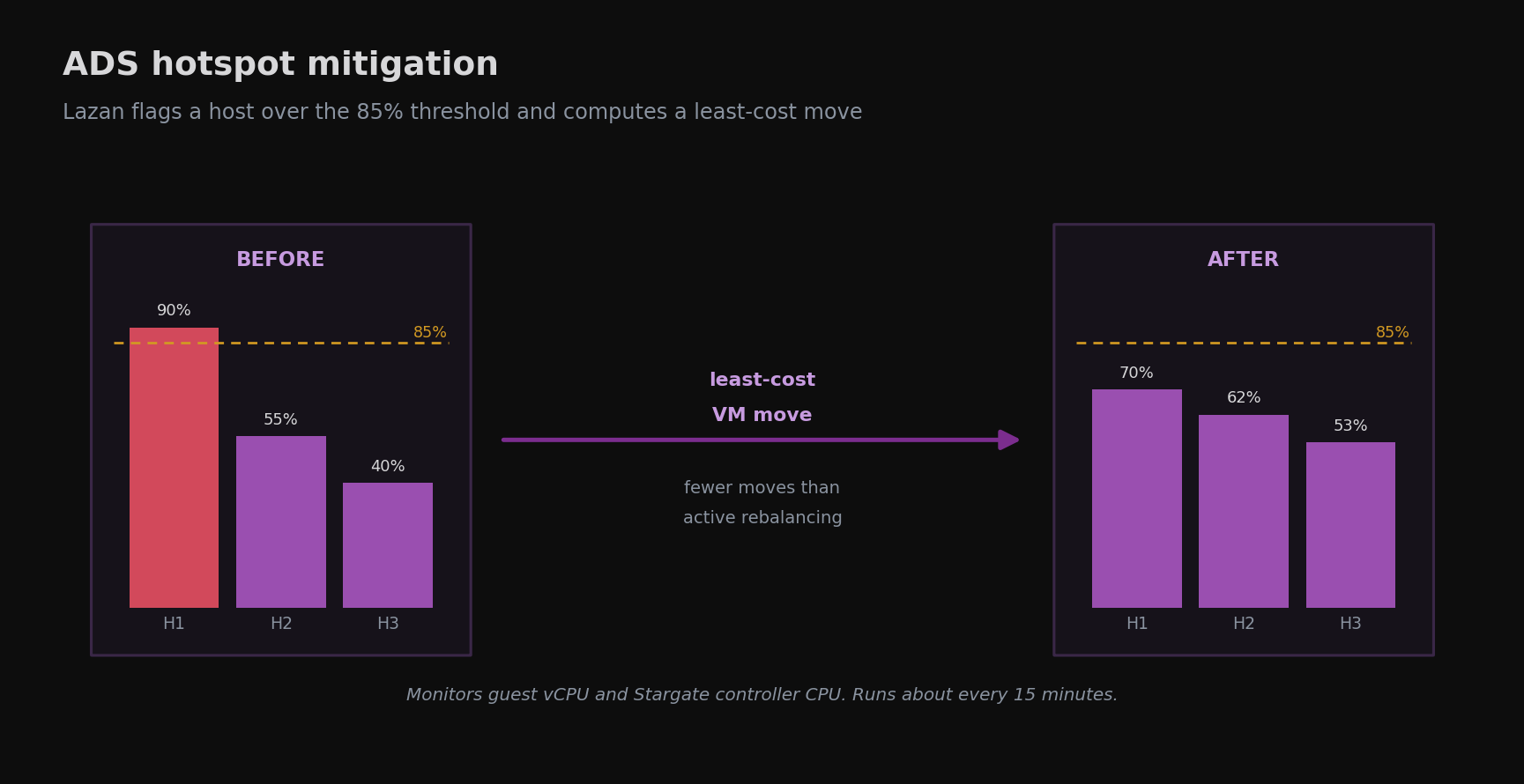
Lazan monitors guest vCPU usage and Stargate storage controller CPU usage per VM or iSCSI target. It does not load balance on memory usage, but it keeps every migration plan inside memory limits, including HA reservations. A host that stays above 85 percent for the 15 minute analysis window triggers a migration plan, and Lazan runs on roughly that 15 minute cadence.
ADS puts a penalty on movement and prefers the lowest cost move that resolves the problem. The result is far fewer migrations than a constant rebalancer would make. It also will not move a VM blindly. If there is an obvious hotspot but no move resolves it without creating a new one, for example a single large VM saturating its host while no other host can absorb it, ADS leaves placement alone and raises an alert instead.
Disabling it
ADS is enabled by default and Nutanix recommends leaving it on. You can disable it from a CVM with acli ads.update enable=false, but the contention checks keep running in the background and still raise alerts. Nothing gets moved automatically once it is off, so you own remediation by hand.
ADS is hotspot mitigation, not continuous balancing in the style of VMware DRS. Do not expect evenly loaded hosts. Expect no sustained hotspots above the threshold. Designing around perfectly level utilization will leave you disappointed and will tempt you to disable the one thing that protects you from contention.
Affinity and anti affinity
AHV gives you two placement controls, and both shape every migration and HA decision the scheduler makes.
VM host affinity
VM host affinity ties a VM to a host or a group of hosts so it only runs there. The common reasons are socket locked software licensing, where you must limit how many hosts an application can run on, and appliances bound to specific hardware.
A VM pinned to one host cannot live migrate off it. That host cannot be evacuated for maintenance without powering the VM down, and HA cannot restart that VM elsewhere if the host fails. Pin to a group of hosts wherever the license model allows it, never to a single host, unless you accept that the VM is offline for every host maintenance event.
VM anti affinity
VM anti affinity declares that a named set of VMs should not run on the same host. Use it to keep the members of a clustered or replicated tier apart, so one host failure does not take out database replicas, domain controllers, or load balanced front ends all at once.
There is one behavior you must design around. When the cluster becomes constrained, AHV overrides anti affinity to keep the VMs running. Availability of the VM wins over separation. Anti affinity is therefore best effort under pressure, not a hard guarantee. The way to keep it honest is to size the cluster so that, in your worst tolerated failure case, there is always somewhere for the separated VMs to go without breaking the rule.
Processor compatibility and migration between clusters
Mixed CPU generations inside one cluster are supported, and migration still works across them. AHV finds the lowest processor generation in the cluster and constrains every QEMU domain to that feature level, the same idea as VMware Enhanced vMotion Compatibility. Every VM then sees a feature set that exists on all hosts, so it can land anywhere.
Advanced Processor Compatibility, APC, improves on that. It lets a cluster present a consistent CPU model so you are not permanently held to the lowest common denominator across hardware refreshes, and it lets you set a baseline CPU model per VM for on demand live migration to a different generation of hardware, including to another cluster.
Live migration between clusters
You can live migrate a running VM to another physical cluster, in the same location or a different one, to rebalance workloads or to drain a cluster for maintenance. Nutanix recommends a network with 5ms of latency between the clusters and supports up to 40ms.
Live migration between clusters moves a running VM. It is not DR failover, it is not replication, and it does not create a recovery point. The same convergence math applies over the longer link, so it suits planned mobility, not shoving busy VMs across a slow path on a whim. Build real data protection separately. Snapshots and replication are covered in NCD-08.
Getting workloads onto AHV from another hypervisor
The supported tool for moving VMs onto AHV from another hypervisor is Nutanix Move, a downloadable appliance you run close to the destination. It is separate from AOS and you upgrade it on its own track. Move is on its own release train. Use the current Move guide and release notes for the migration source, target, guest OS, VirtIO, permissions, and upgrade path you are designing around. For this article, the architecture point is simple: Move is a seed plus incremental sync plus cutover tool, not AHV live migration.
| Source | Target |
|---|---|
| VMware ESXi | AHV |
| Microsoft Hyper-V | AHV |
| Microsoft Azure | AHV (and ESXi on Nutanix) |
| AWS EC2 | AHV (and ESXi on Nutanix) |
| VMware Cloud on AWS | AHV and NC2 on AWS |
| AHV | AWS EC2 |
How Move works
Move is largely agentless. It seeds a full copy of each source VM disk onto AHV, then keeps that copy current using incremental change tracking while the source VM keeps running. The only downtime is the cutover: the source is quiesced, the last delta is shipped, and the VM boots on AHV. Move injects the VirtIO drivers the guest needs to run on AHV as part of the process.
Move details worth checking before you deploy it:
- Direct in place upgrade from Move 5.6.0. Older 5.4.x and 5.5.x come forward through migration.
- It can carry VMware NSX security policies into Nutanix Flow Network Security.
- It reserves
172.17.0.0/16and172.18.0.0/16for internal services, so do not overlap those ranges. - ESXi sources need the Cryptographic Operations: Direct Access permission granted to the Move service account.
- The supported VirtIO version is 1.2.4.
There is always a cutover. It is planned and short, but it is real downtime, and it is per VM. Migrate in waves, validate that each guest boots and the application comes up before you sign off, and keep the source VM intact until you have. Do not promise the business a zero downtime hypervisor change with Move.
Do not assume you can flip an existing ESXi cluster to AHV in place. Treat Nutanix Move as the supported, documented migration path. If you are considering any in place conversion option, confirm whether it is supported on your specific AOS 7.3 build with Nutanix before you design around it.
Running ESXi on Nutanix without migrating
If you are running ESXi on Nutanix hardware, AOS lets you perform common VM operations from Prism, so you are not forced into vCenter for everyday work. That is hypervisor coexistence on the same platform, not a migration, but it is worth knowing when you are planning a phased move rather than a single cutover.
Common design mistakes
VM host affinity to one host means that host cannot be evacuated and HA cannot restart the VM elsewhere. Pin to a group, not a host, unless you accept downtime on every maintenance event.
Under constraint AHV breaks anti affinity to keep VMs up. Size the cluster so your worst tolerated failure case still has room to honor the rule, rather than assuming the rule holds.
A VM dirtying memory faster than the migration network can drain it will not converge, will stall your patch window, or will force a power cycle. Watch guest memory write rate and migration bandwidth, not RAM size alone.
ADS mitigates hotspots above 85 percent. It does not level a lightly loaded cluster and it is not trying to. Designing around even host utilization sets a target ADS will never hit.
Turn ADS off and you lose automatic hotspot resolution and HA aware placement, while keeping only the alerts. If you need placement control, use affinity rules. Do not disable the scheduler.
Live migration moves a running VM for planned mobility. It is not replication and not a recovery point. Build data protection separately and do not let a mobility feature stand in for it.
Key Takeaways
- AHV live migration is a QEMU and libvirt operation: an iterative memory copy, a 300ms stun window, and a RARP broadcast to relearn the network. Convergence depends on guest memory write rate against migration bandwidth, not RAM size.
- Migrations are triggered by maintenance, ADS, node expansion, and manual requests. Maintenance mode drains a host by live migrating its VMs off it.
- ADS, implemented by Lazan, mitigates host hotspots above 85 percent on a roughly 15 minute cadence, watching guest and Stargate CPU, with cost minimized plans. It is hotspot mitigation, not continuous balancing.
- VM host affinity pins placement, so watch single host pinning. VM anti affinity separates VMs but is overridden when the cluster is constrained.
- CPU leveling and APC let VMs migrate across processor generations. Live migration between clusters is supported at 5ms recommended and 40ms maximum latency, and it is not a DR substitute.
- Nutanix Move 6.0 is the supported tool for moving VMs onto AHV from ESXi, Hyper-V, Azure, AWS, and VMware Cloud on AWS. It is a seed plus incremental copy with a short cutover, not live migration.