

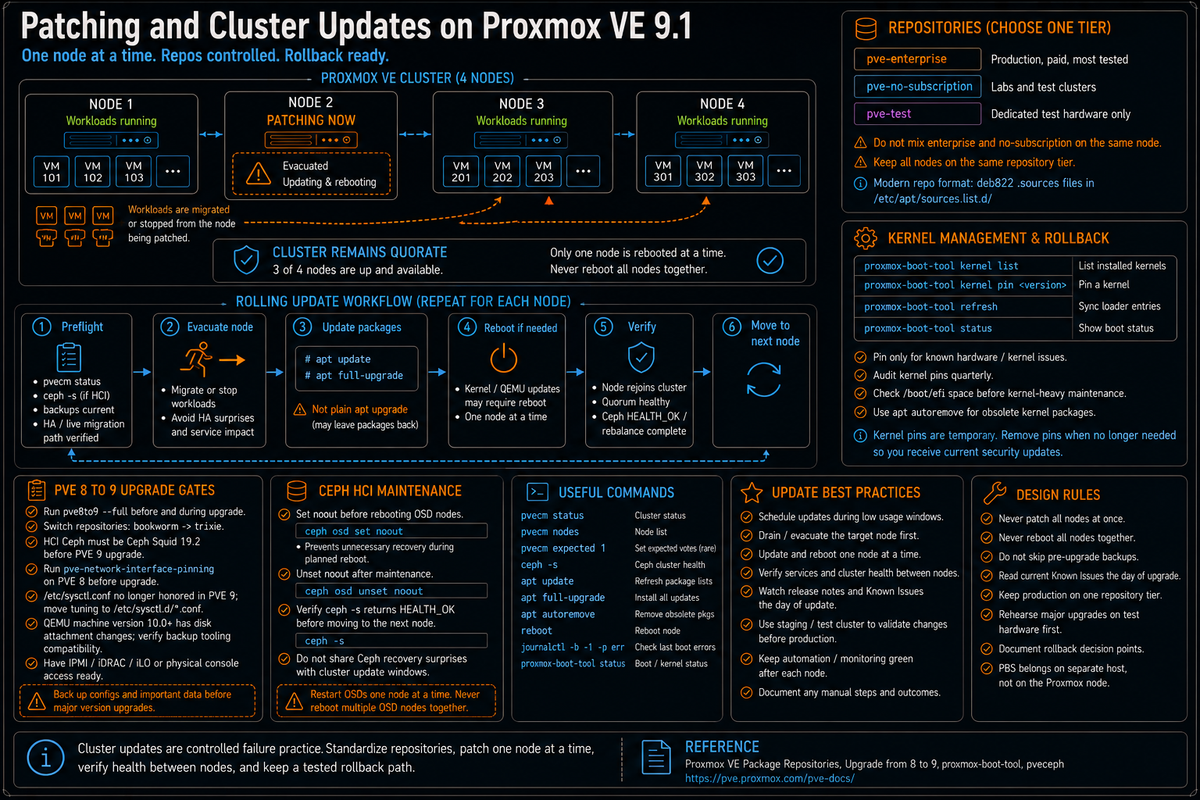
Article 6 in the Proxmox VE Cluster Design Fundamentals for v9.1 series. PVCD-05 covered VM mobility within the cluster. This article covers the apt repository options (no subscription, test, enterprise), kernel pinning with proxmox-boot-tool, rolling cluster updates, the 8 to 9 upgrade path with its known issues, and the operational rhythm that keeps a Proxmox cluster current without breaking it.
Patching a Proxmox cluster looks straightforward at the apt level and gets complicated quickly when you remember that the host is doing four jobs at once. It is a Debian system that needs Debian security updates. It is a hypervisor with QEMU and KVM kernel modules that get fixes regularly. It is a cluster member that has to stay version compatible with its peers. And on hyperconverged setups it is a Ceph node where Ceph version drift across nodes can break the cluster.
This article walks the four moving pieces: which apt repository to use, how to pin or skip kernels that have known issues, how to do a rolling update without breaking quorum or HA, and what to do when the major version upgrade comes around. Series target version is Proxmox VE 9.1 on Debian 13 Trixie. Every claim below is sourced to the Package Repositories wiki, the Upgrade from 8 to 9 wiki, the proxmox-boot-tool man page, or linked Proxmox forum threads with Proxmox staff responses.
The repository decision
Per the Package Repositories wiki, Proxmox VE offers three primary repositories plus a Ceph repository.
| Repository | Purpose | Subscription | Stability |
|---|---|---|---|
| pve-enterprise | Production. Receives updates after testing in pve-no-subscription. | Required | Most stable. Updates arrive after additional testing and feedback. |
| pve-no-subscription | Freely available repository for labs, test clusters, and environments without enterprise repo access. | Not required | Less heavily tested than enterprise. Use deliberately, not by accident. |
| pve-test | Developer and test repository. New packages land here first. | Not required | Use only on dedicated test infrastructure. |
| Ceph (enterprise or no subscription) | Ceph packages tracked separately from the PVE meta package. | Enterprise version requires subscription | Pinned to a Ceph release (Squid, Reef, etc). |
Per the Repositories wiki, repositories are configured in /etc/apt/sources.list (legacy single line format) or in .sources files placed in /etc/apt/sources.list.d/ (modern deb822 multi line format). Since Proxmox VE 7, the web UI shows repository state at Datacenter, Node, Repositories.
The right answer for most clusters: pve-enterprise on production, pve-no-subscription on labs and test clusters, pve-test only on dedicated test hardware. Mixing pve-enterprise and pve-no-subscription on the same node is not supported and produces unpredictable upgrade behavior.
Per a Proxmox staff forum reply: running PVE and PBS on the same host is generally not recommended, and the package and kernel behavior may be outside the combinations normally validated for the enterprise repository. If your design requires PBS, run it on a separate host. PBS is well documented in PVCD-08.
deb822 sources file format
Per the Package Repositories wiki, the modern deb822 format for the no subscription repository:
For the Ceph Squid no subscription repository (used on hyperconverged 9.x clusters):
Per the wiki, the keyring file /usr/share/keyrings/proxmox-archive-keyring.gpg is installed automatically by the Proxmox VE ISO. On a Proxmox installed on top of Debian (less common), the wiki documents the install steps for the keyring.
Kernel pinning with proxmox-boot-tool
Per the Proxmox VE documentation, Proxmox ships kernels that follow the Ubuntu HWE cadence. PVE 9.1 originally shipped with kernel 6.17 as the stable default. Proxmox later introduced the 7.0 kernel for the 9 series and began rolling it out through test and no subscription repositories, with 7.0 planned as the default for PVE 9.2 and PBS 4.2. Check the repository you actually use before treating a kernel as current.
Per a Proxmox staff forum announcement: this follows our tradition of upgrading the Proxmox VE kernel to match the current Ubuntu version until we reach an Ubuntu LTS release, at which point we will only provide newer kernels as an opt in option. The 7.0 kernel is based on the upcoming Ubuntu 26.04 release.
The reason kernel pinning matters: kernel upgrades occasionally break specific hardware combinations, drivers, or workloads (NVIDIA vGPU, certain SR-IOV configurations, edge case PCI passthrough scenarios). When a known issue affects your hardware, you want to keep the working kernel until the issue is fixed.
proxmox-boot-tool kernel pin
Per a Proxmox staff forum reply, the syntax to pin a specific kernel as the default boot:
The list subcommand shows installed kernels. The pin subcommand fixes a specific kernel as the boot default until unpin is called. After pin or unpin, run proxmox-boot-tool refresh to update the bootloader configuration on all configured boot disks.
Per Proxmox documentation, the proxmox-boot-tool is the canonical tool for managing the Proxmox VE bootloader configuration when ZFS or systemd-boot are in use. For traditional GRUB on EXT4 root, the tool still works and updates GRUB.
Per the Proxmox Roadmap (Known Issues and Breaking Changes section): NVIDIA vGPU was incompatible with kernel 6.17 at the PVE 9.1 release. As of January 2026, NVIDIA vGPU driver 19.4 became compatible with kernel 6.17, so the upgrade path is now to update to NVIDIA vGPU 19.4 or later before upgrading to PVE 9.1. Per the same Roadmap: some users have reported failure to boot kernel 6.17 and machine check errors on certain Dell PowerEdge servers, with kernel 6.14 booting successfully on the same hardware. Per the Roadmap, enabling SR-IOV Global and I/OAT DMA in firmware reportedly helps; if it does not, Proxmox recommends pinning the 6.14 kernel.
Per the Roadmap, AMD systems running kernel 6.17.9 or newer without an active microcode update will disable the RDSEED32 CPU bit, which causes QEMU guests with CPU types that expose that bit (for example EPYC or EPYC-v4) to fail to start. The fix is the amd64-microcode package version 3.20251202.1~bpo13+1 or newer combined with a BIOS that contains the Entrysign vulnerability fix. Mitigation is to use a CPU type that is not affected (for example host or the default x86-64-v2-AES). Always check the Roadmap Known Issues section and the Proxmox forum sticky threads for the kernel you are about to install.
Rolling cluster updates
The point of having a cluster is that you can update one node at a time without VM downtime. The sequence matters because doing it wrong creates HA fence events, replication breakage, or quorum loss.
Pre flight checks per the wiki
Per the Upgrade from 8 to 9 wiki, before any major upgrade:
- Run the official upgrade checklist:
pve8to9 --fullis the supported pre flight tool. Run it before and during the major upgrade workflow; it surfaces version mismatches, repository state, configuration issues, and known compatibility blockers. - Verify cluster health:
pvecm statusshows quorate, all expected nodes Online. - Check Ceph health if hyperconverged:
ceph -sshows HEALTH_OK or document any existing warnings. - Verify all VMs in HA groups have working live migration paths to other nodes.
- Verify backups are current. The Proxmox upgrade wiki recommends a complete backup of all VMs before any major version upgrade.
- Read the latest version of the upgrade guide. The wiki notes Known Issues sections that change as Proxmox identifies new compatibility problems during the upgrade window.
The rolling update sequence
The standard rolling update for a single node within a major version:
Per the Upgrade from 8 to 9 wiki, use apt full-upgrade rather than apt upgrade. Full upgrade allows packages to be removed if needed to install upgrades, which Proxmox upgrades sometimes require. Plain upgrade leaves dependencies stuck and produces partial upgrade state.
For Ceph hyperconverged clusters, set the noout flag before rebooting any OSD node to prevent unnecessary recovery during the maintenance window. Per PVCD-04 and the Ceph wiki:
VM level considerations
Per the Proxmox 8 to 9 upgrade wiki: in preparation for features like snapshots on thick LVM, it was necessary to change how Proxmox VE attaches disks to QEMU internally. This is in effect for virtual machines using a QEMU machine version 10.0 or higher.
The implication: VMs with QEMU machine version 10.0 or higher use a new disk attachment model. Per the upgrade wiki at the time of release, Veeam had not yet adapted to these changes. Per the Veeam R&D forums, Veeam Plug-in for Proxmox VE 12.1.5.17 (released September 2025) added official support for Proxmox VE 9. Either pin the affected VMs to machine version 9.2+pve1, upgrade Veeam to 12.1.5.17 or later, or postpone the upgrade until third party tools you depend on catch up.
The 8 to 9 upgrade
Major version upgrades are different from rolling updates. PVE 9 is on Debian 13 Trixie; PVE 8 was on Debian 12 Bookworm. The upgrade involves a Debian distribution change in addition to Proxmox version change. Per the Upgrade from 8 to 9 wiki, the documented process is the canonical reference.
Repository transition
Per the wiki, the 8 to 9 upgrade requires switching all configured repositories from bookworm to trixie suite, and from PVE 8 components to PVE 9 components. The wiki provides step by step cat > /etc/apt/sources.list.d/... blocks for each repository.
After updating repositories, run apt update followed by apt policy to verify the new repositories are picked up correctly. The wiki notes: "make sure that apt picks it up correctly with apt update followed by apt policy."
Ceph version constraint
Per the upgrade wiki, for hyperconverged Ceph setups: at this point a hyperconverged Ceph cluster installed directly in Proxmox VE must run Ceph 19.2 Squid, otherwise you need to upgrade Ceph first before upgrading to Proxmox VE 9 on Debian 13 Trixie. Check the Ceph version in the Ceph panel of each node in the web UI before starting the upgrade.
Network interface naming
Per the wiki: due to the new kernel recognizing more features of some hardware, like virtual functions, and interface naming often derives from the PCI(e) address, some NICs may change their name, in which case the network configuration needs to be adapted.
The Proxmox VE 9 release ships a pve-network-interface-pinning tool that pins NICs to nicX based names to avoid this drift. Per the wiki, run this on PVE 8 before upgrading to lock the NIC names in place. The tool generates persistent rules that survive the kernel upgrade.
Out of band access during upgrade
Per the wiki: it is recommended to either have an independent remote connection to the Proxmox VE host console, for example through IPMI or IKVM, or physical access for managing the server even when its own network does not come up after a major upgrade or network change.
This is non negotiable for production. NIC renaming, kernel boot issues, GRUB or systemd-boot misconfiguration during the upgrade can all leave a node unreachable on its management interface. IPMI, IDRAC, ILO, or equivalent gets you back into the console without a site visit.
Per the upgrade wiki: in the systemd-sysctl version shipped with Proxmox VE 9, /etc/sysctl.conf is no longer honored. Therefore, any values set there will not get applied anymore. Instead, they should be moved or recreated in /etc/sysctl.d/<NN>-<name>.conf, where NN should be a two digit number defining the ordering of the config file. If you have local sysctl tuning (for kernel parameters, network buffers, etc), audit it before upgrading.
Ceph version upgrades
Ceph is upgraded separately from Proxmox VE. The two cadences are independent. A typical Ceph upgrade sequence (Reef to Squid, for example):
- Read the Proxmox Ceph upgrade wiki for the specific source and target versions.
- Verify cluster health:
ceph -sshows HEALTH_OK. - Replace the Ceph repository on each node with the target version repository.
- Upgrade in the required order per the Ceph upgrade documentation: monitors first, then managers, then OSDs, then MDS (if CephFS), then RGW (if used).
- Set noout before each OSD node reboot, unset after.
- Verify HEALTH_OK before moving to the next node.
Per the Proxmox VE 9 release notes, PVE 9.x ships with Ceph Squid (19.2.x) as the supported version. Earlier Ceph releases are out of scope for new installs and require an upgrade before the PVE 8 to 9 upgrade can complete.
Kernel rollback and recovery
If a kernel upgrade breaks boot, GRUB or systemd-boot allows selecting a previous kernel at boot time. Per the proxmox-boot-tool documentation, multiple kernels are kept installed by default. The latest two are typically retained automatically.
The recovery sequence:
- At the boot menu, select the previous kernel (Advanced options, then the working kernel version).
- Once the system is up, pin the working kernel:
proxmox-boot-tool kernel pin <version>. - Run
proxmox-boot-tool refresh. - Verify the next reboot uses the pinned kernel:
proxmox-boot-tool status.
Per a Proxmox forum thread on space management: if /boot/efi runs out of space (common on small ESPs), kernel installs fail. The fix is apt autoremove to clear old kernel headers and modules, then retry. Small EFI System Partitions can fill after several kernel installs. Check available space before a kernel heavy maintenance window, and use apt autoremove to clear obsolete kernel packages when appropriate.
The patching design mistakes that bite you later
All nodes upgraded at once
The biggest mistake. Run apt full-upgrade on every node simultaneously, then reboot them all together. Quorum collapses (no nodes online during reboot), HA never gets a chance to relocate VMs, and if the kernel boots wrong on multiple nodes you have a multi node recovery problem instead of a single node recovery. Always do one node at a time.
Skipping the pre upgrade backup
Per the upgrade wiki, the recommendation is a complete backup before major upgrades. Skipping this is fine until the day a kernel upgrade or Ceph upgrade goes wrong on multiple nodes. Tested backups are non negotiable for production clusters.
Mixed enterprise and no subscription repositories
Per Proxmox forum guidance: pick one. Mixing enterprise and no subscription on the same node produces unpredictable apt behavior, particularly during major upgrades where dependency resolution can pull packages from either source. Standardize per node and across the cluster.
Upgrading without reading Known Issues
The Upgrade from 8 to 9 wiki has a Known Issues section that gets updated as Proxmox identifies problems during the upgrade window. NIC renaming, sysctl behavior change, machine version compatibility, kernel module regressions, NVIDIA vGPU constraints. Read the current Known Issues section the day of the upgrade, not the week before.
No IPMI/IDRAC/ILO available
If the upgrade breaks management network connectivity, you need out of band access to recover. Production nodes without remote console access mean a site visit when an upgrade goes wrong. For test clusters this is tolerable; for production it is not.
Skipping Ceph noout flag during HCI upgrades
Reboot a Ceph OSD node without noout, the cluster waits the default 10 minutes (mon_osd_down_out_interval) and starts recovery, the node returns mid recovery and the cluster has to undo it. Hours of unnecessary network and CPU load. Always set noout for HCI maintenance.
Upgrading the cluster before upgrading Ceph
Per the upgrade wiki, hyperconverged Ceph clusters must run Ceph 19.2 Squid before the PVE 8 to 9 upgrade. Skipping this leaves you mid upgrade with incompatible versions of Ceph between PVE 8 and PVE 9 nodes. The fix is messy; the prevention is reading the Ceph version constraint in the upgrade wiki.
Letting /boot/efi fill up
Per Proxmox forum reports: kernel installs fail when /boot/efi has insufficient space. apt autoremove clears old kernel headers; if that is not enough, manually remove old kernel packages with apt purge proxmox-kernel-<version>-pve-signed. Running this proactively as part of the rolling update sequence prevents the issue.
Pinning a kernel and forgetting
Pin a kernel because of a known issue, the issue gets fixed three months later, the pin is still in place, the cluster runs an old kernel forever. Document pinned kernels in operational notes and audit them quarterly. proxmox-boot-tool status shows the current pin.
Skipping the upgrade rehearsal
The 8 to 9 upgrade is the kind of operation you do once per major release on production. The first rehearsal should be on a test cluster that mirrors production hardware. Document the steps your team will follow, including the order of nodes, the verification gates between nodes, and the rollback decision criteria. Operational muscle memory matters more here than for normal patching.
Key Takeaways
- Three repository tiers. pve-enterprise (paid, most stable), pve-no-subscription (free, less tested than enterprise), pve-test (development and test only). Do not mix on the same node. Modern format is deb822 in /etc/apt/sources.list.d/*.sources.
- Kernel pinning with proxmox-boot-tool.
proxmox-boot-tool kernel pin <version>to fix a kernel as default. Use when a kernel upgrade has known issues for your hardware (NVIDIA vGPU, PCI passthrough, etc). Runrefreshafter pin or unpin. - Rolling updates one node at a time. Migrate or evacuate VMs first.
apt full-upgradenotapt upgrade. Reboot if kernel changed. Wait for cluster rejoin and Ceph rebalance before moving to next node. Set Ceph noout flag for HCI nodes. - PVE 9.1 shipped with kernel 6.17 as the stable default. 7.0 is being rolled out via test and no subscription repositories and is planned as the default for 9.2 and PBS 4.2. Per the Proxmox Roadmap, NVIDIA vGPU driver 19.4 (released January 2026) is the path to 6.17 compatibility. Check the Roadmap Known Issues section for current kernel issues before upgrading.
- 8 to 9 upgrade requires Ceph Squid first on HCI clusters. Per the upgrade wiki. Switch repositories from bookworm to trixie suite, run pve-network-interface-pinning before upgrade to lock NIC names, audit /etc/sysctl.conf settings (no longer honored in PVE 9), have IPMI access ready.
- QEMU machine version 10.0+ uses new disk attachment model. Per the upgrade wiki, Veeam was called out as not yet adapted at PVE 9 release; Veeam Plug-in 12.1.5.17 (September 2025) added official PVE 9 support. Pin affected VMs to machine 9.2+pve1 or upgrade third party tools first.
- Out of band access is non negotiable for production. Per the upgrade wiki. NIC renaming, kernel boot issues, network config errors during upgrades all require console level recovery. IPMI, IDRAC, ILO, or equivalent.
- /boot/efi fills up after several kernel installs.
apt autoremoveas part of rolling update sequence. Manualapt purge proxmox-kernel-X.Y.Z-pve-signedfor stuck cases. - Kernel pins are documentation debt. Audit pinned kernels quarterly.
proxmox-boot-tool statusshows current state.