

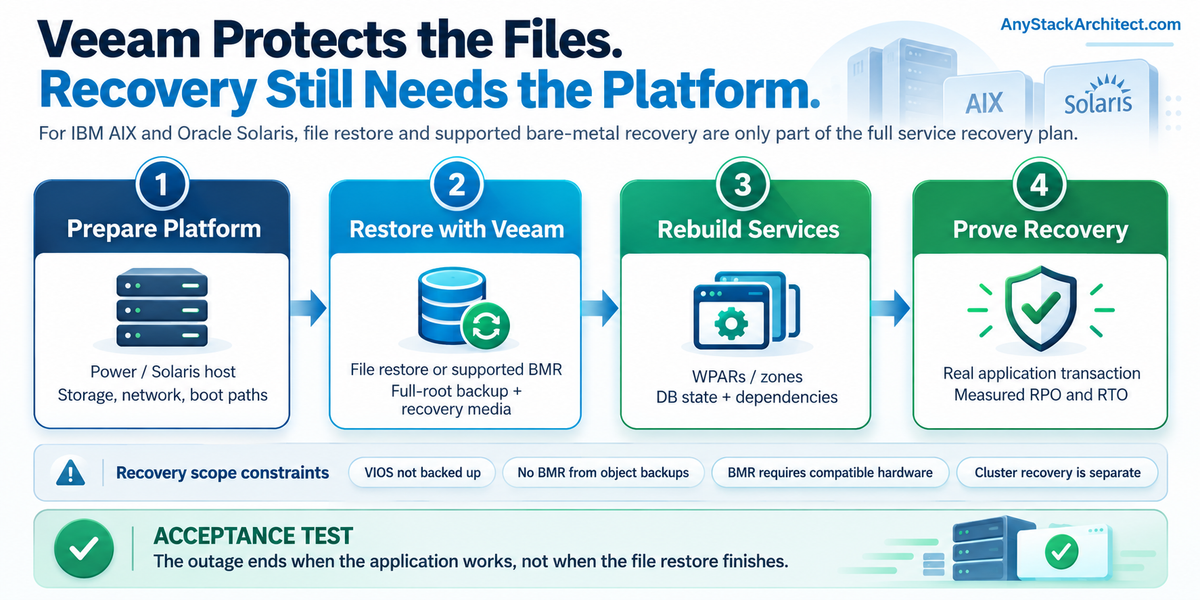
Critical applications still run on IBM AIX and Oracle Solaris. They may sit outside the main virtualization estate, but they often depend on the same storage, networks, backup operations, and recovery facilities. Adding them to Veeam looks straightforward until somebody asks how the entire service will come back after a site failure.
Veeam Agent for IBM AIX and Veeam Agent for Oracle Solaris provide useful protection. Both work at the file level, can restore selected files, and support bare-metal recovery under documented conditions. Those capabilities should be part of the recovery plan. They aren't a substitute for rebuilding the platform underneath the operating system or recovering a database to a verified consistent point.
For the 13.1 agents documented here, Veeam lists AIX 7.1 through 7.3 TL3, with AIX 6.1 under experimental support. Solaris support covers Solaris 10 1/13, 11.3, and 11.4 on SPARC and x86. The supported OS releases and updates must have been generally available before Agent 13.1. I'd check the exact OS release and architecture against the current support requirements before relying on any recovery procedure. [7] [8]
Start with what the agent actually backs up
Both agents perform file-level backup. You select files and directories, the agent creates a full backup and then incremental restore points, and the data is written to the configured repository. A job that includes the complete root directory can also capture the metadata needed for the agent's bare-metal recovery procedure. Calling the job an entire-machine backup does not turn it into an image of the physical server or the virtualization platform. [1] [2] [5] [6] [20] [21]
That matters when people borrow expectations from a VMware or Hyper-V restore. The AIX agent does not back up a PowerVM Virtual I/O Server (VIOS), and neither agent supports backup of clustered systems. An otherwise supported AIX LPAR may still depend on VIOS storage and networking, HMC configuration, and SAN presentation that must be handled outside the agent backup. PowerHA workloads need a separate supported protection and recovery design. On Solaris, the host and its zones, ZFS layout, or Solaris Volume Manager configuration can raise a similar problem. [7] [8]
The practical scope is easier to understand when the recovery task is named before the job is built.
| Recovery task | What the Veeam agent can contribute | What the plan still needs |
|---|---|---|
| Recover deleted application files | Restore selected protected files and directories | Correct ownership, permissions, application state, and an accepted restore point |
| Rebuild a bootable operating system | Bare-metal recovery from eligible full-root backups with system metadata and recovery media | Compatible target hardware, accessible backup storage, and restored platform dependencies |
| Recover a WPAR or non-global zone | File-level protection from the host context or an agent installed inside the environment | Zone/WPAR configuration, allocated storage, and application validation |
| Recover the complete business service | Files, configuration, and system content captured by the selected job | Database consistency, cluster services, storage and network connectivity, and service acceptance |
AIX: LPAR protection is not Power infrastructure recovery
Veeam supports installing the AIX agent in an LPAR or inside a Workload Partition (WPAR). For WPAR data, it documents two approaches. The agent can run in the hosting LPAR and back up WPAR directories when the host has access and owns their storage. Alternatively, the agent can run inside an individual WPAR. WPAR-owned storage that isn't accessible to the LPAR will not be covered by the first approach. An agent installed inside each WPAR also requires its own license. [3]
Backups created from within a WPAR cannot be used for bare-metal recovery because they don't contain the required system metadata. Veeam also excludes VIOS backup entirely. Neither of those facts means WPAR files cannot be recovered; it means restoring those files and rebuilding the hosting Power environment are separate steps. [3] [5] [7]
For bare-metal recovery, Veeam requires recovery media and a backup containing the complete root directory with system metadata. Its AIX recovery procedure reconstructs partitions, restores data, and creates the boot loader. Recovery to dissimilar hardware is not supported. When using flexible mapping, rootvg must be restored as a whole volume group, and mirrored logical-volume copies are ignored during restore. [5]
I'd keep the Power platform recovery runbook separate from the Veeam restore procedure. The first should establish a supported LPAR, usable VIOS paths, accessible disks, network connectivity, and application prerequisites. The second should identify which restore point is usable and how the agent will put its backed-up content onto that prepared target. A successful file restore does not prove that the Power platform can be rebuilt.
Solaris: zones and ZFS change the restore question
For Solaris non-global zones, Veeam supports backing up zone files from the global zone, provided the global-zone root account has access and the global zone owns the storage device. The agent can also be installed inside a non-global zone. As with AIX WPARs, an inside-the-zone backup cannot be used for bare-metal recovery because the system metadata isn't present. Each agent installed in a non-global zone also needs its own license. [4]
ZFS deserves closer inspection. Veeam's Solaris agent copies selected file content; it doesn't turn a ZFS file-level backup into a native ZFS replication stream. The file-level backup excludes hidden ZFS snapshot directories, and sparse files are restored as ordinary files. Extended attributes are not backed up. If the recovery depends on a specific dataset layout, snapshots, delegated permissions, or an application using ZFS volumes, don't assume that restoring files recreates all of it. [2]
Solaris bare-metal recovery excludes dissimilar hardware and Solaris Volume Manager configurations, and it does not restore data from ZFS volumes. Under flexible mapping it ignores special ZFS pool arrangements such as RAIDZ, mirrors, and cache devices, and has restrictions on mapping the system rpool. I'd document the source storage topology and rehearse the target layout before declaring the restore procedure ready. [6]
None of this makes the Solaris agent useless. It makes file recovery, host recovery, and storage-configuration recovery distinct operations. For systems built around ZFS, the appropriate combination may include Veeam file-level protection and separate native ZFS or platform recovery procedures, with each method tested for the job it is expected to perform.
A backup destination can rule out bare-metal recovery
Veeam Agent 13.1 supports local storage, NFS or SMB shares, Veeam Backup & Replication (VBR) repositories, and supported object-storage destinations for AIX and Solaris. Object storage is an option for data protection, including direct-to-object connections. But Veeam explicitly says backups stored in an object-storage repository cannot be used for these agents' bare-metal recovery. That restriction changes how I would design the backup copies, particularly for a workload with no quick way to rebuild its operating system. [7] [8] [9] [10]
I would decide whether the recovery plan requires a bootable system restore or only file and application-data recovery before choosing repository placement. A working object-storage backup is useful, but it is not proof of a supported bare-metal restore path. If bare-metal recovery is an objective, verify that a compatible backup target holds the required full-root backup, and test the recovery media against that location. [5] [6] [9] [10]
Cloud Connect handles primary backups and backup copies differently. An AIX or Solaris agent cannot send its primary backup job directly to a Cloud Connect repository. It can write to a supported VBR repository, after which a separate VBR-managed backup copy job can send the backup to the provider's cloud repository. Veeam's Cloud Connect backup-copy support list explicitly includes IBM AIX and Oracle Solaris on x86 and SPARC. The VBR Backup Copy documentation also includes both UNIX agents. [7] [8] [16] [17] [19]
One general VBR Backup Target note still excludes both backup and backup copy for these agents. Its sections describe agent backup-job targets, but the dedicated Cloud Connect copy page explicitly includes AIX and Solaris, and the provider restore-access page also recognizes those copied backups. I read the broader exclusion as a documentation-scoping inconsistency. The specific copy guidance supports the VBR-managed workflow. [15] [16] [18]
Cloud Connect excludes backup copy from backup copy for Veeam Agent backups. I'd test the tenant's copy job and restore a point from the provider repository, then record how that point would be made available for the intended recovery method during a site outage. Copy support alone does not establish a bare-metal restore path. [16]
For primary agent backups written to VBR-managed repositories, Veeam documents a direct IP connection to the backup server, no VBR server behind NAT, and no Kerberos authentication. Repositories with KMS encryption enabled are also unsupported for these agent jobs. Those requirements concern the agent-to-VBR primary backup path. They don't describe the separate VBR-managed copy to Cloud Connect. [7] [8]
With an AIX repository configured as a mounted network location, Veeam says it does not verify that the remote share is mounted. If the mount is absent, it can start a new backup chain in the local directory instead. Monitor the actual mount and destination, not only the job's success state. [13]
Application consistency needs its own proof
Both agents can run pre-job and post-job scripts to coordinate database operations. On Solaris, Veeam also documents using scripts to prepare UFS or ZFS snapshots for file-level backup; the AIX agent does not support JFS2 snapshot backup. A completed file-backup job by itself does not establish a database-consistent recovery point. [1] [4] [11] [12]
Veeam documents that the UNIX agent starts the backup even if the pre-job script fails. If an application quiesce operation fails, the job can still run. I'd test that failure and check the session warnings before accepting the resulting point for application recovery. [11] [12]
For databases, I'd want the application owner to define the consistency mechanism, transaction-log or redo-log handling, restart procedure, and acceptance test. If native database backup is the right source of consistency, Veeam may protect the resulting files and the host configuration. I'd test that whole chain instead of relying on a file backup job status.
Neither agent backs up extended attributes; sparse files are restored as normal files. A file can have the right contents and still fail the application's permission or access expectations after recovery. [1] [2]
AIX supports NFSv4 ACL backup and restore, but not AIXC ACL backup. Its bare-metal process restores supported ACLs automatically, while file-level ACL restore requires NFSv4 on the agent machine. File-level restores from the recovery environment use NFSv3 mounts and cannot restore those ACLs. I'd include the intended restore method in the permissions test. [14]
What I would prove in a recovery test
I wouldn't sign off on AIX or Solaris protection from a completed job and a single file restore. I would test the actual failure and the recovery objective the business expects.
- Recover a representative file set. Include permissions, ownership, ACL behavior, and the paths that the production application actually uses. Verify any excluded mounts or external filesystems deliberately.
- Recover the application data. Have the application owner validate a consistent point, database open and recovery behavior, logs, and an actual application transaction rather than accepting a successful file copy.
- Prove the bare-metal path where required. Use compatible recovery hardware, working recovery media, a full-root backup with metadata, and a supported non-object backup target. Record any partition, rootvg, rpool, or ZFS mapping differences.
- Recover the surrounding platform. For AIX, include VIOS paths, LPAR configuration, storage visibility, and any clustering dependencies. For Solaris, include global-zone configuration, non-global zone services, and any separate ZFS or SVM procedures.
- Repeat without production services. Check that target-side networking, repository access, credentials, DNS, and the people authorized to run the recovery remain available when the original site is down.
These tests allocate the platform, data, and application recovery work to the teams that will perform it. An environment might meet its objective with file-level recovery onto a prebuilt UNIX host. Another might require supported bare-metal recovery followed by several hours of storage and application reconstruction. The right plan depends on which dependencies survive and which ones must be rebuilt.
Where Veeam fits
Veeam gives AIX and Solaris administrators a way to put file-level protection and conditional system recovery into a broader backup operation. That's valuable, particularly when these machines have been isolated from the rest of the enterprise protection process. But the agent protects a defined set of data and recovery functions. It doesn't replace PowerVM administration, a Solaris storage design, database recovery, or cluster rebuild procedures.
Before I'd accept an RTO for either platform, I'd want an end-to-end test that starts with the assumed site failure and finishes when the application works. The backup restore is one part of that measurement. The test should show exactly which pieces Veeam restores and which pieces the infrastructure and application teams still have to recover.
Source Notes
Documentation was checked on October 21, 2026: Veeam Agent for IBM AIX and Oracle Solaris 13.1, build 13.1.0.2260, and VBR 13.1, build 13.1.1.18. The Cloud Connect copy guidance supports the VBR-managed workflow described above. Treating the broader backup-target exclusion as a scoping inconsistency is an architectural reading of the documentation, not a vendor-confirmed erratum. No recovery tests were executed in a lab for this article. The source manifest records each page's scope and update date. [22]
IBM, AIX, Power, PowerVM and PowerHA are trademarks of International Business Machines Corporation. Oracle is a registered trademark of Oracle and/or its affiliates. Other product names and marks belong to their respective owners.