

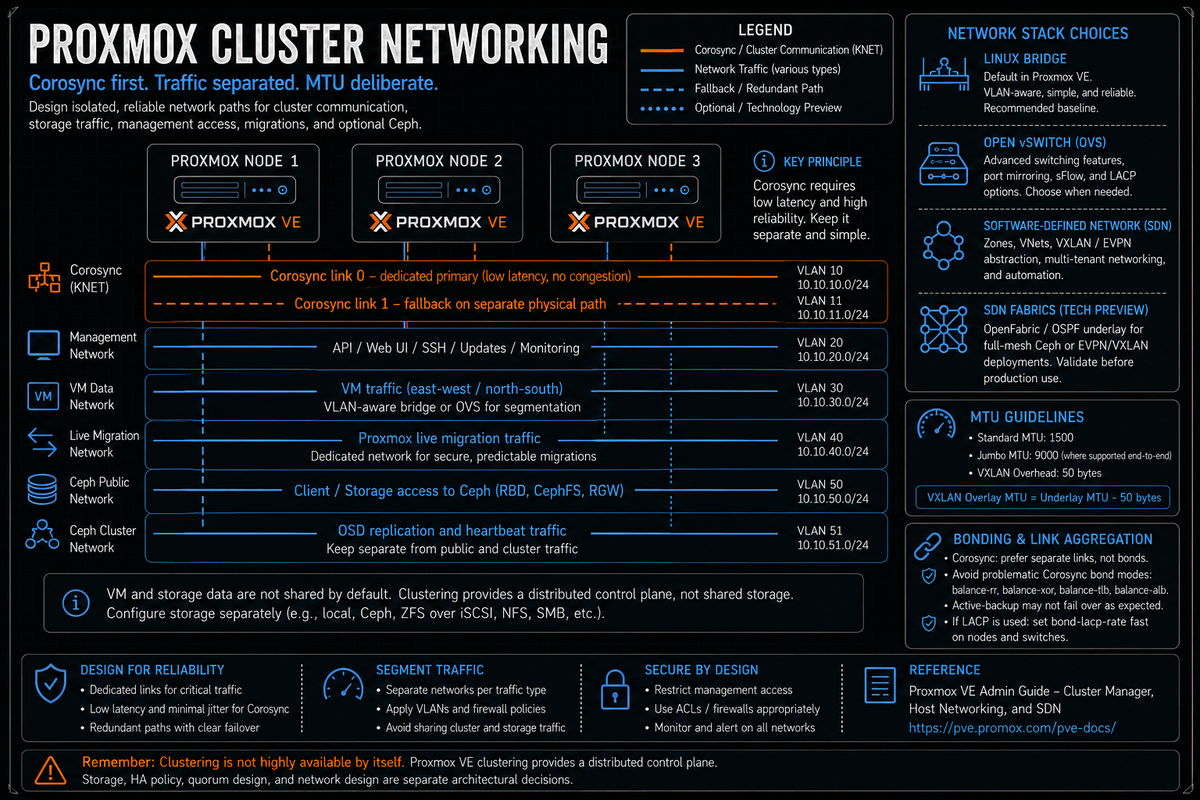
Article 2 in the Proxmox VE Cluster Design Fundamentals for v9.1 series. PVCD-01 introduced Corosync, pmxcfs, and the requirement that Corosync runs on a low latency dedicated network. This article covers the full networking design: Linux bridges versus Open vSwitch versus the SDN module, VLAN handling, MTU, bonding, and how to separate Corosync, migration, Ceph, VM, and management traffic. A common Proxmox cluster outage class is a network design that put Corosync next to storage or VM traffic.
Networking is where most Proxmox cluster designs go wrong. Not because the technology is hard, but because the defaults work fine in a homelab and look fine in a small production deployment, then quietly break under load three months later. This article covers the design choices that matter: which bridge type to use, how to layer VLANs, how to bond for redundancy without breaking Corosync, what MTU to set where, and how to separate the traffic classes so a Ceph rebalance does not propagate as cluster fencing.
Series target version is Proxmox VE 9.1. Where the 9.0 introduction of SDN Fabrics or the SDN module deltas matter operationally, the article calls it out.
The three networking stacks in Proxmox
Proxmox VE has three different ways to define guest networking. They are not interchangeable. Pick deliberately at design time, because mixing them is messy and changing later is disruptive.
- Linux bridges. The default. Standard kernel bridges (
vmbrX), configured via/etc/network/interfaces, with optional VLAN awareness. Per the Network Configuration wiki, this is the recommended starting point for most clusters. ifupdown2 is the default network manager since Proxmox VE 7.0 and supports applying changes live without a reboot. - Open vSwitch (OVS). A more flexible virtual switch. Requires the
openvswitch-switchpackage. Supports features Linux bridges do not, including more sophisticated VLAN handling, port mirroring, and richer LACP modes (balance-slb, balance-tcp). Per the Open vSwitch wiki, OVS bridges, ports, internal ports, and bonds are configured via interface typesOVSBridge,OVSPort,OVSIntPort, andOVSBond. - SDN module. A higher level abstraction that defines virtual networks at the cluster level (zones, VNets, IPAM, controllers, and as of 9.0 SDN Fabrics). Per the official SDN docs, configurations are stored in
/etc/pve/sdn/and synchronized cluster wide through pmxcfs. SDN sits on top of Linux bridges or other underlay; it is not a replacement for them.
The decision tree most teams should use:
- Single site cluster, simple VLAN segmentation, no overlay networking required: Linux bridges with VLAN aware bridges. The default works; do not over engineer.
- Need port mirroring, sophisticated LACP, or want OVS for operational reasons (network team familiarity): Open vSwitch.
- Multi tenant or need overlay networks across L3 underlay (VXLAN), or building a full mesh Ceph routed underlay, or pursuing an EVPN design: SDN module. Treat EVPN designs as advanced SDN work; SDN Fabrics for the underlay routing is tech preview in 9.x.
Linux bridge with VLAN aware bridges is closest to a Hyper-V external virtual switch with VLAN trunking enabled, or a vSphere standard switch with VLAN trunk port groups. OVS is closest to a vSphere Distributed Switch in concept. The SDN module is closest to NSX, with VNets analogous to NSX Segments. Core SDN VNet and zone management covers the VLAN, QinQ, and basic VXLAN cases. IPAM/DHCP, FRRouting, controller integration, and SDN Fabrics are tech preview areas in the current docs, and EVPN designs should be treated as advanced SDN work, not equivalent to a fully shipped NSX deployment.
Linux bridges and VLAN handling
Per the Network Configuration wiki, a Linux bridge interface (commonly called vmbrX) connects guests to the underlying physical network. Bridge names commonly use vmbrN, where N can range from 0 to 4094. The installer creates vmbr0 connected to the first Ethernet card.
The two VLAN models for Linux bridges:
Traditional Linux bridge (one bridge per VLAN)
Per the Network Configuration wiki example for VLAN 5 management with traditional Linux bridge:
Each VLAN gets its own bridge. Verbose to manage at scale, but explicit and the model many engineers coming from vSphere or Hyper-V find familiar.
VLAN aware Linux bridge (one bridge, tags per port)
Per the Network Configuration wiki example for VLAN 5 management with VLAN aware bridge:
One bridge handles all VLANs. The VLAN ID is set per VM network interface in the VM hardware config. This is the recommended model for most clusters: less interface clutter, simpler to extend, the VM network device VLAN tag is the same configuration whether you have 5 VLANs or 50.
The bridge-vids 2-4094 line restricts which VLANs the bridge will accept. Limit this to the VLANs you actually use in the environment if you want belt and suspenders, but the wide range is fine for most deployments because the upstream switch trunk is what actually enforces VLAN scope.
Open vSwitch when it makes sense
Per the Open vSwitch wiki, OVS provides four main interface types: OVSBridge, OVSPort, OVSIntPort, and OVSBond. The package openvswitch-switch must be installed before OVS interfaces will resolve.
OVS becomes the right answer when you need any of:
- LACP with balance-tcp or balance-slb hash distribution. Linux bonds support 802.3ad LACP but with simpler hashing options.
- Port mirroring (SPAN) for network monitoring or IDS use cases.
- Sophisticated multi VLAN bonding with trunk plus internal port semantics where the host needs IPs on multiple VLANs over the same bond.
- Operational consistency across hypervisors where OVS is already the standard (mixed estate with KVM elsewhere, OpenStack history, etc).
Per the OVS wiki, a typical OVS bond plus bridge configuration with two bonded NICs:
Per the OVS wiki, an OVS internal port (OVSIntPort) is how you give the host an IP on a specific VLAN through the OVS bridge. This replaces the role of vmbr0.5 style sub interfaces in the Linux bridge model.
Per the OVS wiki: some newer Intel Gigabit NICs have a hardware limitation where the maximum MTU is 8996 instead of 9000. If your interfaces will not come up at MTU 9000, try 8996. The wiki also notes that the Intel i40e driver is known not to work with OVS RSTP (older generation Intel NICs using ixgbe are documented as fine, as are Mellanox adapters using the mlx5 driver).
The SDN module and SDN Fabrics
Per the official SDN documentation, the Proxmox VE SDN module provides cluster wide virtual network definitions that get pushed to all nodes from a single configuration set in /etc/pve/sdn/. It is not a replacement for Linux bridges or OVS; it sits on top of an underlay and centralizes the abstraction.
The core SDN concepts:
- Zone. Defines a virtually separated network and its transport type. Zone types include Simple (local NAT), VLAN (802.1Q, requires external switch support), QinQ (802.1ad stacked VLANs), VXLAN (Layer 2 over Layer 3), and EVPN (Layer 3 with BGP control plane for multi cluster).
- VNet. A specific virtual network inside a zone. For VLAN zones a VNet maps to a VLAN ID. For VXLAN zones a VNet maps to a VNI (VXLAN Network Identifier).
- Subnet. An IP range associated with a VNet, optionally with a gateway and DHCP range.
- Controller. The control plane element. EVPN zones require an EVPN controller defining BGP peering. VXLAN zones can use a controller or static peer addresses.
- IPAM. IP address management backend. Defaults to the built in pve plugin. Can use external IPAM such as NetBox.
SDN Fabrics (new in 9.0, tech preview)
Per the SDN wiki and the 9.0 release notes, Fabrics are a new SDN feature introduced in Proxmox VE 9.0 that provide automated routing between cluster nodes. They configure routing protocols on the physical interfaces to establish underlay connectivity.
Per the SDN wiki:
- Fabrics use the FRR implementations of OpenFabric and OSPF as routing protocols. The
frrandfrr-pythontoolspackages are required. - Each fabric node requires a unique router ID assigned as an address on an automatically created dummy interface, which functions as a passive loopback for the fabric routing protocol.
- Fabrics can be used as a full mesh network for Ceph or as the underlay for EVPN and VXLAN zones.
Per the SDN docs page (and consistent with third party reporting), the SDN Fabrics feature is documented as tech preview in the current SDN documentation. Core SDN VNet and zone management (Simple, VLAN, QinQ, and static VXLAN with manually specified peers) is supported. IPAM/DHCP, FRRouting, controller integration, and SDN Fabrics are tech preview areas. EVPN zones depend on controller integration and FRR, so EVPN designs should be treated as advanced SDN work and validated against the current SDN docs before committing production workloads.
Two cases where SDN Fabrics make practical sense in 9.x: full mesh routed Ceph networks where each node has direct point to point links to every other node, and EVPN underlay where you want OSPF or OpenFabric to maintain the L3 reachability between VTEPs without manual static configuration. For everything else, the cost (FRR, OpenFabric or OSPF, dummy loopbacks, more moving parts) outweighs the benefit. Stick with VLAN or static VXLAN unless you have a specific use case.
Bonding and the LACP rule for Corosync
Per the Network Configuration wiki and the Cluster Manager wiki, bonding is supported for guest and storage traffic but Corosync traffic on a bond requires careful mode selection. Some bond modes can produce asymmetric connectivity in failure scenarios, which propagates as Corosync timeouts and fencing events.
Per the Cluster Manager Corosync over Bonds section directly:
- active-backup may not provide the expected redundancy in certain failure scenarios. The bond may not switch to the backup link if the active interface fails in a way that keeps the link state up but stops transmitting packets.
- balance-rr, balance-xor, balance-tlb, balance-alb are explicitly advised against for Corosync traffic. They can cause asymmetric connectivity that breaks quorum.
- IEEE 802.3ad (LACP) can recover from asymmetric connectivity, but with the default
bond-lacp-rate slowthe failover takes about 90 seconds. Per the docs: nodes with HA resources fence themselves after roughly one minute without stable quorum, so 90 seconds is too slow. The fix isbond-lacp-rate faston both the Proxmox VE node and the switch, which reduces failover to about 3 seconds.
Per the Cluster Manager wiki, for the cluster network specifically, Corosync does not need a bond for redundancy because Corosync can switch between separate networks itself. Up to 8 fallback links are supported since Proxmox VE 6.2. The recommendation is multiple separate networks for Corosync rather than a single bonded link, because a bond can fail in modes Corosync cannot route around but separate links can.
Sharing the Corosync network with VM, storage, or migration traffic is one of the easiest Proxmox cluster outages to create. Corosync is not high bandwidth but is sensitive to latency jitter, and a Ceph rebalance, a backup window, or a noisy VM saturating the link looks like a Corosync timeout, which propagates as cluster events, which can trigger HA fencing of healthy nodes. The fix is dedicated Corosync NICs (or separate links over different physical paths) plus at least one fallback link. The cost is a couple of low bandwidth NICs. The impact when you skip it is the cluster fencing itself in production.
Traffic separation: the network classes
A production Proxmox cluster has at least five logical traffic classes, sometimes more. Designing the network is mostly about which classes share which links and which are isolated. Per the Cluster Manager wiki, the rule for Corosync is dedicated network plus fallback link; the rules for the rest follow from how the workload behaves.
| Traffic class | Bandwidth | Latency sensitivity | Sharing rule |
|---|---|---|---|
| Corosync | Very low | Very high (latency jitter triggers fencing) | Dedicated NIC. Fallback link on separate physical path. |
| Ceph public (client to OSD) | High | High (slow Ceph blocks VMs) | Dedicated 10/25/40 GbE. Separate from VM data. |
| Ceph cluster (OSD to OSD) | Very high during rebalance | High | Dedicated, often separate from Ceph public on bigger clusters. Jumbo frames standard. |
| Live migration | High during migration | Moderate | Dedicated link or separate VLAN. Configurable via the migration property in datacenter.cfg per the official manual. |
| VM data | Variable | Application dependent | The largest class typically. Bonded for resilience and bandwidth. |
| Management (web UI, API, SSH) | Low | Low | Often shares with management VLAN on VM bond. Acceptable. |
| Backup (PBS pull or push) | High during backup window | Low | Often shares with VM data; consider separate link if backups saturate the network. |
The minimum production design is two physical networks: one dedicated for Corosync, one shared for everything else. That works for small clusters with light Ceph or no Ceph at all. For Ceph at scale or for clusters where migrations happen often, separating Ceph (public and cluster) and migration onto dedicated links is the next step up.
The four NIC reference design that holds up well in production:
- NIC 1 dedicated to Corosync link 0 (primary).
- NIC 2 dedicated to Corosync link 1 (fallback) plus management VLAN.
- NICs 3 and 4 bonded (LACP) for VM data, with VLANs for management overlap, migration, and tenant networks.
The six NIC reference design for HCI with Ceph:
- NIC 1 dedicated to Corosync link 0.
- NIC 2 Corosync link 1 plus management.
- NICs 3 and 4 bonded (LACP) for VM data and live migration on different VLANs.
- NICs 5 and 6 bonded (LACP) for Ceph public and Ceph cluster on different VLANs (or in larger clusters, separate physical links). Jumbo frames (MTU 9000) for the Ceph traffic class.
MTU considerations
MTU mistakes are subtle. They do not produce loud failures; they produce slow ones (path MTU discovery failures, fragmentation that kills throughput, and tools that work fine on small packets but stall on large ones).
The rules:
- Standard MTU 1500. Default for most VM data and management traffic. Works everywhere; no special switch configuration required.
- Jumbo frames (MTU 9000). Standard for Ceph cluster and Ceph public networks. Improves throughput for large I/O operations. Requires the entire path (NICs, switches) to support 9000 bytes. Per the OVS wiki, some Intel Gigabit NICs cap at 8996.
- VXLAN overhead. Per the SDN documentation, "Because VXLAN encapsulation uses 50 bytes, the MTU needs to be 50 bytes less than the maximal MTU of the outgoing physical interface. Optional, defaults to 1450." If the underlay is MTU 9000, the VXLAN VNet should be MTU 8950. If the underlay is MTU 1500, the VXLAN VNet defaults to 1450. Get this wrong and overlay VMs experience random connectivity issues for fragmented traffic.
The operational rule: set MTU at every layer explicitly. Do not rely on inherited defaults. The interfaces config, the bridge, the bond, and any VLAN sub interface all need consistent MTU values. A bond with MTU 9000 and a bridge defaulting to 1500 will drop, fragment, or stall traffic in hard to diagnose ways.
Corosync redundancy: links not bonds
Per the Cluster Manager wiki, Corosync supports up to 8 fallback links (since Proxmox VE 6.2) over its integrated Kronosnet layer. Links are used according to a priority set by knet_link_priority in corosync.conf, or via the priority parameter when creating the cluster with pvecm.
The design that works:
Per the docs, this would cause link1 to be used first because it has the higher priority. If link1 fails, Corosync switches to link0.
Per the Cluster Manager wiki: "Even if all links are working, only the one with the highest priority will see corosync traffic. Link priorities cannot be mixed, meaning that links with different priorities will not be able to communicate with each other. Since lower priority links will not see traffic unless all higher priorities have failed, it becomes a useful strategy to specify networks used for other tasks (VMs, storage, etc.) as low priority links. If worst comes to worst, a higher latency or more congested connection might be better than no connection at all."
The design implication: configure at least two Corosync links. The primary link goes on a dedicated NIC. The fallback link can ride a different physical path (different switch, different NIC, different VLAN on a bonded link). The fallback should never be the same physical link as the primary, because a single switch failure or NIC failure should not take both links down simultaneously.
ifupdown2 and applying changes safely
Per the Network Configuration wiki, Proxmox VE does not write changes directly to /etc/network/interfaces. Instead, changes go to /etc/network/interfaces.new, which is staged. With the recommended ifupdown2 package (default for new installations since Proxmox VE 7.0), it is possible to apply network configuration changes without a reboot.
The safe process:
- Edit network configuration through the web UI (Datacenter, Node, Network) or by editing
/etc/network/interfaces.newdirectly. - Review the staged changes before applying. The web UI shows a diff.
- Apply via the web UI Apply Configuration button or via
ifreload -aon the command line. - Verify connectivity. Have a console fallback path available (IPMI, IDRAC, ILO, or physical access) in case the apply breaks management connectivity.
Network changes that break the management interface lock you out of the node. If management is the only path to the node, a typo in /etc/network/interfaces.new followed by an apply leaves the node unreachable until physical or IPMI access is available. For production nodes, IPMI/IDRAC/ILO is non negotiable. For test nodes without IPMI, do all network changes from a console session.
The networking design mistakes that bite you later
Corosync sharing a link with storage or VM traffic
One of the easiest mistakes to make. Detailed above. Dedicate a NIC to Corosync link 0. Add a fallback link 1 on a separate physical path. The cost is small; the impact when you skip it is the cluster fencing itself during a backup window or a Ceph rebalance.
LACP for Corosync without bond-lacp-rate fast
Per the Cluster Manager wiki, default LACP failover is about 90 seconds, which is longer than the HA fence timeout. Setting bond-lacp-rate fast on both Proxmox and the switch reduces failover to about 3 seconds. Forgetting this on either side recreates the asymmetric connectivity problem the bond was supposed to solve.
Mixing Linux bridge and OVS on the same node
The two stacks coexist but create operational complexity that rarely earns itself. Pick one and standardize per node. If you genuinely need OVS features for some bridges, do not mix; switch the whole node to OVS.
VLAN aware versus traditional bridge inconsistency across nodes
Mixed Linux bridge models across cluster nodes mean the VM hardware config behaves differently depending on which node the VM lands on after a migration. Standardize on VLAN aware bridges across the whole cluster.
Forgetting MTU on one layer
Bond MTU set, bridge MTU defaulted to 1500. Or VXLAN VNet at 1450 over an underlay at 1500 with no headroom. The symptom is application stalls on large transfers; the diagnosis takes hours of packet captures. Set MTU explicitly at every layer.
Hostnames that resolve differently on different nodes
Per the Cluster Manager wiki, "we always recommend referencing nodes by their IP addresses in the cluster configuration." The wiki also notes that while it is common to make node names resolvable through /etc/hosts or other means, this is not strictly necessary for the cluster to work. The operational reality the wiki is hinting at: a hostname that resolves to different IPs on different nodes silently breaks Corosync. If you do use hostnames, ensure every node resolves every other node identically, ideally through entries in /etc/hosts rather than DNS.
Migration network not separated
By default, Proxmox uses the cluster network for migration traffic. The official admin guide (Guest Migration section) confirms this and documents how to set a separate migration network in /etc/pve/datacenter.cfg. The syntax per the datacenter.cfg manual page is migration: [type=]<secure|insecure> [,network=<CIDR>], for example migration: secure,network=10.20.20.0/24. Migration traffic is bursty; do not let it ride the same link as Corosync.
Ceph public and cluster on the same link as VM traffic
A Ceph rebalance can saturate a 10 GbE link for hours. If VM traffic is on the same link, VMs experience the rebalance as latency spikes and timeouts. Dedicated Ceph links (or at minimum separate VLANs with quality of service) keep the rebalance contained. Covered in detail in PVCD-04.
SDN Fabrics in production before the tech preview ships as supported
Per the SDN documentation, SDN Fabrics is documented as tech preview. Use it in lab and dev with eyes open; do not commit production critical workloads to it before it ships as fully supported. Static VXLAN with manual peer addresses is the production path today for overlay networking.
Skipping the network change rehearsal
The first network apply on a production cluster should not be the first network apply you have ever done. Build a test cluster, practice the network change process, fail a node intentionally, recover, and document the steps. Operational muscle memory is the difference between a 5 minute change and a 5 hour incident.
Key Takeaways
- Three networking stacks: Linux bridges, OVS, SDN. Linux bridges (default, VLAN aware) is the right answer for most clusters. OVS for port mirroring, sophisticated LACP, or operational fit. SDN module sits on top and centralizes definitions for VLAN, QinQ, VXLAN, EVPN.
- VLAN aware bridges over the traditional one bridge per VLAN model. Less interface clutter, simpler to extend. Per the docs,
bridge-vlan-aware yeswithbridge-vids 2-4094. - SDN Fabrics is tech preview in 9.x. Per the SDN docs. Use OpenFabric or OSPF for full mesh Ceph or as EVPN underlay; for everything else, prefer simpler options.
- Corosync rule: dedicated NIC plus fallback link on separate path. Per the Cluster Manager wiki, up to 8 links supported since 6.2. A common cluster outage class is sharing Corosync with storage or VM traffic.
- Bond modes for Corosync. Per the docs: avoid balance-rr, balance-xor, balance-tlb, balance-alb. Active-backup may not switch over reliably. If LACP is used for Corosync, set
bond-lacp-rate faston both Proxmox and the switch (default slow takes 90 seconds, longer than HA fence timeout). - Five traffic classes minimum. Corosync, Ceph public, Ceph cluster, live migration, VM data plus management. Production design: at least separate Corosync from everything else; HCI design separates Ceph traffic onto dedicated links with jumbo frames.
- MTU at every layer. Standard 1500 for VM and management. Jumbo 9000 for Ceph. Per SDN docs, VXLAN MTU is underlay minus 50 bytes (default 1450 over 1500). Some Intel Gigabit NICs cap at 8996 per the OVS wiki.
- ifupdown2 default since 7.0. Apply changes live via web UI Apply Configuration button or
ifreload -a. Always have IPMI/IDRAC/ILO available before changing management network configuration. - Use IPs not hostnames in cluster configuration. Per the Cluster Manager wiki recommendation, hostnames can resolve differently and break Corosync silently.
- Set a dedicated migration network in datacenter.cfg. Per the official admin guide (Guest Migration section), default uses cluster network. Syntax:
migration: secure,network=<CIDR>.