

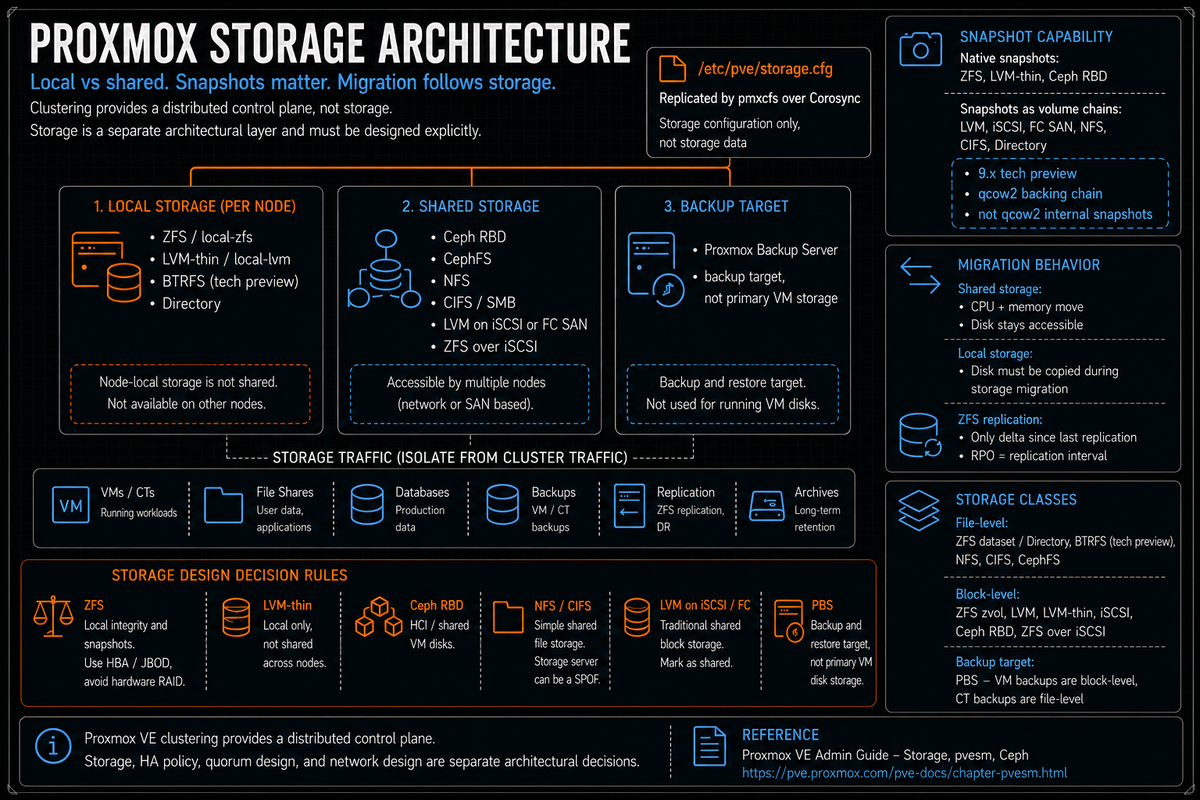
Article 3 in the Proxmox VE Cluster Design Fundamentals for v9.1 series. PVCD-01 covered the cluster control plane; PVCD-02 covered the network. This article covers the storage layer: the storage types Proxmox supports, how they differ, where the snapshot model fits or breaks, the new snapshots as volume chains feature in 9.x, ZFS RAIDZ expansion, and how to pick the right storage for the cluster you are actually building.
Storage is where Proxmox cluster designs split into completely different categories. A homelab on a single ZFS pool. An SMB on NFS off a NAS. An MSP on Ceph hyperconverged. An enterprise with a Fibre Channel SAN and now expecting to do snapshots. The right answer depends on what the cluster is for, what skills the operations team has, and what the recovery model needs to look like. This article covers the building blocks and the decision rules. PVCD-04 goes deeper on Ceph specifically, because Ceph is its own entire architecture.
Series target version is Proxmox VE 9.1. The 9.0 to 9.1 storage delta worth calling out: snapshots as volume chains for thick provisioned LVM on iSCSI or Fibre Channel SAN, plus Directory, NFS, and CIFS (tech preview); ZFS 2.3.4 with RAIDZ expansion (the 9.0 release shipped 2.3.3 with the same feature); Ceph Squid 19.2.3 as the bundled version.
Storage classes per the Proxmox storage model
Per the official Storage wiki, Proxmox VE recognizes two fundamental classes of storage:
- File level storage. Per the docs: ZFS, Directory, BTRFS, NFS, CIFS, and CephFS. File based storage stores VM disks as files (qcow2, raw, vmdk) and supports content beyond VM disks (ISO images, container templates, backups, snippets).
- Block level storage. Per the docs: ZFS, LVM, LVM-thin, iSCSI, Ceph (RBD), and ZFS over iSCSI. Block storage exposes volumes that look like raw disks. Per the docs: "It is usually not possible to store other files (ISO, backups, ..) on such storage types."
- Backup storage (PBS) is separate. Proxmox Backup Server is its own storage type with content type
backup. Per the PBS technical docs, snapshots are stored as manifests, indexes, blobs, and deduplicated chunks inside a PBS datastore. PBS is not file storage or block storage in the same sense as the live storage backends above. It is the protection and recovery target, not a place where running VM disks live. Covered separately in PVCD-08.
ZFS appears in both lists because it can be used either as a filesystem (Directory storage on a ZFS dataset) or as a block storage backend (zfspool, zvols). They are different storage entries in /etc/pve/storage.cfg with different content type support.
Default storage on a fresh installation
Per the Storage wiki and the default storage.cfg shipped with the installer:
- local (dir). Path
/var/lib/vz. Content types: ISO images, container templates, backups, snippets. Local to the node only. The general purpose directory storage that Proxmox creates automatically. - local-lvm (lvmthin). Default on LVM based installations. Thinpool name
datain volume grouppve. Content types: container rootdir, VM images. - local-zfs (zfspool). Default on ZFS based installations. Pool
rpool/data. Sparse provisioning. Content types: VM images, container rootdir.
The defaults work for a single node. They do not give you shared storage; they do not give you HA; they do not give you the ability to live migrate without a storage migration step. For a production cluster the question is not whether to use the defaults; it is what shared or replicated storage to add alongside them.
The storage types in detail
ZFS (local)
Per the Storage wiki, ZFS is "probably the most advanced storage type regarding snapshot and cloning." The backend uses ZFS datasets for VM images (raw format on zvols) and container data (subvol format).
What ZFS gives you per the docs:
- Native efficient snapshots and clones (no qcow2 layering required).
- Compression (lz4 default), deduplication (rarely worth it).
- Copy on write integrity, end to end checksums.
- RAIDZ levels (1, 2, 3) and mirror configurations for redundancy without a hardware RAID controller.
- RAIDZ expansion in ZFS 2.3 (bundled in PVE 9.x). Per the OpenZFS pull request: "A new device (disk) can be attached to an existing RAIDZ vdev, by running
zpool attach POOL raidz2-0 NEW_DEVICE." The vdev name (raidz2-0in this example) is the existing RAIDZ vdev identifier you can see inzpool statusoutput. Thefeature@raidz_expansionon disk feature flag must be enabled to initiate an expansion. Pools with expanded RAIDZ vdevs cannot be imported by older releases. Old blocks keep the old data to parity ratio until they are rewritten; expansion does not convert raidz1 to raidz2 or raidz2 to raidz3.
What ZFS does not give you:
- Shared storage. ZFS is local. Live migration with ZFS requires storage migration (the data is copied to the destination node) or ZFS replication (covered in PVCD-05). ZFS replication is local storage replication, but the storage naming still has to match: the target node needs the same Proxmox storage ID, backed by a matching ZFS pool or dataset path, before pvesr can place the replicated guest volumes there. pvesr does not treat differently named local ZFS storages as interchangeable targets.
- Hardware RAID compatibility. Per ZFS best practice and consistent Proxmox community guidance, run on HBA or JBOD passthrough mode, not behind a hardware RAID controller. A RAID controller in front of ZFS hides the disks ZFS needs to manage directly.
- Cheap RAM. ZFS likes RAM (the ARC). Production ZFS deployments size memory for the working set; ECC is strongly recommended.
Per the Proxmox forum discussion on PVE 9 ZFS expansion, feature@raidz_expansion lets you add a single disk to an existing RAIDZ vdev. It does not let you change the raidz level (raidz1 stays raidz1, raidz2 stays raidz2). It also does not rebalance existing data; old data still uses the original parity ratio until you rewrite it. For maximum capacity gain you still need to rewrite the data after expansion. The feature is real and useful, but not magic.
LVM and LVM-thin
Per the Storage wiki, LVM is a typical block storage layer that sits on top of disks and partitions. Two distinct backends in Proxmox:
- LVM (regular). Per the docs, this backend does not support snapshots and clones in the regular form because normal LVM snapshots are inefficient and interfere with all writes on the entire volume group during snapshot time. The benefit per the docs: LVM can be used with shared storage (for example, an iSCSI LUN), and the backend implements proper locking across the cluster if the storage is marked as shared in the configuration.
- LVM-thin. Per the docs: "fully supports snapshots and clones efficiently. New volumes are automatically initialized with zero." Thin provisioning means blocks are allocated only when written. The constraint per the docs: "LVM thin pools cannot be shared across multiple nodes, so you can only use them as local storage."
LVM-thin is the default for VM disks on a non ZFS install (the local-lvm entry). LVM (regular) over iSCSI or FC SAN is how you get shared block storage from a traditional SAN array.
Snapshots as volume chains (new in 9.x, tech preview)
Per the Storage wiki and the pvesm man page directly: "Since Proxmox VE 9, snapshots as a volume chain have been available for VMs. These snapshots use separate volumes for the snapshot data and layer them."
The mechanics per the LVM Storage wiki:
- The feature manages snapshot volumes through the storage plugin and uses qcow2 to layer separate volumes as a backing chain. This creates a single disk state exposed to the guest.
- Per the docs: "Note that, although this feature relies on qcow2, it only uses qcow2's ability to layer multiple volumes in a backing chain, not qcow2's snapshot functionality. The snapshot functionality is managed by the PVE storage system."
- Enabled via the
snapshot-as-volume-chainflag on the LVM storage configuration. Per the docs: "Enabling or disabling this flag only affects newly created virtual disk volumes." - Per the docs, snapshots as volume chains provide vendor agnostic support for snapshots on any storage system that supports block storage, including iSCSI and Fibre Channel attached SANs.
This is the feature that makes thick provisioned LVM on iSCSI or FC SAN finally usable for the snapshot workflow that VMware admins took for granted. Per the docs, Directory, NFS, and CIFS storages also gain support for snapshots as volume chains in 9.x.
Per the official Proxmox VE Storage documentation and the 9.0 release coverage, snapshots as volume chains is documented as a tech preview feature. Because this is tech preview, test snapshot creation, rollback, deletion, consolidation, backup interaction, and failure recovery before using it for production workloads. Expect changes between minor releases.
Ceph (RBD and CephFS)
Per the Storage wiki, Ceph RADOS is "a distributed system, replicating storage data to different nodes that can be accessed as RBD (RADOS Block Device)." Proxmox VE 9.1 ships Ceph Squid 19.2.3 as the bundled version.
Two Ceph backends in Proxmox storage configuration:
- RBD. Block storage. The backend for VM disks on Ceph. Native snapshots, thin provisioning, replication or erasure coding configurable per pool.
- CephFS. File storage. Used for ISO images, container templates, backups, and snippets that need to be accessible from all cluster nodes simultaneously.
Ceph is its own architecture: OSDs (object storage daemons running on each node, one per disk), MONs (monitors managing cluster state, odd number for quorum), MGRs (managers for metrics and orchestration), and optionally MDSs (metadata servers, required for CephFS). PVCD-04 goes deep on Ceph design specifically.
The relevant point for storage architecture decisions: Ceph gives you shared storage with HA and distributed redundancy without a separate SAN. It is the right answer for hyperconverged Proxmox at scale. It is the wrong answer for a 3 node cluster with limited storage hardware budget.
NFS
Per the Storage wiki, NFS provides shared file storage accessible from all cluster nodes. Content types: ISO images, container templates, backups, snippets, VM disks (as qcow2 files for snapshot support), container rootdir.
NFS is the simplest path to shared storage. A NAS or a Linux box with NFS exports gives you an immediate target for VM disks, backups, and ISOs across the cluster. Live migration works because all nodes can see the same files.
The constraints:
- Performance is bound by the NFS server and the network. A single NFS server is a single point of performance and single point of failure unless paired with NFS HA.
- VM disk performance over NFS is fine for general purpose workloads, less appropriate for high IOPS database workloads.
- Per the docs, snapshots on NFS for VM disks use qcow2. With 9.x, snapshots as volume chains are also supported on NFS.
iSCSI and ZFS over iSCSI
Per the Storage wiki: "iSCSI is a widely employed technology used to connect to storage servers." The backend requires the open-iscsi package.
Two approaches for iSCSI in Proxmox:
- Direct iSCSI as a storage backend. The iSCSI LUN appears as raw block storage. Useful but limited; the docs note this is mostly for cases where you want to expose the LUN directly rather than layer LVM on top.
- LVM on iSCSI or Fibre Channel. The recommended approach for shared SAN block storage. Create an LVM volume group on top of the iSCSI LUN, mark the storage as shared in Proxmox, and the cluster wide locking handles storage operations safely. Shared LVM is a shared volume group visible to multiple hosts, not one writer and many readers on the same active guest disk. Different hosts can use different LVs from the same shared VG. The guest disk LV is actively used by the node running that VM. Other nodes can see the storage and take over during migration or HA, but they should not mount or write the same guest disk at the same time. Per the docs, this works within a single Proxmox cluster, not between different clusters sharing the same SAN. With 9.x snapshots as volume chains, this configuration supports VM snapshots without depending on the SAN's native snapshot capability.
- ZFS over iSCSI. Per the Proxmox docs, this backend is better understood as remote ZFS zvols presented to Proxmox as iSCSI LUNs. The storage host owns the ZFS pool. Proxmox connects to that host over SSH, creates a zvol for each guest disk, exports it as an iSCSI LUN, and uses that LUN for the VM disk. Common pairing is a TrueNAS or similar ZFS appliance as the storage host. Do not read this as local ZFS stretched across cluster nodes; the Proxmox nodes consume remote zvol backed LUNs while the storage host owns the pool.
CIFS / SMB
Per the Storage wiki, CIFS provides shared file storage similar to NFS but over the SMB protocol. Useful when the storage server is Windows based or when SMB is the available export protocol from the NAS. Content types match NFS. Snapshots as volume chains work with CIFS in 9.x per the release notes.
Directory storage
The simplest backend: any POSIX filesystem mounted at a path. Proxmox uses it for the default local storage pointing at /var/lib/vz. Useful for ISO images, templates, backups, and as a fallback. Per the docs, snapshots as volume chains in 9.x extends snapshot support to Directory storage as well.
BTRFS
Per the Storage wiki, BTRFS is a modern copy on write filesystem with native snapshots and self healing. Selectable as the root filesystem during installation. Per the docs: "RAID 5/6 are considered experimental and dangerous." BTRFS RAID 0, RAID 1, and RAID 10 are supported.
BTRFS is a viable option for local storage with snapshots, but ZFS has the larger production footprint in the Proxmox community and the better documented operational story. Choose BTRFS deliberately if you have a specific reason; default to ZFS otherwise.
Proxmox Backup Server (PBS) as backup storage
PBS is a backup storage backend in PVE, not a datastore for running VM disks. It belongs in the protection and recovery section, not beside Ceph RBD, NFS, LVM, ZFS, iSCSI, or ZFS over iSCSI. Per the PBS technical docs, PBS stores backup snapshots as manifests, indexes, blobs, and deduplicated chunks inside a PBS datastore. VM image backups use fixed size chunks; file based backups for containers and file archives use dynamic chunks through pxar. The PBS backend in PVE has content type backup; image formats, snapshots, and clones do not apply. Covered properly in PVCD-08; mentioned here only because PBS does appear in the pvesm storage type list.
The storage decision matrix
Picking storage is the most consequential design decision in a Proxmox cluster. The defaults work; the wrong default for the workload bites you for years. The decision factors:
| Cluster type | Recommended primary storage | Why |
|---|---|---|
| Single node, no HA needed | ZFS local (default install) | Snapshots, integrity, RAID without hardware controller. Simple. |
| 2 to 3 node cluster, modest budget | ZFS local plus ZFS replication | Async replication gives you VM mobility without shared storage. Covered in PVCD-05. |
| 3+ node cluster, HCI workload, no SAN | Ceph (RBD plus CephFS) | Distributed shared storage with HA. Per Ceph defaults, replication 3/2 across nodes. |
| SAN already in place (FC or iSCSI) | LVM on iSCSI or FC, with snapshot-as-volume-chain | Reuse existing SAN investment. New 9.x snapshot support closes the long standing snapshot gap. |
| Existing NAS, mixed workload | NFS for ISOs, templates, backups; ZFS or Ceph for VM disks | Use NFS for what it is good at (shared files); use a block backend for VM performance. |
| Large enterprise, multi tenant, multi cluster | Ceph with separate pools per tenant or workload tier | Ceph CRUSH map and pool design provide isolation and tier separation. |
vSphere admins are used to VMFS on a SAN as the default. The closest Proxmox analog is LVM (or LVM-thin) on iSCSI or FC, marked shared. Snapshots historically did not work on this configuration in Proxmox; the new 9.x snapshots as volume chains feature changes that.
Hyper-V admins are used to CSV on shared storage or Storage Spaces Direct. The closest Proxmox analogs: LVM on shared iSCSI for the CSV model, and Ceph for the S2D approach.
VMware vSAN admins moving to Proxmox HCI: Ceph is the analog. The architecture is different (Ceph is older, more flexible, more configuration knobs) but the design (distributed storage across cluster nodes) is similar.
Shared versus local: the live migration consequence
Per the Storage wiki, one major benefit of storing VMs on shared storage is the ability to live migrate running machines without any downtime, as all nodes in the cluster have direct access to VM disk images. Per the docs, there is no need to copy VM image data, so live migration is very fast in that case.
The implications:
- Shared storage (Ceph RBD, NFS, LVM on iSCSI/FC, CephFS): Live migration moves the VM CPU and memory state only. Disk stays in place. Migration is usually much faster because the VM disk is not copied.
- Local storage (ZFS, LVM-thin, BTRFS, Directory on local disk): Live migration must copy the disk content as well. Per the QEMU live migration mechanics, this can be done online via storage migration but is slower and consumes substantial network bandwidth.
- Local with replication (ZFS replication): Replication keeps a periodic snapshot copy on a peer node. Live migration to the replica node only needs to copy the delta since the last replication. Approaches the speed of shared storage at the cost of RPO equal to the replication interval. Covered in PVCD-05.
The architectural takeaway: shared storage and local storage with replication are different designs, not different price points of the same design. Pick deliberately based on what the recovery model demands.
Storage configuration mechanics
Per the pvesm man page, storage configuration lives in /etc/pve/storage.cfg, replicated across the cluster via pmxcfs. The CLI tool pvesm provides commands for adding, modifying, and querying storage:
The nodes property restricts which cluster nodes can use a given storage. Useful for asymmetric clusters where not every node has access to a particular SAN or NAS, or for isolating storage to specific node groups.
The storage design mistakes that bite you later
Picking ZFS without ECC RAM
ZFS depends on memory integrity. Production ZFS without ECC has been debated for years; the practical advice from the Proxmox community and ZFS best practice is straightforward: use ECC for production. The cost differential is small; the consequences of memory bit flips on a checksumming filesystem are not.
Putting ZFS behind a hardware RAID controller
ZFS wants direct disk access. A hardware RAID controller hides the disks behind a single LUN ZFS sees as a single device. ZFS cannot do its job (mirror or raidz redundancy, scrubs, resilver, hot spares) properly. Use HBAs in IT mode or JBOD passthrough.
LVM-thin for shared storage
Per the Storage wiki directly, LVM-thin pools cannot be shared across multiple nodes. If you want shared block storage, use LVM (regular) on a shared iSCSI or FC LUN, or use Ceph RBD. Trying to share LVM-thin breaks in subtle and unpleasant ways.
Snapshots as volume chains in production before validating recovery
Because this is tech preview, test snapshot creation, rollback, deletion, consolidation, backup interaction, and failure recovery before using it for production workloads.
Single NFS server as the only shared storage
A single NFS server is a single point of failure for the entire cluster. If the NFS server reboots or the network to it fails, every VM on NFS storage becomes unavailable. Either pair NFS with HA at the NAS layer, run two NFS servers and use ZFS replication for VM disks, or move to Ceph.
Mixing storage types without naming discipline
A cluster with local-lvm, local-zfs, nas-iso, ceph-rbd, san-lvm, and backup-pbs needs naming discipline. Use a consistent prefix for each storage class, document which content types are allowed where, and review the storage list during quarterly architecture reviews. Sprawl is real and shows up as confused VM placement decisions.
Treating the default local-lvm as production storage
The default local-lvm is local to one node. VMs placed on it cannot live migrate without a storage migration step, cannot be HA managed across nodes without external replication, and rely on the single node for all redundancy. It is fine for the host OS and for ISO storage; it is rarely the right place for production VM disks.
Forgetting the backup target is also storage
Backups need somewhere to land. PBS gets its own architecture decision (PVCD-08), but storage planning needs to account for backup retention, network bandwidth to the backup target, and the recovery time the chosen target supports. A cluster on Ceph with backups going to a single slow NFS share has a hidden capacity and recovery time problem waiting to surface.
Skipping the storage type rehearsal
The first time you snapshot, restore, migrate, and rebalance on the chosen storage type should not be in production. Build a representative test cluster, exercise each storage operation, document the timings and the gotchas, and only then commit production workloads. ZFS replication failover takes time to learn. Ceph rebalance behavior takes time to learn. Snapshot chain consolidation on volume chains takes time to learn. Build the muscle memory before you need it.
Key Takeaways
- Two storage classes per the docs: file level and block level. File: ZFS, Directory, BTRFS, NFS, CIFS, CephFS. Block: ZFS, LVM, LVM-thin, iSCSI, Ceph RBD, ZFS over iSCSI. PBS is separate; it is backup storage, not live VM storage.
- Default install gives you local plus local-lvm or local-zfs. All local. None of these are shared storage. Production clusters need a deliberate addition.
- ZFS for local with snapshots and integrity. Requires HBA or JBOD (no hardware RAID), ECC RAM strongly recommended. ZFS 2.3.4 in 9.1 adds RAIDZ expansion via
zpool attach POOL <existing-raidz-vdev> NEW_DEVICE; requiresfeature@raidz_expansionenabled viazpool upgrade. - LVM-thin is local only. Per the docs, cannot be shared across nodes. For shared block, use LVM (regular) on iSCSI or FC, marked shared.
- Snapshots as volume chains is new in 9.x and tech preview. Vendor agnostic snapshots for thick provisioned LVM (iSCSI, FC SAN) plus Directory, NFS, CIFS storage. Uses qcow2 layering for backing chain, not qcow2 internal snapshots. Test recovery scenarios before production.
- Ceph for HCI shared storage. Per 9.1, Ceph Squid 19.2.3 bundled. RBD for VM disks, CephFS for shared files. Default pool size 3 with min_size 2. Detailed in PVCD-04.
- NFS is the simplest shared storage path. Good for ISOs, templates, backups, and modest VM workloads. Single NFS server is a single point of failure.
- Live migration depends on storage class. Shared storage (Ceph RBD, NFS, LVM on iSCSI) is usually much faster because the VM disk is not copied. Local storage requires storage migration of the VM disk. Local plus ZFS replication moves the delta since the last replication.
- The storage decision drives the cluster design. 3 node HCI on Ceph is a different cluster than 5 node compute hosts on FC SAN. Pick deliberately based on what the cluster is for.