

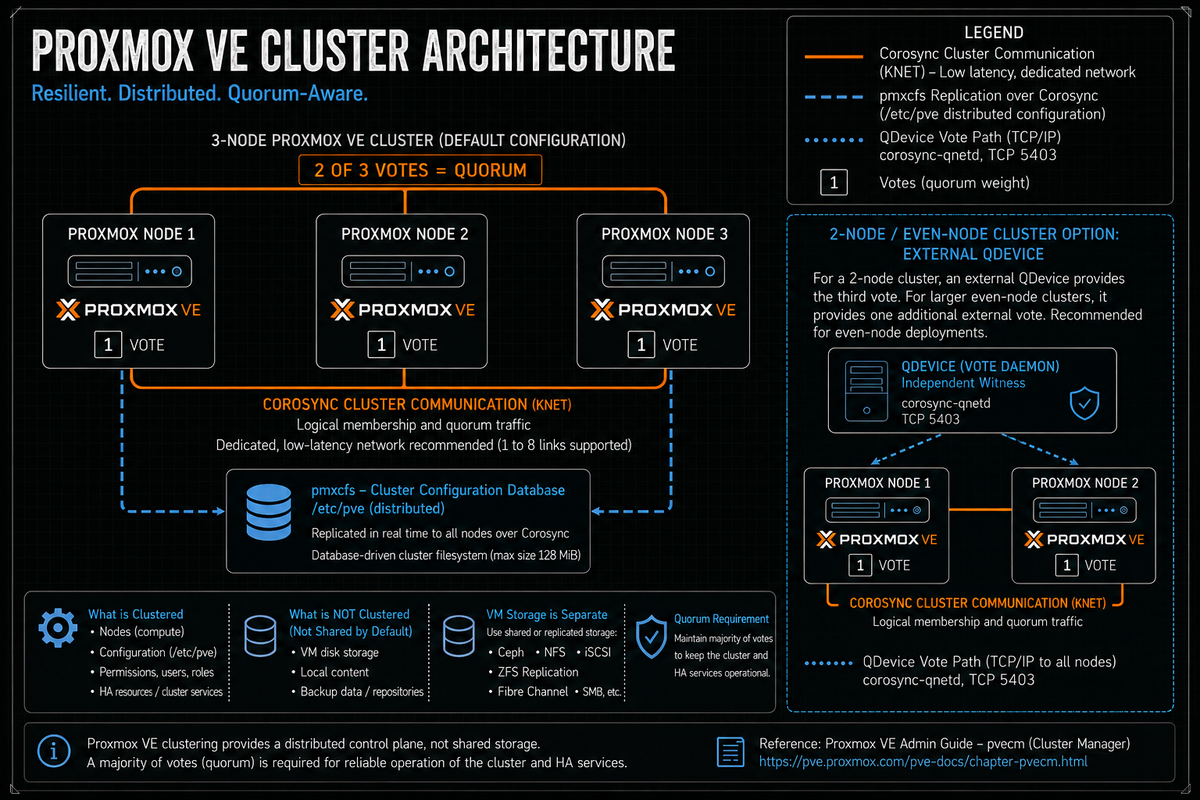
Article 1 in the Proxmox VE Cluster Design Fundamentals for v9.1 series. This article covers what a Proxmox cluster actually is: corosync as the messaging layer, pmxcfs as the distributed config filesystem, quorum mechanics, the two node problem and QDevice, network requirements for the cluster, and what clustering does and does not give you out of the box. Sets the architectural frame for the remaining 11 articles.
Proxmox VE clusters look simple from the web UI. Add a node, type a fingerprint, done. That simplicity hides a real architecture: Corosync as the cluster engine running the Totem single ring ordering protocol, a userspace distributed filesystem called pmxcfs that mounts at /etc/pve, a votequorum daemon that decides when the cluster is allowed to make changes, and a node ownership model where every guest config lives under the node that hosts it. None of those concepts come from VMware or Hyper-V, so engineers crossing over usually trip on the same handful of things in the first few months.
This article and the eleven that follow assume production scale: tens to low hundreds of nodes, one or more datacenters, real availability requirements. The point is to make the architectural decisions deliberately, with primary source backing, instead of discovering after the first incident that the cluster you built is not the cluster you needed.
Series target version is Proxmox VE 9.1. Where the 9.0 to 9.1 delta or the 8.4 to 9.x upgrade matters operationally, the article calls it out.
What a Proxmox cluster actually is
Per the Proxmox VE Administration Guide (Cluster Manager chapter), a Proxmox VE cluster is a group of physical servers tied together by the Proxmox VE cluster manager pvecm, which uses the Corosync Cluster Engine for reliable group communication. The cluster's distributed configuration is stored in pmxcfs (the Proxmox Cluster File System) and replicated in real time to every node.
The mechanical pieces:
- Corosync. The cluster messaging layer. Implements the Totem single ring ordering protocol over Kronosnet (knet) transport on UDP ports 5405 to 5412. Carries cluster membership, quorum decisions, and pmxcfs replication traffic. Per the docs, Corosync is sensitive to latency jitter and should run on a dedicated network.
- pmxcfs. A FUSE based filesystem that mounts at
/etc/pve. Stores cluster configuration as files, but underneath uses SQLite as the persistent store and Corosync as the replication transport. A copy of the data resides in RAM. Per the official docs the maximum size is 128 MiB, which is enough for the configuration of several thousand virtual machines. - pve-cluster. The systemd service that runs pmxcfs. Started and managed via systemd; the unit name is
pve-cluster.service. - The web UI, pvecm, and the API. Three views of the same state. Every node is a peer, runs the same management plane, and exposes the same API. There is no separate management server analogous to vCenter.
Every node in a Proxmox cluster runs the same set of services and exposes the same management plane. There is no master node in the vCenter sense. There is no vCenter in any sense. The web UI you connect to is whatever node you happened to point your browser at; the configuration is identical because pmxcfs replicates it.
Two things to internalize. First, there is no separate management server. Every Proxmox node is the management plane. If the node you logged into goes down, log into another node and the same UI is there with the same view of the cluster.
Second, the cluster does not include shared storage by default. vSphere clusters often imply VMFS on a shared SAN. Hyper-V clusters often imply CSV on shared storage. A Proxmox cluster is purely a control plane construct: Corosync messaging plus pmxcfs configuration replication. Storage is layered on separately (Ceph, ZFS plus replication, NFS, iSCSI, FC, and so on; see PVCD-03 and PVCD-04).
Quorum mechanics
Per the Proxmox VE Administration Guide, the cluster uses a vote based quorum scheme. Each node has one vote by default. The cluster is "quorate" when more than half of the expected votes are present. When quorum is lost, pmxcfs becomes read only on the partition that does not have quorum, which means no configuration changes (no VM start, stop, create, edit) can be made until quorum is restored. Running VMs continue to run; only the configuration plane is frozen.
This is the safety mechanism. Quorum exists to prevent split brain situations where two halves of a partitioned cluster could each think they are the survivor and make conflicting changes to the same VM, which leads to irreversible data corruption. The cluster only allows changes from the side that has a clear majority. Per the docs, the cluster switches to read only mode if it loses quorum.
To check current quorum status:
The output shows expected votes, total votes, the quorum threshold, and per node membership. Reading Quorate: Yes with all nodes listed is the healthy state.
What "quorum lost" means in practice
When pmxcfs goes read only:
- The web UI on the affected nodes can still load but configuration actions return errors.
- Running VMs and containers continue running. They do not stop.
- VM live migration, start, stop, and create operations all fail.
- HA managed guests do not relocate from a partition that is non quorate.
- Changes to
/etc/pve(any file) fail with a read only filesystem error.
Per the docs, recovery happens automatically when enough nodes are reachable again to satisfy quorum. There is also a manual override (pvecm expected 1) which is useful for recovering a stranded node but should never be used as a steady state configuration.
The two node problem and QDevice
The two node cluster is where most operational mistakes start. Per the Proxmox VE Administration Guide, if you are interested in High Availability, you need to have at least three nodes for reliable quorum. A two node cluster cannot survive a single node failure without losing quorum: with 2 expected votes, the threshold for quorum is 2, and one node alone has only 1 vote.
The Proxmox supported answer is the QDevice mechanism. Per the Cluster Manager docs, this involves two daemons. The Corosync Quorum Device (QDevice) daemon runs on each cluster node. The external vote daemon, QDevice Net (the only currently supported third party arbitrator), runs the corosync-qnetd service on an independent server and provides an additional vote to the cluster's quorum subsystem.
QDevice mechanics
- Install
corosync-qnetdon an external server (separate physical machine, small VM in another cluster, NAS, Raspberry Pi, anything that can reach both Proxmox nodes over the network). Per the docs, the host running QDevice is "almost configuration and state free." - Install
corosync-qdeviceon each Proxmox cluster node. - Configure with
pvecm qdevice setup <qdevice ip>from one Proxmox node. SSH keys are copied automatically. - Verify with
pvecm status. Expected output shows the QDevice as a member with one vote and the total vote count up by one.
QDevice behavior depends on cluster size parity
Per the official docs, QDevice behavior differs significantly between even and odd numbered clusters:
- Even node count (2, 4, 6, etc.). QDevice provides 1 vote. There are "no negative implications when using a QDevice. If it fails to work, it is the same as not having a QDevice at all." This is the right design for two node clusters.
- Odd node count (3, 5, 7, etc.). QDevice provides (N-1) votes where N is the cluster node count. This sounds attractive (the cluster can survive N-1 simultaneous node failures with QDevice intact), but per the docs it makes the QDevice "almost a single point of failure": if QDevice fails, no single node may fail without losing quorum. The Proxmox docs explicitly call this out: "in a cluster with 15 nodes, 7 could fail before the cluster becomes inquorate. But, if a QDevice is configured here and it itself fails, no single node of the 15 may fail."
Use QDevice for clusters with an even node count, especially two node clusters. Do not use QDevice on clusters with an odd node count unless you have a specific reason and you understand that you have just made the QDevice a single point of failure. The odd cluster default should be no QDevice.
QDevice is not a node
QDevice does not host VMs. It cannot. It is a vote arbitrator. The supported deployment is on a separate physical machine that is not part of the cluster and not running on cluster hardware. Running QDevice as a VM on the same cluster defeats the external vote design: the failure that takes out the cluster also takes out the QDevice. Put it on independent infrastructure (separate physical machine, NAS appliance, Raspberry Pi, or a VM on a different cluster).
Cluster size limits in practice
Per the official Cluster Manager documentation, there is "no explicit limit for the number of nodes in a cluster. In practice, the actual possible node count may be limited by the host and network performance." The docs note that as of 2021 there are reports of production clusters with over 50 nodes running on enterprise grade hardware.
The practical scaling constraint is Corosync. Per a Proxmox forum discussion with a Proxmox staff developer (forum thread max cluster nodes with pve6?), the consensus algorithm Corosync uses (Totem) does not scale arbitrarily because the protocol requires consensus across all members on each ordered message. Paxos based consensus protocols face similar scalability constraints. As cluster size grows:
- Per node packets per second (PPS) on the cluster network increase linearly.
- Latency jitter sensitivity increases. A single sluggish node can cause cluster events for everyone.
- Round trip messaging coordination costs grow.
Proxmox staff guidance on the same forum thread (PVE 6 era stress tests, still the most current public data points from Proxmox staff): a few thousand PPS and a few MB/s of traffic with all 36 nodes continuously writing on pmxcfs; without load, a few hundred PPS and a few hundred KB/s. 36 nodes was the upper bound of their internal testing at that time. Clusters of 50 plus nodes exist in production per the Cluster Manager docs. Beyond that, the operational model shifts toward multiple smaller clusters with a separate management plane integration (the remote migration feature in 9.x is part of that direction).
The pragmatic design rule:
- Up to ~16 nodes. Comfortable. Default cluster size for most production deployments.
- 16 to 32 nodes. Works. Plan dedicated Corosync network seriously, not as an afterthought.
- 32 to 50 plus nodes. Works in production but you are at the edge of what Proxmox routinely tests. Plan operational maturity (monitoring, change windows, network design) for the scale.
- Beyond 50. Consider whether multiple smaller clusters with cross cluster management (remote migration, shared backup target) is the better design.
Network requirements for the cluster
Per the Proxmox VE Administration Guide directly:
- Latency. "The Proxmox VE cluster stack requires a reliable network with latencies under 5 milliseconds (LAN performance) between all nodes to operate stably. While on setups with a small node count a network with higher latencies may work, this is not guaranteed and gets rather unlikely with more than three nodes and latencies above around 10 ms."
- Ports. "All nodes must be able to connect to each other via UDP ports 5405-5412 for corosync to work. An SSH tunnel on TCP port 22 between nodes is required."
- Time sync. "Date and time must be synchronized." NTP is required, not optional.
- Dedicated NIC. "We recommend a dedicated physical NIC for the cluster traffic. Additional links for cluster traffic offers redundancy in case the dedicated network is down."
- Bandwidth. Low. Corosync does not need much bandwidth. The constraint is latency and PPS, not throughput.
- Redundant links. "As of Proxmox VE 6.2, up to 8 fallback links can be added to a cluster." For production, at least one fallback link is the design default.
The single most common Corosync design mistake is sharing the network with storage or VM traffic. Per the docs: "The network should not be used heavily by other members, as while corosync does not uses much bandwidth it is sensitive to latency jitters; ideally corosync runs on its own physically separated network."
PVCD-02 covers the full networking design in detail. The rule for now: Corosync on its own dedicated network, with a fallback link on a different physical path. Anything else is an availability bet you do not need to make.
Hostname, IP, and version constraints
Per the docs, three constraints that catch people out:
- Hostname and IP cannot change after cluster creation. "Make sure that each node is installed with the final hostname and IP configuration. Changing the hostname and IP is not possible after cluster creation." Plan the hostname and IP scheme up front. Renaming or renumbering after the fact requires removing the node from the cluster and joining it back in.
- Online migration requires same vendor CPUs. "Online migration of virtual machines is only supported when nodes have CPUs from the same vendor. It might work otherwise, but this is never guaranteed." Mixed Intel/AMD clusters can migrate VMs but only offline. For mixed CPU generations within the same vendor, see PVCD-05 on live migration tuning.
- All nodes should run the same version. The cluster will tolerate temporary version skew during a rolling upgrade, but mixed versions in steady state is a configuration smell. Plan upgrade windows to bring all nodes to the same version reasonably quickly.
The pmxcfs ownership model
This is one of the architectural facts that catches VMware and Hyper-V engineers off guard.
Per the official pmxcfs documentation, for the guest configuration files in nodes/<NAME>/qemu-server/ (VMs) and nodes/<NAME>/lxc/ (containers), Proxmox VE sees the containing node <NAME> as the owner of the respective guest. Per the docs, this concept enables the use of local locks instead of expensive cluster wide locks for preventing concurrent guest configuration changes.
What this means operationally:
- VM 100 lives in
/etc/pve/nodes/node1/qemu-server/100.confwhen it runs on node1. Move it to node2 and the file moves to/etc/pve/nodes/node2/qemu-server/100.conf. - The node containing the config file is the owner. Only that node holds the local lock for the guest, which is why concurrent configuration changes are prevented without expensive cluster wide locking.
- If the owning node fails (power outage, fence event), the guest config is stranded under that node's directory. A regular migration cannot happen because the local lock is unobtainable on the offline node.
- For HA managed guests, the HA stack handles this with cluster wide locking and watchdog fencing (covered in PVCD-12).
- For non HA guests with shared storage, manual recovery is documented: move the config file. Per the official docs example:
mv /etc/pve/nodes/node1/qemu-server/100.conf /etc/pve/nodes/node2/qemu-server/.
If a node is offline and a non HA guest needs to come up on a surviving node, the recovery is moving the config file under /etc/pve/nodes/ from the offline node's directory to a surviving node's directory. This is documented Proxmox guidance and it works because pmxcfs is a cluster wide filesystem; moving the file moves the ownership. If you are coming from VMware or Hyper-V this looks unusual. It is also clean.
What clustering does and does not give you
This is where coming from another platform creates wrong expectations. Be clear about what a Proxmox cluster provides and what it does not.
What clustering provides
- Single management plane across all nodes. Configuration replicated via pmxcfs.
- Centralized authentication and authorization (PVE auth realms, LDAP/AD integration; PVCD-07).
- Live migration of VMs between nodes (with caveats around CPU vendor and storage).
- Storage migration of VMs between storage backends.
- HA manager for automatic restart of designated guests on node failure (PVCD-12).
- Cluster wide backup orchestration via Proxmox Backup Server integration (PVCD-08).
- Resource scheduling for HA workloads. Static placement plus, in recent Proxmox 9.1 packages (pve-ha-manager 5.2.0 shipped in 9.1.8), dynamic load aware placement with an optional automatic rebalance setting. Verify repository availability before treating this as production ready (initial rollout observed on the pve-no-subscription repository channel); see PVCD-12.
What clustering does not provide out of the box
- Shared storage. The cluster is a control plane. Storage is configured separately. Ceph (PVCD-04), ZFS with replication (PVCD-05), NFS, iSCSI, FC, and others are layered on. None come automatically.
- DRS style continuous workload balancing. Proxmox HA traditionally did static placement with restart on failure. Recent Proxmox 9.1 packages introduced dynamic load aware HA placement and automatic rebalance work (pve-ha-manager 5.2.0 in 9.1.8, with a CRS configuration surface under Datacenter, Options, Cluster Resource Scheduling). Verify repository availability before treating it as production ready: initial availability was observed on the pve-no-subscription repository channel, and documentation patches are still in review at the time of writing. Full feature parity with VMware DRS still typically involves community projects (ProxLB or PegaProx with built in ProxLB).
- Distributed lock management for non HA guests. The pmxcfs ownership model uses local locks. If the owning node is offline, recovery requires the manual
mvstep or HA management. - Built in stretched cluster across sites. Stretched Proxmox is possible but complex (PVCD-12). Default design assumption is a single site.
- Witness disk concept. No equivalent to the Failover Clustering disk witness. QDevice is the analog for quorum arbitration.
The cluster design mistakes that bite you later
Two node cluster without QDevice
A two node cluster cannot tolerate a single node failure without losing quorum. If you are intentionally building two nodes (small office, edge site), add a QDevice on a third device. If you cannot add a QDevice, run two standalone nodes instead of a cluster and accept that you do not have HA. Two clustered nodes without QDevice is the worst of both worlds: no HA and a fragile control plane.
Corosync sharing a network with VM or storage traffic
Per the official docs Corosync is sensitive to latency jitter. A storage saturation event or a VM traffic burst on the shared network propagates as Corosync timeout, which propagates as cluster events, which can trigger HA actions. The fix is dedicated Corosync network with a fallback link. The cost is small (a low bandwidth dedicated NIC) and the impact is large.
Hostname or IP picked without thought
Hostname and IP cannot change after cluster creation per the official docs. Pick names that scale (avoid host01 if you have any chance of host10 existing later; pick a naming scheme that sorts naturally). Pick IPs from a stable subnet you control. Document why each was chosen.
Mixed CPU vendors with live migration expectation
Per the docs, online migration is only supported across same vendor CPUs. Building a cluster with three Intel hosts and three AMD hosts means VMs cannot live migrate between the two halves. Plan the hardware homogeneity at procurement time, not after the cluster is in production.
QDevice on odd node clusters by default
Per the docs, QDevice on an odd node cluster gives N-1 votes and makes the QDevice a single point of failure. The default for odd node clusters is no QDevice. Do not configure QDevice on a 3 or 5 node cluster "just in case." It does not improve resiliency; it reduces it.
QDevice as a VM on the cluster it serves
QDevice exists to provide an external vote. Running it inside a VM on the same cluster means the failure that takes out the cluster takes out the QDevice. Put it on independent infrastructure: separate physical machine, NAS appliance, Raspberry Pi, or a VM on a different cluster. Not the cluster the QDevice serves.
Treating clustering as automatic shared storage
Cluster creation does not give you shared storage. Live migration without shared storage works (storage migration), but it is slower and more disruptive than live migration over shared storage. The cluster design and the storage design are two separate decisions, made together at planning time, covered in PVCD-03 and PVCD-04.
Production clusters without a dedicated Corosync fallback link
Single Corosync link means the cluster goes inquorate if the dedicated NIC, switch port, or cable fails. Per the docs, Proxmox supports up to 8 fallback links. Production clusters should have at least one fallback link on a different physical path, configured at cluster creation or added via pvecm after the fact. The cost is low; the resilience benefit is high.
Ignoring the time sync requirement
Date and time must be synchronized across nodes. Corosync, pmxcfs, certificates, scheduled backups, and HA all assume coherent time. NTP setup is part of node provisioning, not an afterthought. A node with drifted time generates cluster events long before it generates any visible application problem.
Skipping the rebuild test
The first time the cluster handles a real node failure should not be the first time anyone has tested cluster recovery. Test the failure modes during the build window: pull a node, watch the cluster, verify HA actions happen as expected, restore the node, verify it rejoins cleanly. The recovery steps Proxmox documents are clean (move config files, rejoin a removed node, etc.) but the operational muscle memory only develops by doing it.
Key Takeaways
- A Proxmox cluster is Corosync plus pmxcfs. Corosync is the messaging layer (Totem protocol over Kronosnet, UDP 5405 to 5412). pmxcfs is the FUSE distributed config filesystem mounted at
/etc/pve, replicated to every node, max 128 MiB total. - No separate management server. Every node runs the management plane and exposes the same UI and API. Unlike vCenter on vSphere, there is no central server to lose.
- Quorum mechanics are vote based. Per the docs, the cluster is quorate when more than half of expected votes are present. Loss of quorum makes pmxcfs read only. Running guests continue running; configuration changes block until quorum is restored.
- QDevice for even node clusters. Per the official docs, QDevice provides 1 vote on even node clusters with no downside if it fails. On odd node clusters, QDevice gives (N-1) votes and makes itself a single point of failure. Default rule: QDevice for two node and other even node clusters; no QDevice on odd node clusters.
- QDevice is external. Separate physical machine, NAS, or VM on a different cluster. Not a VM on the cluster it serves.
- No explicit cluster size limit. Per the official docs, "no explicit limit." Production clusters of 50 plus nodes exist. Practical sweet spot for most environments is up to ~16 nodes; 16 to 32 needs deliberate Corosync network design; beyond 50 consider multiple clusters.
- Network requirements per the Proxmox VE Administration Guide. Latency under 5 ms (under 10 ms tolerated for very small clusters), UDP 5405 to 5412 reachable, TCP 22 SSH between nodes, NTP synchronized, dedicated NIC for cluster traffic, fallback link strongly recommended (up to 8 supported since 6.2).
- Hostname and IP cannot change after cluster creation. Pick the scheme deliberately at install time.
- Online migration requires same vendor CPUs. Mixed Intel/AMD clusters can only migrate offline. Plan procurement around it.
- Guest ownership lives under
/etc/pve/nodes/<NAME>/qemu-server/. The directory determines which node holds the local lock. Recovery for non HA guests on offline nodes is the documentedmvcommand. - Clustering does not include shared storage. Storage is a separate design decision (Ceph, ZFS replication, NFS, iSCSI, FC). Covered in PVCD-03 and PVCD-04.
- Clustering does not include continuous workload rebalancing by default. HA traditionally did static placement with restart on failure. Recent Proxmox 9.1 packages (pve-ha-manager 5.2.0 in 9.1.8) introduced dynamic load aware placement and an automatic rebalance setting; verify repository availability before treating it as production ready. Full DRS parity typically uses ProxLB or PegaProx.