

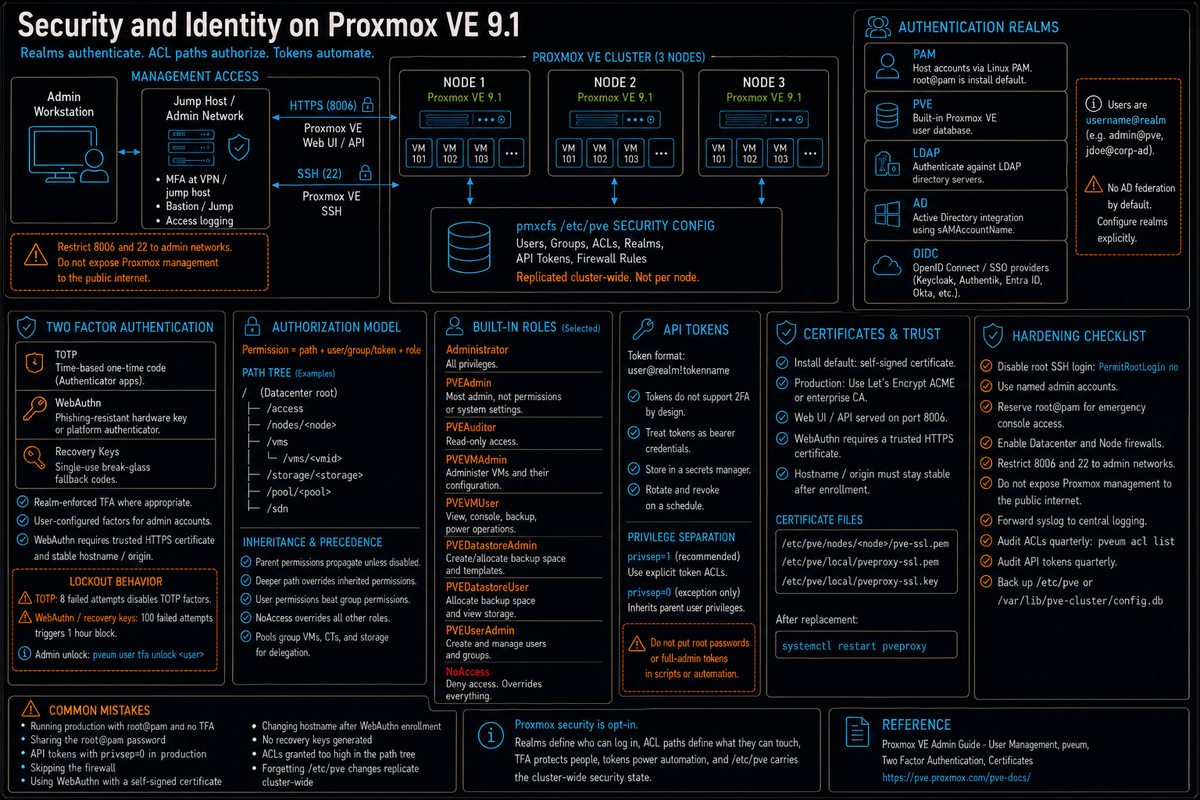
Article 7 in the Proxmox VE Cluster Design Fundamentals for v9.1 series. PVCD-06 covered patching the cluster. This article covers who can log in and what they can do once they are in: authentication realms (PAM, PVE, LDAP, AD, OpenID Connect), two factor with TOTP and WebAuthn, the role and path based permission model, API tokens with privilege separation, certificate management, and the operational hardening that turns a default Proxmox install into something you can put in front of an audit.
Security on Proxmox is straightforward once you understand the model, but the model is not what most VMware admins expect. There is no Active Directory federation by default. There is no single global MFA switch across every realm. Enforce TFA per realm and require user configured factors for admin accounts. The default install accepts root@pam with the password you set during install, and that is the entire access control story until you configure more. Everything from there is opt in: realms, two factor, roles, ACLs, tokens, certificates, firewall rules. None of it is on by default; all of it is necessary for production.
This article walks the actual primitives Proxmox exposes and the operational decisions that come with them. Series target version is Proxmox VE 9.1. Every claim below is sourced to the User Management wiki, the pveum(1) man page, the Proxmox VE Administration Guide, the Two Factor Authentication chapter, or linked Proxmox forum threads with Proxmox staff responses.
Authentication realms
Per the Proxmox VE Administration Guide, Proxmox VE supports multiple authentication sources: Microsoft Active Directory, LDAP, Linux PAM, OpenID Connect, and the built in Proxmox VE authentication server. Each authentication source is called a realm. Users are identified internally as username@realm.
The realms available out of the box:
- pam (Linux PAM Standard Authentication). The host operating system's user accounts.
root@pamis the install default. PAM users must exist as Linux system users on every Proxmox node (added viaadduser). Use this only for true administrative access on the host. - pve (Proxmox VE Authentication Server). The built in user database. Stored in
/etc/pve/user.cfgwith passwords in/etc/pve/priv/shadow.cfg(SHA-256 hashed). Users are independent of host accounts. Recommended for small to mid scale where Proxmox users should not be Linux system users. - LDAP. Authenticate against an LDAP directory. Configure the LDAP server, base DN, bind DN, and user/group filters via Datacenter, Permissions, Realms.
- AD (Active Directory). Specialized LDAP for Microsoft AD. Same configuration model with AD specific defaults for sAMAccountName lookups.
- OpenID Connect. SSO via an OIDC provider (Keycloak, Authentik, Azure Entra ID, Okta, etc). Per the Proxmox VE 9.1 Roadmap, the mobile web interface added OIDC realm login support in 9.1.
The realm decision matrix:
| Use case | Right realm | Notes |
|---|---|---|
| Single host, single admin | pam (root@pam) | Default. Set a strong password. Enable TOTP. |
| Small team, no central directory | pve | Manage users via the web UI. Users do not need shell access. |
| Existing AD environment | AD or OIDC | OIDC if your AD environment exposes Entra ID or ADFS; AD direct if you must bind directly. |
| Modern SSO infrastructure | OpenID Connect | The cleanest integration with central MFA, conditional access, group sync. |
Two factor authentication
Per the User Management wiki, Proxmox VE supports the following two factor methods in addition to realm enforced TOTP and YubiKey OTP:
- User configured TOTP. Time based one time password. A short code derived from a shared secret and the current time, changes every 30 seconds. Per the wiki, uses HMAC-SHA1, time step and password length configurable.
- WebAuthn. Per the wiki, a general standard for authentication implemented by various security devices like hardware keys (YubiKey, Nitrokey) or trusted platform modules (TPM) from a computer or smartphone. Phishing resistant by design because the credential is bound to the exact origin URL.
- Single use Recovery Keys. Per the wiki, a list of keys which should either be printed and locked in a secure place or saved digitally in an electronic vault. Each key can be used only once. The fallback if you lose your TOTP device or hardware key.
Per the wiki, before WebAuthn was supported, U2F could be set up by the user. Existing U2F factors can still be used, but the wiki recommends switching to WebAuthn once it is configured on the server.
WebAuthn configuration prerequisites
Per the wiki, WebAuthn requires:
- A trusted HTTPS certificate. The wiki notes that while it probably works with an untrusted certificate, some browsers may warn or refuse WebAuthn operations if not trusted. Use a Let's Encrypt certificate or a certificate from your enterprise CA.
- WebAuthn configuration set up at Datacenter, Options, WebAuthn Settings. The wiki notes this can be auto filled in most setups.
- The rpid (relying party ID) and origin must match the URL used to access Proxmox. If you change the hostname later, existing WebAuthn credentials stop working.
TFA brute force protection
Per the User Management wiki: a second factor protects users when their password is leaked or guessed, but factors can still be brute forced, so Proxmox locks users out after too many failed second factor attempts.
- TOTP: 8 failed attempts disables the user's TOTP factors. Unlock by logging in with a recovery key. If TOTP was the only available factor, admin intervention is required, and the wiki recommends requiring the user to change their password immediately.
- FIDO2/WebAuthn and recovery keys: Higher limit (100 tries) since these are less susceptible to brute force, but all second factors are blocked for an hour when exceeded.
Admins can unlock a user's TFA at any time via the user list in the UI or the command line (pveum user tfa unlock <user>).
The role and path permission model
Per the User Management wiki, Proxmox VE uses a role and path based permission management system. Permissions are expressed as a triple of (path, user or group or token, role). The role is a bundle of privileges; the path identifies the resource the privileges apply to.
Built in roles
Per the wiki, major predefined roles include:
- Administrator. All privileges.
- NoAccess. No privileges. Used to forbid access. Per the wiki, NoAccess overrides all other roles on a path and cannot be bypassed.
- PVEAdmin. Most things, except modifying system settings or permissions (Sys.PowerMgmt, Sys.Modify, Realm.Allocate, Permissions.Modify).
- PVEAuditor. Read only access.
- PVEDatastoreAdmin. Create and allocate backup space and templates.
- PVEDatastoreUser. Allocate backup space and view storage.
- PVEPoolAdmin. Allocate pools.
- PVESysAdmin. Audit, system console, and system logs. User administration belongs under PVEUserAdmin.
- PVETemplateUser. View and clone templates.
- PVEUserAdmin. User administration.
- PVEVMAdmin. Fully administer VMs.
- PVEVMUser. View, backup, config CDROM, VM console, VM power management.
Per the wiki, custom roles can be created by combining specific privileges via the GUI or CLI (pveum role add).
Permission paths
Per the wiki, permissions apply to a hierarchical object path:
/root/accesspermissions, users, groups, realms/nodes/<node>a specific node/vmsall VMs and containers/vms/<vmid>a specific VM or container/storage/<storage>a specific storage/pool/<pool>a specific resource pool/sdnSDN configuration
Per the wiki, the inheritance rules:
- Permissions set on a parent path are inherited by child paths by default, controlled by a propagate flag.
- User permissions take precedence over group permissions.
- Group permissions apply when the user is a member of that group.
- Permissions set deeper in the path tree override those inherited from higher levels.
- The NoAccess role nullifies all other roles associated with a specific path.
- Tokens with privilege separation enabled are restricted from having permissions the corresponding user does not possess.
Resource pools
Per the wiki, a resource pool is a named collection of virtual machines, containers, and storage volumes. Pools provide a unit of permission grouping: assign a role to a user on the pool path and the role applies to all resources in the pool. Useful for multi tenant deployments where each tenant has their own pool, or for organizational grouping (production, staging, development).
API tokens
Per the User Management wiki, API tokens enable easy and stateless API access. A token is identified as user@realm!tokenname and has its own credentials independent of the parent user's password.
The two privilege models per the wiki:
- Privilege separation enabled (privsep=1, recommended). The token can only use permissions explicitly assigned to it. It cannot inherit everything from the parent user account. This is the default and the right choice for production automation.
- Privilege separation disabled (privsep=0). The token inherits all privileges of the parent user. Equivalent to logging in as the user. Use only for special automation cases where the token genuinely needs the parent user's full access.
The CLI for token management:
Per the User Management wiki, API tokens do not support 2FA by design; they are meant for automation. Token hygiene matters more once 2FA is enforced for interactive logins, because tokens are the one credential class that bypasses the second factor.
Tokens are bearer credentials. Anything with the token string can authenticate as that token. Store tokens in a secrets manager (HashiCorp Vault, AWS Secrets Manager, Azure Key Vault, 1Password Connect, sops). Do not commit tokens to git, do not paste them into Slack, do not store them in plaintext config files on shared filesystems. Rotate tokens on schedule and immediately when an automation host is decommissioned.
Certificate management
Per the Proxmox VE Administration Guide, Proxmox VE generates a self signed certificate during installation, used by the web UI on port 8006 and by the API. Self signed works but produces browser warnings and is not appropriate for production WebAuthn (which requires a trusted certificate per the User Management wiki).
The two production options:
- Let's Encrypt via the built in ACME client. Configure under Datacenter, ACME. Supports DNS challenge for nodes that are not reachable on port 80 from the public internet. Renewal is automatic.
- Enterprise CA certificate. Upload your CA issued certificate via Node, Certificates, Upload Custom Certificate. The right answer for environments where Let's Encrypt is not appropriate (air gapped, internal CA mandated by policy).
The certificate paths on each node:
/etc/pve/nodes/<node>/pve-ssl.pemdefault node specific certificate, signed by the cluster CA./etc/pve/local/pveproxy-ssl.pemcustom or ACME certificate if configured./etc/pve/local/pveproxy-ssl.keyprivate key for the custom or ACME certificate.
After replacing the certificate, restart pveproxy: systemctl restart pveproxy.
Hardening checklist
The default Proxmox install is functional but not hardened. The operational checklist for a production node:
Authentication and access
- Enforce TOTP or YubiKey OTP at the realm where appropriate. Use WebAuthn as a user configured second factor for admin accounts. Per the User Management wiki, TFA enforcement at the realm level means only users with configured TFA can log in.
- Disable root@pam SSH login (set
PermitRootLogin noin/etc/ssh/sshd_config) and use named admin accounts with sudo where possible. - For pve realm users, set a password policy and enforce it via your operational process (Proxmox does not enforce password complexity itself).
- Configure an authentication realm appropriate to your org: AD or OIDC for centralized identity.
- Use API tokens with privsep=1 for automation. Never use passwords or root credentials in scripts.
Network and firewall
- Enable the Proxmox firewall at Datacenter, Firewall (cluster level) and Node, Firewall (node level). The firewall is off by default.
- Restrict management interface access (port 8006) to admin networks only. Production Proxmox should not be reachable on 8006 from the public internet.
- Restrict SSH to admin networks. Better still, put management behind a VPN or jump host.
- Separate management network from VM networks at the bridge or VLAN level (covered in PVCD-02).
TLS and certificates
- Replace the self signed certificate with Let's Encrypt or an enterprise CA cert.
- Review pveproxy TLS configuration against your security policy. Only change cipher suites or supported TLS versions when policy requires it, and test before rollout.
- If using WebAuthn, the certificate must be trusted (per the User Management wiki).
Monitoring and audit
- Forward syslog to a central logging system. Logins, privilege changes, and configuration changes are all logged but only useful if collected.
- Monitor failed login attempts. Brute force attempts on root@pam are common on internet exposed Proxmox; the firewall should block this entirely, but logs will show the attempts.
- Audit ACLs quarterly.
pveum acl listshows the current ACL table. Compare against your authoritative list of who should have what. - Audit API tokens quarterly.
pveum user listfollowed bypveum user token list <user>for each. Revoke tokens for systems that are no longer in use.
Backup the configuration
- The pmxcfs filesystem at
/etc/pvecontains all cluster configuration including ACLs, tokens, realms, firewall rules. It replicates across the cluster, but a complete cluster failure means everything is gone. - Regular backups of
/etc/pve(or its underlying SQLite database at/var/lib/pve-cluster/config.db) are essential. Cover this in your operational runbook (PVCD-08 covers backup with PBS).
The security design mistakes that bite you later
Running production with default root@pam and no TFA
The biggest mistake. Default install accepts password only login as root@pam. A single password compromise hands an attacker every VM in the cluster. Enable TOTP or YubiKey OTP at the realm level on day one, before adding any production workload. Use WebAuthn as a user configured second factor for admin accounts.
Sharing the root@pam credential
One root password shared across the team means no audit trail, no individual accountability, no clean offboarding when someone leaves. Create named admin accounts (in pve realm or via AD/OIDC), assign Administrator role on /, and reserve root@pam for emergency console access only.
API tokens with privsep=0 in production
Tokens that inherit the parent user's full privileges are equivalent to giving an automation script full Administrator. Per the User Management wiki, the right default is privsep=1 with explicit ACLs. The few cases where privsep=0 is genuinely needed should be reviewed and approved as exceptions, not defaults.
Skipping the firewall
The Proxmox firewall is off by default. Production clusters with no firewall configured are wide open at the network layer to anything that can reach the management VLAN. Enable the firewall, default deny inbound, allow specific admin source networks for ports 8006 and 22.
WebAuthn with self signed certificate
Per the User Management wiki, WebAuthn requires a trusted certificate. Self signed works in some browsers, fails in others, and breaks for users who have not added the cert to their trust store. Use Let's Encrypt or an enterprise CA before configuring WebAuthn.
Hostname change after WebAuthn enrollment
Per the WebAuthn standard and confirmed in Proxmox forum threads, the rpid and origin must match the URL used to enroll the credential. Change the hostname or the URL clients use, and existing WebAuthn credentials stop working. Pick a hostname before enrolling WebAuthn for users; do not change it later without enrolling everyone again.
No recovery keys generated
TOTP device gets lost or wiped. WebAuthn key falls in the ocean. Without recovery keys, the user is locked out and admin intervention is required to disable TFA on their account. Recovery keys take 30 seconds to generate and save you a real incident later.
ACLs set at the wrong path level
Granting PVEVMAdmin on / instead of on a specific pool gives the user admin over every VM in the cluster. The hierarchical model is forgiving; mistakes propagate. Test ACL changes in a test environment first, and use NoAccess at the right paths to constrain blast radius for risky permissions.
Forgetting that pmxcfs replicates everything
ACLs, tokens, realm configurations, firewall rules: all of this is in /etc/pve which replicates cluster wide. Adding a permission on one node adds it everywhere. There is no per node ACL. Plan around the cluster wide model from day one.
Skipping the certificate renewal monitoring
Let's Encrypt certificates renew automatically via the built in ACME client. Until they do not (DNS challenge misconfiguration, ACME endpoint changes, expired account, network change blocking the renewal). Monitor certificate expiration as part of your standard infrastructure monitoring; an expired cert breaks every browser session and every WebAuthn login.
Key Takeaways
- Five realm types out of the box. pam (Linux PAM), pve (built in), LDAP, AD, OpenID Connect. Per Proxmox VE 9.1 Roadmap, OIDC realm login also works on the mobile web interface in 9.1.
- Two factor: TOTP, WebAuthn, recovery keys. Per the User Management wiki, TOTP uses HMAC-SHA1, WebAuthn requires a trusted certificate. Recovery keys are single use and take 30 seconds to generate.
- TFA brute force lockouts. Per the wiki: 8 failed TOTP attempts disables TOTP factors; 100 failed WebAuthn attempts triggers a 1 hour lockout. Recovery keys unlock TOTP; admin intervention unlocks WebAuthn.
- Role and path permission model. Per the wiki, permissions are (path, user/group/token, role) triples. Built in roles include Administrator, PVEAdmin, PVEVMAdmin, PVEVMUser, PVEAuditor, PVEDatastoreAdmin, NoAccess, and others. NoAccess overrides everything.
- Inheritance: deeper paths override, user beats group, NoAccess wins. Plan ACLs at the right path level. Pools are a useful unit of permission grouping for multi tenant or organizational segmentation.
- API tokens with privsep=1 by default. Per the wiki, privsep tokens cannot inherit privileges the parent user does not have. Tokens do not support 2FA; treat them as bearer credentials and store in a secrets manager.
- Replace self signed cert before production. Let's Encrypt via built in ACME or enterprise CA. Required for WebAuthn per the wiki.
- Firewall is off by default. Enable cluster and node firewalls. Restrict 8006 and 22 to admin networks. Production should not be reachable on 8006 from the internet.
- Audit ACLs and tokens quarterly.
pveum acl listandpveum user token listshow the authoritative state. Compare against your access control matrix. - Backup /etc/pve. The pmxcfs database holds all cluster security configuration. PVCD-08 covers backup with PBS.