

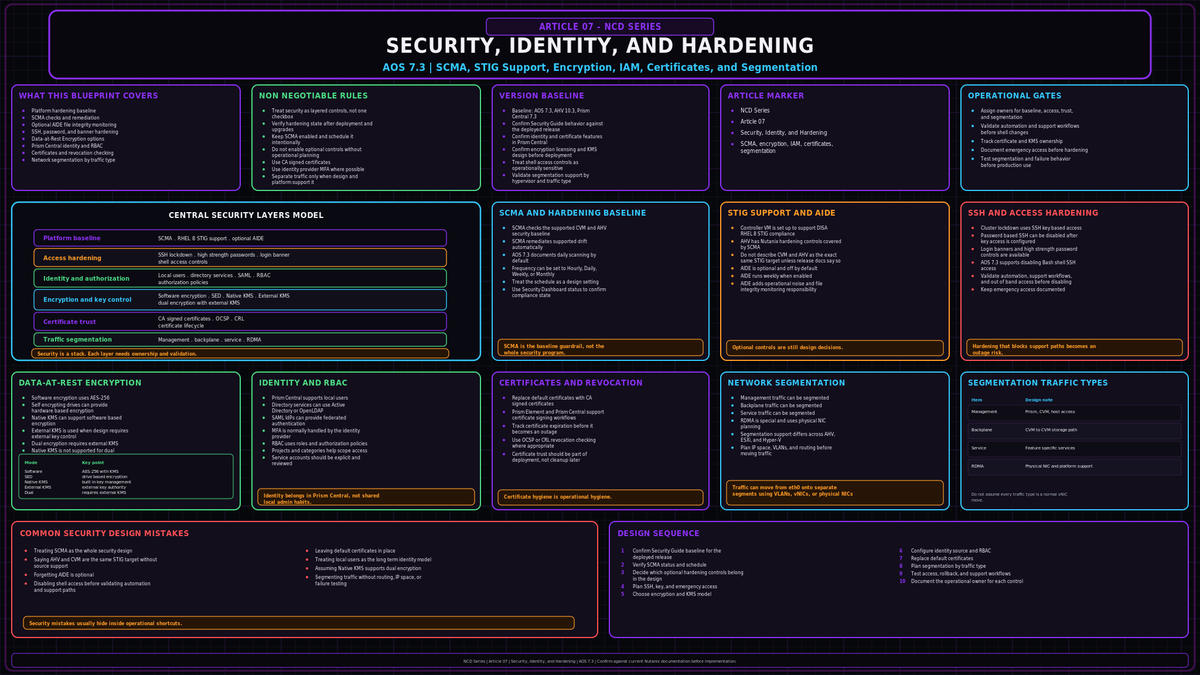
Nutanix arrives with most of its security controls already running. The platform applies a hardened operating system baseline at the factory and holds it there without operator effort. That changes the job on a cluster. The work is less about turning protection on and more about knowing what is already active, deciding which optional controls to add, and wiring the cluster into the identity and certificate infrastructure you already run.
This covers the cluster security surface on AOS 7.3 with AHV 10.3 and Prism Central 7.3: the platform baseline, cluster lockdown, encryption, identity and access, certificates, and network segmentation. Flow microsegmentation, the east west firewall for guest VM traffic, is a workload concern and sits in a later article.
The platform baseline runs by default
The Controller VM and AHV conform to the RHEL 8 STIG published by DISA, aligned to NIST 800-53. The mechanism that holds that baseline is SCMA, the Security Configuration Management Automation framework, which uses SaltStack to inspect the operating system and hypervisor configuration on a schedule and reset any drift back to the supported state without intervention.
SCMA is enabled by default. Nothing turns it on. The only knob is the schedule, and it is set separately for the Controller VM and the hypervisor, each with its own command family:
More baseline controls sit behind the same two command families and are off by default. AIDE, the Advanced Intrusion Detection Environment, runs a weekly file integrity check. Its schedule is fixed at weekly and cannot be changed, only enabled or disabled. A high strength password policy raises local account complexity (minlen 15, difok 8, remember 24), and a Department of Defense consent banner can be presented at login. Apply each to both the CVM and the hypervisor, or the other side stays at its default:
Prism surfaces STIG status and the security posture of each node in its security dashboard, so the compliance state is visible without leaving the management plane.
SCMA covers the operating system and hypervisor only. It does nothing for identity, certificates, encryption, or segmentation. Treat the default baseline as the floor, not the finished cluster.
Cluster lockdown and the AOS 7.3 SSH change
Cluster lockdown removes login by password to the CVM and AHV and requires SSH keys instead. The flow is deliberate. Add one or more public keys through Prism under the cluster lockdown configuration, validate that access with the key works, then disable remote login with a password. Removing the password path before validating key access is the fastest way to lock yourself out.
AOS 7.3 adds a control worth calling out on its own. You can now disable Bash shell SSH access entirely. This removes external SSH to the CVM and AHV with Bash and cuts a meaningful slice of attack surface. Internal traffic that still needs SSH, CVM to CVM or host to CVM for cluster services, keeps working because port 22 routes through an envoy proxy rather than the Bash shell.
Confirm out of band access through IPMI or the host console works before any lockdown. If SSH by password is your only door and you close it without a working console, recovery gets painful fast.
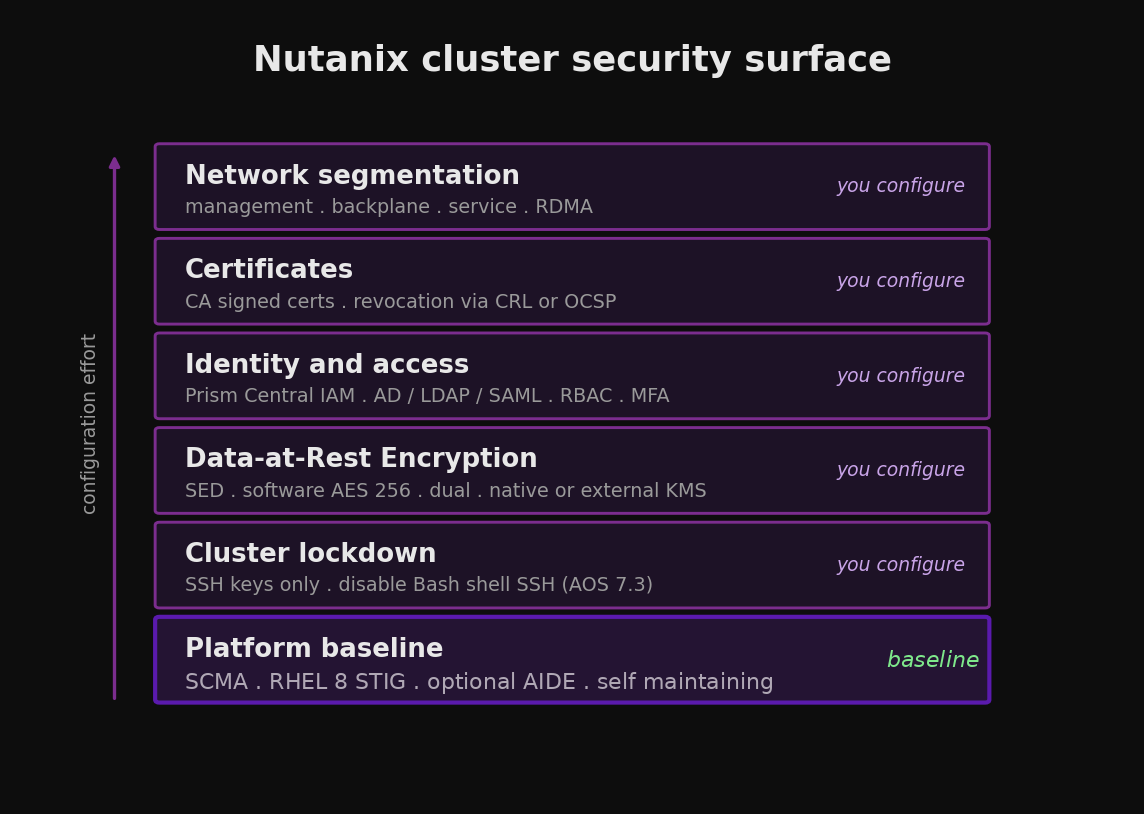
The cluster security surface, from the always on platform baseline out to the controls you configure.
Data-at-Rest Encryption
Data-at-Rest Encryption protects stored data in one of three modes. SED encryption uses hardware self encrypting drives. Software only encryption applies AES-256 in AOS with no special drives required. Dual encryption layers both, hardware and software together, for environments that demand it.
Key management splits two ways. The native key manager, the local key manager introduced in AOS 5.8, keeps keys inside the cluster and offers backup and rotation from Prism. The alternative is an external KMS that speaks KMIP or is TCG compliant, such as Vormetric or SafeNet. The choice matters before you enable anything: dual encryption has required an external KMS, with the native key manager not supported for it. Confirm that restriction against the KMS Considerations section of the current Security Guide before design, since it has not been restated in recent documentation.
| Mode | What encrypts | Key management | Encryption scope |
|---|---|---|---|
| SED | Self encrypting drives | Native or external KMS | Cluster (drives encrypt themselves) |
| Software only | AES-256 in AOS | Native or external KMS | AHV cluster level; ESXi and Hyper-V cluster or container level |
| Dual | SED plus software | External KMS (native key manager not supported; confirm on current guide) | Cluster |
On AHV, encryption is configured at the cluster level on an empty or populated cluster. On ESXi and Hyper-V it can be set at the cluster or the container level, and container level encryption has to be enabled again for every new container created afterward.
SED behavior is worth understanding for failure planning. Keys are never cached on the cluster. A cold boot or an IPMI reset forces a fresh call to the KMS to unlock the drives, while a soft CVM reboot does not. A drive that is reseated locks until it gets its key, and a stolen drive is inert without the key encrypting key. If a whole node is taken, revoking the node certificates at the KMS blocks it from unlocking any drive.
Data-at-Rest Encryption requires the appropriate license tier. Confirm the current entitlement against your NCI licensing before committing a design to it, since the bundling has changed across recent releases.
Identity and access
Prism Central IAM, reached through Admin Center, is the front door for identity. Three authentication sources are supported: local accounts, directory services through Active Directory or LDAP, and SAML through an external identity provider. For directory auth, use LDAPS on port 636 rather than cleartext LDAP. For SAML, Prism Central acts as the service provider against an IdP such as ADFS, Entra ID, Okta, or Duo.
Multi factor authentication is delivered through the IdP on the SAML path, which is the cleanest way to add a second factor without managing it on the cluster. Prism also supports client certificate authentication, including common access card setups, for environments that require certificate based login.
Access control is role based. Prism Central ships system defined roles and lets you build custom roles with granular permissions at the operation and entity level. Authorization policies bind a role to a user or group and a scope. Projects and categories then group resources for quota and delegated access. Prism Element keeps its own simpler set of built in roles: Viewer, Cluster Admin, and User Admin.
Drive RBAC from directory or IdP groups, not individual accounts. Roles bound to named people rot the moment staff changes. Map roles to groups and let the directory handle membership.
Certificates
Every cluster arrives with factory self signed certificates on its management endpoints. Replace them with certificates signed by your own CA. The cluster generates a certificate signing request, your CA signs it, and you import the result through Prism. Prism Element and Prism Central hold separate certificate scopes, so both need attention.
Two settings often get missed. Certificate revocation checking can be enabled through a revocation list or OCSP, so a revoked certificate is actually rejected. And Prism Central does not support the SSLv2 or SSLv3 ciphers, which means clients still offering them must have those options disabled before they connect.
Network segmentation
Segmentation isolates a class of cluster traffic onto its own network for security, resilience, or bandwidth. Nutanix recognizes four traffic types:
- Management. Prism, SSH, rsyslog, SNMP, Prism Element to Prism Central, and anything that uses the default gateway.
- Backplane. CVM to CVM cluster service traffic, plus host to host and host to CVM.
- Service. A chosen AOS feature, such as Nutanix Volumes, confined to its own vNIC and network.
- RDMA. Stargate only. Rather than a vNIC, a physical NIC is passed through from the hypervisor to the CVM.
By default every traffic type rides the management interface, eth0. Each segment can be separated logically with VLANs or physically with its own NICs and switching. Hypervisor support is not uniform: management and backplane segmentation work on AHV, ESXi, and Hyper-V, with Hyper-V offering logical segmentation only, while service specific isolation is limited to AHV and ESXi.
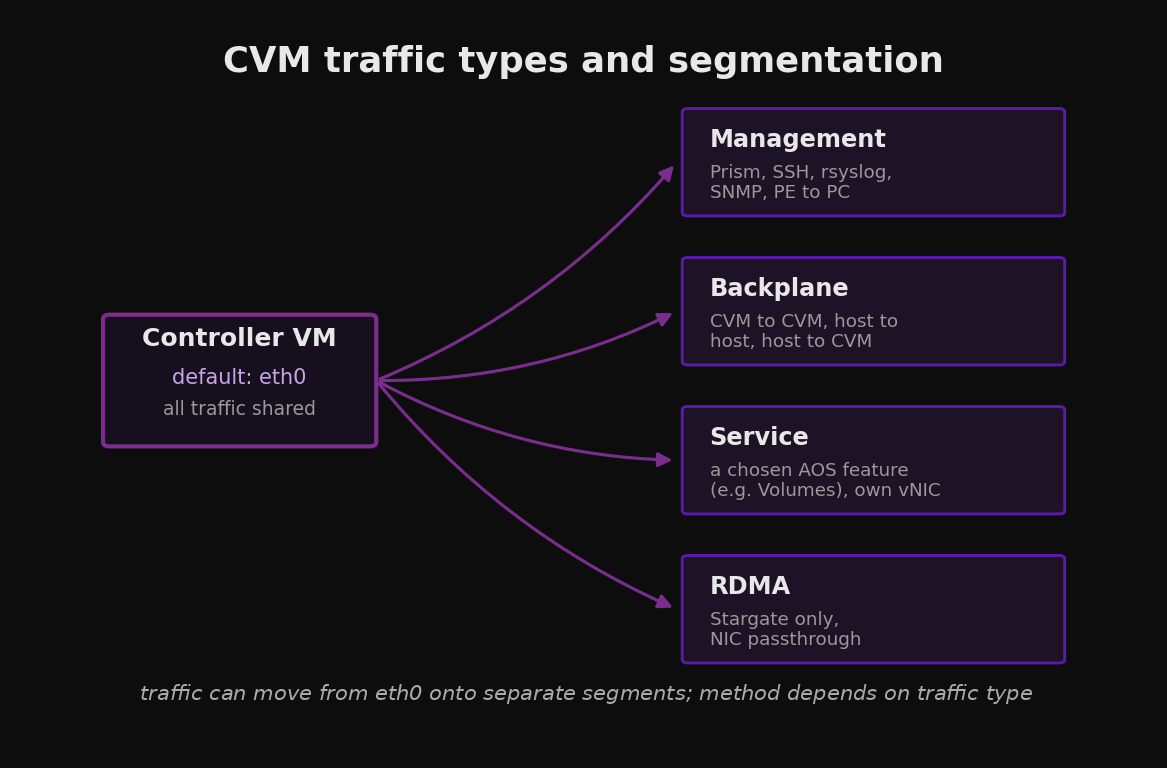
The four traffic types, each able to move from the shared management interface onto its own segment.
Plan the address space up front. Segmentation needs n+1 IP addresses per cluster, one per node plus one for the virtual IP. Where disaster recovery is in scope, enable segmentation at both the local and remote sites before configuring the remote relationship.
Decide backplane segmentation at design time. Retrofitting it onto a production cluster touches every CVM interface and is disruptive after the fact.
A hardening order for a new cluster
The controls layer cleanly if you apply them in the right order. Lockdown comes last so you never cut access before the rest is in place.
Confirm out of band access through IPMI and the host console before touching anything.
Register the cluster with Prism Central and configure the IAM authentication source, directory or SAML.
Define custom RBAC roles and authorization policies, bound to directory or IdP groups.
Replace the self signed certificates on Prism Element and Prism Central with CA signed certificates, and enable revocation checking.
Plan and apply network segmentation, backplane first, ideally during deployment.
Configure Data-at-Rest Encryption and key management before workloads land.
Enable the optional baseline controls you want, AIDE, high strength passwords, the login banner, and confirm the SCMA schedule.
Apply cluster lockdown last. Load SSH keys, validate them, disable password login, and on AOS 7.3 evaluate disabling Bash shell SSH.
Six design choices that go wrong
- Treating the default baseline as the finish line. SCMA holds the operating system baseline and nothing else. Identity, certificates, encryption, and segmentation are still entirely yours to configure.
- Locking down SSH before confirming console access. If login by password was the only door and you remove it without working IPMI, recovery turns into a site visit.
- Choosing dual encryption with no external KMS. Dual has required an external KMIP key manager, with the native key manager not supported for it. Plan for an external KMS whenever dual is in scope, and decide key management before enabling encryption.
- Building RBAC on individual accounts. Roles bound to people instead of groups break the moment staff changes. Bind to directory or IdP groups.
- Retrofitting backplane segmentation onto production. It touches every CVM interface and is disruptive after the cluster is live. Decide at design time.
- Leaving factory certificates in place. Self signed certificates train operators to click through browser warnings and remove any ability to validate the management endpoint. Replace them early.
Key Takeaways
- Nutanix applies and self maintains a RHEL 8 STIG baseline through SCMA. That covers the operating system, not your identity or data controls.
- AOS 7.3 adds the option to disable Bash shell SSH to the CVM and AHV, with internal traffic proxied on port 22 through envoy.
- Data-at-Rest Encryption has three modes. Choose key management, native or external KMS, before enabling, and plan for an external KMS whenever dual encryption is in scope.
- Centralize identity in Prism Central IAM, drive RBAC from directory or IdP groups, and add multi factor authentication through the IdP.
- Replace self signed certificates and plan network segmentation during deployment, not after the cluster is carrying production.