
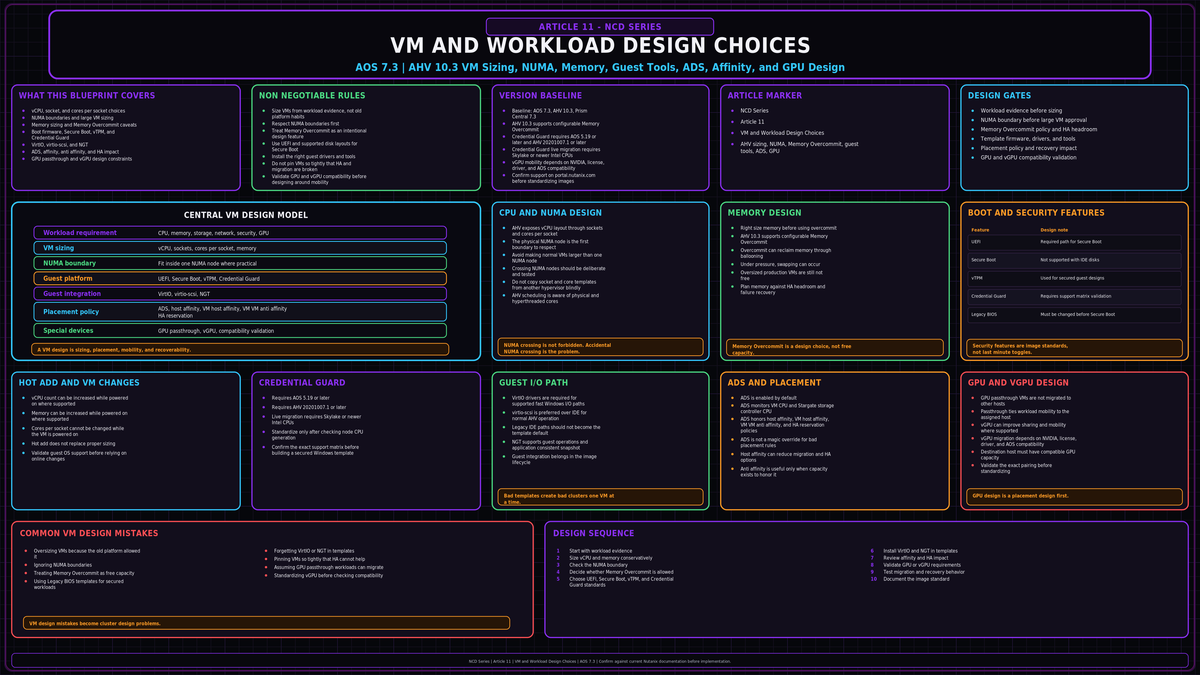
NCD-11 in the Nutanix Cluster Design series. The cluster is built, the storage is tuned, replication is in place. Now you put workloads on it. This article covers how to size and configure VMs on AHV 10.3 so they run fast, migrate cleanly, and do not fight the scheduler: CPU and NUMA, memory, boot firmware and guest security, disk layout, guest tooling, and the placement rules that decide where a VM actually runs.
Sources: Verified against the Nutanix AHV Administration Guide v10.3, the AHV Best Practices solution document (BP-2029), the Nutanix Bible (Book of AHV), and Nutanix Tech Center material on the Acropolis Dynamic Scheduler. The technical claims and version sensitive values below were checked against those sources. Anything tied to a specific hardware generation or NVIDIA driver pairing should be confirmed against portal.nutanix.com for your exact build before you commit a design.
CPU: vCPUs, cores, and the NUMA boundary
AHV exposes two CPU controls per VM. The number of vCPUs maps to virtual sockets. The number of cores per vCPU maps to cores inside each socket. A VM configured with 4 vCPUs and 2 cores per vCPU presents as 4 sockets of 2 cores, for 8 logical processors total.
The physical NUMA node is the first boundary to respect in AHV CPU sizing. Each physical socket on the host is a NUMA node with its own directly attached memory. When a VM gets CPU on one NUMA node and reaches across to memory on another node, you pay a latency tax on every access that crosses the boundary. The goal is to keep a VM inside one NUMA node wherever the workload allows it.
Two sizing rules follow from that:
- For normal VM sizing, avoid making a VM larger than the physical cores available in one NUMA node unless the application is NUMA aware and the design has been tested that way. Crossing NUMA nodes is sometimes necessary for very large workloads, but it should be deliberate, not an accident caused by copying a socket or core template from another platform.
- Use the physical core count for your ceiling, not the hyperthreaded logical count. Hyperthreads are not full cores and sizing against them oversubscribes the socket.
Nutanix documents a default preference to add vCPUs (sockets) before adding cores per vCPU. That guidance keeps the topology simple for the common case where a VM fits comfortably inside one node. The moment a VM is large enough that socket count would push it across NUMA boundaries, the boundary wins: size the VM so its total cores stay within one physical socket, and only span nodes deliberately for a NUMA aware application that you configure vNUMA for.
Hot add has an asymmetry you will trip over
You can hot add vCPUs (sockets) to a running VM. You cannot change cores per vCPU on a running VM. Changing the cores per socket value requires a power cycle. This catches people who provisioned a VM with a single core per socket and many sockets, then later want to consolidate cores: that change is offline.
Provision for the topology you want from the start. If a VM is going to be large, set the cores per socket correctly at build time so you are not forced into a maintenance window later to fix a layout decision. Hot add of sockets gives you headroom for growth; it does not let you reshape the socket geometry online.
Frodo and the I/O path
AHV runs an optimized I/O path called Frodo, enabled by default on VMs powered on after AOS 5.5. Frodo gives the guest a multiqueue virtio-scsi device and cuts CPU overhead on the I/O path substantially while raising throughput. For VM design this means two things: present disks through the virtio-scsi controller rather than legacy emulated controllers, and make sure the guest has current virtio drivers installed so it actually uses the fast path.
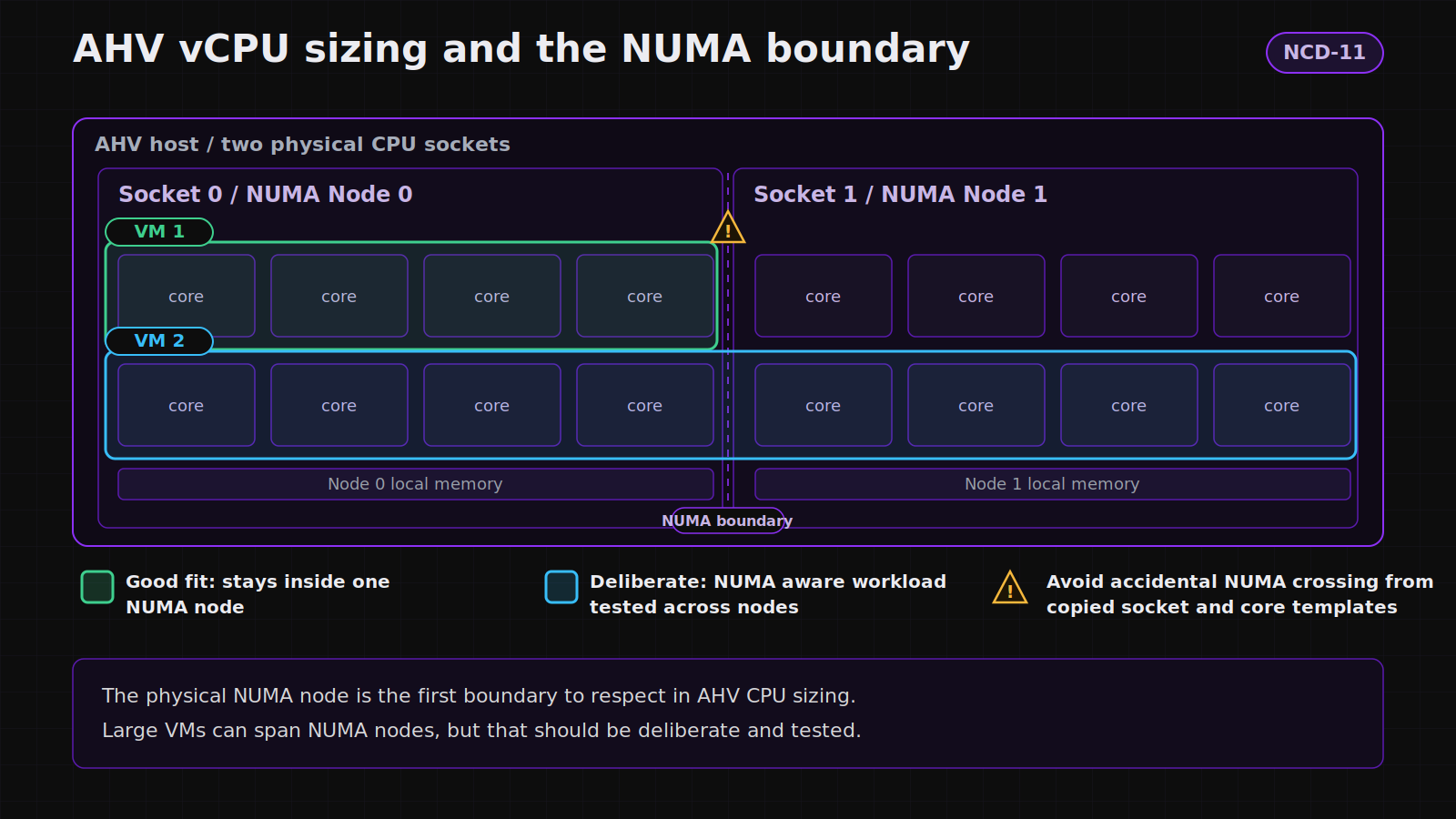
A VM kept inside one NUMA node versus one that spans two and pays remote memory latency on every cross node access.
Memory: size for the node, use overcommit only by design
AHV should still be sized like memory is real capacity unless you intentionally enable Memory Overcommit and validate the tradeoff. On AHV 10.3, Memory Overcommit is a configurable VM feature. When it is enabled, AHV can reclaim unused guest memory through ballooning and, under pressure, swapping. That can help density in the right environment, but it is not a free production sizing escape hatch. For normal cluster design, assigned memory still has to be planned against host capacity, HA headroom, and failure recovery.
Two consequences for design:
- Right size memory. Even when Memory Overcommit exists, oversized production VMs are not free. Padding every VM with memory it never touches reduces consolidation ratio for the whole cluster and eats into the headroom you need for host failure restart.
- Keep memory inside the NUMA node alongside the CPU. A VM whose memory exceeds what one node holds will span nodes the same way an oversized vCPU count does, and the same latency penalty applies.
Memory hot add is supported for running VMs. As with CPU, plan the steady state size rather than relying on hot add to rescue an undersized build, because not every guest OS picks up hot added memory cleanly without a reboot.
Boot firmware and guest security
AHV supports legacy BIOS and UEFI boot. UEFI is the prerequisite for the security features modern Windows wants, so for any new Windows build, start on UEFI.
| Feature | Requirement on AHV | Why it matters |
|---|---|---|
| UEFI boot | Supported on AHV. Required before Secure Boot or vTPM can be enabled. | Replaces legacy BIOS. Baseline for everything below. |
| Secure Boot | Supported on the Q35 machine type only. Nutanix does not support converting a VM that uses IDE disks or legacy BIOS straight to Secure Boot. | Blocks unsigned boot binaries. All boot drivers must be signed. |
| vTPM | Supported. vTPM data is encrypted by Mantle, the Nutanix distributed secrets service, and isolated per VM. | Required for Windows 11. Backs BitLocker and other key storage. |
| Credential Guard | Requires AOS 5.19 or later and AHV 20201007.1 or later. VM live migration is supported only between nodes with Skylake or newer Intel CPUs. | Useful for secured Windows builds, but CPU generation and feature support must be checked before standardizing. |
The practical sequence for a Windows 11 golden image: build on the Q35 machine type, boot UEFI, enable Secure Boot, attach a vTPM, and inject the virtio drivers into the install media so the disk and network come up on the fast path. Confirm your host generation supports Credential Guard live migration before you turn it on fleet wide, or you will pin those VMs to whatever host they booted on.
The Secure Boot and Credential Guard hardware pairings shift with CPU generation and AHV build. Treat AOS 5.19 or later, AHV 20201007.1 or later, and Skylake or newer CPUs for live migration as the documented minimums, then confirm the exact support matrix for your nodes on portal.nutanix.com before standardizing a secured Windows image across the cluster.
Disk layout
VM disks on AHV are vDisks living in a storage container on the Distributed Storage Fabric. There is no LUN to carve and no datastore to size. You attach vDisks to a VM and the fabric handles placement, replication, and the capacity optimizations covered in NCD-03 and NCD-04.
- Use virtio-scsi. Attach data and OS disks on the SCSI controller so they ride the Frodo path. Reserve IDE for the rare guest that truly cannot use virtio, and remember IDE disks block Secure Boot conversion.
- Let the container own the data services. Compression, deduplication, and erasure coding are container level decisions, not per VM. Place a VM in the container whose data services match the workload rather than trying to tune storage behavior on the VM itself.
- Do not thick provision out of habit. The fabric is thin by default. Reserving capacity per VM removes flexibility from the cluster without buying the VM anything in the common case. Reserve deliberately, for the few workloads that actually require guaranteed space.
Nutanix Guest Tools
Nutanix Guest Tools (NGT) is the in guest agent and it earns its place. Install it on every VM you care about. It provides application consistent snapshots through a VSS requestor on Windows and script hooks on Linux, self service file restore, and the communication channel the platform uses for guest level operations during recovery and migration.
The connection between NGT and design is that several recovery and mobility behaviors depend on it. A VM without NGT can still be snapshotted, but you lose the application consistency that makes those snapshots safe to restore for a database, and you lose the in guest steps that smooth a cross cluster recovery. Treat NGT as part of the build, not an afterthought.
Placement: ADS, host affinity, and anti affinity
Where a VM runs is decided by the Acropolis Dynamic Scheduler (ADS), which runs on every AHV cluster by default. ADS is not a constant load balancer. It watches for resource contention and only moves VMs when a host crosses a hotspot threshold, which keeps migration churn low compared to a scheduler that rebalances constantly. It also enforces the placement rules you set and honors HA reservations.
Host affinity
Host affinity pins a VM to a named host or set of hosts. The VM will only run and only migrate within that set. Use it where a VM must stay on specific hardware, for example a GPU passthrough VM that needs the host holding the card, or a workload with a host bound license. Be deliberate: a VM pinned to one host has no HA target if that host fails, so you have traded availability for placement control.
Anti affinity
Anti affinity keeps a set of VMs off the same host so a single host failure cannot take down more than one member. This is how you protect a clustered application, paired domain controllers, or the nodes of a database availability group. When you apply an anti affinity rule to VMs that are already running on the same host, ADS migrates them apart on its own schedule rather than instantly, so confirm the rule actually separated them before you rely on it.
Host affinity and HA reservation interact. A VM hard pinned to a single host cannot be restarted elsewhere on failure. If a workload needs both placement control and survivability, pin it to a set of two or more hosts rather than one, so ADS has somewhere to restart it while still honoring the constraint.
GPU workloads
AHV presents physical GPUs to VMs two ways, and the choice has a direct effect on mobility.
| Mode | How it works | Mobility |
|---|---|---|
| GPU passthrough | A whole physical GPU is handed to one VM. Multiple GPUs can be assigned to a single VM. | The VM is tied to a host that has the card. Use host affinity to keep it there. Plan its availability around that constraint. |
| vGPU (NVIDIA GRID) | One physical GPU is divided into vGPU profiles and time sliced across multiple VMs. | Live migration of vGPU enabled VMs is supported only on qualifying NVIDIA, license, driver, and AOS combinations. Placement still depends on compatible GPU capacity on the destination host, so verify the NVIDIA and AOS pairing before you design around live migration. |
For VDI and shared graphics, vGPU is the design that keeps the cluster fluid because the VMs can still migrate and ADS can still place them. Reserve passthrough for the single tenant, full card workloads that need the entire device, and accept that those VMs become host bound. Before you depend on vGPU live migration, confirm the exact NVIDIA driver and AOS pairing in the AHV 10.3 documentation, because that pairing is the part most likely to differ from what you remember.
The design mistakes that cost you later
Key Takeaways
- On AHV a vCPU is a socket and cores per vCPU are the cores in it. Keep a VM inside one physical NUMA node for normal sizing, and only cross the node boundary deliberately for a NUMA aware workload you have tested.
- You can hot add sockets and memory online, but cores per socket only change with a power cycle. Set the topology right at build time.
- AHV 10.3 supports configurable Memory Overcommit, but do not treat it as free capacity. Right size memory first, and only enable overcommit when the workload, HA model, and performance risk are understood.
- For secured Windows, build on Q35 with UEFI, Secure Boot, and a vTPM, and confirm the Credential Guard live migration hardware floor (AOS 5.19 or later, AHV 20201007.1 or later, and Skylake or newer CPUs for live migration) before standardizing.
- Attach disks on virtio-scsi for the Frodo path, let the container own the data services, and avoid reflexive thick provisioning.
- ADS places VMs, enforces host affinity and anti affinity, and honors HA reservations. Pin to a host set rather than a single host when a VM needs both placement control and survivability.
- vGPU keeps GPU workloads migratable; passthrough makes them host bound. Verify the NVIDIA and AOS pairing for vGPU live migration on your build.