

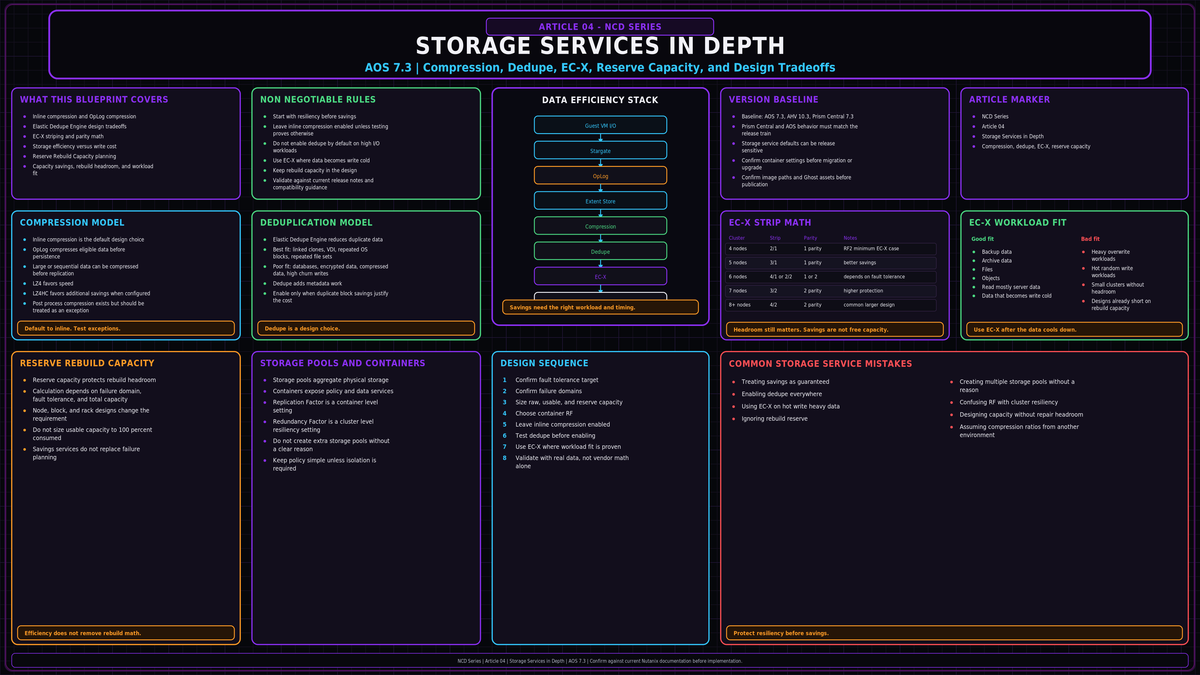
This is article 04 of the Nutanix Cluster Design Fundamentals series, targeting AOS 7.3 with AHV 10.3 and Prism Central 7.3. NCD-03 walked the Distributed Storage Fabric: Stargate, Curator, the OpLog and Extent Store, the Unified Cache, and the read and write paths. This article sits on top of that fabric and covers the data services that decide how much usable capacity you actually get from it. Compression, deduplication, and Erasure Coding (EC-X), plus capacity reservation and where each control lives. The point is not to enable everything. The point is to know which service earns its CPU and metadata cost on which workload, and which one quietly makes things worse.
Sources: Nutanix Bible (Book of AOS, Data Efficiency), portal.nutanix.com Prism Web Console Guide and Capacity Reservation best practices, the Nutanix Data Efficiency and Thin Provisioning tech notes, and next.nutanix.com engineer guidance. The technical claims and version sensitive values below were checked against those sources. Where AOS behavior changed across releases, the release that changed it is named.
Where the data services live
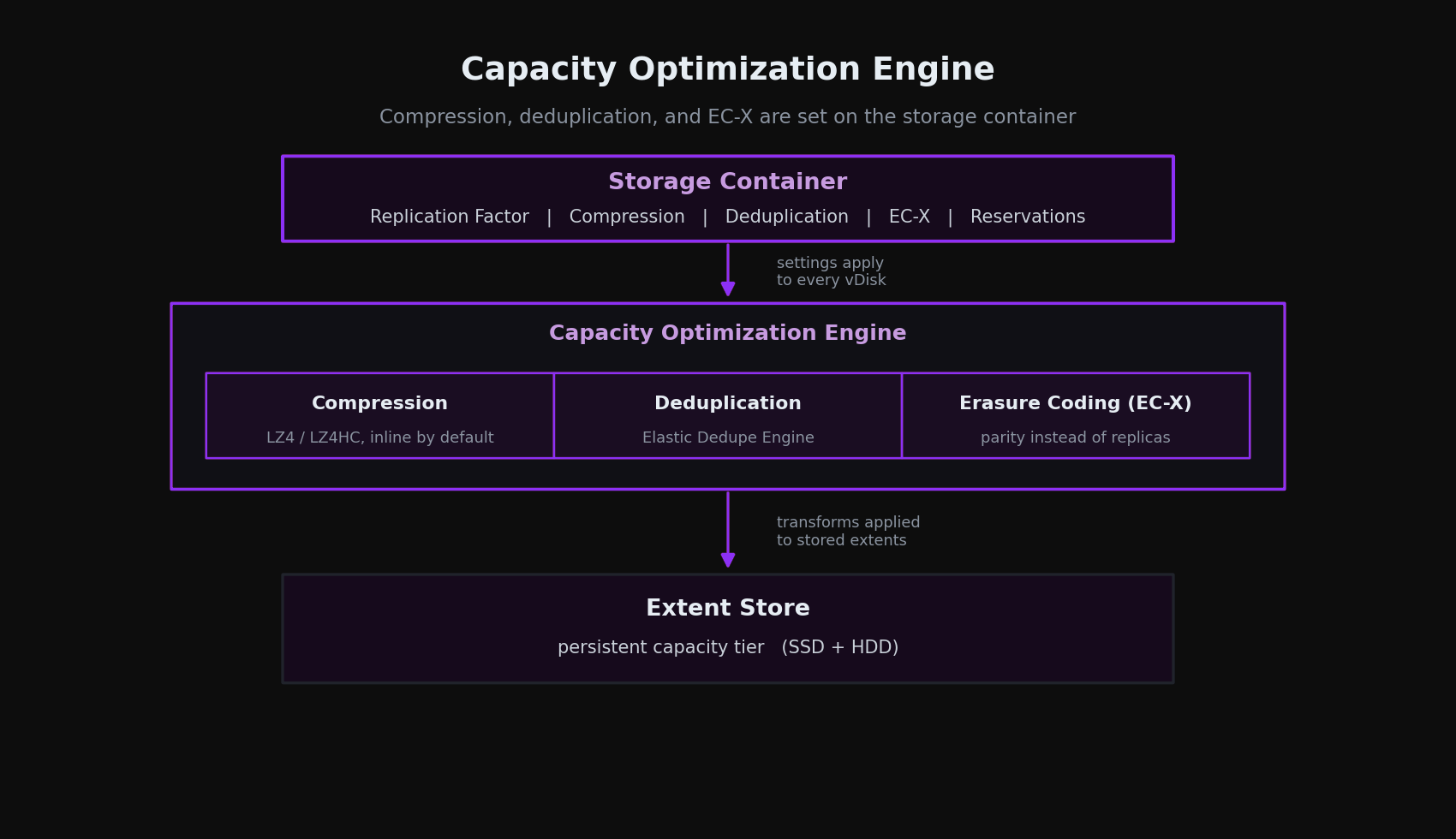
The three capacity optimizations run through the Capacity Optimization Engine (COE), the part of AOS responsible for transforming data on the Extent Store to use less space. Compression, deduplication, and EC-X all act on data that has already landed in the fabric NCD-03 described. None of them are new storage tiers. They are transformations applied to extents that already exist.
Almost every control here is set on the storage container, not the cluster and not the VM. A container is the logical slice of the storage pool where you set Replication Factor, compression, deduplication, EC-X, and reservations. Settings apply to every vDisk in that container. This matters for design: if a database and a VDI pool share one container, they share one set of efficiency policies, and a policy that helps one will tax the other. The clean approach is to separate workloads into containers by their data behavior, then set efficiency per container.
Compression
Compression is the one efficiency service you should treat as on by default and leave on for almost everything. AOS enables inline compression on every new storage container at creation. There are two modes, inline and offline, and the design decision is almost always to use inline.
Inline compression
Inline compression compresses sequential streams and large I/O, meaning writes above 64K, as they are written to the Extent Store. That includes data draining from the OpLog and sequential data that skips the OpLog. The key property: it only compresses large or sequential writes inline. Small random writes are left alone on the inline path, so inline compression does not tax random write performance the way a blanket compress everything approach would.
Inline buys you more than space. Compressing large and sequential data before it hits the Extent Store increases the usable size of the SSD tier, which keeps more of the working set on flash and improves effective performance. It also shrinks what Replication Factor has to ship across the wire, because RF replicates the compressed form. Less data to copy means faster writes and quicker recovery to full protection.
Inline compression means a compression delay of 0. It compresses only the writes that compress cheaply and skips the rest. There is rarely a reason to disable it, and it pairs cleanly with EC-X for additional savings.
OpLog compression
Separately from the container setting, the OpLog compresses incoming writes above 4K that show good compressibility. This keeps the OpLog dense and helps sustain write performance under burst. When data drains from the OpLog to the Extent Store it is decompressed, aligned, and recompressed at a 32K aligned unit. This is on by default and needs no configuration. You do not manage it, but it is worth knowing it exists when you reason about write latency.
Offline compression, and why you rarely want it
Offline compression writes data uncompressed first, then has Curator compress it cluster wide after a configurable delay. Inline should be the default choice for most modern deployments. Offline remains available for specific legacy or operational scenarios, but it generally provides less benefit than inline while requiring additional background processing, since inline already compresses large and sequential writes immediately and defers only the random and small I/O that offline was meant to handle.
Under the hood, AOS uses LZ4 for normal data, a good balance of ratio and speed, and LZ4HC for cold data to squeeze out a better ratio. Data is treated as cold after no read or write access for 3 days for regular data, or 1 day for immutable snapshot data. Reads of compressed data are decompressed in memory before being served.
Deduplication: the Elastic Dedupe Engine
Deduplication on AOS is the Elastic Dedupe Engine, a software feature that removes duplicate data in the capacity tier, the Extent Store. If your mental model is the old split of a separate cache dedupe toggle and a separate capacity dedupe toggle, drop it. The current engine fingerprints on ingest, deduplicates in the capacity tier, and benefits reads through the Unified Cache. One mechanism.
How it works
As data is ingested with an I/O size of 64K or larger, either on the initial write or when draining from the OpLog, AOS fingerprints it at 16K granularity within each 1MB extent. Fingerprinting happens inline on ingest and is stored persistently in the block metadata, so unlike background scanning approaches it never has to read the data again to find duplicates. AOS now uses logical checksums to select dedupe candidates, where releases before AOS 5.11 used a SHA-1 hash. Once duplicates are identified, a Curator background process removes the redundant copies. Reads of deduplicated data are pulled into the Unified Cache, so repeated reads of the same fingerprint come from cache.
The cost is metadata. Every fingerprint is metadata that has to be stored, balanced across the cluster, and maintained. That metadata also consumes CVM memory and space on the metadata disk, so dedupe pays for its capacity savings in memory and metadata on every node. To keep that overhead in check, AOS monitors fingerprint reference counts and discards fingerprints with low refcounts, since data that is not actually duplicated anywhere is pure overhead. Two AOS 6.6 changes reduced the cost further: within a 1MB extent only the chunks that have duplicates are marked for dedupe rather than the whole extent, and dedupe metadata moved from the vDisk block map down to the extent group id map, which stopped snapshots from copying dedupe metadata and bloating it.
When dedupe is worth it, and when it is not
Deduplication only pays off when the same blocks truly repeat across vDisks in a way AOS has not already collapsed. The strong cases are clone heavy VDI and persistent desktops, repeated golden images and repeated operating system content, and P2V and V2V imports. The workloads that gain little are large databases, encrypted datasets, and already compressed media, where there is no recoverable duplication to find. The common mistake is enabling it on general server and database containers by reflex, where you pay the metadata cost for almost no return.
Never enable deduplication on databases such as SQL or Oracle, or on any high I/O performance workload. The fingerprint metadata overhead can degrade performance and, on storage heavy nodes, an unbalanced concentration of dedupe metadata can push the cluster into trouble. If your VMs were created with AOS clones, they are already space efficient and dedupe adds cost without savings.
Erasure Coding (EC-X)
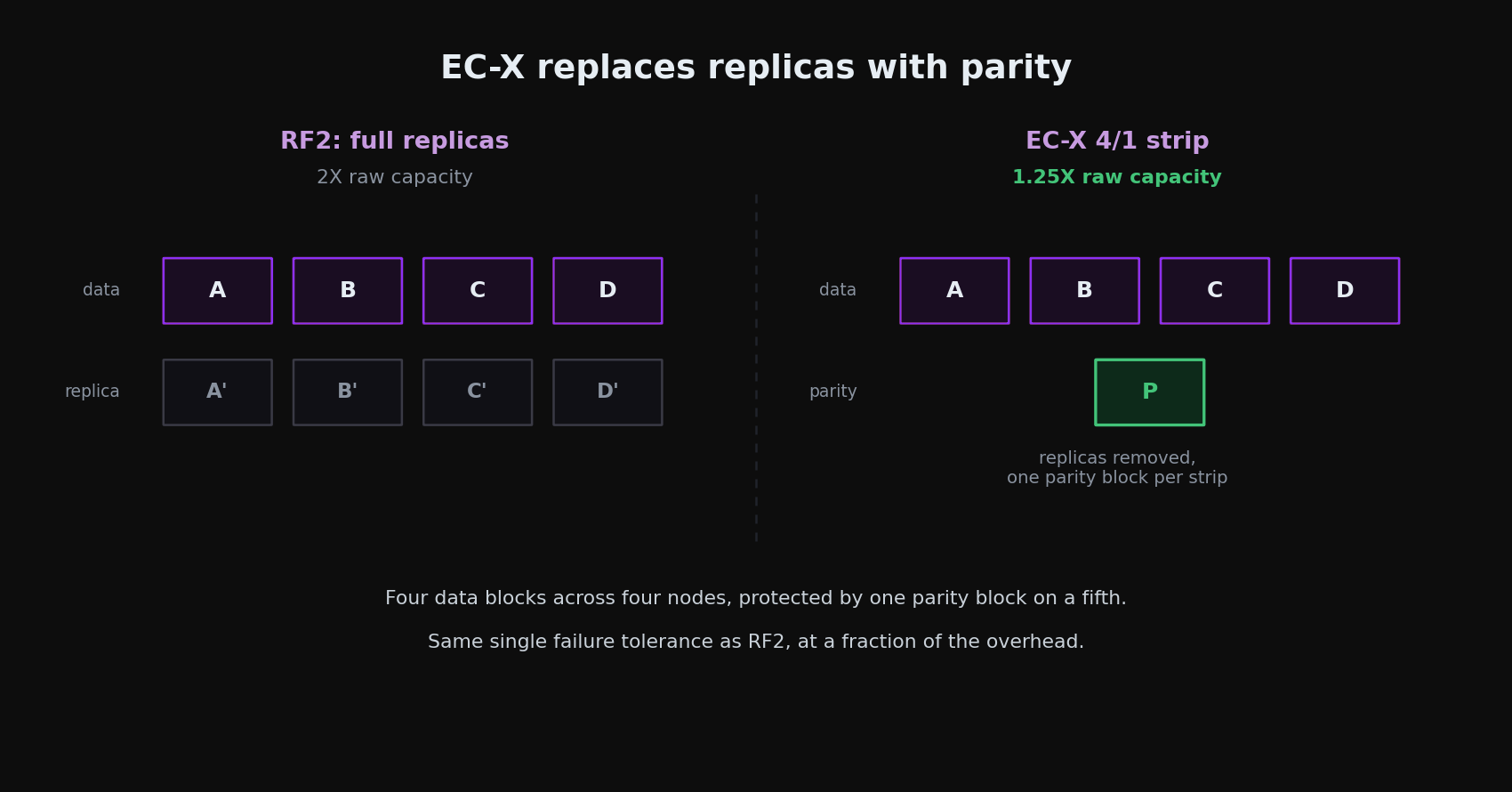
Replication Factor, covered in NCD-01, gives the highest availability because a failure never requires reading from more than one place or recomputing anything. The cost is full copies: RF2 stores 2 copies, RF3 stores 3. EC-X trades a little of that simplicity for a lot of capacity. It protects data with parity instead of full replicas, the way RAID 5 and 6 do, but implemented in software across nodes.
How a strip is built
EC-X encodes a strip of data blocks, where a data block is an extent group, across different nodes and computes parity. If a node or disk fails, the parity reconstructs the missing blocks. Placement follows the read temperature of the data. For read cold data AOS prefers a same vDisk strip, spreading one vDisk's blocks across nodes, which keeps garbage collection simple because deleting the vDisk drops the whole strip. For read hot data it prefers a cross vDisk strip that keeps a vDisk's blocks local and fills the rest of the strip from other vDisks, minimizing remote reads. If a cold strip turns hot, AOS recomputes it to localize the data.
A strip is described as data blocks over parity blocks. RF2 like availability (N+1) uses a single parity block; RF3 like availability (N+2) uses two. The defaults are 4/1 for RF2 like and 4/2 for RF3 like, set on the container:
Strip size scales with cluster size
AOS picks the strip width based on how many nodes are available, because a strip can only be as wide as the cluster can spread it while still tolerating a failure. The overhead is parity blocks over data blocks. A 4/1 strip carries 25 percent overhead, or 1.25X the raw data, against the 2X of RF2. A 4/2 strip carries 50 percent overhead, or 1.5X, against the 3X of RF3.
| Cluster size | FT1 strip (RF2 equiv.) | FT1 overhead | FT2 strip (RF3 equiv.) | FT2 overhead |
|---|---|---|---|---|
| 4 nodes | 2/1 | 1.5X | N/A | N/A |
| 5 nodes | 3/1 | 1.33X | N/A | N/A |
| 6 nodes | 4/1 | 1.25X | 2/2 | 2X |
| 7 nodes | 4/1 | 1.25X | 3/2 | 1.6X |
| 8+ nodes | 4/1 | 1.25X | 4/2 | 1.5X |
Two things fall out of this table. EC-X savings improve as the cluster grows, and there is a floor: FT2 EC-X needs at least 6 nodes, and the wider RF3 like strips only arrive at 7 and 8 nodes. On a small cluster, EC-X buys you less than the marketing number suggests.
Block awareness and rebuild headroom
EC-X can place data and parity in a block aware way so a whole block can fail without data loss, but only if the cluster has at least strip size plus one blocks available, written as (k+n)+1. The same logic drives the single most important sizing rule for EC-X: keep at least one more node, or one more block for block aware placement, than the combined strip width. A 4/1 strip is five blocks wide, so it wants at least 6 nodes. Without that headroom there is nowhere to rebuild a strip after a failure, and reads stay on the slower decode path until the strip is rebuilt. The cluster size table above already follows this rule. EC-X reduces capacity consumption compared to full replica storage, but it does not eliminate the need for rebuild headroom. Always size clusters with enough free capacity to absorb failures, rebuild activity, maintenance operations, and growth.
When it runs, and the inline option
EC-X normally runs as a background job. A Curator full scan finds extent groups that are write cold, meaning they have not been written for a while, controlled by the curator_erasure_code_threshold_seconds Gflag, then distributes and throttles the encoding tasks through Chronos. Because encoding is deferred, the normal write path is untouched. Once a strip is encoded and parity is computed, the replica extent groups are removed and you get the savings.
There is also an inline EC-X mode, enabled per container, that encodes at ingest instead of waiting for data to go cold. It defaults to same vDisk strips with an option for cross vDisk, and a background policy is available as a fallback if ingest gets too heavy. Inline EC-X is only sensible for workloads that do not need data locality and do not overwrite much. Nutanix Objects fits that profile and ships with inline EC-X on by default, because Objects treats overwrites as new writes.
Starting in AOS 7.3, EC-X supports strips up to 12/2, but only on dedicated clusters running Nutanix Unified Storage for Files and Objects. The wider strip raises the data to parity ratio for high density file and object clusters. It is not a setting for your general VM containers.
EC-X is right for most general and read heavy workloads, and ideal for Files and Objects. It is the wrong choice for write or overwrite intensive workloads like VDI, where the constant rewriting fights the encode and decode cycle. And it pairs with inline compression, so the two stack to compound the savings.
Capacity reservation and provisioning
AOS thin provisions by default. Capacity is consumed only when data is actually written, which means you can present more storage than the cluster physically has. That is the right default for most clusters, but it puts the burden on you to watch physical utilization rather than the logical numbers a hypervisor reports. The reservation controls exist to add guardrails to that model, and they live at two scopes.
Container scope
Two optional container settings shape capacity, both blank by default. Keep one principle in mind before touching either: reservations protect capacity, they do not create capacity, and each one consumes some of the cluster's allocation flexibility.
- Advertised Capacity caps the size the container presents. Set it below what the cluster could provide and the container, and the datastore or share built on it, reports that smaller ceiling. This is how you stop one container from consuming the entire shared free pool.
- Reserved Capacity guarantees space for a container by carving it out of the pool up front, so other containers cannot consume it. Use it sparingly. Every reserved gigabyte is removed from the shared pool whether the container fills it or not.
Below the container, thick provisioning a vDisk reserves the blocks at the vDisk level. AOS honors the reservation you asked for, but it works against the efficiency of thin provisioning and is the usual cause of a surprise. A cluster with plenty of real free space can still throw a data resiliency alarm because thick reservations have committed more logical space than the cluster can protect at its Replication Factor. Use thin unless a workload truly requires a reservation.
Cluster scope
The one reservation that belongs at the cluster level is Reserve Rebuild Capacity. Enable it and the cluster sets aside the capacity of its largest node, so that if a node fails there is room to rebuild back to full resiliency. This is the reservation worth making deliberately, because it protects the property that actually matters: the ability to restore full data protection after a failure. Container reservations protect a tenant's space. Rebuild reservation protects the whole cluster's resiliency.
Choosing what to enable
The decision is not which features are available, it is which ones earn their cost on a given container. Compression is cheap and broadly useful. Deduplication is narrow and metadata heavy. EC-X is broadly useful but allergic to overwrites and small clusters. Match the service to how the data behaves:
| Workload | Compression | Dedupe | EC-X | Why |
|---|---|---|---|---|
| General server VMs | On | Off | Depends | Inline compression is free value. Little real duplication. EC-X if the data is read heavy and the cluster is large enough. |
| Databases (SQL, Oracle) | On | Off | Off | High I/O and overwrite heavy. Dedupe metadata and EC-X encode and decode both hurt here. |
| VDI, full clone or persistent | On | On | Off | The case dedupe was built for. Overwrite activity rules out EC-X. |
| Backup and archive targets | On | Off | On | Write once, read rarely, cold. EC-X reclaims the most capacity here. |
| Files and Objects (NUS) | On | Depends | On | Ideal EC-X target, including the wider AOS 7.3 strips and inline EC-X for Objects. |
The unifying rule: compression on nearly always, dedupe only where the same blocks truly repeat, EC-X only on cold or read heavy data with cluster size to spare. Enabling everything on one container does not stack savings linearly. It stacks costs.
The design mistakes that cost you later
Enabling deduplication by reflex
Dedupe is the feature most often turned on because the license includes it, on containers that hold databases and general application servers with almost no true duplication. You pay the fingerprint metadata cost on every container and get savings on almost none of it. Turn it on only for full clone VDI, persistent desktops, P2V and V2V, and Hyper-V ODX data.
Running EC-X on overwrite intensive workloads
EC-X assumes data goes cold and stays put. VDI and other overwrite heavy workloads constantly invalidate strips and force recompute, which burns Curator and adds read decode overhead on every failure. Keep EC-X off those containers and let RF do the protecting.
Choosing offline compression over inline
Offline compression delays savings and adds a background Curator workload to do what inline already does, since inline compresses large and sequential writes immediately and leaves random I/O alone. Inline should be the default for most modern deployments. Reach for offline only in specific legacy or operational cases, and otherwise leave the container on inline, which is the default.
Turning on EC-X without rebuild headroom
A 4/1 strip is five blocks wide and wants at least 6 nodes so a failed strip has somewhere to rebuild. Enable EC-X on a cluster sized exactly to the strip width and a single failure leaves reads stuck on the slow decode path with no room to restore protection. Size the cluster to at least strip width plus one before enabling EC-X.
Thick provisioning by habit
Carrying vSphere or legacy habits onto Nutanix and thick provisioning every vDisk reserves blocks AOS would otherwise thin provision, and trips data resiliency alarms even when real free space is plentiful. Use thin provisioning unless a workload truly requires a guaranteed reservation, and make rebuild capacity the reservation you set deliberately.
Assuming savings stack linearly
Compression, dedupe, and EC-X do not add up to one big multiplier. Compressed data dedupes and encodes differently than raw data, dedupe finds little to remove in already efficient data, and EC-X overhead is fixed by cluster size. Size capacity on conservative, workload specific estimates and confirm actual ratios in Prism under Storage, Dashboard after the data lands. Do not commit to savings you have not measured.
Key Takeaways
- Compression, deduplication, and EC-X run through the Capacity Optimization Engine and are set per storage container. Separate workloads into containers by data behavior, then set efficiency per container.
- Inline compression is on by default on every new container and should stay on for nearly everything. It compresses only large and sequential writes, leaves random I/O alone, increases usable SSD tier, and shrinks RF replication traffic. Inline is the default choice; offline rarely adds benefit and exists for specific legacy or operational cases.
- Deduplication is the Elastic Dedupe Engine: fingerprinted at ingest at 16K within 1MB extents, deduped in the capacity tier, cached on read through the Unified Cache. It is metadata heavy. Use it where blocks truly repeat: clone heavy VDI, persistent desktops, golden images and repeated operating system content, and P2V and V2V. Skip it on large databases, encrypted datasets, already compressed media, and high I/O workloads.
- EC-X replaces full replicas with parity. Defaults are 4/1 for RF2 like and 4/2 for RF3 like. Overhead is parity over data: 4/1 is 1.25X versus 2X for RF2, 4/2 is 1.5X versus 3X for RF3. Savings improve with cluster size and FT2 EC-X needs at least 6 nodes.
- Always keep at least one more node or block than the combined strip width, so (k+n)+1, to allow rebuilds. A 4/1 strip wants 6 nodes. EC-X is for cold and read heavy data, never overwrite intensive workloads, and AOS 7.3 adds 12/2 strips for dedicated NUS clusters only.
- AOS thin provisions by default. Advertised Capacity caps what a container presents, Reserved Capacity guarantees a container its space, both at the container. Reserve Rebuild Capacity is the cluster level reservation worth setting. Avoid thick provisioning by habit; it trips resiliency alarms.
- Match the service to the data. Compression nearly always, dedupe only where blocks truly repeat, EC-X only on cold or read heavy data with cluster size to spare. The savings do not stack linearly, the costs do.