

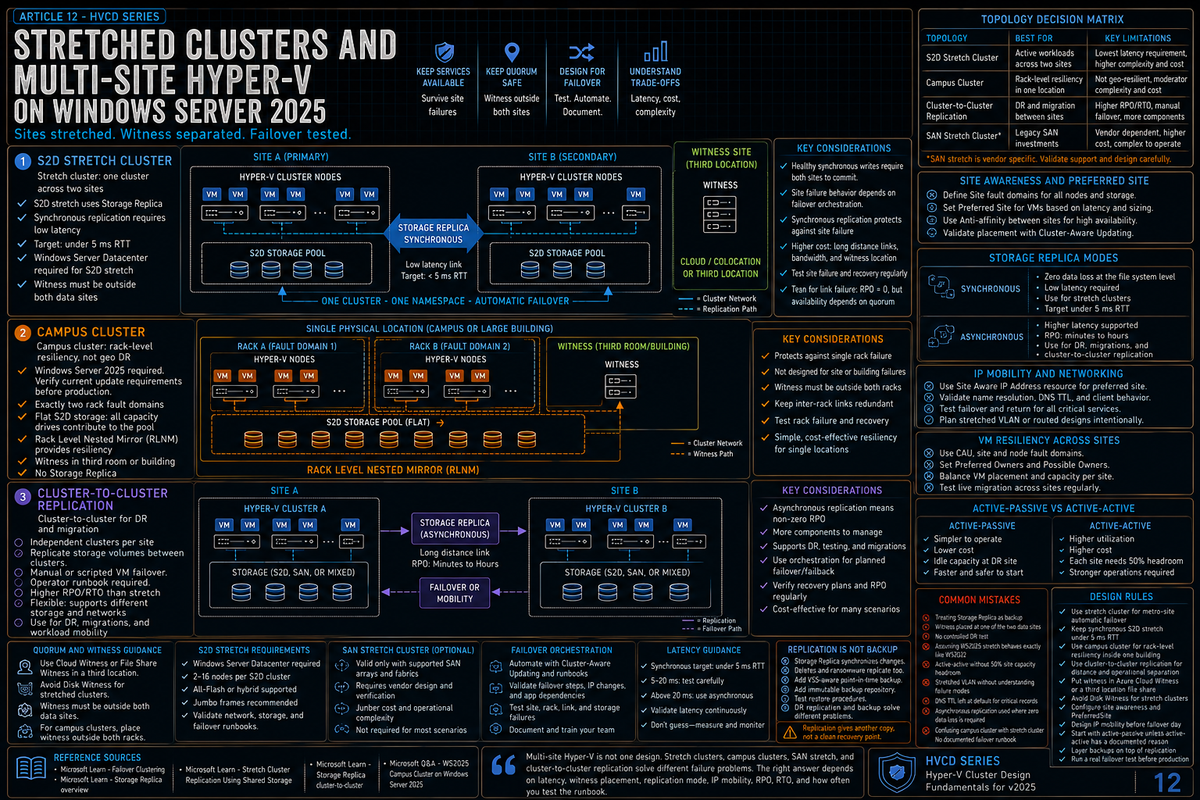
Article 12 in the Hyper-V Cluster Design Fundamentals for Windows Server 2025 series, and the final article. This article covers stretched clusters and multi-site Hyper-V: stretch cluster versus campus cluster versus cluster-to-cluster replication, S2D stretch with Storage Replica, SAN stretch, campus cluster requirements (new in WS2025), site awareness configuration, quorum considerations, IP address handling across sites, the WS2025 stretch cluster failover issue users reported in a Microsoft Q&A thread, and the multi-site mistakes that turn a DR architecture into a DR incident.
Multi-site clustering is where Hyper-V design gets hard. Single site clusters tolerate node and drive failures gracefully because the cluster can communicate over fast LAN connections and storage replication is a non issue. Multi-site adds latency, partitioning risk, more complex quorum, IP address mobility problems, and a much larger blast radius for any architectural mistake. The features Microsoft documents work, but they require clean configuration and they have caveats that catch people out.
This article covers the topologies Microsoft supports, what each one buys you, where the operational gotchas live, and what is genuinely new in 2025. The goal is to make a deliberate architecture choice rather than discovering you built the wrong topology after the first DR test.
Multi-site Hyper-V options on Windows Server
Per Microsoft Learn (Failover Clustering topologies), the two failover clustering topologies covered for multi-site Hyper-V are stretch cluster and campus cluster. Microsoft Storage Replica documentation covers stretch cluster and cluster-to-cluster replication designs as additional Storage Replica deployments. SAN stretch cluster depends on the storage vendor replication design and Microsoft Failover Clustering support. Each option has a different operational model.
| Topology | Failover | Connectivity | Storage |
|---|---|---|---|
| Stretch cluster | Automatic with orchestration (per Microsoft Learn Storage Replica FAQ) | WAN between sites | S2D stretch with Storage Replica, or SAN stretch with vendor replication |
| Campus cluster (new in WS2025) | Automatic at the rack fault domain level | LAN between racks at the same physical location | Single S2D pool spanning racks with Rack Level Nested Mirror |
| Cluster-to-cluster | Manual intervention required (per Microsoft Learn) | WAN between separate clusters | Storage Replica between clusters; can use S2D, Storage Spaces, SAN LUNs, or iSCSI |
Per Microsoft Learn Storage Replica FAQ, the stretch cluster topology is ideal when the workload requires automatic failover with orchestration (Hyper-V private cloud cluster, SQL Server FCI). Cluster-to-cluster is ideal when you want manual failover or when the second site is provisioned for disaster recovery and not for everyday use.
S2D stretch cluster
Per Microsoft Learn (Failover Clustering topologies), in a Storage Spaces Direct stretch cluster configuration, each site operates its own independent Storage Spaces Direct storage pool. Storage Replica handles replication between sites and can be configured as synchronous or asynchronous depending on the distance and latency between locations.
Network requirements
Per Microsoft Learn, synchronous replication requires less than 5 ms round trip latency over the WAN connection. This requirement ensures good performance. Asynchronous replication does not have a published latency recommendation per Microsoft Learn (Stretch Cluster Replication Using Shared Storage page); it tolerates higher latency at the cost of giving up zero data loss guarantees.
The 5 ms RTT is the constraint that drives most stretch cluster placement decisions. At roughly 5 microseconds per kilometer one way through fiber, 5 ms RTT is about 500 km of one way fiber path before overhead. Real designs are shorter once carrier routing, switch hops, optics, and storage latency are included. Most synchronous stretch cluster designs belong in metro paired sites, not arbitrary long distance DR sites.
Synchronous versus asynchronous
Per Microsoft Learn (Storage Replica overview):
- Synchronous. Mirrors data within a low latency network site with crash consistent volumes to ensure zero data loss at the file system level during a failure. The write is acknowledged to the application only after both sites have committed it.
- Asynchronous. Mirrors data across sites beyond metropolitan ranges over network links with higher latencies, but without a guarantee that both sites have identical copies of the data at the time of a potential failure.
The decision is RPO (recovery point objective) versus performance and distance. Synchronous gives zero data loss at the file system level with crash consistent volumes, but caps the distance and adds the round trip to every write. Application consistency depends on the application layer (database log handling, application checkpointing). Asynchronous tolerates distance but accepts an RPO equal to the replication lag at the moment of failure, with no guarantee both sites have identical data at failure time. Neither replication mode is a backup; Storage Replica protects against site failure, not user error, application corruption, or data corruption.
Edition requirement
Per Microsoft Learn, S2D stretch cluster requires Windows Server Datacenter edition for Storage Replica functionality. Windows Server Standard supports limited Storage Replica scenarios on Windows Server 2019 or later: one replicated volume, up to 2 TB. S2D stretch cluster remains a Datacenter design.
Users in a Microsoft Q&A thread (Stretched Cluster Support in Windows Server 2025) reported that WS2025 stretch clusters fail to come up automatically after a failover action. The reported workaround is to stop the cluster service and run Start-Cluster -Node <node> -FixQuorum to bring the cluster back, then use Set-SRPartnership to move the cluster disk to the proper node. Users in the same thread reported active Microsoft support tickets and that the same setup worked correctly on WS2022. Because stretch cluster failover behavior is the production dependency, verify current Microsoft known issue status and run a controlled failover test on the exact Windows Server 2025 patch level before committing the design.
SAN stretch cluster
Per Microsoft Learn, a SAN stretch cluster relies on the storage area network vendor's replication capabilities to maintain data synchronization between sites. The SAN handles replication at the storage layer, presenting replicated LUNs to cluster nodes at both sites.
The Microsoft side of the configuration is straightforward: it is just a multi-site Failover Cluster with shared storage that happens to be replicated by the SAN. The complexity lives at the SAN layer.
What to verify with the SAN vendor:
- Is the SAN replication mode supported for active-passive or active-active stretch cluster scenarios with Microsoft Failover Clustering?
- What is the failover orchestration? Does the SAN automatically promote the secondary LUN, or does it require manual intervention?
- What is the network latency and bandwidth requirement for the SAN replication?
- What is the supported configuration matrix for the specific SAN product and the specific Windows Server version?
Per Microsoft Learn, ensure your SAN solution is validated for stretch cluster scenarios and meets your specific disaster recovery objectives. The SAN vendor's interoperability matrix is the document that matters; do not assume a SAN that supports stretch on one Windows Server version supports it on the next.
Campus cluster (new in WS2025)
Per Microsoft Community Hub (Announcing Support for S2D Campus Cluster on Windows Server 2025), the S2D Campus Cluster is a new configuration supported on Windows Server 2025 with the 2025-12 Security Update (KB5072033, OS Build 26100.7462) applied on each Failover Cluster node. The use case: rack level resiliency within a single physical location connected by LAN, rather than site level resiliency across geographic distance.
Per Microsoft Community Hub directly: the S2D Campus Cluster does not use Storage Replica. It uses S2D replication between the cluster nodes. This is the key distinction from S2D Stretch Cluster (which does use Storage Replica between two geographically separated sites).
Requirements per Microsoft
- Windows Server 2025 with the 2025-12 Security Update (KB5072033) installed on every node in the failover cluster
- "Flat" S2D storage: all capacity drives, all flash (SSD or NVMe). Avoid using a caching tier, avoid using HDDs
- Exactly two RACK cluster fault domains, with the cluster nodes placed in these two racks
- Cluster quorum resource (File Share Witness, Disk Witness, Cloud Witness, or USB Witness) placed in a third room separate from the data rooms containing the racks
- Rack Level Nested Mirror (RLNM), included in KB5072033, distributing data copies across racks: two copy volumes place one copy in each rack (50% capacity efficiency), four copy volumes place two copies in each rack (25% capacity efficiency)
Per Microsoft Community Hub, supported configurations include 1+1, 2+2, 3+3, 4+4, and 5+5 (nodes per rack). A 2+2 configuration with four copy volumes provides "Rack + Node" resiliency: you can lose a rack and a node and still have one copy of the data. Microsoft describes this as "a good tradeoff between cost and performance for many applications."
When campus cluster is the right answer
Campus cluster is appropriate when:
- The DR risk you care about is rack level (a rack PDU failure, a rack switch failure, a rack level cooling event) rather than site level
- Both racks are in the same physical building and connected by LAN, not WAN
- Workload performance characteristics need single S2D pool rather than two pools with replication
- You can deploy on WS2025 with the December CU and accept the requirement of all flash drives for the recommended performance
Campus cluster is not a substitute for stretch cluster across geographic distance. The two solve different problems. If your DR requirement is to survive the loss of an entire datacenter site, you need stretch cluster (or cluster-to-cluster replication). If your requirement is to survive a single rack failure within a healthy datacenter, campus cluster is the more elegant answer.
Cluster-to-cluster replication
Per Microsoft Learn Storage Replica overview, in cluster-to-cluster replication, one cluster synchronously or asynchronously replicates with another cluster. The configuration uses Storage Replica between clusters and supports Storage Spaces Direct, Storage Spaces with shared SAS storage, SAN LUNs, and iSCSI attached LUNs.
Per Microsoft Learn, you manage cluster-to-cluster replication using Windows Admin Center and PowerShell. The configuration requires manual intervention for failover, in contrast to stretch cluster topology which supports automated workload failover.
What this means operationally:
- Two completely separate clusters, one at each site
- Storage Replica between them keeping data in sync
- If the primary site fails, an operator runs the failover procedure:
Set-SRPartnershipto flip the replication direction, bring the volumes online at the secondary site, restart the VMs there - RTO is measured in minutes to hours depending on the procedure and how well it is documented
Cluster-to-cluster is the right answer for true geographic disaster recovery where:
- The two sites are far enough apart that synchronous replication is not viable
- Manual failover is acceptable (the DR site is for disasters, not for daily operations)
- You want clean separation between the production and DR clusters for change isolation
Site awareness
For stretch and campus clusters, the cluster needs to know which nodes are at which site. Per Microsoft documentation, this is configured via fault domains.
The PowerShell commands:
What this gets you:
- The cluster places workloads at the preferred site by default and uses the other site for failover.
- S2D placement and Storage Replica direction follow the site definitions.
- Quorum decisions during partition events factor in the site awareness.
The PreferredSite setting is the deliberate choice of which site is the active primary. It does not prohibit running on the other site; it sets the default.
Quorum for multi-site clusters
Quorum in multi-site is the part where most operational mistakes happen. The general guidance across Microsoft documentation and Microsoft Q&A discussions is to place the witness outside both data sites so the failure of either site does not degrade quorum.
The witness options:
- Cloud Witness (Azure). Uses Azure Storage as the tiebreaker. Requires internet connectivity from the cluster nodes. The natural choice when you do not have a third datacenter to host a file share witness.
- File Share Witness in a third location. A traditional approach. Requires a third site with a file server that both primary sites can reach.
- Disk Witness. Not appropriate for stretch cluster because the disk has to live at one site, biasing quorum toward that site.
Why the third location matters: in a stretch cluster with witness at one of the two sites, the failure of the witness site degrades quorum exactly when you need it most. The Microsoft Community Hub Campus Cluster guidance applies the same approach at the rack level: Microsoft recommends the cluster quorum resource (File Share Witness, Disk Witness, Cloud Witness, or USB Witness) be placed in a third room separate from the data rooms containing the racks. The same logic applies to stretch cluster across sites: keep the witness out of the failure domains it is supposed to arbitrate between.
IP address mobility across sites
VMs failing over to a different site present an IP address problem. The VM's IP address belonged to the network at site A; if site A is down, the VM cannot use that IP at site B unless the network is set up to support it.
The four common approaches:
Stretched VLAN
The same VLAN exists at both sites with appropriate L2 extension between the sites (VXLAN, OTV, EVPN, MPLS L2VPN, or similar). The VM keeps its IP address across sites. Conceptually clean but operationally expensive: you are extending L2 across the WAN with all the failure mode complexity that brings.
Different subnets per site, DHCP and DNS
Each site has its own subnet. VMs get new IP addresses when they fail over. DNS is updated to point to the new IP. Lower TTLs on critical records reduce client cache impact.
Per Microsoft Learn (Stretch Cluster Replication Using Shared Storage page), techniques to support faster DNS site failover include lowering DNS TTL and using common approaches to reduce client side caching. The Microsoft documented configuration also includes using (Get-Cluster).ResiliencyDefaultPeriod=10 to configure VM resiliency so guests do not pause for long during node failures.
Network abstraction devices
Microsoft Learn lists network abstraction devices among the common techniques for stretch cluster networking. In practice these are load balancers, application delivery controllers, or proxies that present a stable client facing IP that maps to whichever site is active. The application clients connect to the abstraction device IP; the device routes to the active site. Adds an infrastructure dependency but keeps client configuration stable.
Software defined networking
Hyper-V SDN provides network virtualization that decouples VM IP addresses from physical network locations. The VM keeps its IP across the failover; the SDN fabric handles the routing. Capable, complex to deploy correctly. Microsoft Learn's stretch cluster documentation lists "Hyper-V software defined networking" among the techniques to support faster site failover.
The right choice depends on the application. Stateless web services often work fine with DHCP plus DNS plus low TTL. Database listeners and application services with hard coded IPs need stretched VLAN or a network abstraction device. Mixed environments often use more than one approach.
Active-passive versus active-active stretch
The two operational modes for stretch cluster:
- Active-passive. All workloads run at the primary site. The secondary site is for failover only. Simpler to design and operate. The secondary site infrastructure is mostly idle in steady state, which has a cost.
- Active-active. Workloads run at both sites in steady state. Each site is the failover target for the other. Better resource utilization. Requires careful capacity planning so each site can absorb the other's workload during failover. Network latency between sites becomes a steady state performance concern, not just a replication concern.
Active-active is appealing on paper and harder in practice. The capacity headroom math from article 9 applies to each site independently: if you want either site to absorb the entire workload during failover, each site needs to operate at 50% or less in steady state. Active-passive avoids the math at the cost of idle DR site capacity.
For most production stretch clusters, active-passive is the right starting answer. Move to active-active only if there is a clear workload reason (latency sensitive customers at both sites, regulatory requirement to keep data physically in specific regions) and the capacity model is genuinely sound.
VM resiliency settings
Per Microsoft Learn (Stretch Cluster Replication Using Shared Storage page), you can configure VM resiliency so guests do not pause for long during node failures. The cmdlet:
This sets the default time the VM stays in the unmonitored isolated state before the cluster declares it failed and triggers recovery actions. The default is longer; reducing to 10 seconds means VMs fail over to the new replication source storage faster after a node failure. The tradeoff is that transient network glitches that would have self healed inside the longer default window now trigger failover.
For stretch cluster scenarios where node failures are real and the goal is fast recovery, the lower setting is appropriate. For single site clusters with stable internal networking, the longer default is usually fine.
Backup considerations
This is where multi-site Hyper-V is famous for confusing people: stretched cluster with Storage Replica is not a backup. Microsoft Learn frames Storage Replica as protecting against hardware failures, natural disasters, and planned maintenance. Partner documentation including the Dell EMC Azure Stack HCI stretched cluster reference makes the explicit point: stretched cluster is a disaster recovery solution that keeps a business running in the event of a site failure, but customers should still rely on application and infrastructure backup solutions to recover lost data due to user error, application corruption, or data corruption.
Storage Replica is data synchronization. If somebody deletes a critical file on the primary, that delete replicates to the secondary. If ransomware encrypts the primary, the encryption replicates. Storage Replica gives you a live copy at the other site, not a point in time recovery target.
The proper data protection layering for multi-site Hyper-V:
- Stretch or cluster-to-cluster replication for site DR (covered in this article)
- VSS based backup product for point in time recovery (covered in article 7)
- Immutable backup repository (hardened repo, object lock storage) for ransomware recovery
- Tested restore procedures, not just tested backup procedures
All four layers belong in the design. None of them substitutes for the others.
The multi-site mistakes that bite you later
Treating Storage Replica replication as backup
Replication propagates everything, including the bad things. You still need point in time backup with retention separate from the replication target.
Witness at one of the two sites
If the witness lives at site A and site A goes down, quorum degrades exactly when you need it most. Use Cloud Witness or a third location file share witness for stretch cluster.
No DR test
Stretch cluster designs that have not been failover tested do not work as expected. Schedule a real failover test in a controlled window. The mistakes the test reveals (witness configuration wrong, network paths assumed, DNS TTLs not lowered, runbook missing steps) are cheaper to fix in a planned test than in an actual incident.
Assuming WS2025 stretch cluster works the way WS2022 worked
Users in a Microsoft Q&A thread reported that WS2025 stretch clusters do not come up automatically after failover the way WS2022 did. Because stretch cluster failover behavior is the production dependency, verify current Microsoft known issue status and run a controlled failover test on the exact Windows Server 2025 patch level before committing the design.
Active-active without the capacity math
Each site needs to be able to absorb the other site's workload. That means 50% or less per site steady state for true active-active. In practice, environments doing active-active often run hotter than that, which means a real site failure produces resource contention at the surviving site exactly when the workload needs to be stable.
Stretched VLAN without understanding the failure modes
L2 extension across WAN is operationally complex and has its own failure modes (broadcast storm propagation across sites, MAC table corruption, MTU mismatches, control plane convergence problems). If you do not have networking expertise to operate stretched VLAN, use DHCP plus DNS or network abstraction devices instead.
No DNS TTL lowering on critical records
Default DNS TTL of 24 hours means client side caches still point to the failed site for up to a day after failover. Lower TTLs on critical records (database listeners, application VIPs, mail servers) to 60 or 300 seconds depending on the workload tolerance.
Asynchronous replication used where synchronous is required
If the workload requires zero data loss at the file system level and the site distance allows synchronous (under 5 ms RTT per Microsoft Learn), use synchronous. If you use asynchronous you are accepting some data loss during a failover; both sites are not guaranteed to have identical data at failure time. The moment that matters is the moment somebody asks "how much did we lose."
Forgetting that campus cluster solves a different problem than stretch cluster
Campus cluster is rack level resiliency within a building. Stretch cluster is site level resiliency across distance. They are not interchangeable. If your DR requirement is "the building burned down," campus cluster does not help.
No documented failover runbook
The runbook for a stretch cluster failover should be specific: what command to run, what to check before declaring success, what to do if the automatic path does not work, who to escalate to. Discovering at 3 AM during an incident that nobody documented the failover procedure is the most expensive way to find out.
Key Takeaways
- Multi-site Hyper-V options. Per Microsoft Learn Failover Clustering topologies: stretch cluster (automatic failover with orchestration) and campus cluster (rack level resiliency in single location, new in WS2025 with KB5072033). Storage Replica also documents cluster-to-cluster replication for manual failover designs. SAN stretch depends on the storage vendor and Microsoft Failover Clustering support.
- S2D stretch cluster requires under 5 ms RTT for synchronous replication. Per Microsoft Learn. That practically caps stretch cluster distance at metro paired sites within a single metropolitan area. Asynchronous tolerates higher latency at the cost of higher than zero RPO and no guarantee both sites have identical data at failure time.
- Production S2D stretch cluster needs Datacenter edition. Per Microsoft Learn. Windows Server Standard on Windows Server 2019 or later supports limited Storage Replica scenarios (one replicated volume, up to 2 TB). S2D stretch cluster remains a Datacenter design.
- Campus cluster requires WS2025 plus KB5072033 December CU. Per Microsoft Community Hub announcement. Exactly two rack fault domains, single S2D pool spanning racks, Rack Level Nested Mirror, all flash drives recommended for performance.
- Cluster-to-cluster replication requires manual failover. Per Microsoft Learn Storage Replica overview. Set-SRPartnership flips the direction; the rest of the failover is operator driven.
- Quorum needs a third location witness. Cloud Witness (Azure) or file share witness in a third datacenter. Witness at one of the two stretch sites breaks quorum at exactly the wrong moment.
- WS2025 stretch cluster has reported failover issues. Users in a Microsoft Q&A thread reported the cluster does not come up automatically after failover and requires
Start-Cluster -FixQuorumandSet-SRPartnership. Verify current Microsoft known issue status and run a controlled failover test before committing the design. - Configure site awareness via fault domains. New-ClusterFaultDomain, Set-ClusterFaultDomain -Parent, (Get-Cluster).PreferredSite. Drives placement, S2D layout, and quorum decisions.
- IP mobility across sites needs deliberate design. Stretched VLAN, DHCP plus DNS plus low TTL, network abstraction devices, or SDN. Pick based on workload requirements, not by default.
- Storage Replica is not backup. The replication propagates the bad things along with the good. Layer point in time backup, immutable repositories, and tested restore procedures on top of the replication.
- Active-passive is the right starting answer. Active-active needs 50% or less per site steady state and a real reason. Most production stretch clusters should start active-passive and move to active-active only if there is a documented requirement and the capacity math is sound.
- Test the failover. Stretch cluster designs that have never been exercised do not work as expected. Schedule a real failover test in a controlled window. The runbook gaps the test reveals are cheaper to fix in planning than in incident.