

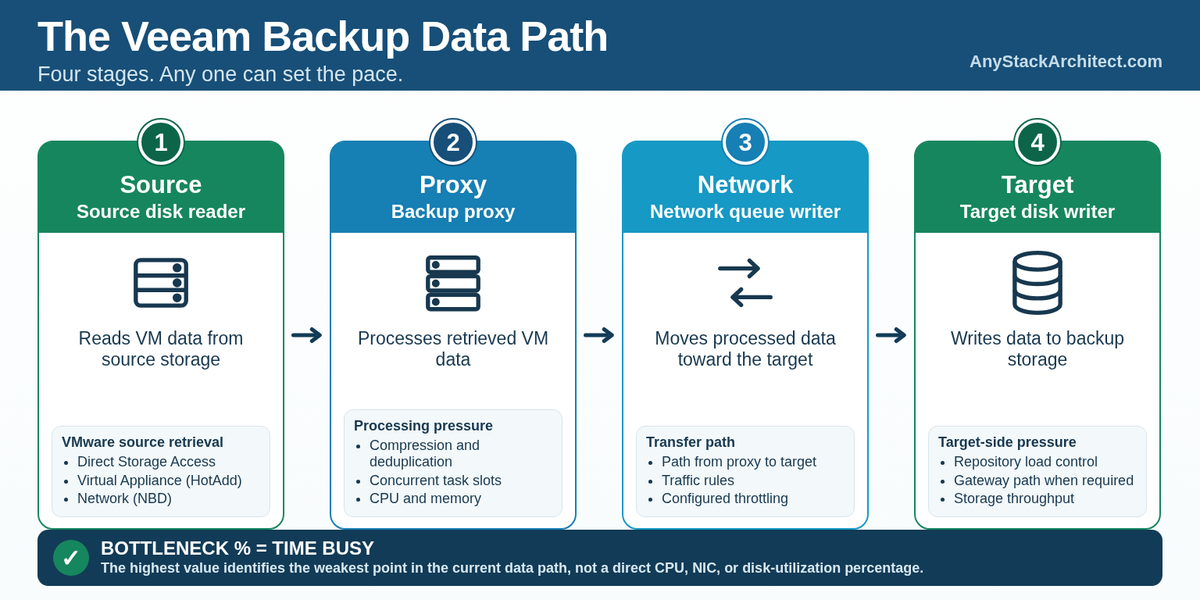
A fast repository cannot compensate for a slow source, an overloaded proxy, or a constrained transfer path.
When a Veeam backup job is slow, the repository is an easy place to start. It is the destination, storage benchmarks are familiar, and repository throughput gives you a number you can compare. The problem is that the repository only sees data the rest of the backup path manages to deliver.
Veeam describes normal VM processing as a data pipe with four main stages: Source, Proxy, Network, and Target. Source reads the data, the proxy processes it, Network moves the processed stream toward the target, and Target writes it. Veeam calculates each bottleneck percentage from the amount of job time that component is busy, then identifies the weakest point in the current path.[1]
A Target value near 100 percent is not a disk utilization counter. It means the target disk writer stayed busy for most of the job while other stages spent more time waiting. That is enough to tell you where to investigate first. It is not enough to tell you what hardware to buy.[1]
Read the Job as a Pipeline
Veeam's four bottleneck labels are processing points, not necessarily four physical servers. The infrastructure behind each point depends on the workload, proxy placement, source transport, repository type, gateway use, and the work already sharing those components.[1]
| Stage | Veeam component | What the statistic represents | Where I would look next |
|---|---|---|---|
| Source | Source disk reader | Time spent retrieving data from source storage | Source read demand, storage behavior, source transport path |
| Proxy | Backup proxy | Time spent processing VM data | CPU, memory, task slots, proxy placement |
| Network | Network queue writer | Time spent moving processed data toward the repository or another proxy | Path from proxy to target, traffic rules, shared links, throttling |
| Target | Target disk writer | Time spent writing to backup storage or a replica datastore | Repository resources, gateway path where applicable, storage throughput, concurrent work |
Backup copy and replication jobs using WAN accelerators can expose additional Source WAN Accelerator and Target WAN Accelerator points. Veeam can also report Throttling when a configured repository rate limit or network throttling rule is constraining the session.[1]
The slowest stage sets the pace for the stages behind it. If Source cannot feed the proxy, the proxy waits. If the proxy cannot process fast enough, Network and Target wait. If the transfer stage is constrained, the target never sees the write rate it could otherwise accept. The repository only demonstrates its real ceiling when the rest of the path can keep it fed.
Source Performance Starts Before the Proxy
The Source statistic represents the source disk reader retrieving data from source storage.[1] For VMware, the way the proxy reaches that data can change the read path substantially without changing the repository at all.
For standard VMware proxy transport, Veeam lists Direct Storage Access, Virtual Appliance (HotAdd), and Network, in that automatic preference order when several modes are available. Direct Storage Access includes Direct SAN, Direct NFS, and Storage Integration Access.[2][3] Veeam can also use Backup from Storage Snapshots when the VM disks are on a supported storage system that has been added to Veeam Backup & Replication.[5]
Network transport mode is one source retrieval method. In Network mode, ESXi sends VM data to the proxy over LAN using NBD.[4] That is a different point in the architecture from Veeam's Network bottleneck statistic, which measures the network queue writer sending already processed data from the proxy toward the repository or another proxy.[1]
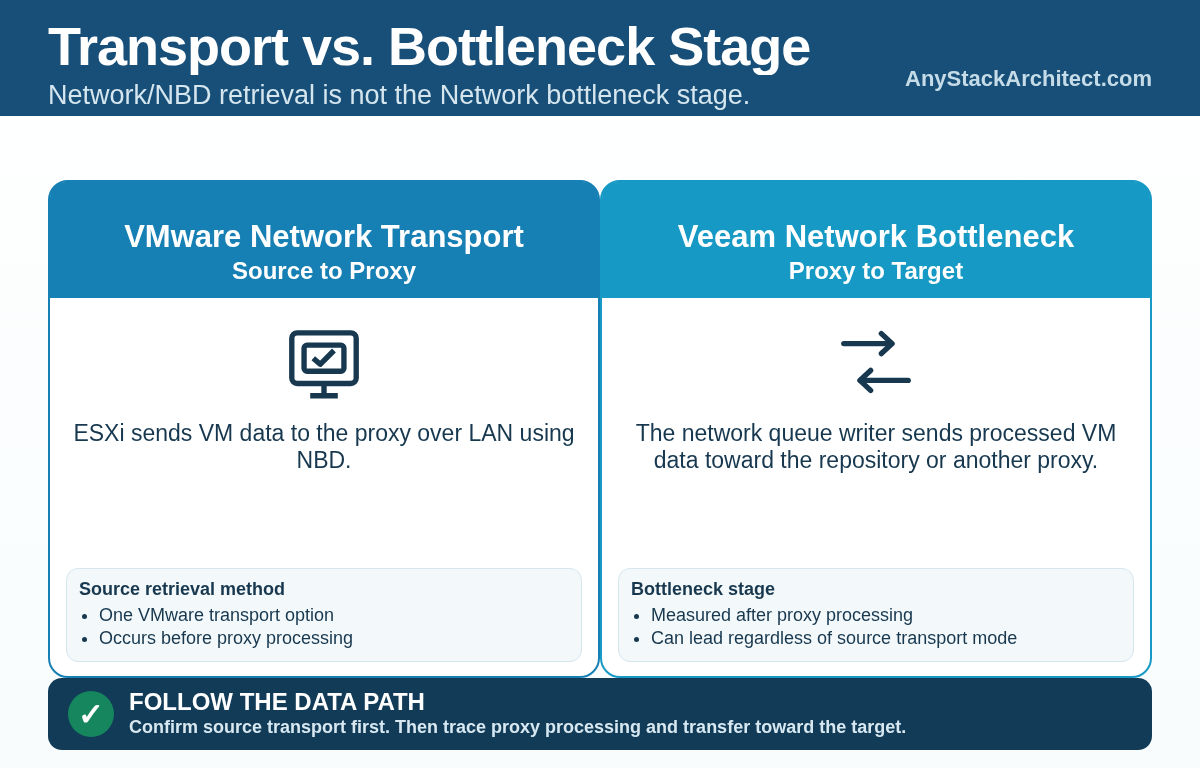
I do not draw one generic network arrow from production storage to the repository and call the path understood. I want to know how the proxy gets source data first, then how the processed stream leaves the proxy. A design can use Direct Storage Access or HotAdd for source retrieval and still become limited by the Network stage later in the job.
The Proxy Does Real Work
A VMware backup proxy does not simply relay data. In Veeam's VMware backup architecture, the source-side Veeam Data Mover runs on the backup proxy. While copying VM data, it filters blocks, compresses and deduplicates the data, then moves the processed stream to the target-side Veeam Data Mover.[12]
That makes proxy capacity part of backup throughput. Veeam recommends dedicated proxies for larger installations and can distribute concurrent work across multiple available proxies.[5] CPU, memory, placement, and task limits all affect how much work the proxy layer can keep moving.
Veeam creates a separate processing task for each VM disk during VMware data protection and recovery. Its own example uses a VM with six disks with a proxy limited to four concurrent tasks: four tasks run and two remain pending until a slot is free.[6] A fast repository cannot compensate for a proxy layer that is out of CPU, short on memory, poorly placed, or already full of tasks.
Network Is the Handoff After Processing
In Veeam's bottleneck model, Network is the network queue writer that takes processed VM data from the backup proxy and sends it over the network to the backup repository or another proxy.[1] The label narrows the investigation to a stage. It does not tell you whether the underlying cause is a NIC, a virtual switch, an uplink, a route, a firewall, a traffic rule, or a remote link.
Configured limits can also make the ceiling intentional. Veeam reports Throttling when repository read/write rate limits or network throttling rules constrain the job.[1] Before tuning interfaces or replacing switches, I would verify that the software has not been told to stop going faster.
Operational view If Network is the highest stage, I first confirm which VMware source transport was actually used so I do not confuse the bottleneck label with NBD. Then I trace the path from the proxy to the target and check Veeam traffic rules before I start blaming a specific network device.
Target Is a Topology, Not Just a Disk Array
Target still matters. Veeam repository settings can limit both maximum concurrent tasks and read/write data rate, and Veeam explicitly warns that storage throughput must be considered when repository task limits are set.[6][7][8] If the storage cannot keep up with the assigned work, it becomes the limiting factor.
The target side may also contain more than one component. Shared folder repositories and several deduplicating or object storage repository types cannot host the target Veeam Data Mover themselves, so Veeam uses a gateway server to bridge the data path.[9] Object storage repositories can use a direct connection from the proxy to object storage or a path through gateway servers depending on configuration.[10]
Architecture point A Target bottleneck deserves an investigation of the target side, not an automatic conclusion that the disks are slow. Depending on repository type, I would include repository resources, gateway resources where applicable, the path from the gateway to storage, repository load controls, storage behavior, and other work already running against the target.
Veeam also says a reported bottleneck does not necessarily mean the backup infrastructure has a problem. It identifies the weakest point in the current data path.[1] If the backup window is being met, a busy Target may simply describe where a balanced path is spending its time. If the window is being missed, the statistic tells you which part of the path needs proof.
Concurrency Changes the Result
A single stream is useful for isolating a component. It is not a capacity test for a production backup window. Real schedules put multiple VM disks, multiple proxies, repository tasks, synthetic operations, backup copies, restores, and other work on the same infrastructure.
Veeam's scheduler makes some of that pressure visible. For VMware and Hyper-V, repository task accounting is based on VM disks, and synthetic full, merge, and transformation operations also consume repository tasks, one per VM chain.[6] Veeam recommends considering actual storage throughput when task limits are set because a repository can be assigned more work than the storage can sustain.[6]
For performance testing, I want both the single stream number and the aggregate number under representative concurrency. A repository that benchmarks well in isolation can still miss the backup window when source reads, proxy processing, transfer traffic, merges, and repository writes overlap.
Use the Session Before You Use a Benchmark
The bottleneck percentage becomes more useful when it is read with the job counters. Veeam defines Processed as the total size of the VM disks processed by the job. Read is the amount the source Data Mover actually reads before compression and deduplication. Transferred is the amount sent between the source and target Data Movers after compression and deduplication, and it does not necessarily equal the final backup file size.[11]
Processing rate has its own definition. Veeam calculates it from the amount of data actually read and the time used to process that data, using transfer time rather than the job's complete wall clock runtime.[11] I would not use processing rate by itself to declare the repository healthy or slow.
Operational view When a job misses its window, I want these questions answered before I change hardware:
- Which bottleneck stage has the highest busy time, and is Veeam reporting Source, Proxy, Network, Target, or an explicit Throttling condition?
- How much data was Processed, Read, and Transferred, and does that fit the workload and change rate I expected?
- Which source transport path was actually used, including whether storage snapshots were involved?
- Are proxy or repository tasks waiting because configured limits have been reached?
- What else is sharing the source storage, proxies, transfer path, gateways, and repository during the same window?
- Does the system still miss the objective when the suspected stage is tested under representative concurrency?
Those answers usually tell me what to measure next. They also keep a repository upgrade from becoming the default response to a source, proxy, transport, or scheduling problem.
Size the Path
Repository design still needs capacity, throughput, resiliency, immutability where required, and recovery performance. Throughput is one requirement inside the backup path, not a number that represents the whole system.
Start with the amount of data that has to be read and protected inside the required window. Make sure source storage can supply it, the selected source transport can reach it, the proxy layer can process it, the transfer path can move it, and the target side can accept it under the concurrency the environment will actually run.
When a backup job is slow, follow that path before replacing hardware. The repository may be the bottleneck. Veeam gives you enough information to prove it.
Key Takeaways
- Source, Proxy, Network, and Target are stages in one Veeam data path.
- Bottleneck percentages measure how much job time a component is busy. They are not direct CPU, NIC, or disk utilization percentages.
- VMware Network transport mode and Veeam's Network bottleneck statistic describe different points in the path.
- Proxy capacity, source transport, gateway placement, repository limits, concurrency, and target storage can all set the pace.
- Test the path under representative concurrency. A repository benchmark by itself cannot prove the backup window.
Source Notes
Product behavior changes. These sources were rechecked against the public Veeam Backup & Replication 13 documentation for build 13.1.1.18 on September 27, 2026.