
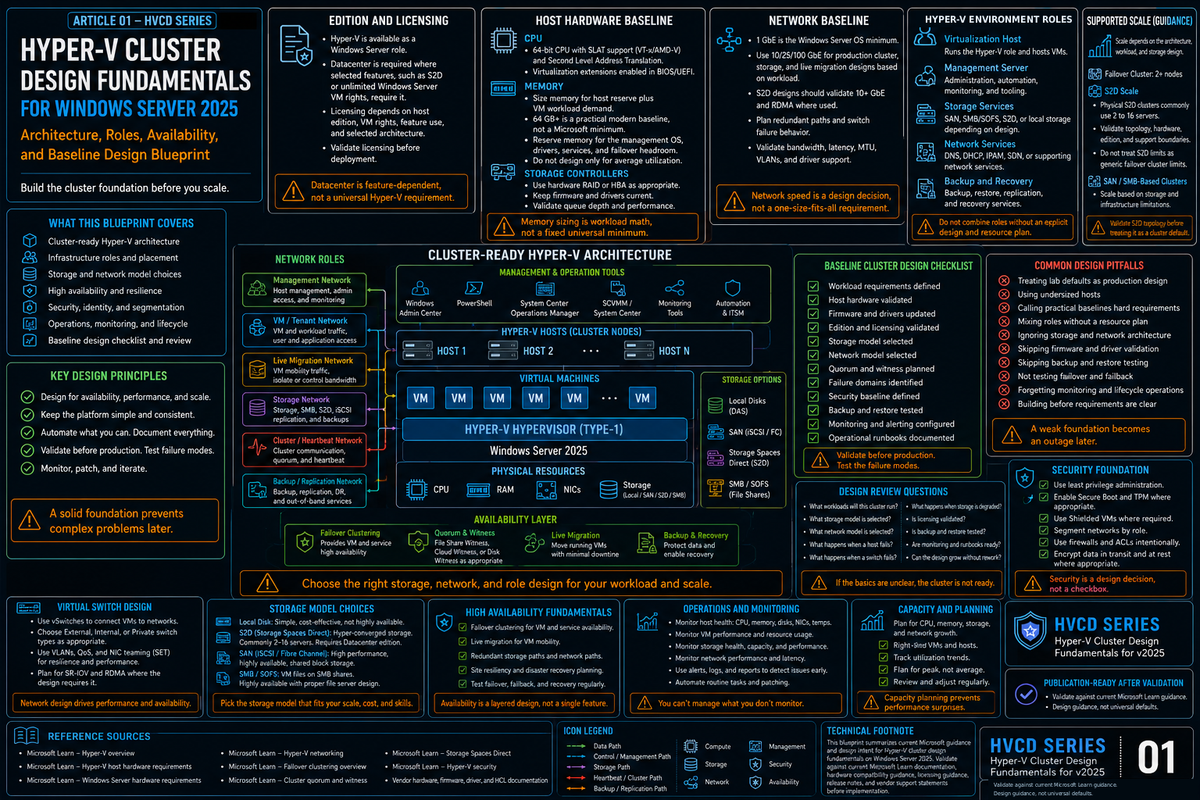
This is the first article in a new series on Hyper-V cluster design for Windows Server 2025. The goal of the series: give infrastructure engineers a practical architecture reference for building production Hyper-V clusters without inheriting the design debt most shops carry forward from 2016 and 2019. Start here with the four design decisions that determine whether your cluster ages well or ages you.
Hyper-V clustering looks simple on paper. Install the role, install Failover Clustering, run the wizard, add nodes, create a CSV, call it done. That path works. It also produces clusters that look fine in month one and start hemorrhaging operational goodwill in year two: backup windows that collide, quorum that collapses during a rack reboot, live migrations that saturate the management network, and a sizing model that has no answer for the loss of any single node.
Windows Server 2025 is a real step forward under the hood. GPU partitioning now survives live migration and failover. Dynamic processor compatibility handles mixed CPU generations in a way 2022 could not. Network ATC removes a full category of manual network configuration work. Workgroup clusters finally got the live migration support that made Active Directory an absolute prerequisite for a decade. None of those features fix a bad design. They just give you better primitives to work with.
This article covers the four decisions that shape every Hyper-V cluster: sizing, CSV architecture, quorum and witness, and fault domains. Get these right and the rest of the platform is mostly configuration. Get any of them wrong and the platform fights you for years.
Cluster sizing: the limits that matter and the ones you should ignore
Microsoft publishes a headline number: 64 nodes and 8,000 virtual machines per cluster on shared storage. That is the supported ceiling. It is also nowhere near the number you should design for.
For Storage Spaces Direct (S2D) clusters the ceiling drops to 16 nodes. Azure Local (the rebrand of Azure Stack HCI) lives under the same 16 node cap. Workgroup clusters, new for 2025, are bounded more by your operational appetite for PKU2U and certificate based authentication than by any Microsoft support limit.
Blast radius, not ceiling
Cluster size should be set by blast radius, not by the published maximum. Every VM in a cluster shares the same cluster database, the same CSV set, the same quorum, the same cluster service patches, the same Cluster-Aware Updating window, and the same failure domain for a runaway coordinator node. When something goes wrong at the cluster layer, it goes wrong for everything in that cluster.
A 32 node cluster running 2,000 VMs has the same blast radius as a single failure of the cluster service. Two 16 node clusters running 1,000 VMs each have half the blast radius and roughly the same hardware cost. The operational argument for larger clusters (fewer management domains) is real. The operational argument for smaller clusters (smaller blast radius, easier patching, simpler quorum math) is usually stronger.
For most production Hyper-V on shared storage, 8 to 16 nodes per cluster is the sweet spot. You get meaningful consolidation, N+1 or N+2 is affordable, quorum math stays simple, and a rolling Cluster-Aware Updating pass completes in a predictable window. Going past 16 nodes is a deliberate choice that should answer a specific business question, not a default.
N+1 is a floor, not a plan
N+1 means the cluster can lose one node and keep running the same workload. That sounds fine until you realize N+1 leaves zero headroom during patching. Cluster-Aware Updating pulls one node out of rotation at a time. If that node is also your redundancy, a second unrelated failure during the patch window takes production down.
N+2 is the floor for any cluster that runs business critical workloads through a monthly patch cadence. N+2 means you can tolerate one failure during planned maintenance without stopping the maintenance and without starting an incident. For 8 node clusters that is a 25 percent capacity overhead. For 4 node clusters it is 50 percent. Those numbers are the price of running a cluster instead of running standalone hosts.
Consolidation ratios and the memory wall
Windows Server 2025 supports Generation 2 VMs up to 240 TB of memory and 2,048 virtual processors per VM. Those numbers do not matter to your consolidation ratio. What matters is your actual memory commitment across all VMs on a host, plus a reserve for the parent partition, plus the CSV in-memory read cache (size it deliberately for your OS version), plus headroom for live migration in flight.
A common failure mode: size hosts for 80 percent memory commitment at steady state, schedule monthly patches that evacuate one host onto the remaining hosts, and discover that N minus 1 pushes the survivors past 95 percent. At that point Dynamic Memory pressures VMs, pagefile activity spikes on Windows guests, and live migrations slow down because the compressed memory pages take longer to resolve. Your sizing model should target a realistic worst case, not steady state.
CSV architecture: what actually happens under the covers
Cluster Shared Volumes are the point where most Hyper-V cluster problems eventually surface. Understanding the I/O paths is the difference between debugging a storage issue in ten minutes and debugging it in four hours.
What a CSV actually is
A CSV is a clustered filesystem (CSVFS) layered on top of NTFS or ReFS. Every node in the cluster mounts the volume at the same time and can read and write to it. One node at a time is the coordinator: it owns the underlying NTFS or ReFS filesystem, handles all metadata operations, and synchronizes metadata to the other nodes over SMB 3.0. Data I/O generally bypasses the coordinator entirely and hits the storage directly.
The directory structure is the same on every node. A CSV mounts at C:\ClusterStorage\Volume1 (or whatever name you give it) on every node. Drive letters are not used. This is how a VM can fail over between nodes without any remapping.
The three I/O modes
CSV operates in one of three modes at any moment. Knowing which mode a given CSV is in is the job of Get-ClusterSharedVolumeState.
| Mode | Behavior | When it happens |
|---|---|---|
| Direct I/O | Node writes directly to storage, bypassing the NTFS or ReFS stack on the coordinator. | Normal operation. This is where you want to live. |
| Block Redirected | I/O is redirected to the coordinator at the block level via SMB 3.0 and written through Disk.sys on the coordinator. Fast but uses the cluster network. | The node lost storage connectivity (HBA failure, all MPIO paths down). Temporary fallback until the path recovers. |
| File System Redirected | I/O is redirected to the top of the CSV pseudo filesystem stack on the coordinator, traverses NTFS or ReFS on the coordinator, and writes to disk. Slowest path. | Backups using legacy snapshot methods, deduplicated files, ReFS volumes on SAN, admin forced redirect via Suspend-ClusterResource. |
The distinction matters. Direct I/O gets the full performance of your storage fabric. Block Redirected moves all of that traffic onto your cluster network. If your cluster network is a pair of 10 GbE links that were sized for heartbeat and light CSV metadata, a storage path failure on one node can saturate those links in seconds.
NTFS or ReFS: the filesystem choice matters
The rule is counterintuitive and catches a lot of people out:
| Storage type | Format with | Why |
|---|---|---|
| SAN (Fibre Channel, iSCSI, FCoE) | NTFS | NTFS enables Direct I/O mode on SAN. ReFS on a SAN CSV forces File System Redirected for all I/O, which is a severe performance penalty. |
| Storage Spaces Direct (S2D) | ReFS | S2D volumes are designed for ReFS. You get integrity streams, block cloning, accelerated VHDX operations, and the pool optimizations S2D depends on. |
If you have a SAN and someone on the team formats a CSV as ReFS because ReFS is newer, your VMs will run. Performance will just be measurably worse than it should be, and the root cause will be invisible in most monitoring tools because the IOPS and latency look vaguely plausible at a glance. Run Get-ClusterSharedVolumeState on any new CSV. If it reports FileSystemRedirected when nothing should be redirecting, your filesystem choice is the first thing to check.
CSV block cache
CSV block cache is system memory reserved on each node to cache read only unbuffered I/O from CSVs. Hyper-V accesses VHDX files with unbuffered I/O, which bypasses the standard Windows cache manager. The CSV block cache fills that gap specifically for Hyper-V workloads.
CSV in-memory read cache is available on modern Windows Server failover clusters. Confirm the default for your OS version and tune it deliberately with (Get-Cluster).BlockCacheSize instead of assuming the platform default is correct for your workload. The cache can be raised up to 80 percent of physical RAM. For Hyper-V hosts, 1 to 4 GiB per node is usually a sensible operating range. For Scale-Out File Server nodes, larger allocations pay off.
# Set cluster-wide CSV block cache to 4 GiB per node
(Get-Cluster).BlockCacheSize = 4096

# Verify
(Get-Cluster).BlockCacheSize
The cache is read only and write through. Writes are never cached. That means CSV block cache helps read heavy workloads (VDI boot storms, image deployments, web tier VMs) and does not help write heavy workloads (databases, message queues, backup targets).
How many CSVs should you create
There is no official formula. The operational rule I land on every time: one CSV per cluster node as a starting point, with each CSV's coordinator role distributed across nodes so the cluster spreads metadata and backup load evenly.
The reason is backup parallelism. When a backup runs against a VM on a CSV, that CSV is placed in File System Redirected mode for the duration of the snapshot by most backup vendors, and all I/O from every node flows through the coordinator. One CSV means one coordinator handling all backup I/O for the entire cluster. Multiple CSVs distributed across coordinators means backups can run in parallel, with each CSV handling its own share.
Eight nodes, eight CSVs, coordinator role of each CSV homed on a different node. That gives you eight parallel backup lanes without any of them piling up on a single host. For larger clusters (12 or 16 nodes), scale the CSV count to match, up to the point where CSV management overhead starts to cost more than it saves.
Quorum and witness: the math that decides who survives
Quorum is not a feature. Quorum is the algorithm that keeps your cluster from splitting into two halves that both think they own the workload and both start writing to the same storage. Split brain at the storage layer corrupts data. The entire purpose of quorum is to prevent that outcome.
The vote arithmetic
Every cluster node gets one vote. The witness, if configured, gets one vote. The cluster needs a strict majority of the total votes to stay running. For a four node cluster with no witness, that is three votes. Lose two nodes and the cluster stops. Configure a witness and now you have five votes, majority is three, and losing two nodes leaves three votes (two surviving nodes plus the witness) and the cluster stays up.
That is the vote math. The operational guidance that follows from it is simpler: configure a witness on every production cluster regardless of node count. Node counts shift under your feet during maintenance, failures, and scale events. A witness means the cluster has an answer ready for whichever count it ends up at.
Dynamic Quorum and Dynamic Witness
Dynamic Quorum was introduced in Windows Server 2012 and has been enabled by default ever since. When a node leaves the cluster cleanly or is paused, the cluster drops that node's vote and recalculates the majority against the remaining nodes. That is what allows a cluster to run down to the last node standing, as long as nodes leave sequentially rather than at the same time.
Dynamic Witness (Windows Server 2012 R2 and later) extends the same logic to the witness. With an even node count the witness vote is active. With an odd node count the witness vote is automatically disabled so it does not create a tie breaking path that was not intended. You do not have to think about it. You configure the witness and the cluster manages the vote.
Witness type selection
| Witness type | Use when | Do not use when |
|---|---|---|
| Disk witness | Single site cluster on shared storage where the disk is physically reachable from every node. | Stretched or multisite clusters. The disk becomes a single point of failure for the surviving site during a site outage. |
| File share witness | Clusters without shared storage, clusters across sites where a third site has an SMB share, Azure Local deployments that cannot reach Azure. | The file share lives on one of the cluster nodes (circular dependency). The share lives in the same fault domain as the primary site of a stretched cluster. |
| Cloud witness | Stretched clusters, multisite clusters, branch office clusters. Azure Storage account acts as the tiebreaker from a completely independent fault domain. | Air gapped environments with no outbound internet access. Hostile network environments where outbound HTTPS to Azure is not acceptable. |
Cloud Witness was introduced in Windows Server 2016 and is still the correct answer for almost every stretched or geographically distributed cluster. It needs an Azure Standard general purpose V2 storage account. The Azure cost is pennies per month. The design value is that the witness lives in a fault domain completely independent of either datacenter.
Put a file share witness on a domain controller in one of the sites. That colocates two different things (AD and the cluster witness) in one fault domain. Lose that site and both the witness and the local DCs go at the same time, which is exactly the scenario the witness is supposed to arbitrate.
Fault domains and site awareness
Fault domains were introduced in Windows Server 2016 and give you an explicit hierarchy for telling the cluster about your physical topology. There are four canonical levels: site, rack, chassis, and node. Nodes are discovered automatically. Everything above node is optional and manually declared.
The cluster uses fault domains for three things: placement policies (where VMs fail over to), quorum behavior (which site wins a split), and S2D resiliency (how copies are distributed across hardware).
Defining a fault domain hierarchy
# Create site-level fault domains
New-ClusterFaultDomain -Type Site -Name "Atlanta-Primary" -Description "Primary DC"
New-ClusterFaultDomain -Type Site -Name "Atlanta-DR" -Description "DR DC"

# Create rack fault domains and parent them to sites
New-ClusterFaultDomain -Type Rack -Name "Rack-A1"
Set-ClusterFaultDomain -Name "Rack-A1" -Parent "Atlanta-Primary"

New-ClusterFaultDomain -Type Rack -Name "Rack-A2"
Set-ClusterFaultDomain -Name "Rack-A2" -Parent "Atlanta-Primary"

# Parent nodes to their rack
Set-ClusterFaultDomain -Name "HV-01" -Parent "Rack-A1"
Set-ClusterFaultDomain -Name "HV-02" -Parent "Rack-A1"
Set-ClusterFaultDomain -Name "HV-03" -Parent "Rack-A2"
Set-ClusterFaultDomain -Name "HV-04" -Parent "Rack-A2"

# Verify topology
Get-ClusterFaultDomain
Preferred site and quorum split behavior
Once sites are defined, you can designate a preferred site. During a clean quorum split (even vote count, symmetrical failure, no witness arbitration), the preferred site automatically wins and the nodes in the other site drop out of cluster membership. That is the outcome you want. A tiebreaker that defers to a coin flip is not a tiebreaker.
# Designate the primary as preferred site
(Get-Cluster).PreferredSite = "Atlanta-Primary"

# Preferred site can also be set per cluster group (per VM)
# so that specific workloads have opposite affinity
(Get-ClusterGroup -Name "VM-Web01").PreferredSite = "Atlanta-DR"
Per group preferred site is how you build configurations where one site hosts half the workload by design and the other site hosts the other half, with both sites failing over to each other as needed.
Do not confuse a normal single site S2D cluster, an S2D campus cluster, and an S2D stretch cluster. Current Windows Server guidance supports specialized S2D campus and stretch topologies, but they carry stricter latency, witness, replication, site awareness, fault domain, and operational requirements than a standard single site cluster. For many environments, two independent clusters with Storage Replica, backup replication, application level replication, or orchestrated disaster recovery is still operationally cleaner than stretching one cluster across sites. Pick the topology that matches the failure handling your team can actually run, not the most ambitious one the platform technically supports.
Network design notes
Hyper-V cluster networking is its own article (and a future one in this series). The minimum needed for a design conversation:
- Four network roles, which may or may not be four physical networks depending on your NIC and switch design: management, cluster and CSV, live migration, and VM access. If you run SMB based storage (Scale-Out File Server or S2D) add a fifth role for storage traffic.
- Cluster and CSV should never share a physical path with VM traffic. A runaway VM can starve cluster heartbeats and trigger false failovers. That is a real failure mode, not a theoretical one.
- Live migration traffic is not encrypted by default. Either run it on an isolated network, enable SMB encryption, or both. The security posture around the transport is your responsibility, not Hyper-V's.
- Windows Server 2025 live migration improvements worth knowing. The cluster now picks live migration networks faster (no more 20 second wait per failed network) and discovers routed paths between nodes in multisite clusters that do not share a subnet. Separately, the cluster parameters
SetSMBBandwidthLimitandSetSMBBandwidthLimitFactor(available on 2022 and 2025) cap live migration SMB bandwidth cluster wide. Setting these stops live migration from starving storage or heartbeat traffic on the same NIC and is worth doing on every cluster that runs live migration over SMB. - Network ATC is intent based network configuration that comes to Windows Server with 2025. You declare what each adapter is for (management, compute, storage) and Network ATC applies the right VLAN, QoS, DCB, and RDMA settings. It is a meaningful improvement over manually configuring every host and should be the default approach for new 2025 deployments.
The sizing decisions that bite you later
Cluster design decisions are cheap to make and expensive to undo. The following are the ones that most commonly turn into a rebuild project 18 months later.
Sizing to steady state instead of worst case
The memory math needs to survive the loss of your largest host during the monthly patching window. That means your steady state memory utilization target is lower than you think, often 60 to 70 percent rather than 80. Storage IOPS have the same rule: the surviving nodes after a failure have to absorb the failed node's load without exceeding their own IOPS budget.
One CSV for everything
The single CSV design optimizes for initial setup and pessimizes for everything that comes after. Backup throughput becomes serialized, coordinator load concentrates on one node, and any CSV level problem takes the entire cluster with it. Start with one CSV per node.
Disk witness on a stretched cluster
If you have two sites and your witness is a LUN, that LUN lives in exactly one of those sites. Lose that site and you lose the witness at the same time as half the nodes. That is the scenario cloud witness was built for. Use it.
Ignoring fault domains until you need them
Fault domains can be declared after the fact, but S2D specifically wants the topology defined before you enable Storage Spaces Direct. Pool configuration, tiering, and resiliency calculations all use the fault domain hierarchy. Once a pool is created, data does not retroactively redistribute when you change fault domains. You can fix it (evict nodes, redefine, add them back) but that is a maintenance project rather than a configuration change.
Mixed CPU generations without planning
Dynamic processor compatibility in 2025 is meaningfully better than it was in 2022. It preserves the set of processor features available across every server in the cluster and can save processor state between hosts that use different generations. That is the feature that lets you add Ice Lake hosts to a Skylake cluster and live migrate between them. It is not a license to run every generation of CPU you own in the same cluster. Plan for CPU refresh by cohort: migrate an entire cluster to newer silicon rather than mixing indefinitely.
Licensing density as an afterthought
Windows Server 2025 Datacenter Edition gives you unlimited Windows guest OS rights on the licensed host, with minimum core licensing obligations that depend on socket and core count. For clusters with high Windows VM density, Datacenter almost always wins on cost. For clusters running mostly Linux guests, Standard Edition with its two VM entitlement per licensed host can be a better fit. Model the licensing cost alongside the hardware cost during cluster sizing. The license bill on a 16 node cluster with modern core counts is not a rounding error.
Source notes
For defaults, supportability statements, and configuration knobs referenced above, verify against the relevant Microsoft Learn topics for the exact OS build you are deploying. The entry points that cover most of this article:
- Hyper-V scale limits on Windows Server. Microsoft Learn: "Plan for Hyper-V scalability in Windows Server" and the supported configurations matrix for Hyper-V on the OS version you run.
- Failover Clustering Cluster Shared Volumes. Microsoft Learn: "Use Cluster Shared Volumes in a failover cluster," along with the CSV I/O mode and CSV cache topics.
- Cluster quorum and witness configuration. Microsoft Learn: "Configure and manage quorum in a failover cluster" and the Cloud Witness deployment topic.
- Network ATC. Microsoft Learn: "Deploy host networking with Network ATC" and the Network ATC intent reference.
- Failover clustering site topologies. Microsoft Learn: stretched cluster overview topics for Windows Server, plus the Storage Spaces Direct deployment topics covering single site, campus, and stretch designs and their distinct requirements.
Key Takeaways
- Sizing. Microsoft's 64 node ceiling is a supportability number, not a design target. 8 to 16 nodes per cluster is the sweet spot for most Hyper-V on shared storage. S2D caps at 16 nodes regardless.
- Redundancy. N+1 does not survive the patching window. N+2 is the floor for production. Build your memory and IOPS model around worst case, not steady state.
- CSV filesystem. NTFS for SAN, ReFS for S2D. Getting this wrong silently forces File System Redirected mode and kills performance.
- CSV count. One CSV per node with coordinators distributed evenly. Backup parallelism depends on it.
- CSV block cache. Available on modern Windows Server failover clusters. Confirm the default for your OS version and tune it with
(Get-Cluster).BlockCacheSize. Raise to 2 to 4 GiB on read heavy Hyper-V clusters. It does not help writes. - Quorum. Dynamic Quorum and Dynamic Witness are on by default. Configure a witness on every production cluster regardless of node count.
- Witness selection. Disk witness for single site only. Cloud witness for stretched or multisite clusters. File share witness lives or dies by where you place it; never on a node in the same fault domain as the primary site.
- Fault domains. Define site, rack, chassis, and node topology before enabling S2D. Set a preferred site for stretched clusters so quorum splits resolve deterministically.
- S2D site topologies. Distinguish a normal single site S2D cluster from S2D campus and S2D stretch topologies. Campus and stretch designs are supported but carry stricter latency, witness, replication, site awareness, and operational requirements. Two independent clusters with Storage Replica, backup replication, application level replication, or orchestrated DR is often the simpler and safer choice.
- Windows Server 2025 additions worth designing around. Network ATC for intent based network configuration, Dynamic Processor Compatibility for mixed CPU cohorts, GPU-P live migration and failover for AI and graphics workloads, workgroup clusters for AD free deployments at the edge, and faster live migration network selection for multisite clusters.