
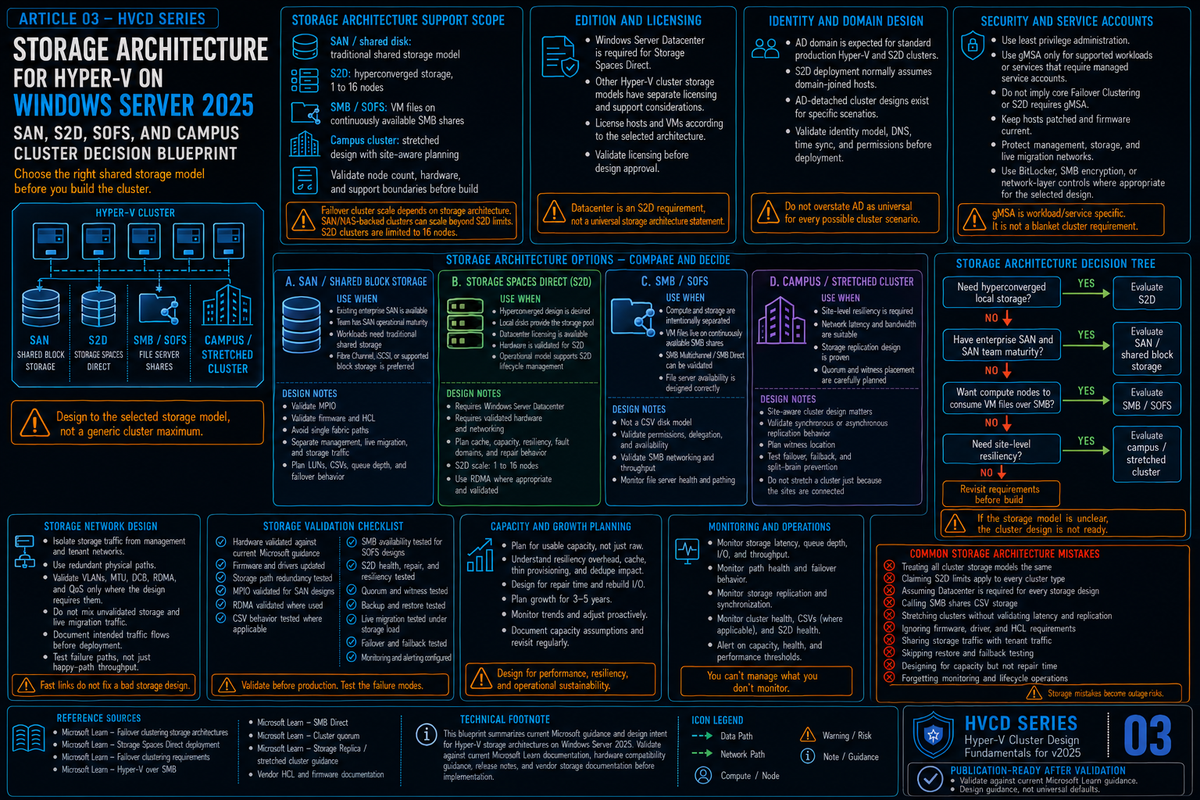
Article 3 in the Hyper-V Cluster Design Fundamentals for Windows Server 2025 series. Article 1 covered the design pillars. Article 2 covered networking. This article covers storage architecture, which is the decision that shapes everything else. Pick SAN and you inherit one operational model. Pick Storage Spaces Direct and you inherit a different one. Pick disaggregated S2D with Scale-Out File Server and you inherit a third. The choice you make on this single question determines how you scale, how you patch, how you back up, and how much of your weekend you spend reading event logs.
Hyper-V on Windows Server 2025 supports three production storage architectures. Each one has a clean fit for some scenarios and is the wrong answer for others. The mistake most teams make is picking based on whatever they ran last (familiarity bias) or whatever they read about in a vendor blog (recency bias). The right way to pick is to start with what your business actually needs from storage, what your operational team can actually run, and what your existing investment can plausibly extend, and then map those to the architecture that fits.
This article works through all three architectures, the WS2025 enhancements that change the conversation, and a decision framework you can apply to a real project. The new feature worth flagging up front: S2D Campus Cluster, released in the December 2025 cumulative update, gives you two rack fault domain resiliency within a single physical location and changes the design conversation for any shop with two racks, two server rooms, or nearby buildings on the same campus connected by low-latency LAN or dark fibre. It is not a WAN disaster recovery design.
The three architectures
Strip out the marketing names and Hyper-V cluster storage comes down to three patterns:
| Pattern | What it is | Hyper-V hosts see |
|---|---|---|
| SAN backed | Three tier classic. External storage array (Fibre Channel, iSCSI, FCoE). Storage scales separately from compute. | Block LUNs presented over a storage fabric. Mounted as CSV with NTFS. |
| Hyperconverged S2D | Software defined storage. Each Hyper-V node has its own drives. The cluster pools them and presents virtual disks back to itself. | Local pool, virtual disks, CSV with ReFS. No external storage array. |
| Disaggregated S2D plus Scale-Out File Server | Two clusters. One runs S2D and exposes the storage as SMB 3.0 shares. The other is the Hyper-V cluster, which uses those shares as VM storage. | SMB shares from the SOFS cluster. VMs live on SMB paths instead of CSV. |
Two architectural notes that matter before going further. First, S2D and Storage Spaces Direct are the same thing; the docs use both names. Second, Storage Spaces Direct is a Datacenter Edition feature only. If you are running Standard Edition, you cannot use S2D and you are choosing between SAN and a third party HCI alternative.
SAN backed clusters
The traditional pattern. A storage array sits between your Hyper-V hosts and the disks. Hosts connect to the array over Fibre Channel, iSCSI, or FCoE. The array presents LUNs that the cluster claims as Cluster Shared Volumes. Hyper-V VMs live on those CSVs.
This is the pattern most enterprises know best because it has been the default since Hyper-V 1.0. It is also the pattern most likely to be on the floor today if you are inheriting an existing environment. Microsoft still fully supports SAN backed clusters in 2025 and continues to add features for them, including the new NVMe over Fabrics initiator and a heavily optimized NVMe storage stack that delivers significantly higher IOPS on modern PCIe Gen 5 hardware.
When SAN is the right answer
- You already own a recent storage array. A Pure, NetApp, Dell PowerStore, or HPE Alletra that has years of life left and was paid for last year. Throwing that away to chase HCI economics is rarely the right answer.
- Your storage scaling pattern is independent of compute. You add capacity by buying disk shelves, not by buying servers. You add compute by buying servers without touching storage.
- Multiple consumers share the storage. The Hyper-V cluster, a SQL FCI, a few file servers, and maybe some bare metal database hosts all sit on the same array. Consolidating that across multiple HCI clusters costs more than the SAN does.
- Your operational team has SAN expertise. Storage administration is a real discipline. If your team owns LUN provisioning, multipathing, replication, and array based snapshots, switching to S2D throws all of that institutional knowledge away.
- Your backup ecosystem is array based. If you do storage based snapshots that integrate with Veeam, Commvault, or your array's native replication, that integration usually does not exist for S2D.
SAN gotchas to design around
Three SAN specific things that catch people out, all of which I have seen in production:
NTFS for CSV, not ReFS. Article 1 covered this in detail. ReFS on a SAN backed CSV forces File System Redirected I/O for every operation, which silently kills performance. NTFS on SAN, ReFS on S2D. The rule is that strict.
MPIO has to be configured on every host the same way. One node with a different round robin policy, one HBA with a stale firmware, one missed PowerPath or DSM install, and you have a node that runs fine until storage pathing is tested. Test it. Pull a path during business hours in a maintenance window and watch what happens.
Thin provisioning at the array level needs monitoring. Hyper-V VHDX files can grow. The array's thin LUNs can fill up. The host has no idea the array is out of physical capacity until I/O starts failing in unhelpful ways. Set hard alerts at the array level for both LUN level and pool level utilization.
WS2025 SAN enhancements worth knowing
Two material additions for SAN backed Hyper-V on 2025:
- Native NVMe stack improvements. Native NVMe stack improvements are real in Windows Server 2025 and matter for modern NVMe hardware. Treat NVMe-oF initiator support separately: validate its current support state against Microsoft documentation, your exact build, and your storage vendor before designing a production SAN around it. NVMe-oF initiator support should be treated as preview or Insider-build functionality unless current Microsoft production documentation and the storage vendor explicitly support it for the target build. RDMA support for NVMe-oF is being rolled out in updates rather than at GA.
- NVMe stack optimization. Microsoft reworked the NVMe storage stack in 2025 with a native NVMe path that drops the legacy SCSI translation layer for NVMe devices. Microsoft-published testing cites roughly 3.3 million IOPS on PCIe Gen 5 enterprise SSDs, with materially lower CPU utilization (Microsoft references roughly 80 percent more 4K random read IOPS versus Windows Server 2022 on identical hardware and around 45 percent fewer CPU cycles per I/O in their lab numbers). Native NVMe is opt in: it reached general availability in the October 2025 cumulative update and you enable it with a registry key (or Group Policy MSI). Test it in a non production environment before turning it on. Treat the published lab numbers as ceilings; most production workloads will not see the headline numbers, but the floor is meaningfully higher.
Storage Spaces Direct (hyperconverged)
S2D pools local drives across the cluster nodes and presents them back as virtual disks the cluster owns. Compute and storage scale together: every new node adds CPU, memory, and storage capacity at the same time. The hosts run both the VM workload and the storage stack.
S2D supports 2 to 16 nodes per cluster. Drives are pooled into a single storage pool by default and exposed as virtual disks formatted with ReFS and added to the cluster as CSVs. The fastest tier of drives in the system (NVMe in modern builds) automatically becomes a write back cache; the slower tier (SSD or HDD, depending on what is in the chassis) becomes capacity. In all flash systems with NVMe and SSD, NVMe caches in front of SSD. In all NVMe systems, all the drives are capacity and there is no caching layer because nothing would be faster than the capacity tier.
Resiliency types
| Resiliency | Capacity efficiency | Failures tolerated | Best for |
|---|---|---|---|
| Two way mirror | 50 percent | 1 drive or 1 node | Lab, dev, small clusters where 1 node redundancy is acceptable |
| Three way mirror | 33 percent | 2 simultaneous drives or nodes | Production VMs. Default for clusters with 3 or more nodes. |
| Dual parity | ~50 to 80 percent (depends on cluster size) | 2 simultaneous failures | Cold or archival data. Slow on writes. Avoid for VMs. |
| Mirror accelerated parity | Mixed | Mirror tier: 2; parity tier: 2 | Mixed workload volumes where hot data is on the mirror tier and cold on parity. |
| Four copy mirror (RLNM, Campus Cluster) | 25 percent | 1 rack and 1 node | Two rack Campus Clusters where rack level fault tolerance matters. |
For the vast majority of production Hyper-V S2D deployments, the answer is three way mirror on three plus node clusters. Two way mirror is acceptable on two node clusters but does not let you survive a node failure during patching. Dual parity is for archive workloads, not VMs. Mirror accelerated parity sounds clever and works fine in lab; in production it has enough operational complexity around tier balancing that most shops just run mirror.
Storage Spaces Direct on Windows Server 2025: what changed
2025 brought meaningful S2D improvements that take it from "viable HCI option" to "competitive HCI platform":
- Thin provisioning. Until 2025, S2D volumes were always thick. A 1 TB volume immediately consumed 1 TB of pool capacity whether you used it or not. 2025 introduces thin provisioning for S2D volumes, which means a 1 TB volume only consumes pool capacity as data is written. You can convert existing fixed volumes to thin without rebuilding. This was the single biggest functional gap between S2D and competing HCI platforms and it is now closed.
- Native ReFS deduplication and compression. ReFS now supports dedup and compression natively, with cluster awareness. Microsoft's published numbers cite around 60 percent storage savings on file servers and up to 90 percent on volumes holding VHD or ISO backups. There are two compression algorithm choices (more aggressive or less). Dedup runs as a scheduled job so you control when it consumes CPU. Treat the savings numbers as ceilings; what you actually get depends on the workload.
- NVMe over Fabrics initiator. Same caveat as for SAN: validate NVMe-oF initiator support against current Microsoft documentation, your exact build, and your storage vendor. Do not treat it as a settled GA SAN replacement feature for every deployment. For S2D this is mostly relevant if you want to consume external NVMe-oF storage from the same hosts, not for the S2D pool itself.
- Storage Replica compression: documentation is mixed. Windows Server 2025 marketing and feature guidance describe Storage Replica compression as available across editions, while the core Storage Replica documentation still contains older Azure Edition caveats in places. Validate exact edition, build, and licensing behavior before relying on compression for a design. Storage Replica itself is still Datacenter for full functionality; Standard supports a single partnership, a single resource group, a maximum 2 TB volume, and requires Windows Server 2019 or later.
- Storage pool version 29. Most of the new 2025 features (thin provisioning specifically) require the storage pool to be upgraded to version 29 with
Update-StoragePool. The upgrade is irreversible. If you are upgrading an existing 2019 or 2022 S2D cluster to 2025, plan the pool upgrade as a deliberate step after every node is on 2025 and the cluster is fully healthy.
# Check current storage pool version
(Get-CimInstance -Namespace root/microsoft/windows/storage `
  -ClassName MSFT_StoragePool -Filter 'IsPrimordial = false').Version

# Upgrade pool to version 29 (irreversible)
Get-StoragePool S2D* | Update-StoragePool

# Create a thin provisioned three way mirror volume
New-Volume -FriendlyName "VMs-01" -StoragePoolFriendlyName S2D* `
  -FileSystem CSVFS_ReFS -Size 1TB `
  -ResiliencySettingName Mirror -PhysicalDiskRedundancy 2 `
  -ProvisioningType Thin
When S2D is the right answer
- Greenfield clusters with no existing storage investment. Building from scratch. No SAN to amortize. The HCI economics work cleanly.
- Edge and branch deployments. Two or four node clusters where buying a SAN does not make sense. S2D fits the cost profile of small remote sites better than any external storage option.
- VMware exit projects where you are already replacing servers. If you are buying new hardware to land VMware workloads, S2D nodes give you the storage and the compute in one purchase decision.
- Workloads that benefit from the local cache tier. NVMe in front of SSD as a write back cache is a real performance advantage for write heavy workloads.
- Operational teams comfortable with software defined storage. S2D failure modes are different from SAN failure modes. Drive failures get rebuilt automatically by the pool. Node failures cause data to be redistributed and replicated across surviving nodes. The team needs to understand what is normal noise and what is a real problem.
S2D gotchas
Mixed drive types in the pool. S2D treats the fastest tier as cache and the rest as capacity. Mixing NVMe, SSD, and HDD across nodes asymmetrically (one node has a different drive layout than the others) is a supportability problem. All nodes should have the same drive layout, same drive types, same drive counts. SDDC validation enforces this for certified configurations and you should follow it for self built ones too.
Pool capacity warnings need attention. The pool has reserve capacity for rebuilds. When utilization gets high enough that the pool cannot rebuild a failed node into existing free space, you start getting capacity warnings that admins often dismiss as noise. Those warnings are not noise. If a node fails when the pool is too full to absorb its data, rebuild stalls and the cluster is in a degraded state until you add capacity.
Drive replacement workflow. Replacing a single failed drive in S2D is straightforward but takes some time for the pool to rebuild. Replacing multiple drives or replacing entire nodes requires careful sequencing. Test it on a non production cluster before you have to do it on a production one at 2 AM.
Three way mirror requires three nodes minimum. A two node cluster can only run two way mirror. If your design relies on surviving a node failure during patching (which it should), three nodes is your real minimum, not two.
S2D Campus Cluster (the new option in 2025)
S2D Campus Cluster, released in the WS2025 December 2025 cumulative update (KB5072033), is a single S2D cluster spanning two racks within a single physical location. The two racks can be in the same datacenter, two server rooms in the same building, or two nearby buildings on the same campus connected by low-latency LAN or dark fibre. They cannot be in geographically separated sites; that is still S2D Stretch Cluster territory. A stretch cluster is one failover cluster extended across geographically separated sites, where each site maintains its own S2D pool and Storage Replica handles replication between them.
Campus Cluster uses a new resiliency type called Rack Level Nested Mirror (RLNM), which places copies of data symmetrically across the two racks. A two copy volume puts one copy in each rack. A four copy volume puts two copies in each rack and survives the loss of an entire rack plus a node in the surviving rack.
Why Campus Cluster matters
Before Campus Cluster, the only way to get rack level fault tolerance for S2D was to either run a stretch cluster across two physical sites with Storage Replica between the per site pools, or build a multi-cluster topology with two independent S2D clusters coordinating at the application or storage layer. Both approaches add capital cost (two pools, two of everything or substantial added complexity), replication management overhead, and failover behavior that is not transparent to applications during a rack outage.
Campus Cluster gives you a single S2D cluster, single storage pool, single management plane, and rack level resiliency. If you have two server rooms in the same building or two buildings on the same campus, this is materially simpler than running stretched architectures with Storage Replica.
2+2 configuration: two failover cluster nodes in each rack, four nodes total, plus a file share witness in a third room. Use four copy volumes for important workloads (provides Rack plus Node resiliency: lose a whole rack plus one node in the surviving rack and still have a copy of the data). Use two copy volumes for less important workloads to save capacity.
Campus Cluster requirements
- WS2025 December 2025 cumulative update (KB5072033) or later on every node.
- All flash storage. NVMe and SSD only. No HDDs. No caching tier; flat storage.
- Exactly two rack fault domains declared via
New-ClusterFaultDomain, with nodes assigned to the racks. - 1 ms inter rack latency or less for the storage network. RDMA strongly recommended.
- Cluster witness in a third room separate from the two racks (file share, disk, cloud, or USB witness).
- Storage pool version 29 with the appropriate resiliency types declared.
# Define the fault domain hierarchy before enabling S2D
New-ClusterFaultDomain -Type Site -Name "Atlanta-Campus"
New-ClusterFaultDomain -Type Rack -Name "Rack-A"
New-ClusterFaultDomain -Type Rack -Name "Rack-B"
Set-ClusterFaultDomain -Name "Rack-A" -Parent "Atlanta-Campus"
Set-ClusterFaultDomain -Name "Rack-B" -Parent "Atlanta-Campus"
Set-ClusterFaultDomain -Name "HV-01" -Parent "Rack-A"
Set-ClusterFaultDomain -Name "HV-02" -Parent "Rack-A"
Set-ClusterFaultDomain -Name "HV-03" -Parent "Rack-B"
Set-ClusterFaultDomain -Name "HV-04" -Parent "Rack-B"

# Then enable S2D and accept the rack fault tolerance prompt
Enable-ClusterStorageSpacesDirect

# Create a four copy mirror volume (RLNM) for production VMs
New-Volume -FriendlyName "Campus-Prod" -StoragePoolFriendlyName S2D* `
  -FileSystem CSVFS_ReFS -Size 2TB `
  -ResiliencySettingName Mirror -PhysicalDiskRedundancy 3 `
  -NumberOfDataCopies 4 -ProvisioningType Thin
The March 2026 update added Rack Local Reads, which optimizes mirrored reads to come from the closest healthy copy instead of treating all copies as equal. For Campus Clusters where one rack might be across the building, that can be a meaningful latency improvement.
These are different things and the names are confusingly similar. S2D Campus Cluster is a single cluster across two racks within a single physical location, using RLNM and S2D internal replication. S2D Stretch Cluster is one failover cluster extended across geographically separated sites, with each site maintaining its own S2D pool and Storage Replica handling replication between sites. A multi-cluster topology, by contrast, is two or more independent failover clusters operating separately and coordinating at the application or storage layer. If anything in the conversation involves a WAN link or a separate disaster recovery datacenter, you are talking about Stretch Cluster (or a multi-cluster design). If both rack fault domains are in the same building or on the same campus and connected by LAN or dark fibre, you are talking about Campus Cluster.
Disaggregated S2D with Scale-Out File Server
The third pattern: a separate cluster runs S2D and exposes the storage as SMB 3.0 shares via Scale-Out File Server. The Hyper-V cluster does not have local storage at all; its VMs live on SMB shares from the SOFS cluster. Compute and storage scale independently the way they do with SAN, but the storage tier is software defined.
This pattern was Microsoft's flagship recommendation for a few years. It is still fully supported in 2025 and Microsoft continues to ship updates to it. In practice, it has lost ground to hyperconverged S2D for new builds because the operational overhead of running two clusters instead of one is real and the cost savings of disaggregated storage rarely materialize until you are at substantial scale.
When SOFS still makes sense
- Multiple Hyper-V clusters share storage. If you have three or four separate compute clusters all consuming the same storage tier, one SOFS cluster serving all of them is more efficient than three or four hyperconverged clusters with their own storage pools.
- Scaling compute and storage at materially different rates. If you add VMs faster than you add storage capacity, or vice versa, decoupled scaling matters. Most shops do not actually have this problem; their growth rates track each other.
- SQL Server FCI alongside Hyper-V. SOFS shares can host SQL FCI database files (continuously available shares). If you are running both SQL FCI and Hyper-V and want them on the same software defined storage, SOFS is the pattern.
- Storage administrative ownership separate from compute administrative ownership. Some organizations have separate storage and compute teams that do not want to share a cluster boundary. SOFS draws a clean line between them.
SOFS architecture in practice
The SOFS cluster runs S2D internally (or, less commonly, classic Storage Spaces with shared SAS JBOD). It creates volumes on its own CSV. Those volumes get exposed as continuously available SMB shares using the File Server cluster role configured as Scale-Out File Server. The shares look like \\sofs-cluster\share-name from the Hyper-V hosts.
The Hyper-V hosts connect to those shares using SMB Direct (RDMA). This is where the networking from Article 2 becomes critical: SOFS over slow or non RDMA networking is meaningfully slower than properly tuned hyperconverged S2D. SOFS done right requires 25 GbE or faster RDMA between the compute and storage clusters, with proper switch fabric.
Do not run the SOFS file server role on the same nodes as your Hyper-V workloads. The whole point of disaggregated architecture is that compute and storage are separate failure domains. Some shops do this anyway because they want to "save hardware," and they end up with the worst of both worlds: hyperconverged level resource contention plus the operational complexity of running SMB shares for VMs. If you want hyperconverged, run hyperconverged S2D directly. If you want disaggregated, give the SOFS cluster its own nodes.
Storage Replica for cross site DR
Whatever you pick for primary storage, cross site DR is its own conversation. Storage Replica is Microsoft's block level replication built into Windows Server. It works between two servers, two clusters, or two clusters with stretched configurations. It can run synchronously (for sites within a few milliseconds of each other) or asynchronously (for sites further apart).
| Mode | Latency tolerance | RPO | Use case |
|---|---|---|---|
| Synchronous | Roughly 5 ms or less round trip | Zero (write is acknowledged only after replication) | Two datacenters within metro distance. |
| Asynchronous | Any (cross country, cross continent) | Application visible (writes acknowledged before replication) | Geographic DR. Cross region. |
Two WS2025 changes worth knowing for Storage Replica:
- Compression: documentation is mixed. Windows Server 2025 marketing and feature guidance describe Storage Replica compression as available across editions, while the core Storage Replica documentation still contains older Azure Edition caveats in places. Compression materially helps replication over slower or metered links when it does apply, but validate exact edition, build, and licensing behavior before relying on it for a design.
- Standard Edition limits unchanged. Standard Edition can still only do a single Storage Replica partnership, a single resource group, with a maximum 2 TB volume, and requires Windows Server 2019 or later. For real multi cluster DR, you still need Datacenter.
For S2D Stretch Clusters specifically, Storage Replica is what does the cross site replication. The pattern is one failover cluster extended across the two sites, with each site maintaining its own S2D pool and CSVs, and Storage Replica replicating volumes between them. This is distinct from Campus Cluster (a single S2D cluster across two racks in the same site) and from a multi-cluster topology (two or more independent clusters coordinating at the application or storage layer).
Comparison and decision framework
| Criterion | SAN backed | Hyperconverged S2D | Disaggregated S2D + SOFS |
|---|---|---|---|
| Compute and storage scale | Independent | Coupled | Independent |
| Hardware cost (small scale) | High (array purchase) | Low (servers only) | Medium |
| Hardware cost (large scale) | Medium | Medium | Medium to high |
| Operational complexity | Medium (SAN team needed) | Low to medium (one cluster) | High (two clusters, SMB tuning) |
| Maximum nodes | 64 | 16 | 16 storage + up to 64 compute |
| Cross site DR | Array replication or Storage Replica | S2D Stretch Cluster with per-site S2D pools | Storage Replica |
| Within site rack resiliency | Array dependent | Campus Cluster (2025+) | Storage cluster fault domains |
| Edition required | Standard or Datacenter | Datacenter only | Datacenter only |
| Backup integration | Mature (array snapshots, vendor integrations) | VM level (Veeam, Commvault, etc.) | VM level over SMB |
| Right for | Existing array, multi consumer storage, mature SAN team | Greenfield, edge, VMware exit, single cluster scenarios | Multiple compute clusters sharing one storage pool, separate teams |
A simple decision tree
If you have an existing modern SAN that has years of life left, and the team that runs it: SAN backed. Don't replace working storage to chase HCI economics that may not show up at your scale.
If you are building greenfield, especially for edge sites or VMware exit projects on Datacenter Edition: Hyperconverged S2D. Single cluster, simpler operations, hardware refresh aligns with software refresh. Add Campus Cluster if you have two server rooms in the same building or campus.
If you have multiple Hyper-V clusters that need to share a storage tier, or you specifically need separate compute and storage administrative domains: Disaggregated S2D plus SOFS. This is the smaller bucket but it is the correct answer for the scenarios it fits.
If you have two geographically separated sites and need cross site DR: pick whichever primary architecture fits each site, and use Storage Replica between them (or array based replication for SAN, if your array supports it).
The storage decisions that bite you later
ReFS on a SAN backed CSV
Covered in Article 1, worth restating because it keeps happening. ReFS on SAN forces every CSV operation through File System Redirected mode, which silently kills performance. NTFS for SAN, ReFS for S2D. Run Get-ClusterSharedVolumeState on every CSV and verify it reports Direct mode under normal operation.
Skipping the storage pool upgrade
If you upgrade an existing 2019 or 2022 S2D cluster to 2025, the storage pool stays at its previous version until you explicitly upgrade it with Update-StoragePool. Until you do that, the new 2025 features (thin provisioning specifically) are unavailable. The upgrade is irreversible, so do it deliberately after the cluster is fully on 2025 and healthy. Do not roll forward to 2025 nodes and leave the pool on the old version for months while you "evaluate."
Mixing drive types asymmetrically across S2D nodes
S2D expects symmetric drive layouts across all nodes. Two nodes with NVMe + SSD and two nodes with SSD only is a configuration that will validate poorly and surprise you during failures. SDDC certified configurations enforce symmetry and you should mirror that practice on self built clusters.
Treating thin provisioning as free space
Thin provisioned S2D volumes (new in 2025) only consume pool capacity as data is written. That is the point. The risk is that admins overprovision wildly because "it is thin, it does not matter," and then the pool actually fills up because real data growth hit the limit. Set hard alerts on pool level utilization. Treat the pool's actual capacity as a hard ceiling regardless of how much logical capacity is provisioned on top of it.
Witness placement for Campus Clusters
The witness for a Campus Cluster has to be in a third location, not in either of the two racks. If the witness is in Rack A and Rack A goes down, the cluster has lost both half the nodes and the witness, which is exactly the scenario the witness exists to arbitrate. A file share witness on a server in a third room, or a cloud witness in Azure, are both fine. A disk witness inside one of the racks is not.
Running SOFS file server role on Hyper-V hosts
Disaggregated architecture only works if compute and storage are actually separate. Running the SOFS file server role on the same nodes that run your VMs collapses the design back to a worse version of hyperconverged. If you want disaggregated, give the storage cluster its own nodes. If you do not have hardware for that, run hyperconverged S2D and stop trying to fake disaggregation.
Two node S2D clusters and patching
A two node S2D cluster can only do two way mirror, which means losing a node leaves the cluster running on a single copy of the data. During monthly patching, you are evacuating one node and running on a single copy of every volume for the duration. That works in lab. In production, three nodes with three way mirror is the real minimum for clusters that take patching seriously.
Confusing Campus Cluster with Stretch Cluster
Worth stating one more time. Campus Cluster is two racks within one site. Stretch Cluster is one failover cluster extended across geographically separated sites, with each site holding its own S2D pool and Storage Replica handling cross site replication. A multi-cluster topology is two or more independent failover clusters operating separately. They solve different problems. Campus Cluster does not give you geographic disaster recovery. Stretch Cluster does not give you single cluster simplicity within one site. Pick based on what you actually need.
Key Takeaways
- Three architectures. SAN backed, hyperconverged S2D, disaggregated S2D plus Scale-Out File Server. Each is correct for some scenarios and wrong for others. Start from what you actually need, not from familiarity bias.
- SAN backed is still fully supported on 2025. Format CSVs as NTFS (not ReFS). The most material 2025 additions are native NVMe stack improvements; treat NVMe-oF initiator support separately and validate it against current Microsoft documentation, your exact build, and your storage vendor before designing around it.
- S2D is Datacenter Edition only and supports 2 to 16 nodes per cluster. Format CSVs as ReFS. Three way mirror is the production default.
- S2D 2025 enhancements that change the conversation. Thin provisioning, native ReFS dedup and compression, native NVMe stack improvements. NVMe-oF initiator support should be validated against current Microsoft documentation, your build, and the storage vendor rather than treated as a settled GA feature. Storage pool version 29 upgrade required for thin provisioning and is irreversible.
- S2D Campus Cluster (KB5072033, December 2025). Single S2D cluster across two racks in one physical location, with Rack Level Nested Mirror. 2+2 with four copy volumes for important workloads. Witness must be in a third room.
- Campus Cluster vs Stretch Cluster vs multi-cluster. Different things. Campus = two rack fault domains, one site, RLNM. Stretch = one failover cluster extended across geographically separated sites, with per site S2D pools and Storage Replica between them. Multi-cluster = independent failover clusters coordinating at the application or storage layer.
- Disaggregated S2D plus SOFS is supported and useful when multiple compute clusters share storage or when SQL FCI lives alongside Hyper-V. Less common for new builds because the operational overhead of two clusters rarely pays off below substantial scale.
- Storage Replica compression. WS2025 marketing and feature guidance describe it as available across editions while the core Storage Replica documentation still contains older Azure Edition caveats; validate edition, build, and licensing behavior before designing around it. Storage Replica itself is still Datacenter for full functionality; Standard supports a single 2 TB partnership.
- Decision rule. Existing modern SAN with mature team: SAN. Greenfield or edge or VMware exit on Datacenter: hyperconverged S2D. Multiple compute clusters sharing storage or separate admin domains: disaggregated SOFS. Cross site DR on top of any of those: Storage Replica.
- The classic gotchas. ReFS on SAN, mixed drive types in S2D, missed pool upgrades, two node clusters that cannot survive patching, witness in the wrong rack, SOFS role running on Hyper-V hosts. Avoid all of these.