

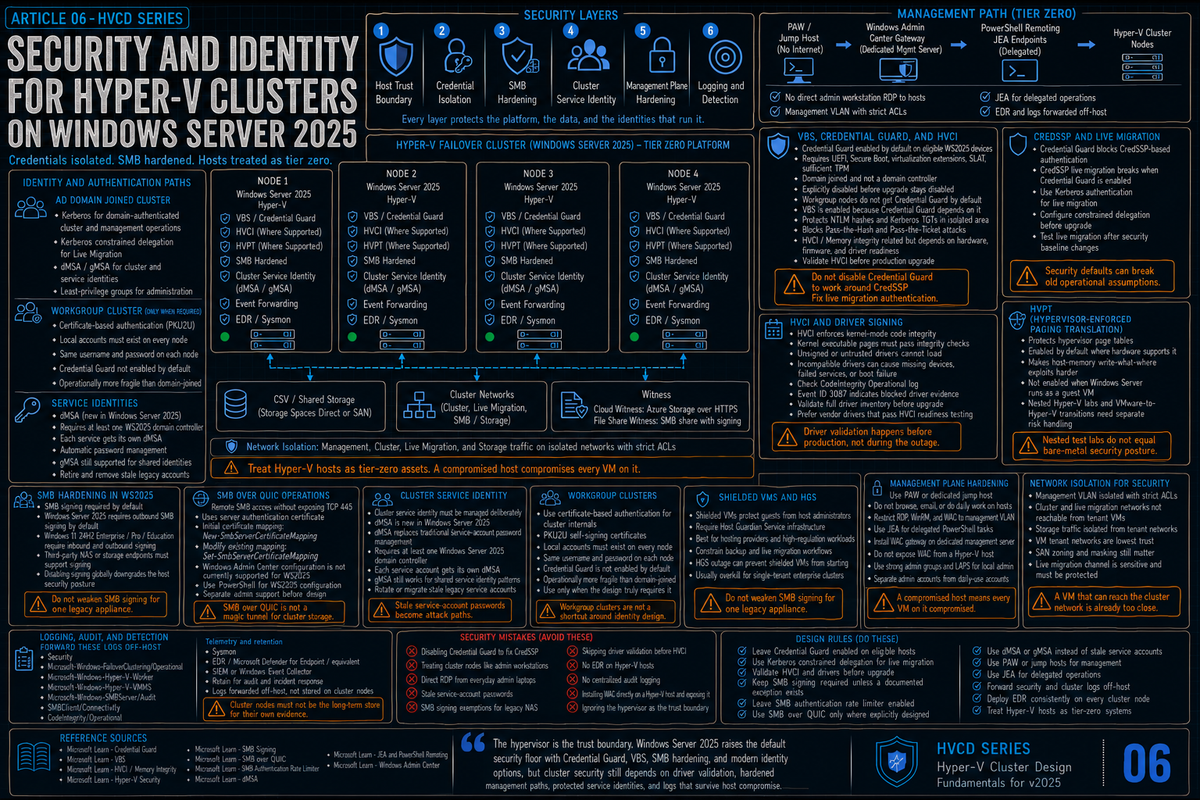
Article 6 in the Hyper-V Cluster Design Fundamentals for Windows Server 2025 series. This article covers security and identity: what Credential Guard and VBS being on by default actually mean for cluster operations and how HVCI (memory integrity) sits in the same VBS family but depends on hardware, firmware, and driver readiness; the SMB hardening changes in 2025 (signing required, authentication rate limiter, SMB over QUIC in all editions), Delegated Managed Service Accounts, workgroup cluster certificate authentication, and the operational practices that keep a cluster from being the soft target on your network.
Security on a Hyper-V cluster is a stack. The hypervisor itself, the management plane, the cluster service, the storage fabric, the live migration channel, the guest VMs, and the credentials used to manage all of it. Each layer has its own defaults, its own configuration surface, and its own ways to get owned. Windows Server 2025 hardens several of these layers by default, which is good for security and surprising for anyone who expected their 2022 patterns to keep working.
The point of this article is not to make you read the entire Microsoft security documentation set. It is to call out the things that change in 2025, the things that catch people out on upgrade, and the practices that hold up under audit and under attack.
What Credential Guard and VBS being on by default actually means
Starting with Windows Server 2025, Credential Guard is enabled by default on eligible devices (UEFI with Secure Boot, virtualization extensions, SLAT, sufficient TPM, domain joined and not a domain controller) unless it has been explicitly disabled. When Credential Guard turns on, Virtualization Based Security (VBS) is automatically enabled too, because Credential Guard depends on VBS to provide the isolated environment. Hypervisor-Protected Code Integrity (HVCI, also called memory integrity) is related to the same VBS security family, but whether HVCI is actually enforced on a given server still depends on hardware, firmware, and driver readiness. Do not assume HVCI is guaranteed to be on for every Windows Server 2025 host or every upgraded host; validate it explicitly on the platforms you actually run.
The mechanics matter:
- VBS uses the hypervisor to create an isolated virtual environment that holds secrets the regular OS kernel cannot reach. Even malware running with administrative privileges in the host OS cannot extract VBS protected secrets.
- Credential Guard uses VBS to isolate NTLM password hashes, Kerberos Ticket Granting Tickets, and credentials stored by applications as domain credentials. This breaks Pass the Hash and Pass the Ticket attacks against the host.
- HVCI uses VBS to enforce kernel mode code integrity. Unsigned or untrusted drivers cannot load. This is a real protection and it is also where most driver compatibility issues with WS2025 show up.
The Hyper-V hosts themselves are an interesting case. They were already running the hypervisor for VMs. With VBS on, the Hyper-V hypervisor is also doing isolation duty for the host's own security boundary. There is some performance overhead from running additional code paths in the isolated VBS environment; the size depends on the workload and the hardware. Microsoft Learn notes that memory integrity works better on processors with Mode-Based Execution Control (Intel Kabylake and higher, AMD Zen 2 and higher), with older processors taking a bigger performance impact through emulation.
Credential Guard turns on by default only if the device meets the requirements (UEFI, Secure Boot, virtualization extensions, SLAT, sufficient TPM) and is domain joined and not a domain controller. Workgroup cluster nodes do not get Credential Guard by default. Devices that had Credential Guard explicitly disabled before upgrade keep it disabled. Domain controllers are explicitly excluded by Microsoft.
The CredSSP collision (covered in article 4, repeats here)
Credential Guard blocks CredSSP based authentication. The single biggest operational consequence in a Hyper-V cluster context is live migration: if your cluster is using CredSSP for live migration authentication, those migrations stop working the moment Credential Guard turns on. Switch live migration auth to Kerberos with constrained delegation before or during the upgrade. This is repeated from article 4 because it shows up everywhere security touches the cluster.
HVCI and driver signing
HVCI runs kernel mode code integrity validation inside the VBS isolated environment. Per Microsoft Learn, kernel memory pages are only made executable after passing code integrity checks, and executable pages are never writable. Drivers that fail validation are blocked from loading. Microsoft documents this directly: incompatibility "can cause devices or software to malfunction and in rare cases may result in a boot failure (blue screen)."
When HVCI blocks a driver, the evidence shows up in Event Viewer at Applications and Services Logs\Microsoft\Windows\CodeIntegrity\Operational, generally under Event ID 3087. The visible operational symptom is a missing device or a failed service. Microsoft publishes the HLK HyperVisor Code Integrity Readiness Test that drivers must pass to be approved for Microsoft signing.
Validate your full driver inventory against HVCI compatibility before upgrade. Any vendor still shipping unsigned or HVCI incompatible drivers in 2025 is a vendor whose driver should not be on a production cluster regardless.
Hypervisor-Enforced Paging Translation (HVPT)
HVPT is a 2025 addition that protects the page tables used by the hypervisor itself. It is enabled by default where hardware supports it. HVPT makes write what where exploits against host memory significantly harder. There is one caveat that matters in nested scenarios: HVPT is not enabled when Windows Server is itself running as a guest in a VM. If you are running Hyper-V on top of VMware or another hypervisor, you do not get HVPT protection for the inner Hyper-V instance. Plan accordingly for nested test labs and for VMware to Hyper-V transition projects.
SMB hardening in WS2025
SMB is the wire protocol for cluster traffic, CSV redirected I/O, SMB Direct live migration, S2D inter node traffic, and Scale-Out File Server access. Microsoft made the most significant changes to SMB security since SMB 2 in this release. Five things matter for cluster operators:
SMB signing required by default
Per Microsoft Learn (Control SMB signing behavior), Windows Server 2025 requires outbound SMB signing by default, and Windows 11 version 24H2 Enterprise, Pro, and Education editions require both outbound and inbound SMB signing by default. Pre 2025 behavior required signing only when connecting to SYSVOL and NETLOGON shares and on AD domain controllers. The Microsoft community hub blog on this change describes it as the most significant SMB security change since SMB 2.
Why it matters in a cluster context: if you have any third party storage, NAS device, or older client that does not support SMB signing, it cannot connect to a 2025 Hyper-V host or SOFS cluster by default. Validate every SMB endpoint in your environment for signing support before upgrade. The fix on a non compliant client is to update it; the fix on the 2025 server is to disable required signing, which downgrades your security posture and is generally the wrong answer.
SMB authentication rate limiter
The SMB server now limits failed authentication attempts. SMB authentication rate limiting adds a default delay (2 seconds by default) between failed NTLM or PKU2U-based authentication attempts. It does not affect Kerberos authentication. An attack that previously could try 300 guesses per second (90,000 attempts in 5 minutes) now takes 50 hours to complete the same volume against NTLM or PKU2U auth. This is on by default and most environments should leave it that way.
SMB over QUIC available in all editions
SMB over QUIC was previously limited to Windows Server 2022 Azure Edition. In 2025 it ships in all editions including Standard. SMB over QUIC creates a TLS 1.3 encrypted tunnel over UDP 443 instead of TCP 445, with mandatory certificate based encryption. It is positioned as an alternative to VPN for remote SMB access. For Hyper-V clusters specifically, SMB over QUIC is a fit when you have SOFS or file servers that need to be reachable from outside the trusted network without exposing TCP 445.
SMB over QUIC is disabled by default. You configure it explicitly: install a server authentication certificate, map it with New-SmbServerCertificateMapping for the initial mapping, and enable SMB over QUIC on the relevant share. Use Set-SmbServerCertificateMapping only to modify an existing mapping. For Windows Server 2025, current Microsoft guidance says the Windows Admin Center method is not currently supported, so PowerShell configuration is required. SMB over QUIC requires Windows 11 or Windows Server 2025 clients; Windows 10 cannot use it.
Local KDC and IAKerb (evolving)
Kerberos-first and NTLM-reduction work is evolving across Windows Server. Local KDC and IAKerb are part of that direction and Microsoft has talked about them as planned mechanisms for Kerberos authentication without an Active Directory domain controller. Do not design production Hyper-V cluster authentication architecture around undocumented, preview, or changing behavior. Use current published SMB authentication guidance, and test against the exact Windows Server build you will actually run.
SMB encryption with SMB Direct (covered in article 4, summary here)
WS2022 and later support SMB Direct (RDMA) with SMB encryption together, where data is encrypted before placement. The pre 2022 behavior where enabling SMB encryption disabled the RDMA fast path is gone. There is still a measurable performance cost to encryption, but no longer the cliff it used to be. If your live migration network is on an isolated VLAN, network isolation is usually still cleaner than encryption. If you cannot isolate, encryption is workable.
Cluster service identity
Every clustered service runs under an identity. Historically this has been a domain account or, for older deployments, the Cluster Network Object (CNO) and Virtual Computer Objects (VCO) automatically created in AD. The 2025 change worth knowing is Delegated Managed Service Accounts.
Delegated Managed Service Accounts (dMSA)
Per Microsoft Learn, Windows Server 2025 introduces Delegated Managed Service Accounts. A dMSA is a new account type that allows migration from a traditional service account to a machine account with managed and fully randomized keys, while disabling the original service account password. Authentication is linked to the device identity, which means only specified machine identities mapped in Active Directory can use the account. The Microsoft documentation calls out that this directly addresses kerberoasting, where a compromised account harvests credentials of other service accounts in the domain.
Two operational facts worth knowing up front:
- Requires at least one Windows Server 2025 Domain Controller per the Microsoft dMSA FAQ. Member servers alone are not enough; the DC has to be on 2025 because the AD schema additions for dMSA only ship there.
- Each service account gets its own dMSA. Per Microsoft, you cannot migrate multiple service accounts to a single dMSA, and you cannot migrate from an existing MSA or gMSA to a dMSA.
For Hyper-V cluster contexts, dMSA matters where you have:
- Backup product service accounts that historically used a domain user account with a static password
- Monitoring agent service accounts with elevated privileges on cluster nodes
- Integration accounts for third party orchestration that have hands on permissions across the cluster
The migration path is documented in Microsoft's dMSA overview. For new clusters deployed on 2025 with a 2025 DC available, prefer dMSA where the application supports it. For existing clusters, plan a controlled migration of service accounts as part of your security improvement work, not as part of the OS upgrade itself.
Group Managed Service Accounts (gMSA) have been the recommended pattern for cluster service accounts since 2012. They still work in 2025 and they are still appropriate for cluster service identities that need to be shared across multiple nodes. dMSA does not replace gMSA wholesale; it is a different mechanism aimed at migrating away from traditional user based service accounts.
Workgroup clusters and certificate based authentication
Article 4 covered live migration in workgroup clusters. The broader security context: workgroup clusters in 2025 use self signing PKU2U certificates for node to node authentication, and require local accounts with identical username and password on each node for the cluster setup itself. Per Microsoft Learn, this is the authentication mechanism that makes cluster internal operations work without Active Directory.
What you need to understand if you are deploying a workgroup cluster:
- The Failover Cluster service automatically generates and automatically renews its own PKU2U certificates. Per the Microsoft Community Hub blog on this configuration, the cluster service handles issuance and renewal for its internal CLIUSR/PKU2U certificates without admin intervention. If you provision your own external certificates for management auth, you manage those separately.
- The PKU2U local security policy must remain enabled. Per the same Microsoft Community Hub guidance, the local policy "Network security: Allow PKU2U authentication requests to this computer to use online identities" is what makes the certificate based node authentication work. It is enabled by default. Some hardening baselines disable it; do not let those baselines apply to workgroup cluster nodes or you will break cluster communication.
- External management still needs its own auth. WinRM remoting from a management workstation, Failover Cluster Manager, Windows Admin Center, all of those still need credentials. Most workgroup cluster deployments use certificate based WinRM (HTTPS with a real or self signed cert that the management workstation trusts) to avoid exposing credentials over plaintext channels.
- Credential Guard does not turn on by default in workgroup mode. Per the Microsoft Community Hub blog on workgroup cluster live migration, Credential Guard requires domain join. In workgroup mode CredSSP keeps working, which is convenient but also means you do not get the automatic credential isolation that domain joined 2025 clusters get.
- Local accounts with identical username and password on every node are required for the cluster setup per Microsoft Learn. Manage these as carefully as you would manage any privileged account: long passphrases, rotation, no reuse with anything else.
Shielded VMs and Host Guardian Service
Shielded VMs are not new in 2025 (introduced in Windows Server 2016) but they are worth knowing about because they are the most aggressive Hyper-V workload security model Microsoft offers. A shielded VM is encrypted, has its TPM state attested by a Host Guardian Service, cannot be modified by a host administrator, and does not expose its console or PowerShell Direct to the host. Even the host admin cannot read the VM's disk or peek at its memory.
The tradeoffs are real:
- Backup integration is constrained. Per Veeam's documentation, application aware processing is not supported for shielded VMs because the backup product cannot interact with the guest OS. Your recovery model has to assume disk only restore, which limits what you can do for SQL or Exchange.
- Live migration is limited to other guarded hosts that the HGS attests.
- The HGS itself becomes a critical infrastructure dependency. Lose the HGS and your shielded VMs do not start anywhere.
For most Hyper-V clusters, Shielded VMs are overkill. They make sense for hosting providers, for highly regulated workloads, or where the host operator and the workload owner are different organizations and trust between them is limited. For a single tenant enterprise cluster, regular Generation 2 VMs with the standard host security stack are usually the right answer.
Management plane hardening
Management plane access is where most cluster compromise actually starts. The hypervisor security stack does not help if an attacker has admin RDP into the hosts.
RDP, jump hosts, and PAW
Direct RDP from administrator workstations to Hyper-V hosts is convenient and is also a primary attack vector. Privileged Access Workstations (PAW) and dedicated jump hosts that are not used for email or web browsing are the right pattern. A jump host that exists only to run management tools, with strict network segmentation and aggressive patching, materially reduces the chance that an admin's compromised laptop becomes a path to the cluster.
Just Enough Administration (JEA)
JEA lets you delegate specific PowerShell cmdlets to specific operators without giving them full administrative privilege on the host. For routine cluster operations (drain a node, check health, restart a service) JEA is materially safer than the alternative. It takes setup work to define the role capabilities, which is why most environments do not bother. For environments where audit and least privilege actually matter, JEA is worth the effort.
Windows Admin Center authentication
Windows Admin Center is the modern web management surface for Hyper-V and clusters. WAC supports Kerberos delegation, local administrator login, and conditional access via Microsoft Entra ID for Azure aware deployments. The default install pattern (gateway mode on a dedicated server, Kerberos delegation to managed targets) is sound. The antipattern is installing WAC directly on a Hyper-V host and then exposing the WAC port to the management network. Do not do that.
Network isolation revisited
Article 2 covered cluster networking in detail. From a security perspective, the rules are simple and worth restating:
- The cluster network and live migration network should not be routable from VM tenant networks. A VM that can reach the cluster heartbeat or live migration VLAN can attempt attacks against the cluster service or against the live migration channel.
- The management network should be on its own VLAN with strict ACLs limiting which subnets can reach it. RDP, WinRM, and WAC traffic terminates here.
- Storage traffic to a SAN or external SOFS cluster should be isolated. SAN fabric security (zoning, masking) is its own topic but it sits in this same conceptual layer.
- VM tenant networks are the lowest trust level. Anything reachable from a VM should be assumed compromised eventually.
Logging, audit, and detection
The cluster generates plenty of useful security events. The default audit policy on Windows Server captures most of what you need; the trick is getting it off the host into something that can correlate and alert.
What to forward
- Security event log for sign in events, privilege use, and account changes
- Microsoft-Windows-FailoverClustering/Operational for cluster lifecycle events
- Microsoft-Windows-Hyper-V-Worker and Hyper-V-VMMS for VM lifecycle and live migration events
- Microsoft-Windows-SMBServer/Audit for SMB authentication failures (relevant given the new authentication rate limiter)
- SMBClient/Connectivity on machines using SMB over QUIC, where Event ID 30832 confirms QUIC transport per Microsoft Learn
Forward to a SIEM or to a centralized Windows Event Collector. Set retention based on your audit and incident response requirements. The cluster nodes themselves should not be the long term log store for their own security events; an attacker with admin on the host can clear those.
Sysmon, EDR, and host telemetry
Microsoft's built in event log is necessary but not sufficient for modern threat detection. Sysmon adds process creation, network connection, and file write telemetry that is useful for detecting hands on keyboard attackers. EDR products (Defender for Endpoint, CrowdStrike, SentinelOne, etc.) add real time response capabilities. Pick one and deploy it consistently across every cluster node. The visibility gap between "have EDR on workstations" and "do not have EDR on Hyper-V hosts" is exactly where credential theft and lateral movement attacks land in incident response reports.
The security mistakes that bite you later
Disabling Credential Guard to fix CredSSP issues
Tempting in the short term, wrong long term. Disabling Credential Guard means going back to the credential exposure model that the platform spent years building protections for. Configure Kerberos constrained delegation properly and leave Credential Guard on. The pain of doing this once during the upgrade is much less than the security debt of running with Credential Guard off forever.
Treating cluster nodes as workstations for the admin team
Logging into a Hyper-V host with your everyday administrator account, browsing to an internal site, and pasting credentials around is the security equivalent of leaving the data center door open. Use jump hosts, PAWs, or at minimum separate administrative accounts that are not used for anything else and do not have Office or browser sessions established.
Service accounts with stale passwords
Service accounts that have not had their password rotated in years are the gift that keeps on giving for attackers. dMSA in 2025 closes this surface for new accounts; for existing service accounts on existing clusters, the fix is gMSA migration or genuine password rotation, not pretending the problem does not exist.
SMB signing exemptions for compatibility
You upgrade to 2025, an old NAS appliance fails to authenticate, you disable SMB signing requirement to make it work. Now every SMB session on that host is unsigned and the security improvement Microsoft shipped is undone. Either update the NAS firmware to support signing, replace the appliance, or isolate it on a different SMB endpoint that is not part of the production cluster. Disabling signing globally to support one device is the wrong tradeoff.
Forgetting that the hypervisor itself is the trust boundary
A compromised Hyper-V host is game over for every VM running on it. Memory inspection, disk access, console capture, all of it is available to an attacker with host root. Cluster security is not a checklist of features to enable on the VMs; it is a defense of the host itself. If the host is compromised, the VMs are compromised regardless of what defenses they have inside.
Skipping driver validation before HVCI takes effect
HVCI rejects drivers that do not meet code integrity requirements at load time. The first 2025 boot on a host that has any noncompliant driver in its inventory will have missing devices or failed services. Validate the entire driver inventory against HVCI before upgrade, not after.
No detection coverage on cluster nodes
If your EDR coverage stops at the workstation, your incident response team is blind for the most important systems in the environment. Hyper-V hosts need the same telemetry, the same response capability, and the same monitoring that your other critical infrastructure has.
Key Takeaways
- Credential Guard is enabled by default on eligible WS2025 devices (UEFI with Secure Boot, virtualization extensions, SLAT, sufficient TPM, domain joined and not a DC) unless explicitly disabled. VBS is enabled with it because Credential Guard depends on VBS. HVCI is in the same VBS family but enforcement still depends on hardware, firmware, and driver readiness; validate it, do not assume it. Workgroup nodes and domain controllers are excluded by Microsoft.
- HVPT protects hypervisor page tables on supported hardware. Not enabled when WS2025 itself runs as a guest VM, which matters for nested labs and VMware migrations.
- SMB signing is required by default in 2025. Windows Server 2025 requires outbound SMB signing; Windows 11 24H2 Enterprise, Pro, and Education require both outbound and inbound. Validate third party SMB endpoints for signing support before upgrade.
- SMB authentication rate limiter adds a default delay between failed NTLM or PKU2U-based authentication attempts. It does not affect Kerberos. On in 2025; leave it on.
- SMB over QUIC ships in all 2025 editions, not just Azure Edition. Disabled by default; configure with
New-SmbServerCertificateMappingfor the initial certificate mapping (useSet-SmbServerCertificateMappingonly to modify an existing mapping) and a server certificate. WAC configuration is not currently supported for WS2025, so PowerShell is required. - Delegated Managed Service Accounts (dMSA) are new in 2025. Migration path from traditional service accounts to machine accounts with managed and fully randomized keys, where authentication is linked to specific device identities. Requires at least one Windows Server 2025 Domain Controller. Each service account gets its own dMSA. gMSA still works for cluster service identities that need to be shared across multiple nodes.
- Workgroup clusters use self signing PKU2U certificates for cluster internal authentication. Require local accounts with identical username and password on each node. Credential Guard not enabled by default in workgroup mode.
- Shielded VMs require Host Guardian Service infrastructure and constrain backup and live migration. Right answer for hosting providers and high regulation workloads, overkill for most enterprise clusters.
- Management plane is where most attacks land. Use jump hosts or PAWs, deploy EDR consistently across cluster nodes, forward security and clustering event logs to a SIEM.
- The hypervisor is the trust boundary. A compromised host is game over for every VM on it. Treat host security with at least the same rigor as any other tier zero asset.